1
MotionPro Timing Hub
7. Troubleshooting
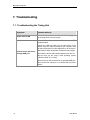
7.1. Troubleshooting the Timing Hub
Symptom
Possible Remedy
Power LED not ON
Connect the power connector from the Power Supply unit
to the back panel of the timing hub.
Check all the cable connections. Be sure to use IDTsupplied cables.
Cannot control the device
through USB port
Unplug the USB-2.0 cable from the back panel of the
device. Keep the cable connected to the computer. Wait
at least 30 seconds. Plug the cable back on to the device.
Wait again at least 30 seconds. Re-start the test program.
Re-install the drivers and provided software from the CD.
Be sure that you are using a valid operating system
(Windows 2000, XP or Vista).
Be sure that you are connected to an operating USB port.
Be sure that the USB port is not shared with any other
device.
26
User Manual