1
3.4 Automatic arming / disarming
2.5 Home arming
The system can automatically arm and disarm for a requested period of a day.
While in the user more, up to ten instructions (time & action) can be programmed
in the period of one day.
To switch the control panel to the user mode enter F 0 master code. User
mode will be indicated by a U on the keypad. To program automatic arming enter:
The installer can program particular detectors so that they will be automatically
bypassed in the so called “Home” partial arming. This allows for people to stay in
the particular part of the house after arming. To arm partially:
64 n a hh mm
where: n = instruction number from 0 to 9
a = action (see the actions' table)
hh = hours (from 00 to 23)
mm = minutes (from 00 to 59)
Example: to program an automatic complete
arming of the system at 21:15 everyday
enter: 64 0 1 21 15
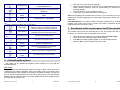
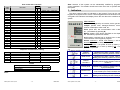
Actions' table
a no splitting
0
no action
1
arm all
2
disarm
3 partial arming
4 partial arming
5
disarm
6
disarm
split
no action
arm all
disarm all
arm A
arm B
disarm A
disarm B
To disarm a partially armed system - enter your user code or press the
button on the remote control.
or
2.6 Door opening
An electrical door lock (if installed) can be controlled via the alarm system.
•
Press the door opening button on the keypad to release the
lock.
2.7 Alarm memory reading
To exit user mode, press the N key.
3.5 Bypass
The supervisor can bypass (switch off) particular zones (potential sources of
alarms) while in the user mode. If a zone is bypassed, it can’t trigger an alarm.
To switch the control panel to the user mode enter F 0 master code. User
mode will be indicated by a U on the keypad.
To set up bypass:
1. Press key 1 to open the bypass menu.
2. With key 1 and 7 you can scroll all potential alarm sources (wireless
detectors are distinguished with the symbol ).
3. Select the source (detector, wired input…) which you want to bypass and:
a. either press key 2 for 2 seconds to bypass the source for the next
arming period (confirmed by flashing Battery LED);
b. or press key 3 for 2 seconds to bypass the source permanently
(confirmed by the Battery LED being permanently lit);
- 10 -
On the keypad press home arming button
H will indicate the Home partial arming on the keypad.
Notes:
• If any automatic action is selected, it will be preformed everyday at the
programmed time, following the internal control panel clock.
• The automatic arming and disarming can be overridden manually anytime
(by a user code or a remote control)
• If the control panel is in the requested arming mode before the action
time, the programmed action will not change the arming
• Factory default setting - all instructions are set for no action
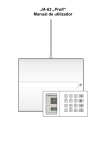
Alarm system JA-63 „Profi“
•
MGK51503
All events (arming, disarming, alarms, failures…) are recorded into the control
panel’s memory along with the time and date. The complete system history can be
viewed using a PC with Comlink software. Alarms and failures can also be viewed
on the keypad by entering:
F 4 - will show the last recorded alarm or failure. Press key 4 multiple
times to go deeper in to the memory.
2.8 Split system arming
The system can be split by the installer into two independent sections (A,B) and
a shared section (corridors, stairs, a main door…). This allows for a particular user
to arm and disarm only a particular section of the house with his/her code or
remote control (exactly as in a non split system). Arming of sections A and B is
indicated by I I symbols on the keypad. The shared section will be armed
automatically when A and B sections are both armed.
With the master code the supervisor can arm and disarm both sections. If the
master code is entered, the system will arm (if completely disarmed) or disarm (if
any section is armed).
Entering F1 master code will control only section A and F2 master code only
section B (this is true only when fast arming is disabled by the installer).
Note: partial Home arming is not possible if the system is split.
Alarm system JA-63 „Profi“
-7-
MGK51503