1
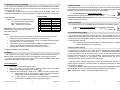
communication
failure
indicated event (Tamper or Failure) was caused
by the telephone line
indicated event (Tamper or Failure) was caused
by a device (keypad or PC) connected to the
digital bus
wireless keypad lost connection with the control
panel
error
self testing error – call installer
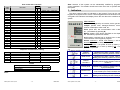
Telephone line
digital bus
tab. 1
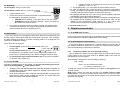
88 display specifies mode of the control panel:
user mode
authorized supervisor can test, bypass zones, change
batteries, record voice messages, program tel.
numbers and adjust internal clock in this mode
home arming
system is partially armed – particular detectors are
bypassed (someone remains in the house)
A section armed
A section is armed (split system)
B section armed
B section is armed (split system)
complete
arming
system is completely armed
bypass
warning that some detectors are bypassed –
indicated while arming
key pressed
waiting for more data to complete the entry
programming
mode
for installer programming and testing
•
•
•
•
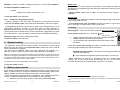
open the cover of the detector (keypad)
replace its batteries with new ones (use only corresponding size and good
quality alkaline batteries). Wait for approximately 20 seconds before
inserting batteries
close the device’s cover and test its function.
to exit User mode, press the N key on the keypad
Note: normal battery life in wireless items is about 1 year. Exposure to a very cold
temperature, frequent triggering or low initial battery capacity can shorten the
battery life.
Recommendations: the system should be annually inspected by a professional
installer. The control panel and the outdoor siren back up batteries should be
replaced with new ones after 5 years.
7 Enrollment of the control panel to UC-2xx modules
The wireless control panel can send data to UC–216, UC–222 and UC-260 output
modules. To enroll the JA-63 control panel to the UC-2xx:
•
•
•
•
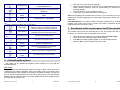
switch the control panel to the user mode (entering F0 master code)
switch the UC-2xx to learning mode (see its manual)
enter 299 on the alarm system keypad – the control panel will enroll
press the N key on the keypad to exit User mode,
tab. 2
2 Controlling the system
The system can by controlled by keypads, remote controls or by a PC with the
Comlink Software.
User codes
Can be used to arm and disarm the system or to reset an alarm. There can be up to
14 different user codes for individual users. The system stores to its memory which
code was used for which operation as well as the time &date of usage. This data can
go to a Central monitoring station and can also be viewed using a PC with Comlink
software. All user codes are empty as a factory default and should be programmed by
the supervisor (see section 3.2).
Alarm system JA-63 „Profi“
-4-
MGK51503
Alarm system JA-63 „Profi“
- 13 -
MGK51503