1
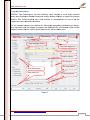
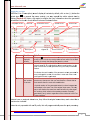
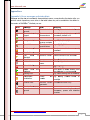
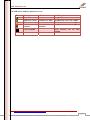
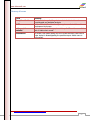
www.kalmasoft.com Error messages and status hints The program displays enough information about the status of each name after the Transcription process; hints may either reflect the status of the Transcription process or inform the user that some changes has been made to the name. Most of the errors can be overcome by simply ignoring the error, but some names cannot undergo the process of Transcription because of errors hard to overcome or correct. You can refer to (Appendix A. Error messages and status hints) on page (57) where a complete list of types of errors are manifested. Types of errors that can be identified include: 1. Inconsistent vocalization: for example the position or type of the diacritics. 2. Spelling: location and type (Arabic or non-Arabic), e.g. improper placement of letters. 3. Mojibake: noisy names that contain non-Arab characters, digits or other symbols. CAUTION: The hint always describes the first error (ﺴﻰ ُ )ﺣﺬﻳﻔُﺔ ﻋﻴfor example has two errors, "Ḍamma on the letter Nuun and letter Seen" only the first error will be manifested (the Professional Edition shows all errors and their respective positions). • MAPSOno® Lite does not fully suggest error correction or allow doing correction on place from the view interface directly (the professional edition provides all of that), retype the correct names to get rid of the errors messages. • If the table cells do not show the full text of the hint you can move the border around the edges a bit to make more space for the full text, drag the right border to enlarge the cell width. • You can check the appropriate box in the quick options pane to hide the status icons, the whole column will rapidly disappear, remove the check and the icons will appear once again. • Identification numbers could be hidden from the quick options pane in the same manner as above, check the box [ID column] the second column will disappear, this is a useful feature serves as a reference for later proofreading. • Hide the hints column from the Quick Options pane by checking the box [Status hints]. • The whole Quick Options pane can be hidden by clicking on the (Hide pane) toggle button, this is the best solution to get a wide view area of the results. Link: http://www.kalmasoft.com/support/DOCMOLTrans.zip 21