1
 www.kalmasoft.com
m Tips an
nd tricks The follo
owing are fe
ew notes to speed up th
he work and
d add up forr a professio
onal using of
o the
program:
You need nott have to clicck the butto
ons to determ
mine the inp
put source off personal names
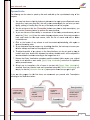
1. Y
(ssingle line, input pane, load
l
file), th
his will be do
one automattically for yo
ou once you start
tyyping, pastin
ng, or loading files, into any of the in
nput ports of
o the progra
am.
; you
2. You
Y do not have
h
to click the (Trans
scribe) butto
on every tim
me to start transcription
t
ca
an use the (Preview) button
b
to perrform the sa
ame function
n.
3. Iff you are no
ot sure of th
he validity orr correctness of the Ara
abic persona
al names you
u can
se
elect the [Check
Ch
mode] from the master languaage selector menu, this mode provid
des a
basic spell check
c
for th
he input na
ames, store the list of names and
d edit or delete
d
unwanted ones.
4. Click
C
on the header of any column
n to sort itss contents alphabetically
a
y, click aga
ain to
re
everse the so
orting order.
5. Iff your data takes
t
time to
o prepare e..g. by adding
g diacritics, the best wa
ay is to save your
fa
avorite settin
ngs and then
n run the pro
ogram on it later.
6. To
T adjust the
e width of any
a column in the View
w Interface, you
y
do not need to dra
ag its
borders each time, double-click betw
ween the collumns heade
ers and it will be adjusted to
e the conten
nts according
g to the long
gest item in it.
acccommodate
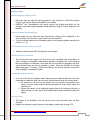
7. Beware that Fuzzy Vocalization gene
erates parallel vocalized Arabic nam
mes, your original
nput is not echoed
e
or evven saved, [Apply Fuzzzy Vocalizatio
ion] works fine for legitiimate
in
A
Arabic
person
nal names.
8. A best way to transcrib
be a list of name is to
o start with [Apply Fuzzzy Vocalizat
ation],
vo
ocalized input can then
n be input and transcrib
bed using th
he [Partial Vocalization
V
];; you
m try to usse the [Use input
may
i
name as
a is] option
n just to makke sure you get
g it right.
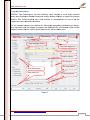
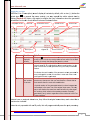
If you use
u
the prog
gram for th
he first time
e, we recom
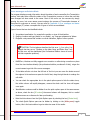
mmend you proceed with
w
Transcriiption
according
g to the illusstration below
w:
Vocalizatio
on
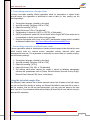
• Progrram setting
• Name
es input
•Spell checking
c
• Ad
dding
dia
acritics
• Prrogram setting
Checking
Romanization
• Preparing
names
• Check diacritics
• Prepare output
o
• Transcripttion
• Save or print
Preparaation
Link: http:///www.kalmaso
oft.com/supportt/DOCMOLTrans.zip
51