1
MPS_UTECLogger v3.0 | Copyright © 2007 By Jason Mussetter | All Rights Reserved
Digital Gauge Window:
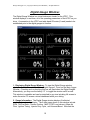
The Digital Gauge Window is a virtual instrument cluster for the UTEC. This
window displays, in real-time, all of the operating parameters of the UTEC as you
drive. A connection to the UTEC and wide-band O2 meter (if used) needs to be
established prior to the digital gauges to function.
1. Displaying Digital Gauge Window: To view the Digital Gauge window,
check the selection box labeled “View Digital Gauges”, found on the Main Logger
Window. Checking and un-checking this box will open/close the Digital Gauges.
Alternatively, you may use the hotkey “G” to toggle the window on/off as well.
This window is resizable and can be stretched to any size including full screen to
make the entire PC screen a virtual dashboard while your driving.
2. Gauge Information: The Digital Gauge window displays 8 individual
readings plus a knock indicator. The 8 data types shown in this window include:
RPM, Air/Fuel Ratio, Throttle Position, MAP (UTEC Load column), Mass Air
Flow, Ignition Timing, Injector Duty Cycle, and Vacuum/Boost. Note that the
10