1
 SEB Telebanka
Installation Manual 2.0 03rd of January, 2011
INTRODUCTION................................................................................................................................... 3
System Requirements ........................................................................................................... 3
Before Installation ................................................................................................................. 3
Downloading SEB Telebanka .............................................................................................. 3
INSTALLING SEB TELEBANKA......................................................................................................... 4
Installing Smart Card Reader .............................................................................................. 4
Windows XP, Windows 2000 .......................................................................................... 4
Windows Vista, Windows 7 ............................................................................................ 4
Setup of single user version of Telebanka ......................................................................... 6
Setup of network version of Telebanka ........................................................................... 11
Server Setup ..................................................................................................................... 11
Workstation Setup........................................................................................................... 14
SETTING UP THE SOFTWARE ......................................................................................................... 19
Step One ........................................................................................................................... 19
Step Two........................................................................................................................... 21
Step Three......................................................................................................................... 22
2
INTRODUCTION Thank you for choosing services of SEB banka for your corporate financial management by using a secure and modern electronic settlement system – SEB Telebanka with a secure electronic signature device – smart card. For your own convenience and successful use of SEB Telebanka, please read this manual thoroughly. System Requirements •
•
•
•
•
•
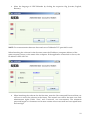
Microsoft Windows XP, Windows Vista, Windows 7, Windows 2003 server or Windows 2008 server operating system; 512Mb RAM; 100Mb of free space on hard drive (database size depends on the number of payments and account statements. 1 incoming, 1 outgoing payment a day and 1 account statement a month (on 20 pages) amount to ~ 20Mb a year); Permanent internet connection (preferably – broadband); 1024x768 screen resolution; 1 available USB slot. Before Installation To start using the SEB Telebanka software, please pay attention to the following: • does your computer meet the requirements of SEB Telebanka; • is there sufficient free space on your hard drive; • does the user who is going to install SEB Telebanka have administrator rights; • is there at least one smart card reader available (supplied by the Bank, acquired or owned by the customer, or, in some cases, built in into the computer or accessories; • is there at least one smart card available to each division (company) to ensure data exchange with the bank. Downloading SEB Telebanka All customers of SEB Telebanka who did not opt for the installation disk in their Telebanka application, should download SEB Telebanka. To download SEB Telebanka setup: • click here: HTTPS://IBANKA.SEB.LV/TELEBANKA/SETUP.EXE If the link does not work, copy the address into the address bar of your browser. • Save the file (setup.exe) on the computer(‐s) that SEB Telebanka will be installed on. NOTE: If the following notification appears when clicking the link, click “Allow” to continue. 3
INSTALLING SEB TELEBANKA To successfully launch SEB Telebanka, please perform the setup operation according to the description – first, install the software and then connect the smart card reader supplied by the Bank to the computer. NOTE: The setup sequence matters only if you are going to use SEB Telebanka on computers with Windows 2000 or Windows XP operating systems. Installing Smart Card Reader To use the smart card with your computer, you will need an ISO 7816‐compatible smart card reader. The smart card reader may be acquired or owned by the customer, or, in some cases, already built in into the computer or accessories. In such case, before working with smart cards of SEB Telebanka, you have to install the smart card reader device according to the manufacturer’s instructions and using the drivers offered by the manufacturer for your specific operating system. In other cases you can just use the smart card reader supplied by the Bank. For Single user version, when SEB Telebanka is used on one computer, you will require only one smart card reader for this computer. If SEB Telebanka application is used on several computers on a network – Network version, then each of the computers that will be used for approving (signing) payments and connected to the Bank will require the connection and installation of a smart card reader. The installation of the smart card reader supplied by the Bank depends on the Windows operating system used. In the case of Windows Vista and Windows 7 operating systems the drivers for the smart card reader offered by the Bank are integrated in the setup packages of Windows operating systems, while in the case of Windows XP and Windows 2000 the smart card reader drivers are included in the SEB Telebanka setup (setup.exe file). Windows XP, Windows 2000 Windows XP and Windows 2000 operating systems do not require additional installation of the smart card reader supplied by the Bank, as it is already included in the SEB Telebanka setup (the setup.exe file). To start using the smart card reader: • plug the smart card reader supplied by the Bank into an available USB slot on your computer. This operation has to be performed by a user who has administrator rights. • wait until a notification stating “Your new hardware installed and ready for use” appears in the bottom right‐hand corner of the screen near the system clock. Windows Vista, Windows 7 Windows Vista and Windows 7 operating systems do not require additional installation of the smart card reader supplied by the Bank, as it is already included in Windows operating system installation package. To start using the smart card reader: • plug the smart card reader supplied by the Bank into an available USB slot on your computer. This operation has to be performed by a user who has administrator rights. • wait until a notification stating “Smart Card reader installed successfully” appears in the bottom right‐hand corner of the screen near the system clock. 4
To start using the smart card: • insert the smart card issued by the Bank in the smart card reader. • wait until a notification stating “Smart Card installed successfully” appears in the bottom right‐hand corner of the screen near the system clock. When inserting the smart card, the Windows 7 operating system may issue a message that the device has not been recognised. It may happen because Windows 7 identifies the smart card as a separate device. This message will not affect the functionality of the SEB Telebanka application, however, if you would like to prevent this notification from appearing each time the smart card is inserted, you should do the following: •
•
•
•
•
Right click the “My Computer” icon and select “Manage”. in the “Computer Management” window that opens choose “Device Manager” under “System Tools” find “Smart Card” on the right‐hand side under “Other Devices” right click and select “Disable” confirm your selection by clicking “Yes” or “OK” 5
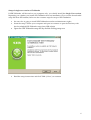
Setup of single user version of Telebanka If SEB Telebanka will be used on one computer only, you should install the Single User version. Depending on whether you install SEB Telebanka from an installation CD or use the downloaded setup file from SEB website, below are the common steps for setup of SEB Telebanka: • the user who is going to install SEB Telebanka must have administrator rights; • Insert the setup CD into your computer and open its contents or open the directory with the downloaded SEB Telebanka setup from SEB website •
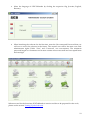
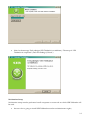
Open the SEB Telebanka setup file by double clicking setup.exe •
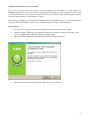
Read the setup instructions and click Tālāk (“Next”) to continue 6
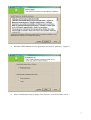
•
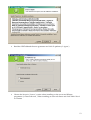
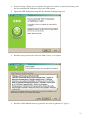
Read the SEB Telebanka licence agreement and click Es piekrītu (“I Agree”) •
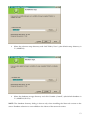
Select Vienlietotāja versiju (“Single User Version”) and click Tālāk (“Next”) 7
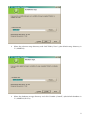
•
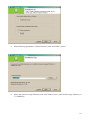
Select the software setup directory and click Tālāk (“Next”) (the default setup directory is C:\AKMENS) •
Select the database storage directory and click Uzstādīt (“Install”) (the default database is C:\AKMENS\DATA) 8
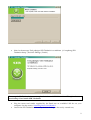
•
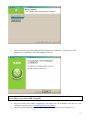
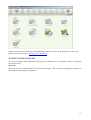
Wait for the message Tiek pabeigta ‘SEB Telebanka’ uzstādīšana (“Completing SEB Telebanka Setup”) and click Pabeigt (“Finish”) The setup of SEB Telebanka is now completed. An icon of SEB Telebanka will be placed on your desktop. Now launch SEB Telebanka. • Plug the smart card reader supplied by the Bank into an available USB slot on your computer. See the section “Installing Smart Card Reader”. • Launch the SEB Telebanka software by double clicking on the newly created icon; 9
•
Select the language of SEB Telebanka by clicking the respective flag (Latvian, English, Russian); •
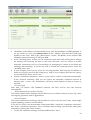
When launching the software for the first time, enter the User name and Password that you will use to access the software in the future. The created user will be the main user with administrator rights. Fields “User” and “Password” are case‐sensitive. The minimum password length is 6 characters and it must contain at least one small and one capital letter and one digit. When accessed for the first time, SEB Telebanka is inactive and has to be prepared for the work; please see the section “Setting Up the Software”. 10
Setup of network version of Telebanka If you need to access the software from several computers on a network, you will require the Network version. The Network version distinguishes between one main computer (server) and workstations (clients). The Network version first has to be installed on the main computer (server) and only subsequently on workstations (clients). Depending on whether you install SEB Telebanka from an installation CD or use the downloaded setup file from SEB website, below are the common steps for setup of SEB Telebanka: Server Setup •
•
the user who is going to install SEB Telebanka must have administrator rights; Insert the setup CD into your computer and open its contents or open the directory with the downloaded SEB Telebanka setup from SEB website •
Open the SEB Telebanka setup file by double clicking setup.exe •
Read the setup instructions and click Tālāk (“Next”) to continue 11
•
Read the SEB Telebanka licence agreement and click Es piekrītu (“I Agree”) •
Choose the Serveris (“Server”) option when installing on the server and Klienta programme (“Client Software”) when installing on network clients and click Tālāk “Next” to continue 12
•
Select the software setup directory and click Tālāk (“Next”) (the default setup directory is C:\AKMENS) •
Select the database storage directory and click Uzstādīt (“Install”) (the default database is C:\AKMENS\DATA) NOTE: The database directory dialog is shown only when installing the Network version on the server. Database selection is not available to the clients of the network version. 13
•
Wait for the message Tiek pabeigta ‘SEB Telebanka’ uzstādīšana (“The setup of SEB Telebanka is completed”) and click Pabeigt (“Finish”) Workstation Setup Workstation setup must be performed on all computers on a network on which SEB Telebanka will be used. • the user who is going to install SEB Telebanka must have administrator rights; 14
•
Insert the setup CD into your computer and open its contents or open the directory with the downloaded SEB Telebanka setup from SEB website •
Open the SEB Telebanka setup file by double clicking setup.exe •
Read the setup instructions and click Tālāk (“Next”) to continue •
Read the SEB Telebanka licence agreement and click Es piekrītu (“I Agree”) 15
•
Select Klienta programmu (“Client Software”) and click Tālāk (“Next”) •
Select the software setup directory and click Tālāk (“Next”) (the default setup directory is C:\AKMENS) 16
•
Wait for the message Tiek pabeigta ‘SEB Telebanka’ uzstādīšana (“The setup of SEB Telebanka is completed”) and click Pabeigt (“Finish”) The setup of SEB Telebanka is now completed. An icon of SEB Telebanka will be placed on your desktop. Now launch SEB Telebanka. •
•
Plug the smart card reader supplied by the Bank into an available USB slot on your computer. See the section “Installing Smart Card Reader”. Launch the SEB Telebanka software by double clicking on the newly created icon; 17
•
Select the language of SEB Telebanka by clicking the respective flag (Latvian, English, Russian); NOTE: For communication between client and server Telebanka TCP port 1885 is used. When launching the software for the first time, enter the IP address (computer address) of the main computer (server) or the name of the computer. If the application is launched on server, the IP address will be 127.0.0.1. •
When launching the software for the first time, enter the User name and Password that you will use to access the software in the future. The created user will be the main user with administrator rights. Fields “User” and “Password” are case‐sensitive. The minimum password length is 6 characters and it must contain at least one small and one capital letter and one digit. 18
When accessed for the first time, SEB Telebanka is inactive and has to be prepared for the work; please see the next section “Setting Up the Software”. SETTING UP THE SOFTWARE You must configure SEB Telebanka following the installation to successfully connect to the Bank and receive data. Step One Select the section “Administration Æ Connection Settings”. The connection settings are common to all database departments (companies). 19
•
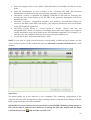
The Bank’s server address is automatically set up after the installation of SEB Telebanka. If, for any reason, it is not, enter akmens.seb.lv in the “Address” field and the TCP/IP port number in the “Port” field of the “Bank Server” section. The Bank’s server receives SEB Telebanka connections using TCP/IP port 1774. • In the “Working hours” section you can restrict the connection with working hours settings for sending and receiving the data to and from the bank. You can choose to restrict automatic connections only or all connections (if attempting to connect to the bank and exchange data manually). If you do not wish to restrict the connection hours, untick the “Working hours” box. • If your company uses a proxy server for accessing internet, then enter the IP address or name of your proxy server in the “Http proxy” field. If your company does not use a proxy server, untick the “Proxy Server” box. • Use the “Automatic connection” section, if you want to connect to the bank automatically. In the “Interval (minutes)” field you can specify the automatic connection interval in minutes (min – 5, max – 60). Furthermore, you have several options of when to connect to the bank: ‐ On user login Each time you launch SEB Telebanka software, the data will be sent and received automatically. ‐ When documents are ready to be sent This option enables data exchange with the bank as soon as there is data to be sent. E.g., there are outgoing payments, mail or applications. ‐ On user actions This option enables data exchange with the bank as soon as the user views data, which might require updating, such as account balances. If you do not wish to use the automatic connection facility, untick the “Automatic connection” box. If the “Automatic connection” box is unticked, data exchange with the bank takes place manually by clicking the “Bank” button. • To save the connection settings, click the toolbar button “Save”. 20
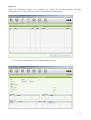
Step Two After the connection settings are complete, you should set up the company (division) configuration. To do this, select the section “Administration Æ Divisions”. •
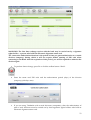
To create a company (division), double click the first row. 21
•
•
•
•
•
Enter the company name in the “Name” field. Both letters and numbers are allowed in the name. Enter the identification of your company in the “Customer ID” field. The customer identification can be found in the setup package supplied to you by the Bank. The feature “Active” is intended for enabling connection to the bank for receiving and sending the data. If this feature is off, the data of the respective department will not be received and sent. The fields “Company”, “Registration Number” and “Address” are fixed fields. When you connect to the Bank, these fields will display your company information that was included in the SEB Telebanka application. The fields “Contact Person 1”, “Contact Person 2”, “E‐mail”, “Phone” and “Fax” are changeable fields. When you connect to the Bank, these fields will display your company contact information that was included in the SEB Telebanka application. For example, you can enter your fax number to later receive a copy of payment order by fax. To save the section, click the toolbar button “Save”. •
NOTE: If you need to create several divisions corresponding to different legal entities, use the “New division” button on the toolbar and enter an individual Customer Identification for each division. Step Three The initial setting up of the software is now completed. The remaining configuration of the software will take place during the first data exchange session. Until the data exchange with the bank is performed, the software is disabled. WARNING! If a smart card has not been previously used with SEB Telebanka, please change its PIN code in order to authorise the connection. To change the PIN code, double click the Smart Card information icon and enter the new PIN code. 22
WARNING! The first data exchange session with the bank may be carried out by a signature rights holder – a person who holds the Electronic Signature smart card. The connection authorisation duration is the period of time you grant authorisation to a certain division (company), during which it will not require further entering of PIN code when connecting to the Bank. After the expiration of this period, you will be required to authorise the division again. • To perform data exchange, press F9 or click the toolbar button “Bank”. •
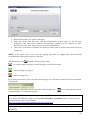
Enter the smart card PIN code and the authorisation period (days) of the division (company) (999 days max). •
If you are using Telebanka with several divisions (companies), then the authorisation of each of such divisions must be carried out by their signature rights holders who hold an Electronic Signature smart card. 23
•
•
•
Select the divisions you wish to authorise. Enter the smart card PIN code and the authorisation period (days) of the division (company) (999 days max). Different authorisation periods can be assigned to each division, however, then they must be authorised individually. Click ʺOKʺ to connect to the bank and authorise other users to receive data on the division (company). NOTE: If the smart card is not used for signing payments or applications, the maximum recommended authorisation period is 140 days. The information icon indicates data exchange status. ‐ no current data exchange or data exchange successfully finished; ‐ data exchange in progress; ‐ data exchange error. By hovering the mouse cursor over the data exchange icon, the date and time of the last connection is displayed. Data exchange information can also be viewed by clicking the icon or selecting the section “Administration Æ Connection to bank”. The setup of SEB Telebanka is now completed and SEB Telebanka is ready for use. To find out more about SEB Telebanka, please read the SEB Telebanka User Manual, which can be found on the installation CD or on our website: http://www.seb.lv/en/corporate/services/electronic/telebank/
If you have any questions, please contact our Client Service Centre by calling 8777 (+371 27778777)! 24