1
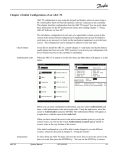
Once in the File Overview screen a drop down choice list is available to allow the user inspection of the file in question.
Info - allows further inspection of the file details
Del - allows the deletion of the file
Write - sends the target file on your PC to the AK-SC255
Once the Info button has been selected, the file name, version and time / date are displayed. For further information the view button
can be selected and the file contents can be displayed.
Local (your PC) directory
List of files shown, select Info to view file match information.
EDF files can get updated to match the very latest controller versions, in
order to maintain an exact match when dialing in via AKA65 the files must
match.
File Mismatch check
When interfacing with Generic devices via the AKA65 software tool, both the AK-SC255 and your PC needs to have the same support
files loaded (edf files). As generic devices get updated or new models introduced, new edf files are required to support these. Use the
file management function to check that both PC and AK-SC255 files match, thus ensuring error free use.
File Mismatch !
Same controller [type] EDF file but different version,
this may lead to errors when commissioning / using
Your PC file info
AK-SC255 file info
Mismatch
(EDF version number is different)
Files OK !
Same EDF version number.
Match
(Same version)
7