1
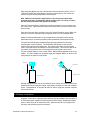
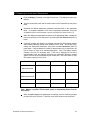
Note that the IPS4 can be supplied with a separate external battery housing, for
applications where a very low vertical profile of the instrument is required. If your
instrument was configured with an external battery housing, further information is supplied
separately.
2.2 Opening the Pressure Case
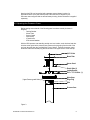
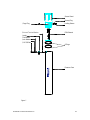
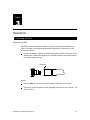
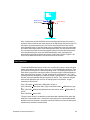
Before starting ensure that all of the following parts have been located (As shown in
diagram):
- Jacking Bracket
- Mount Plate
- Sensor Guard
- Nylon Strap
- 3 plastic bolts
- 5/16 nut and washer
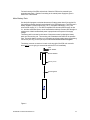
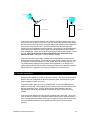
With the IPS4 pressure case standing vertical on a level surface, undo the three bolts that
hold the sensor guard to the pressure case. Remove the purge plug from the side of the
end cap using the Allen key provided (See Figure 3 below). Remove the sensor guard,
anode and the three bolts that plug the mount holes in the upper section of the end cap.
5/16" SS Nut
Mount Plate
Sensor Guard
Plastic Bolts (3)
Jacking Bracket
5/16" x .75" SS Bolts (3)
Upper Sensor guard Holes (3)
Nylon Strap
Purge Plug
IPS4
Pressure Case
Figure 3
© 2004 ASL Environmental Sciences Inc.
9