1
USING THE 999 QUICK/SMART STOP
The operation of the stop has almost no effect on saw operation.
The only signals exchanged are:
- Disabling stop movement if the blades are moving forward.
- Rebate bottom measurement pushbutton (Smart Stop).
- Rebate bottom measurement coder value (Smart Stop).
The 999 Quick Stop/Smart Stop can store 800 files comprising:
- An 8-digit reference.
- Moulding rebate bottom thickness (accuracy: 1/10th mm).
- Frame width (accuracy 1/10th mm).
- Frame length (accuracy 1/10th mm).
- Dimension position: Internal or external.
Nota: En fonction de la forme et des défauts de la moulure, la précision de largeur sera de ± 0,5.
The 999 Quick Stop/Smart Stop can also store 80 standard frames identified only by their
length and width dimensions.
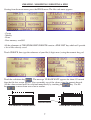
Using the touch screen
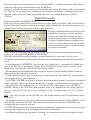
The 999 Quick Stop/Smart Stop is equipped with an intuitive touch screen for man/machine
dialogue. The operating principle is the same as for the other machines in the range (4095/
3099/2095).
The screen only displays the information required and the keys represent the only possible
choices. This makes it much simpler to use as the user is guided.
.
When the numeric keypad appears, any values changed must be validated:
If the terminal detects a problem, the corresponding message is displayed until the problem is
remedied (e.g. “STOP OFF” etc.).
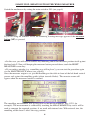
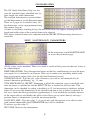
At start-up, the “initialisation” screen appears (programme version, screen version, number of
cuts, distance travelled and choice of available languages).
When the screen is touched, the main menu appears.
5