1
UNPACKING THE NUMERIC STOP (NS)
1
3
2
V1
P1
V2
P2
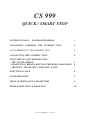
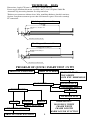
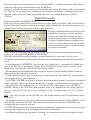
Open the crate and put the NS foot stand into an upright position.
With a 4mm hex head key, unscrew the 4 screws of the 2 foot stand locking
plates: P1 and P2 . Push P1 and P2 right back with a mallet, then slide them down
to the bottom of each foot. Retighten the 4 screws of plates P1 and P2.
With a 5mm hex head key, unscrew V1 and V2 and put the NS feet in the outside
position as shown in figures 3 and 4.
4
ASSEMBLY OF THE NUMERIC STOP (NS)
The NS can only be assembled after the CS 999 has been made level on the ground.
The right-hand extension and its support bracket have been dismantled
and the 2 frame fastening screws are used.
THE FOLLOWING PROCEDURE REQUIRES AT LEAST TWO PEOPLE TO CARRY IT OUT
E
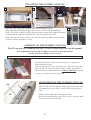
Put wedge E in place on the frame and screw it in, using the 2
frame fastening screws.
Take the NS out of the crate and turn it over. Place the bed of the
NS on bracket E, and screw them together (10mm long tubular
socket wrench + 5mm hex head key) without tightening, with the
2 screws, 2 washers and 2 nuts provided.
ADJUSTMENT OF THE NUMERIC STOP (NS)
GA
Z
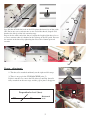
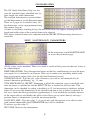
Slide the NS head towards the cutting table and position plate
GA right next to screw VB1 (see fig 4: PR= reference position).
TB
Tighten screw VB1 with a 4mm hex head key.
Repeat for the following screw (VB2), and so on for the other
screws up to the end of the NS.
GB
2