1
P30U-09A/1
USERS MANUAL
Sett Arch. Para
ings Val
m.Ar
Arch
ive
Selecti Type
Archivi on of
of
ng
archive value
param d
which
eters volume will
s
turn on
conditi
onal
archivi
ng
Ar.M
ode
Sett ParFa Secu
rity
ings ct
Serv
ice
Write
Enter
Servic standar the
e
d
passw
param parame ord
eters ters
Over
LoAr
OverH Ar.Ti Ar.E
iAr
me
rase
Rec.T Param
oSD
.SD
Archivi Lower
ng type thresh
old of
archivi
ng
Upper Archivi Erasin
thresho ng time g of
ld of
internal
archivin
archive
g
Manual
copying
of
internal
archive
to the
SD/SD
HC
card
Time
Date
AutoT DispT Lang
ime
est
uage
Setting
the
actual
time
Setting
the
Automa Test of
the
actual tic
date
change LCD
of time display
and
summe diodes
r/winter
and
inversel
y
Fulfillme
nt
percenta
ge of
internal
archive,
which
will turn
on
automati
c record
on the
SD/SDH
C card
Selecti
on of
menu
langua
ge
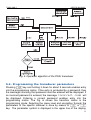
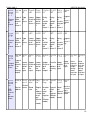
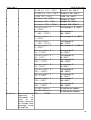
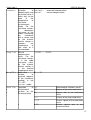
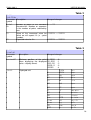
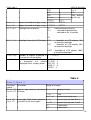
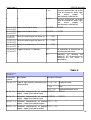
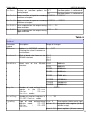
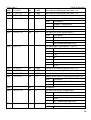
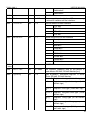
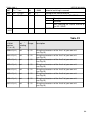
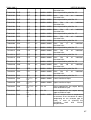
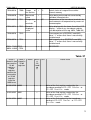
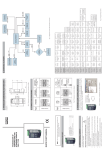
Fig. 6. Programming matrix
5.4.1. Method of changing the selected parameter value
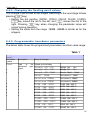
In order to increase the selected parameter value, press
key.
Pressing the key once increases the value by 1. Increasing the value when
the digit 9 is displayed, sets 0 on this digit. The digit is changed, once
key is pressed. Pressing
key while editing the most important
digit enables edition of the digit character – the character is changed by
means of
key.
In order to accept the parameter set, press
key. Then the parameter
will be saved. Pressing
key when changing the parameter value will
cancel saving operation.
14