1
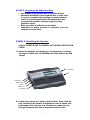
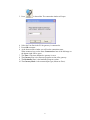
4) Connect an ordinary analog telephone line with the RJ-11 cable to
the socket on left side panel of the gateway unit.
5) On the left side panel you will find the PO WER socket.
Connect the adapter (provided with unit) to the mains outlet
and then to the socket on the unit.
Note: The power input is 90 –260 VAC and the output is 12 VDC
1.2 Amp
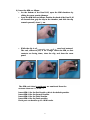
6) Wait 30 seconds for the unit to s tartup.
Testing:
When you see the operator/ provider name on the LCD try
to make an outgoing call, you should see the number dialed.
Make a call to the unit from a remote telephone, ce llular or
landline, the caller ID should appear on the LCD.
Notes:
* Antenna reception: After Sim insertion, antenna connection
and power-up, the LCD will display antenna reception power
in the form of a BarGraph.
Make sure you have as much reception power as possible, by
moving the antenna to different locations.
** A dual gateway unit has 2 ports. The MASTER port (Port1) at
the lower portion of the unit and the SLAVE port (Port2) at
the upper portion. Each port has it's own module and
antenna socket.
The two ports are basically independent but the Master port
controls the RTC (Real Time Clock) and the LCD display.
ALWAYS POWER-DOWN The WINNER UNIT BEFORE INSERTING SIM
CARDS!
11