1
DVI/Audio Matrix Switcher
EDID restore to factory default
Keep pressing the button “<-” for 30 secnds , all the LED of “<-” will be on for 10 seconds. It enters the
EDID setting status.
And, pressing “Input 1” button and “Undo” button. All the outputs will be blank for 3 seconds, to carry the
“EDIDInit.” command, to restore the EDID to factory default.
7.
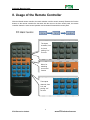
Operation of the Control Panel
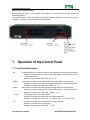
7.1 Front Panel Description
“AV”
“VIDEO”
“AUDIO”
“1,2,3,4”
“All ”
AV synchronal button: To transfer video and audio signal synchronously by the switcher
Example: To transfer both the video and the audio signals from input channel No.3 to
output channel No.4.
Operation: Press buttons in this order “AV”,“3”,, “4””.
Video button: To transfer only video signals from input channel to output channel
Example: To transfer video signals from input channel No.3 to output channel No.4.
Operation: Press buttons in this order “VIDEO”, “3”, “4”.
Audio button: To transfer only audio signals from input channel to output channel
Example: To transfer audio signals from input channel No.2 to output channel No.3.
Operation: Press buttons in this order ““AUDIO”, “2”, “3””.
I/O Keypads: Keys to select I/O channels.
Example: To transfer input channel No.3 to output channel No.1
Operation: Press buttons in this order : “3” in INPUT area, “1” in OUTPUT area.
The button to transfer one input channel to all output channels
Example :To transfer input1 to all outputs.
Operation: Press buttons in this order : “1”, “All”.
10
PTN Electronics Limited
www.PTN-electronics.com