1
DVI/Audio Matrix Switcher
can control it by that computer.
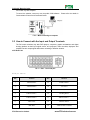
To control the switcher, users may use the public COM software. Please refer the details in
Communication Protocol and Command Codes
F 5-2 MDV connecting to computer
5.3 How to Connect with the Input and Output Terminals
The DVI matrix switchers may take DVD players, computers, graphic workstations and digital
showing platform as their input signal source, and projectors, video recorders, displayers and
amplifiers as their output signal destinations according to different situation.
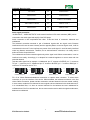
DVI-I Dual Link:
F5—3 DVI-I Dual Link port
DVI-D pin function
PIN
function
PIN
function
1
T.M.D.S.Data2-
13
T.M.D.S.Data3+
2
T.M.D.S.Data2+
14
+5V Power
3
T.M.D.S. Data 2/4 Shield
15
Ground (for +5V)
4
T.M.D.S. Data 4-
16
Hot Plug Detect
5
T.M.D.S. Data 4+
17
T.M.D.S. Data 0-
6
DDC Clock
18
T.M.D.S. Data 0+
7
DDC Data
19
T.M.D.S. Data 0/5 Shield
5
PTN Electronics Limited
www.PTN-electronics.com