1
Part Names
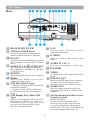
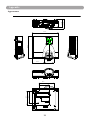
Rear
A
B
Q
C
D
E
P
O
N
A REAR IR RECEIVER
B USB Port (USB-B Type)
F
G H
I
J
K
L
M
I LAN
Please see page 76 Networ k Contr ol
Application for details.
Connect a USB cable to a computer to
control computer Interactive functions.
J S-VIDEO
C RS-232C
Input the S-Video signal from a video
source.
Serial data port for controlling the projector
with a computer or other RS-232 control
device.
K AUDIO IN 3, R / L
D AUDIO IN 1 & P AUDIO IN 2
RCA type corresponds to video input.
L SPEAKER
Mini jack port corresponds to computer
input. (RGB IN 1→AUDIO IN 1, RGB IN
2→AUDIO IN 2)
M VIDEO
E RGB IN 1
To composite the video signal from a video
source.
Input analog RGB signal from a computer.
F HDMI
N RGB IN 2/OUT
Input digital HDMI signal from a
computer & video source.
Input analog RGB signal from a computer
or connect an external monitor to this
connection to view the "RGB IN" input.
G USB Port (USB-A Type)
O AUDIO OUT
1. Supports USB Storage Device and USB
compatible hard disks.
2. Supports wireless (WiFi) USB dongle
for wirelessly projecting the computer‟s
image.
This jack outputs the audio signal from
computer& audio signal to external audio
equipment.
H USB Display Port (Mini-USB
Q Slot for Kensington Micro Saver
Type)
Supports USB mini-B connection from
the computers USB Port by using the
USB mini-B type to A type cable. It also
can access the internal memory from
projector to display the data.
9
Security System
Built-in security slot.
This security slot supports the Micro
Saver® Security System. Micro Saver®
is a registered trademark of Kensington
Microware Inc. The logo is trademarked and
owned by Kensington Microware Inc.