1
extended for the selected number of post-trigger cycles. Optionally, the user can choose
to disable re-triggering.
There is a limit of 2000 cycles (approximately 33.3 seconds at 60Hz) for each waveform
record. (Prior to The M87x will continue to record waveforms until the memory allocated for
the Waveform Recorder is full. Regardless of the number of records stored, if sufficient
memory exists for the designated number of pre-trigger cycles the M87x will create a new
record, although it may not be full-length.
When selecting the COMTRADE File Type for the Configuration settings in the Waveform
Recorder, the user should be aware that certain processing limitations may be
encountered that can result in data loss for a waveform record.
If the host processor encounters large amounts of data due to creating long length
waveform records and is otherwise overloaded with performing other tasks, the data in the
queue may be overwritten before it could be written onto the Flash drive. This is a
possibility that may be encountered when attempting to handle an excessive volume of
data, which may not be handled adequately by the host processor. To reduce the
possibility of this occurring especially during the processing of large amounts of data, it is a
good practice to tailor the selection of the COMTRADE File Type based on the desired
length of the file to be recorded. As a guideline when configuring the waveform recorder,
the following are useful recommendations: a Binary COMTRADE File Type used along
with a lower sample rate is better for recording longer length waveform files; an ASCII
COMTRADE File Type is better suited for recording short length waveform files. Binary
format will generate smaller data files then ASCII format. A higher sample rate can be
more useful when recording short files. Use the lowest sample rates possible when
capturing long waveform records.
If the post trigger times appear to be truncated in the COMTRADE file, that would suggest
that the user adjust the waveform recorder’s configuration settings, accordingly. This will
usually alleviate the issues associated with recording long length waveform files.
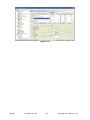
The Waveform Recorders share storage space with the Disturbance Recorders and the
Trend Recorder. The 70 Series Configurator allows the user to select the maximum
available memory for each recorder function. Note that if the user wishes to change
the allocation of memory among the recorders after recordings have already been
made, it is necessary to first remove the existing files from memory before making
any change.
Waveform records are presented in industry standard (IEEE C37.111-1999) Comtrade files
which are stored as compressed .zip files. Waveform records may be retrieved and
deleted from the instrument using the available communications protocols. Please refer to
the specific protocol manual or section 5.5 (Zmodem and FTP) for details. A file cannot be
deleted while being read by another device.
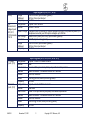
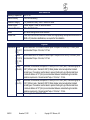
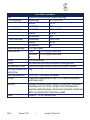
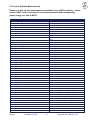
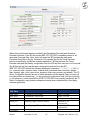
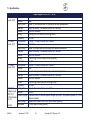
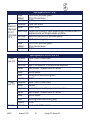
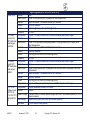
The following table shows the signals that are included in the waveform record. The user
can select a sampling rate of 32, 64 or 128 samples per cycle for all signals on all Mx7x
models. An additional, higher sampling rate of 256 samples per cycle is available when
using the M571 or the M871 models (excludes M572 and M872). Please note, however,
that selecting the 256 sample per cycle sampling rate disables all measurements
ML0021
November 27, 2011
54
Copyright 2011 Bitronics, LLC