1
N E T W O R K I N G
Chapter
9
Networking
T
his version of WaveLore introduces the multi-suite networking feature.
This feature allows one (1) WaveLore Suite to participate in the same
network with other WaveLore Suites. For ease of understanding, WaveLore
suites will be referred to as teams.
**Important note: When connecting a multi-suite network setup, the team B
Instructor role cannot change simulation settings. It can only observe.
Setting up the Host Server
Here are the steps to setup a host server for multi-suite networking:
1. Start team A’s WaveLore server normally. Team A’s server will be the Host
Server.
2. Be sure team A’s server is connected to the internet and that the router is
forwarding the port number to the Host Server.
3. Provide team A’s Host Server IP address and port number to any teams
wishing to connect.
4. Have all team A’s other roles connect to the team A Host Server.
Connecting Other Servers to the Host Server
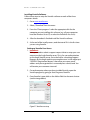
Here are the steps to connect multiple WaveLore teams together:
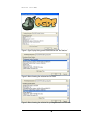
1. Connect team B’s server to another network by clicking “Connect” on the
host server startup menu.
2. Enter the IP address and port number for team A’s Host Server into the
new fields.
3. Now team B’s server is running and connected to team A’s Host Server.
4. Have all team B’s remaining roles connect to the team B server.
31