1
2
05/09 Rev. 5.02-01
USER MANUAL
TTX x50
Commissioning and Operation
– Wildcats – S 45/65/95/105 – TDI/STDI/XXTREME
Unpacking and setting up
the printer
Unpacking
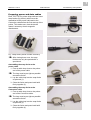
1
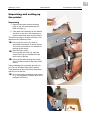
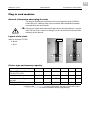
1. Open the box and remove the parts
lying on top, the extra parts and the
foam covering (1).
2. Take hold of the device from the bottom
and lift it out the box. Get somebody to
hold the box when removing the device.
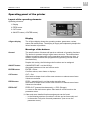
The device is lying on its side in the box. Pay
attention to the following notes:
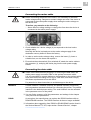
3
2
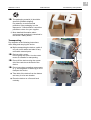
Do not use the cover (2), which is
accessible from above, to lift the device.
The cover moves and is not suitable for
picking up the device.
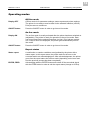
Devices with a cutter:
Do not grasp the cutter (3). Use the
cutter motor (4) as a handle to lift the
device out of the box.
Do not lift the device using the narrow
slit (5) of the card slot at the back of the
device.
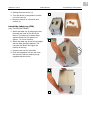
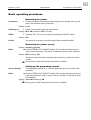
If the packaging has a material inlet slot (6),
you can use it to start lifting up the device.
Then take hold of the device from the bottom
and lift it out of the box.
Do not use other protruding components
(e. g. the magazine or label tray) to lift or
transport the device.
4
6
5