1
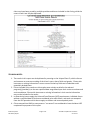
Diagram 1
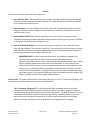
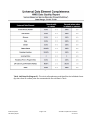
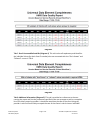
The four user prompts contained in this report are: 1. Enter Effective Date: The user should enter (or select from the calendar) the day immediately following the date range that has been selected. (The value selected is retained as the default for the next time the report is run.) 2. Enter Start Date: The user should enter (or select from the calendar) the first day of the date range that has been selected. (Again the value selected is retained as the default for the next time the report is run.) 3. Enter End Date PLUS 1 Day: The user should enter (or select from the calendar) the day immediately following the date range that has been selected. (Once again this value is retained as the default for the next time the report is run.) 4. Enter Provider(s) for Report: First click the left arrow to remove the “none selected” choice from the right window. Then click the “refresh list” icon and wait for the left window to refresh. Now select the providers to include by highlighting them in the left window and moving them into the right window using the right selection arrow. IMPORTANT NOTE: In order to achieve valid results, the providers included in the running of the report must all share a common work flow element and the proper/corresponding version of this report must be used (outlined above); that is, either all must require program entries and exits in their workflow, or if entry exits are not utilized, then all must require service transactions and utilize the service end date in the same manner. In situations where the providers in the Continuum of Care do not share common work flow elements, it will be necessary to run the report multiple times using the proper version of the report for different subsets of providers and then combine the results, and determine the percentages mathematically. How to read: The report results consist of four report tabs (A, B, C and D). Screen shots (Diagrams 2‐6) and descriptions of these tabs/sub‐reports are provided below. Tab A: Summary: (Diagram 2) This tab analyzes the data connected to clients who were selected based upon whether they were actively enrolled in a provider’s program during the specified date range as determined by their service transactions. The data contained in this tab is valid when all providers included in the report are utilizing a workflow where service start dates and service end dates are required for all clients, and services without an end date indicate a one‐day completed service as opposed to an on‐going service in progress. Bowman Systems ART Gallery Report Page 3 of 12 214 UDE Completeness Closed Svc v.11.05.31