1
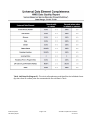
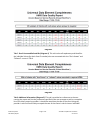
Users with ad‐hoc ART licenses may wish to modify/customize this report to better suit their needs and purposes. When modifying an ART Gallery report such as this one, the user will need to make a copy of the original report into a different folder. This copy can be created either by using the “save as” feature or by clicking on the “organize” icon in folder view. NOTE: The original un‐modified version of this report must be retained in the “ART Gallery Templates” folder. This folder is read‐only so that changes cannot be inadvertently made to the original version. Since the “ART Gallery Templates” folder is a read‐only folder, any/all copies of the report for modification purposes must be made into some other folder. MODIFICATION OPTIONS Ad hoc users may choose to customize this report to display the actual values of the UDEs instead of the “ok”, ”null”, ”na” and “DK or R” designations. This can easily be accomplished by removing or inactivating the various alerters which have been applied to the tables to mask the data, and by then adjusting the widths of the various columns so that the data is fully viewable. It should be noted however that this change will also affect the printability of the reports and that if printability is needed, additional changes to the page layout will need to be made. By adjusting various options such as font size, page margins, page orientation, text wrap, etc, the reports can be adjusted to be both viewable and printable. If these adjustments fail to produce the desired result, another option would be to create a duplicate of the tab/sub‐report, and include half of the UDEs in one and the other half in the other. Experienced ad hoc users will also be able to include additional fields in the report if needed. This can be accomplished by: • adding the needed assessment question(s)/field(s) to the query’s results objects • adding the new field(s) as row(s) in the Tab A sub‐report • adding the new field(s) as column(s) in the Tab B and C sub‐reports • creating the appropriate variables by replicating the logic utilized for the other report elements • creating the appropriate formula for completion of the data tables, again replicating the logic utilized for the other elements • applying the appropriate alerters to the Tab B and C sub‐reports • testing printability and modifying the page layout as needed Bowman Systems ART Gallery Report Page 8 of 12 214 UDE Completeness Closed Svc v.11.05.31