1
3.4.7 Device Simulator
This mode of G-SOFT, which can be activated through the options menu on the
toolbar and then selecting Device Simulator, is very useful in understanding how
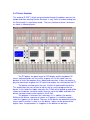
the Genie works in stand-alone mode. The user interface of device simulator is
as shown in following figure.
The PC depicts the genie layout of LCD display and the keyboard .All
menus and commands are very similar to genie unit. In this mode user can
perform all tasks like program entry, debug and execution. It does not require a
physical connection to genie unit. All inputs and outputs are simulated on the PC.
The device simulator gives the user, the feel of working with the device.
This mode helps the user to learn to edit as well as run the program like the
device. In this mode the ladder entered in the G-Soft will be picked up and will be
shown on the device simulation mode. And vise versa the ladder entered in the
device simulator mode can be viewed in the G-Soft.
The program is entered in the same way as it is edited in the device.
Editing in the device, sequence of screen as it appears in simulation mode is
same as it appears on the device. The keys on the device are operated using the
mouse and its function is same as in the device. Inputs can be given and the
output status, the parameters as it appears in the device can be seen.