1
FOUNDATION™
SMART THERMOSTAT AND
HOME ENERGY GATEWAY
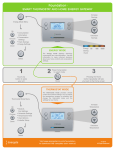
$ ENERGY DISPLAY
Rate of Electricity
The energy display shows
electricity consumption
and rate information. Use
this information to make
informed decisions about
your home comfort and
consumption settings.
Current Electricity Cost
(Rate x Current Use)
Current
Electricity Use
Energy
Saving
Event
1. Touch any
button to wake
your unit
Press Select
to Access:
Home
• Consumption
Information
2. Press Home
Select
button to switch
between Energy
and Temperature
Display
3. Press the
Home button
to exit or cancel
from the menu
• Mode & Fan
Settings
• Schedule
• Temperature Hold
• and more
Energy Event
in progress
Rate of electricity is
higher than base price
Press Select
THERMOSTAT DISPLAY
The thermostat display
provides climate control
and comfort settings.
You can adjust the
temperature, program
a schedule, and change
the thermostat mode and
fan settings for your
home.
Current Temperature
Fan Mode
Increase
Temperature
Decrease
Temperature
Thermostat Mode
Target Temperature
Visit www.energateinc.com/foundation
to download the complete user manual.
©2013 All Rights Reserved