1
Section 1
SETUP
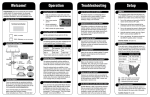
1 Make sure you have everything you need.
2
DIRECTV
The KING Flex will not work with DIRECTV
SWM only receivers.
Do not use dual tuner receivers or receivers
with built-in recorders if your programming
is broadcast from more than one satellite.
2 Place KING Flex in position.
lace the KING Flex on a stable surface. With its built-in
P
leveling feature, the KING Flex does not need to be level,
but make sure it is stable to prevent movement during
operation.
NOTE: When placing the KING Flex on the ground, be sure
ground is dry and free of loose dirt or sand. Do not
place in an area where water may potentially pool or
where water does not drain properly. The KING Flex
may need to be above ground, such as on a platform,
table, etc. Failure to follow these instructions may void
the warranty.
IMPORTANT! Do not block the antenna’s line of sight to
satellites in the southern sky at any time.
TIP: Point handle north to speed
up search time.
3 Make connections A-E in order shown on opposite page.
IMPORTANT! H
AND TIGHTEN COAX CONNECTIONS. DO NOT USE A WRENCH.
Do not allow the coax cable to become bent or kinked.
Do not leave the coax cable where it can be tripped on or run over by a vehicle.
4 Go to Page 4.
For Sales Information Please Contact RoadTrucker Inc (www.RoadTrucker.com)
8312 Sidbury Rd.; Wilmington, NC 28411 - (800) 507-0482 / (910) 686-4281