1
MDWorkflow
4
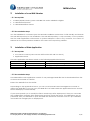
Configuration of Web Application
All configuration properties are stored in file (mdWorkflowClient)/WEB-INF/conf-faces-config.xml
Each property in this file may be modified to fit your requirements. If you upgrade to a new version
of MDWorkflow, it is best to copy the individual modified property values from the old version of the
conf-faces-config.xml to the new version.
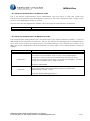
...4.1 Store Properties at Server Level
If using Glassfish, It is also possible to set just one property in the xml file and manage all other
property values at the server level. This allows for simple upgrading of the Workflow app.
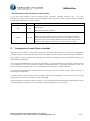
Property
Default
appPropPrefix
md.
Description
The prefix for the system properties set at the server level that
override the property variables in file conf-faces-config.xml
Any property not found at the server level will be obtained from
conf-faces-config.xml.
Example: Setting system property 'md.env' to a value of myPROD
will cause MDWorkflow to use value myPROD instead of the value
stored in the env property in file conf-faces-config.xml
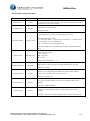
...4.2 Connect MDWorkflow to MDCMS Repository
MDCMS, including library MDREP(instance) must be installed on at least 1 IBMi partition to use
MDWorkflow. DDM is used to connect from that partition to all other IBMi partitions or systems in the
corporate infrastructure.
Property
host
hostEnv
Default
None,
Mandatory
empty,
standard
instance
without
suffix
Description
Host address of the IBMi repository to connect to
Example: 'my.system.com'
MDCMS instance on the IBMi.
Example: DEMO, to use MDCMSDEMO instance
Midrange Dynamics GmbH, Zugerbergstrasse 4, CH-6301 Zug
Tel. +41 (41) 710 27 77, Fax +41 (41) 710 95 87, www.midrangedynamics.com
3/8