1
MDWorkflow
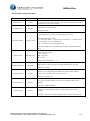
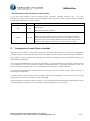
...4.6 Customize Page Information
Property
Default
environment
empty
locationForTS
empty
Description
The Description of your environment. This text will be shown at
the upper left of the browser so that the user will know in which
environment they are working.
The name of a location placed to the right of the time at the
upper right of the browser.
Example: Zurich
An offset to the current GMT time displayed at the upper right
of the browser. An offset to GMT may be set here.
gmtOffsetForTS
dateFormat
firstDayOfWeek
contactLabel
contactPhone
contactLink
empty, GMT
DD.MM.YYYY
Monday
Format is DHHMM where
D -> direction, with + = add time to GMT and - = subtract time
HH -> number of hours difference
MM -> number of minutes difference
Example: +0200 for Central European Time, -0400 for Eastern
Time
The format that dates should be displayed.
Valid Date elements:
YYYY -> year
MM -> month
DD -> day
Valid date separators: / - . or ,
The first day of week shown in the calendar view and in the
date picker. Value may be Monday (default) or Sunday
empty
Example: Sunday
If you would like your users to contact you in case of questions
or issues, you can place the label text here, which will be
shown at the bottom left of the browser.
empty
Example: Contact Us
A phone number that the users can call in case of questions or
issues. The number will be shown at the bottom left of the
browser.
empty
Example: 1 800 800 8000
A link the user can click on (mailto or http) in case of questions
or issues. The link will be shown at the bottom left of the
browser.
Example: http://www.midrangedynamics.com/contact.php
Midrange Dynamics GmbH, Zugerbergstrasse 4, CH-6301 Zug
Tel. +41 (41) 710 27 77, Fax +41 (41) 710 95 87, www.midrangedynamics.com
6/8