1
Store Preset to file…
This function stores the Current Preset of a selected Unit into a Preset File (‘‘*.preset’’).
Click on this function. In the new window browse for the desired directory, keyboard the Preset File name,
and click ‘‘OK’’.
Load Preset from file…
This function loads a Preset from a Preset File (‘‘*.preset’’). This Preset will become the Current Preset in the
selected Unit.
Select this function. In the new window browse for the desired Preset File, select the user memory location
(from 1 to 10) in which the new Preset will be loaded, click ‘‘OK’’.
Lock Unit Hardware Keys (Online Mode)
Clicking on this function alternatively locks and unlocks the front panel commands (even the Mute function)
for the selected Physical Unit.
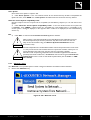
Notes: This function is useful in the Online Mode, but it can be activated in the Offline Mode and then be sent to
the Physical System using the ‘‘Send System To Network’’ function (see section 6.6.3).
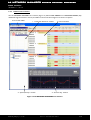
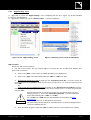
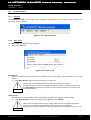
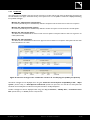
When a Unit is locked a ‘‘key’’ is displayed in the corresponding ‘‘No.’’ cell (see Unit #2 in Figure 14).
When trying to press any keys on a locked Unit front panel, the ‘‘DISPLAY LOCKED’’ message is displayed on the
LCD screen and the action has not effect, even for the ‘‘Mute’’ function (see the ‘‘LA4’’ or ‘‘LA8’’ user manual).
This prevents any unintentional operation during an event performance, for example.
Disconnect (Online to Offline Modes) / Try to connect (Offline to Online Modes)
Clicking on the ‘‘Disconnect’’ function disconnects the selected Unit from the Network.
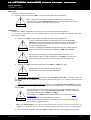
!
When a Physical Unit pertaining to a Group has been disconnected from the
Network by using the ‘’Disconnect’’ function the Group and Unit Parameters (see
section 6.4) remain active into the Physical Unit.
IMPORTANT
Clicking on the ‘‘Try to connect’’ function connects the selected Unit to the Network.
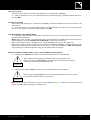
!
When using the ‘‘Try to connect’’ function the Physical Unit becomes the Current Unit
and the Virtual Unit Parameters are overwritten.
IMPORTANT
Note: The Unit mode is indicated by the color of the IP Address cell: green or blue for the Online Mode and
pink for the Offline Mode (see Figure 13 and Figure 14).
NETMAN_UM_E N_1.1.0.45
w w w .l-ac ous ti cs .c o m
21/42