1
Emulex® Drivers
Version 10.4
for Linux
User Manual
P011043-01A Rev. A
Connect • Monitor • Manage
2
Copyright © 2003-2015 Emulex. All rights reserved worldwide. No part of this document may be reproduced by any
means or translated to any electronic medium without the prior written consent of Emulex.
Information furnished by Emulex is believed to be accurate and reliable. However, no responsibility is assumed by
Emulex for its use; or for any infringements of patents or other rights of third parties which may result from its use. No
license is granted by implication or otherwise under any patent, copyright or related rights of Emulex.
Emulex, the Emulex logo, AutoPilot Installer, AutoPilot Manager, BlockGuard, Connectivity Continuum,
Convergenomics, Emulex Connect, Emulex Secure, EZPilot, FibreSpy, HBAnyware, InSpeed, LightPulse, MultiPulse,
OneCommand, OneConnect, One Network. One Company., SBOD, SLI, and VEngine are trademarks of Emulex. All
other brand or product names referenced herein are trademarks or registered trademarks of their respective
companies or organizations.
Emulex provides this manual "as is" without any warranty of any kind, either expressed or implied, including but not
limited to the implied warranties of merchantability or fitness for a particular purpose. Emulex may make
improvements and changes to the product described in this manual at any time and without any notice. Emulex
assumes no responsibility for its use, nor for any infringements of patents or other rights of third parties that may
result. Periodic changes are made to information contained herein; although these changes will be incorporated into
new editions of this manual, Emulex disclaims any undertaking to give notice of such changes.
Emulex, 3333 Susan Street
Costa Mesa, CA 92626
OpenSolaris DHCHAP Notice
Contains portions of Covered Software subject to the Common Development and Distribution License (CDDL)
Version 1.0. Such portions of Covered Software in Source Code form may be obtained from the website
www.opensolaris.org, or by contacting online support from the website www.emulex.com. Derived from the RSA
Data Security, Inc. MD5 Message-Digest Algorithm. Copyright (C) 1991-2, RSA Data Security, Inc. Created 1991. All
rights reserved.
Note: References to OCe11100 series products also apply to OCe11100R series products.
Emulex Drivers Version 10.4 for Linux User Manual
P011043-01A Rev. A
Table of Contents
Table of Contents
List of Tables .......................................................................................8
List of Figures ......................................................................................9
1. Introduction ................................................................................... 10
Overview .............................................................................................. 10
Abbreviations ........................................................................................ 10
2. Installing and Uninstalling .................................................................. 14
General Installation Requirements .............................................................. 14
Binary RPM FC and FCoE Driver Kit .............................................................. 14
Installing the Binary RPM FC and FCoE Driver Kit ...........................................14
Uninstalling the Binary RPM FC and FCoE Driver Kit........................................15
Ethernet Driver Kit.................................................................................. 16
Installing the Ethernet Driver Kit..............................................................16
Uninstalling the Ethernet Driver Kit ..........................................................17
RoCE Driver for the OCe14000-Series Adapters .............................................. 17
Installing the RoCE Driver ......................................................................... 17
Installing OFED ...................................................................................18
Manually Installing the Out-of-Box Driver rpms (OFED-3.12 or higher)...................... 19
Installing and Using DAPL ........................................................................... 19
Installing the IB Stack from the Operating System Distribution ..........................20
Uninstalling the RoCE Driver ...................................................................21
iSCSI Driver Kit....................................................................................... 21
Compiling the iSCSI Driver......................................................................21
Installing the iSCSI Driver Kit ..................................................................22
Uninstalling the iSCSI Driver Kit ...............................................................22
Booting from a Non-Zero LUN Attached to an Emulex FC/FCoE Adapter ................ 23
OneCommand Manager Application.............................................................. 23
3. Configuration ................................................................................. 24
FC and FCoE Driver Configuration ............................................................... 24
FC and FCoE Driver Parameters ...............................................................24
Static FC and FCoE Driver Parameters............................................................ 24
Dynamic FC and FCoE Driver Parameters ........................................................ 27
Configuring FC and FCoE Driver Parameters.................................................29
Temporary Configuration with modprobe........................................................ 29
Persistent Configuration with modprobe.conf or lpfc.conf ................................... 30
Emulex Drivers Version 10.4 for Linux User Manual
P011043-01A Rev. A
3
Table of Contents
Configure Parameters with a Read/Write to sysfs.............................................. 30
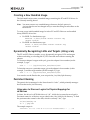
Creating a New Ramdisk Image ................................................................31
Dynamically Recognizing LUNs and Targets (Using scan) ..................................32
Persistent Naming ...............................................................................32
Using udev to Discover Logical to Physical Mappings for sd Devices ......................... 32
Configuring the System to Boot Using Persistent Names ...................................... 33
Using udev with st Devices ......................................................................... 34
Persistent Naming References ..................................................................... 36
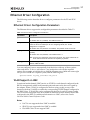
Ethernet Driver Configuration .................................................................... 37
Ethernet Driver Configuration Parameters...................................................37
VLAN Support on UMC ...........................................................................37
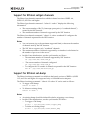
Support for Ethtool set/get-channels.........................................................38
Support for Ethtool set-dump..................................................................38
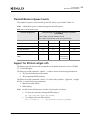
Transmit/Receive Queue Counts ..............................................................38
SR-IOV Configuration ............................................................................39
Introduction........................................................................................... 39
Setting Up SR-IOV .................................................................................... 40
Edge Virtual Bridging ................................................................................ 43
Assigning VFs to a VM on the SLES Operating System .......................................... 44
Link State Reporting with SR-IOV.................................................................. 45
Configuring VFs....................................................................................... 45
Link State Configuration ............................................................................ 47
Viewing VF Properties ............................................................................... 47
ARI Considerations for OCe14000-Series Adapters..........................................48
NIC Partitioning (NPar) Configuration (Dell Only) ..........................................48
Adapter Configuration .............................................................................. 49
Adapter Requirements .............................................................................. 49
Using NParEP ......................................................................................... 50
RoCE Configuration for OCe14000-Series Adapters .......................................... 51
Basic Configuration ..............................................................................51
Setting the Profile ................................................................................... 51
Interface Configuration ............................................................................. 52
Sample Applications ................................................................................. 52
VLAN Configuration ..............................................................................53
Pinning Interrupts to a CPU Core ..............................................................54
MTU Configuration ...............................................................................54
Throughput and Performance Measurement.................................................54
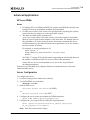
Advanced Applications ..........................................................................55
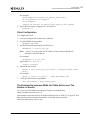
NFS over RDMA ....................................................................................... 55
Server Configuration ................................................................................ 56
Emulex Drivers Version 10.4 for Linux User Manual
P011043-01A Rev. A
4
Table of Contents
Client Configuration ................................................................................. 56
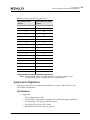
Enabling RDMA on all Four Ports on an OCe14104 Adapter.................................... 57
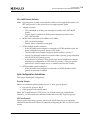
Advanced Configuration ........................................................................58
QoS Behavior.......................................................................................... 58
QoS Configuration Guidelines ...................................................................... 59
Updating the Adapter Firmware for RoCE ...................................................62
Determining the Firmware Version................................................................ 62
Updating the Firmware Manually .................................................................. 62
iSCSI Driver Configuration ......................................................................... 64
Open-iSCSI Support ..............................................................................64
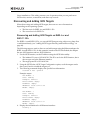
Discovering and Adding iSCSI Targets.........................................................64
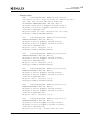
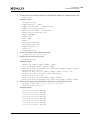
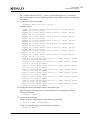
Discovering and Adding iSCSI Targets on RHEL 6.x and SLES 11 SPx ......................... 64
Discovering and Adding iSCSI Targets on SLES 11 SP1, RHEL 5.8, and Later
Versions ............................................................................................... 69
iscsiadm Commands for Configuring the Target ............................................69
iSNS Discovery Using iscsiadm .................................................................70
For SLES 11 SP3....................................................................................... 70
For All Other Linux Distributions .................................................................. 71
VPort Configuration................................................................................. 72
VPort Configuration Prerequisites.............................................................72
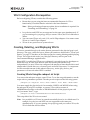
Creating, Deleting, and Displaying VPorts ...................................................72
Creating VPorts Using the mkvport.sh Script .................................................... 73
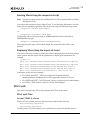
Deleting VPorts Using the rmvport.sh Script .................................................... 73
Displaying VPorts Using the lsvport.sh Script.................................................... 73
VPort sysfs ........................................................................................74
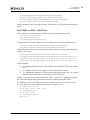
VPort sysfs Tree ...................................................................................... 74
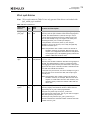
VPort sysfs Entries ................................................................................... 75
Monitoring VPorts with fc_vport (FC and FCoE Drivers) ...................................77
For the FC RHEL 5.x Driver ......................................................................... 77
For FC/FCoE RHEL 6.x/SLES 11 SPx Drivers...................................................... 78
VPort Configuration Limits .....................................................................78
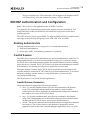
DHCHAP Authentication and Configuration .................................................... 79
Enabling Authentication ........................................................................79
fcauthd Daemon..................................................................................79
fcauthd Daemon Parameters ....................................................................... 80
lpfc_enable_auth Module Parameter .........................................................80
Authentication Configuration Parameters ...................................................80
Setting Remote and Local Passwords .........................................................80
FC/FCoE Driver Performance Tuning............................................................ 81
Overview ..........................................................................................81
Emulex Drivers Version 10.4 for Linux User Manual
P011043-01A Rev. A
5
Table of Contents
lpfc_fcp_io_channel ................................................................................. 81
lpfc_fcp_io_sched ................................................................................... 81
lpfc_fcp_imax ........................................................................................ 82
lpfc_vector_map.sh ................................................................................. 82
Network Performance Tuning .................................................................... 84
Memory Bandwidth Considerations............................................................84
Enabling Optimal Bandwidth Options ............................................................. 84
Populating DIMM Slots ............................................................................... 84
Disabling Memory Mirroring ........................................................................ 84
Using a Fast Clock Speed for the Front Side Bus (FSB) ......................................... 84
Network Memory Limits.........................................................................84
TCP Segmentation Offload (TSO) ..............................................................85
Flow Control ......................................................................................85
RX Frame Coalescing ............................................................................87
Maximum Transmission Unit (MTU) ...........................................................87
Interrupt Coalescing.............................................................................87
Setting the Interrupt Delay Duration to a Range of Values (AIC)............................. 87
Setting the Interrupt Delay Duration to a Constant Value..................................... 88
Receive Side Scaling (RSS)......................................................................88
Analyzing Performance Issues..................................................................88
4. Troubleshooting .............................................................................. 90
Hardware Situations and Resolutions .........................................................90
FC and FCoE Driver Situations and their Resolutions.......................................90
Ethernet Driver Situations and their Resolutions ...........................................94
iSCSI Driver Situations and their Resolutions ................................................95
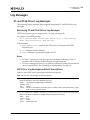
Log Messages ......................................................................................... 96
FC and FCoE Driver Log Messages .............................................................96
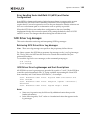
Retrieving FC and FCoE Driver Log Messages .................................................... 96
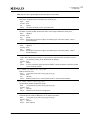
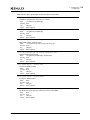
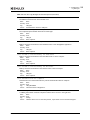
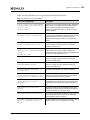
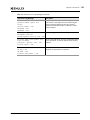
LPFC Error Log Messages and their Descriptions ................................................ 96
Ethernet Driver Log Messages ................................................................ 173
Retrieving Ethernet Driver Log Messages....................................................... 173
Ethernet Driver Log Messages and their Descriptions ........................................ 173
RoCE Error Log Messages...................................................................... 180
iSCSI Driver Log Messages..................................................................... 183
Retrieving iSCSI Driver Error Log Messages .................................................... 183
iSCSI Driver Error Log Messages and their Descriptions ...................................... 183
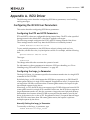
Appendix A. iSCSI Driver ..................................................................... 185
Configuring the iSCSI Driver Parameters ................................................... 185
Configuring the ETO and LDTO Parameters.................................................... 185
Emulex Drivers Version 10.4 for Linux User Manual
P011043-01A Rev. A
6
Table of Contents
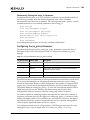
Configuring the large_io Parameter ............................................................ 185
Configuring the im_policy Parameter........................................................... 186
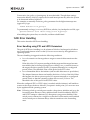
iSCSI Error Handling ........................................................................... 187
Error Handling using ETO and LDTO Parameters .............................................. 187
Error Handling Under MultiPath I/O (MPIO) and Cluster Configurations................... 188
iSCSI Driver Log Messages..................................................................... 188
Retrieving iSCSI Driver Error Log Messages .................................................... 188
iSCSI Driver Error Log Messages and their Descriptions ...................................... 188
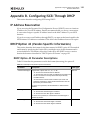
Appendix B. Configuring iSCSI Through DHCP ........................................... 191
IP Address Reservation ............................................................................191
DHCP Option 43 (Vendor-Specific Information) ..............................................191
DHCP Option 43 Parameter Descriptions ................................................... 191
DHCP Option 43 Format....................................................................... 192
Default Initiator Name and Data Digest Settings Example .................................. 192
Default TCP and Mutual CHAP Settings Example.............................................. 193
Appendix C. OneConnect 10 GbE Adapter Port Speed Specifications .............. 194
Port Speed Negotiation on Non-Mezzanine Cards ...........................................194
Port Speed on Mezzanine Cards.................................................................194
Appendix D. Updating Ethernet Firmware ............................................... 195
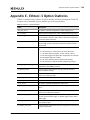
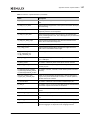
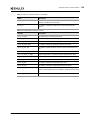
Appendix E. Ethtool -S Option Statistics .................................................. 196
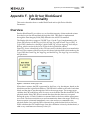
Appendix F. lpfc Driver BlockGuard Functionality ..................................... 199
Overview .............................................................................................199
Enabling BlockGuard...............................................................................200
SCSI Command Support ...........................................................................200
SCSI Operation Codes ......................................................................... 200
lpfc Driver Module Parameters ..................................................................202
lpfc_prot_mask................................................................................. 202
lpfc_prot_guard ................................................................................ 203
Appendix G. Setting Up and Configuring VXLAN ........................................ 204
Setting up VXLAN Networks Across Two Systems............................................204
Emulex Drivers Version 10.4 for Linux User Manual
P011043-01A Rev. A
7
List of Tables
List of Tables
Table
Table
Table
Table
Table
Table
2-1
3-1
3-2
3-3
3-4
3-5
Table 3-6
Table 3-7
Table 3-8
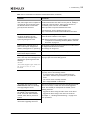
Table 4-1
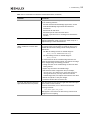
Table 4-2
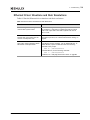
Table 4-3
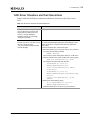
Table 4-4
Table 4-5
Table 4-6
Table 4-7
Table 4-8
Table A-1
Table A-2
Table B-1
Table C-1
Table E-1
Table E-2
Table F-1
Table F-2
Table F-3
Table F-4
Compatible OFED Versions...............................................................18
Static FC and FCoE Driver Parameters .................................................24
Dynamic FC and FCoE Driver Parameters..............................................27
Ethernet Driver Configuration Parameters ............................................37
Tx and Rx Queue Counts .................................................................38
Total VF Counts that are Supported for Various Adapter
Configurations .............................................................................41
Default Link Status of the PFs and VFs ................................................45
Setting sunrpc.rdma_slot_table_entries...............................................57
VPort sysfs Entries ........................................................................75
Hardware Situations and their Resolutions............................................90
FC and FCoE Driver Situations and their Resolutions ................................90
Ethernet Driver Situations and their Resolutions.....................................94
iSCSI Driver Situations and their Resolutions .........................................95
LPFC Error Log Messages and their Descriptions .....................................96
Ethernet Driver Log Messages of Type ............................................... 173
RoCE Error Log Messages ............................................................... 180
iSCSI Log Messages and Descriptions ................................................. 183
Interrupt Moderation Policy (im_policy) Settings .................................. 186
iSCSI Driver Error Log Messages ....................................................... 189
DHCP Option 43 (Vendor-Specific Information) .................................... 191
OneConnect 10 GbE Adapter Negotiated Speed Specifications .................. 194
Ethtool -S Option Statistics ............................................................ 196
Transmit/Receive Queue Statistics................................................... 198
Initiator Operations ..................................................................... 201
lpfc_prot_mask Protection Types..................................................... 202
Protection Data Placement for Supported Profiles ................................ 203
lpfc_prot_guard Guard Types ......................................................... 203
Emulex Drivers Version 10.4 for Linux User Manual
P011043-01A Rev. A
8
List of Figures
List of Figures
Figure F-1
Figure F-2
Data Block showing Type 1 DIF........................................................ 199
Data Transfer between Initiator Host and the Adapter ........................... 201
Emulex Drivers Version 10.4 for Linux User Manual
P011043-01A Rev. A
9
1. Introduction
Overview
1. Introduction
Overview
This Emulex® Drivers Version 10.4 for Linux manual provides installation, updating,
uninstalling, configuring, and troubleshooting procedures for several types of
Emulex-supported drivers for Linux.
This manual is applicable to several versions of Linux drivers, operating systems,
firmware, and adapters.
For supported firmware versions and their latest release, see the “Downloads”
page on the Emulex website for the specific adapter.
For a list of Emulex adapters that are compatible with the standalone driver kits,
see the “Downloads” page on the Emulex website for the specific driver.
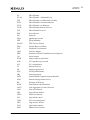
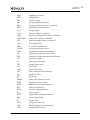
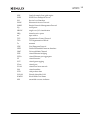
Abbreviations
AIC
adaptive interrupt coalescing
AMD
Advanced Micro Devices
ANSI
American National Standards Institute
API
application programming interface
ANSI
American National Standards Institute
ARI
alternative routing-ID interpretation
ASIC
application-specific integrated circuit
BIOS
basic input/output system
CentOS
Community Enterprise Operating System
CLI
command line interface
CNA
converged network adapter
CPU
central processing unit
CQ
completion queue
CQE
completion queue entry
DAPL
Direct Access Programming Library
DCBX
Data Center Bridging Capabilities Exchange
DHCHAP
Diffie-Hellman Challenge Handshake Authentication Protocol
DIF
Data Integrity Field
DIMM
dual in-line memory module
DMA
direct memory access
EQ
event queue
ETO
extended timeout
ETS
Enhanced Transmission Selection
Emulex Drivers Version 10.4 for Linux User Manual
P011043-01A Rev. A
10
1. Introduction
Abbreviations
FC
Fibre Channel
FC-AL
Fibre Channel - Arbitrated Loop
FCF
Fibre Channel over Ethernet Forwarder
FCFI
Fibre Channel Forwarder Indicator
FCoE
Fibre Channel over Ethernet
FC-SP
Fibre Channel Security Protocol
FCP
Fibre Channel Protocol
FSB
front side bus
FW
firmware
Gbps
gigabits per second
GID
group identifier
GnuPG
GNU Privacy Guard
GRO
Generic Receive Offload
GUI
Graphical User Interface
HBA
host bus adapter
IEEE
Institute of Electrical and Electronics Engineers
I/O
Input/output
IOCB
input/output control block
IOPs
I/O operations per second
IOV
I/O virtualization
IP
Internet Protocol
IPL
initial program load
IQN
iSCSI qualified name
IRQ
interrupt request
iSCSI
internet Small Computer System Interface
iSNS
Internet Storage Name Service
KB
Kilobyte (1024 bytes)
KVM
kernel-based virtual machine
LACP
Link Aggregation Control Protocol
LAN
local area network
LBA
logical block address
LDTO
link down timeout
LLC
logical link control
LOM
LAN on motherboard
LRO
large receive offload
LUN
logical unit number
MAC
Media Access Control
Emulex Drivers Version 10.4 for Linux User Manual
P011043-01A Rev. A
11
1. Introduction
Abbreviations
Mbps
megabits per second
MPIO
multipath I/O
MR
memory region
MSI
message signaled interrupts
MSI-X
message signaled interrupts - extended
MTU
maximum transmission unit
N/A
not applicable
NAA
Network Address Authority
NCSI
Network Communication Services Interface
NFS RDMA
network file system over RDMA
NIC
network interface card (or controller)
NPar
NIC partitioning
NPIV
N_Port ID Virtualization
NUMA
non-uniform memory access
OFED
OpenFabrics Enterprise Distribution
PCI
Peripheral Component Interconnect
PCIe
Peripheral Component Interconnect Express
PD
protection domain
PF
PCIe physical function
PFC
priority flow control
PID
process ID
POST
power-on self-test
PXE
Preboot Execution Environment
QoS
quality of service
QP
queue pair
RDMA
remote direct memory access
RHEL
Red Hat Enterprise Linux
RoCE
RDMA over converged Ethernet
RPI
remote port indicator
RPM
resource package manager
RQ
receive queue
RSCN
registered state change notification
RSS
receive-side scaling
Rx
receive mode
SAN
storage area network
SCSI
Small Computer System Interface
SDP
Sockets Direct Protocol
Emulex Drivers Version 10.4 for Linux User Manual
P011043-01A Rev. A
12
1. Introduction
Abbreviations
SGE
Oracle (formerly Sun) grid engine
SLES
SUSE Linux Enterprise Server
SLI
Service Level Interface
SNAP
Subnetwork Access Protocol
SNMP
Simple Network Management Protocol
SQ
send queue
SR-IOV
single-root I/O virtualization
SRQ
shared receive queue
tar
tape archive
TCP
Transmission Control Protocol
TSO
TCP Segmentation Offload
Tx
transmit
UDP
User Datagram Protocol
UEFI
Unified Extensible Firmware Interface
UMC
Universal Multi-Channel
VEB
virtual Ethernet bridging
VEPA
virtual Ethernet port aggregator
VF
virtual function
VGT
virtual guest tagging
VPort
virtual port
VLAN
virtual local area network
VM
virtual machine
VPD
vital product data
VXLAN
Virtual eXtensible LAN
WWPN
World Wide Port Name
XRI
extensible resource indicator
Emulex Drivers Version 10.4 for Linux User Manual
P011043-01A Rev. A
13
2. Installing and Uninstalling
General Installation Requirements
2. Installing and Uninstalling
Emulex releases Linux binary RPMs that are digitally signed using the GNU Privacy
Guard (GnuPG) standard. This will allow certification of the contents of the RPMs and
verification that the contents have not been modified since they were created by
Emulex. The RPMs have been digitally signed by Emulex with a GnuPG private key
that is only held by Emulex. Instructions for creating the Emulex GnuPG public key file
are located on the Emulex website at:
http://www.emulex.com/downloads/linux-key.html
General Installation Requirements
Note: You must install the driver before updating the firmware.
Prior to driver installation, follow these general requirements:
Install a supported Emulex adapter in the system. Refer to the adapter's
installation manual for specific hardware installation instructions.
Use a supported operating system. See the Emulex website for supported
operating systems.
Binary RPM FC and FCoE Driver Kit
The binary RPM FC and FCoE driver kit contains the following:
A zipped tar file that includes the driver binary RPMs for a specific driver
version and Linux distribution
Note: Use only officially-released Linux distribution kernels. The binary RPM
packages only support officially-released Linux distribution kernels,
and do not support pre-release distribution kernels.
An installation script, elx_lpfc_install.sh, that installs by default the FC and
FCoE driver binary RPM that corresponds to the target system's architecture
and kernel memory variant
A README file that provides a description of the kit structure, its contents, and
distribution support scope
Installing the Binary RPM FC and FCoE Driver Kit
Note: You must uninstall any FC driver kits that are not part of this distribution. For
example, you must uninstall any previous FC and FCoE driver kits that were
installed from the Emulex website before installing this driver kit. This
installation fails if a previous version of the FC and FCoE driver kit is detected.
For more information, see “Uninstalling the Binary RPM FC and FCoE Driver
Kit” on page 15.
Emulex Drivers Version 10.4 for Linux User Manual
P011043-01A Rev. A
14
2. Installing and Uninstalling
Binary RPM FC and FCoE Driver Kit
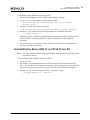
To install the binary RPM FC and FCoE driver:
1. Download the appropriate driver kit from the Emulex website.
2. Log in as “root” to a terminal, and unpack the tarball:
tar xzf elx-lpfc-dd-<Linux distribution version>-<driver
version>.tar.gz
3. Change to the directory that is extracted:
cd elx-lpfc-dd-<Linux distribution version>-<driver version>/
4. Run the elx_lpfc_install.sh script without options to install the driver kit:
./elx_lpfc_install.sh
After the elx_lpfc_install.sh script has finished running successfully, the Emulex FC
and FCoE driver is loaded, and devices that are connected to the system are
accessible.
5. Reboot the system to enable the newly added driver options in the ramdisk. You
can also reboot the system later.
Uninstalling the Binary RPM FC and FCoE Driver Kit
Note: You must run the uninstall script that shipped with the version of the driver kit
you want to remove.
To uninstall the binary RPM FC and FCoE driver:
1. Log in as “root”.
2. If possible, exit all applications that use FC-attached drives, then unmount the
drives. If you cannot exit all applications that use FC-attached drives, the uninstall
script works properly, but you must reboot after the uninstallation is complete.
3. Run the elx_lpfc_install.sh script with the “--uninstall” option:
./elx_lpfc_install.sh --uninstall
Emulex Drivers Version 10.4 for Linux User Manual
P011043-01A Rev. A
15
2. Installing and Uninstalling
Ethernet Driver Kit
Ethernet Driver Kit
The Ethernet driver kit includes the driver that supports the NIC protocol. The Ethernet
driver kit contains the following:
A zipped tar file that includes the driver binary RPMs for a specific driver
version, and for all of the supported Linux distribution kernels
Note: Use only officially-released Linux distribution kernels. The binary RPM
packages only support officially-released Linux distribution kernels,
and do not support pre-release distribution kernels.
An installation script, elx_net_install.sh, which installs (by default) the Ethernet
driver binary RPM that corresponds to the target system's architecture and
kernel memory variant
A README file that provides a description of the kit structure, its contents, and
distribution support scope
Installing the Ethernet Driver Kit
Note: Remove any previously installed Ethernet driver kits that were installed from
the Emulex website (that is, those that were not part of a distribution’s kernel),
before proceeding. See “Uninstalling the Ethernet Driver Kit” in the following
section for more information.
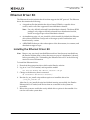
To install the Ethernet driver:
1. Download the appropriate driver kit from the Emulex website.
2. Log in as “root” to a terminal, and unpack the tarball:
tar xzf elx-be2net-dd-<driver version>.tar.gz
3. Change to the directory that is extracted:
cd elx-be2net-dd-<driver version>/
4. Run the elx_net_install script without options to install the driver kit:
./elx_net_install.sh
After the elx_net_install.sh script has finished running successfully, the Emulex
Ethernet driver is loaded, and devices that are connected to the system are
accessible.
5. Reboot the system to enable the newly added driver options in the ramdisk. You
can also reboot the system later.
Emulex Drivers Version 10.4 for Linux User Manual
P011043-01A Rev. A
16
2. Installing and Uninstalling
RoCE Driver for the OCe14000-Series Adapters
Uninstalling the Ethernet Driver Kit
Note: You must run the uninstall script that shipped with the version of the driver kit
you want to remove.
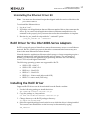
To uninstall the Ethernet driver:
1. Log in as “root”.
2. If possible, exit all applications that use Ethernet-attached drives, then unmount the
drives. If you cannot exit all applications that use Ethernet-attached drives, the
uninstall works properly, but you must reboot after the uninstallation is complete.
3. Run the elx_net_install.sh script with the “--uninstall” option:
./elx_net_install.sh --uninstall
RoCE Driver for the OCe14000-Series Adapters
RoCE is a network protocol that allows remote direct memory access over an Ethernet
network. RoCE is a link layer protocol that allows communication between any two
hosts in the same Ethernet broadcast domain.
Network-intensive applications like networked storage or cluster computing require a
network infrastructure with high bandwidth and low latency. The advantages of
RDMA over other network application programming interfaces are lower latency,
lower CPU load, and higher bandwidth.
The following operating systems are supported for RoCE:
SLES 11 SP2 - Ofed-3.5
SLES 11 SP3 - Ofed-3.12-1
RHEL 6.4 -- Ofed-3.12-1
RHEL 6.5 -- Ofed-3.12-1
RHEL 6.6 -- Native stack (inbox and OOB)
RHEL 7.0 - native stack (OOB only)
Installing the RoCE Driver
Supported RoCE drivers can be downloaded from the Emulex website.
1. Use the following package to install the driver:
elx-ocrdma-dd-<release>-<version>.tar.gz
2. Copy the package to /tmp and run
tar xvzf elx-ocrdma-dd-<release>-<version>.tar.gz
3. Change directory to the RoCE packages directory:
cd /tmp/X.X.X.X/Linux/RoCE
4. Select the required package based on the host on which the driver is being installed.
The current Linux distribution on the host may be determined by typing
lsb_release-i
Emulex Drivers Version 10.4 for Linux User Manual
P011043-01A Rev. A
17
2. Installing and Uninstalling
Installing the RoCE Driver
5. Untar the selected package.
6. Change the directory to the resulting directory from the tar extraction command to
find the installer script ‘elx_roce_install.sh’.
7. Run the installer script to install the required RoCE driver and user library RPMs.
Installing OFED
Table 2-1 lists the available OFED versions that are compatible with the supported
operating systems.
Table 2-1 Compatible OFED Versions
OFED Version
Operating System
SLES 11 SP2
SLES 11 SP3
RHEL 6.4
RHEL 6.5
OFED 3.5
YES
NO
NO
NO
OFED 3.12-1
NO
YES
YES
YES
Supported OFED packages can be downloaded from the following website:
https://www.openfabrics.org/downloads/OFED/
To install OFED:
1. Download the appropriate .tgz tarball file.
2. Extract the downloaded OFED-x.tgz tarball to the /tmp directory:
#tar-xvzf/tmp/OFED-3.5.tgz
3. Install OFED:
#cd /tmp/OFED-3.5
4. When installation of the OFED stack is complete, do one of the following:
Reboot the system
Restart OFED by typing
service openibd restart
Note: If you are installing OFED-3.12-1 packages, this package includes the inbox
be2net and inbox ocrdma drivers. If the out-of-box drivers are desired, use the
following command to install ofed without the inbox be2net and ocrdma
drivers.
#./install.pl --without-ocrdma --without-be2net
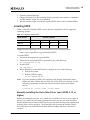
Manually Installing the Out-of-Box Driver rpms (OFED-3.12 or
higher)
Emulex recommends using elx_roce_install.sh to install the out-of-box driver rpms. If
the elx_roce_install.sh is not used to update the drivers and in cases when the inbox
drivers (be2net and ocrdma) of OFED are also present, the following script updates and
loads the inbox drivers properly. The following script prevents the situation where
fresh OOB rpms are installed and modinfo be2net/ocrdma still show older driver
versions.
Emulex Drivers Version 10.4 for Linux User Manual
P011043-01A Rev. A
18
2. Installing and Uninstalling
Installing the RoCE Driver
Goto /lib/modules/<kernel
version>/updates/drivers/net/ethernet/emulex/benet
If be2net.ko exists /bin/rm be2net.ko
Goto /lib/modules/<kernel version>/updates/drivers/infiniband/hw/ocrdma/
If ocrdma.ko exists /bin/rm ocrdma.ko
rpm –ivh kmod-be2net-10.4.xx.x.rpm
rpm -ivh --nodeps kmod-ocrdma-10.4.xxx.ofed-xxx.x.rpm
rpm -ivh libocrdma-10.4.xx.ofed-xx.rpm
rmmod be2net
modprobe be2net
modproce ocrdma
Installing the IB Stack from the Operating System
Distribution
If no OFED is installed and the native IB stack is used, you can install the IB stack from
the operating system.
To install the IB stack from the operating system for RHEL 7.x:
1. Select Infiniband Support while installing the operating system. Selecting
Infinband Support will also install the following:
All IB stack kernel components
User space libraries
Some user space utilities
2. Install the necessary user space rpms. The system must have the following RPMs
(along with their dependencies) for using IB commands.
Basic packages
librdmacm-utils-1.0.17.1-1.el7.x86_64
libibverbs-utils-1.1.7-6.el7.x86_64
libibverbs-1.1.7-6.el7.x86_64
libibmad-1.3.9-3.el7.x86_64
librdmacm-1.0.17.1-1.el7.x86_64
For applications such as ib_* commands
perftest-2.0-3.el7.x86_64
qperf-0.4.9-2.el7.x86_64
Packages for development
libibumad-devel-1.3.8-3.el7.x86_64
libibverbs-devel-1.1.7-6.el7.x86_64
libibumad-1.3.8-3.el7.x86_64
librdmacm-devel-1.0.17.1-1.el7.x86_64
To verify whether an rpm is installed, use the following command.
?
rpm -qa |grep <rpm_name>
Emulex Drivers Version 10.4 for Linux User Manual
P011043-01A Rev. A
19
2. Installing and Uninstalling
Installing the RoCE Driver
Installing and Using DAPL
If no OFED is installed and the native RDMA stack is used, you can download and
install DAPL and the DAPL utilities 7.x.
To install DAPL and DAPL utilities 7.x:
1. Install the following RPMs:
libibverbs-devel
librdmacm-devel
2. Download the DAPL tar ball. A supported DAPL tar ball can be downloaded from
the following website:
http://downloads.openfabrics.org/downloads/dapl/
3. Type the following for the build steps:
tar -zxvf dapl-x.x.x.tar.gz
cd dapl-x.x.x
./configure
make
make install
4. Configure DAPL. Edit /etc/dat.conf to append following lines:
ofa-v2-scm-roe-ocrdma0-1
dapl.{dapl_ver} "ocrdma0
ofa-v2-scm-roe-ocrdma1-1
dapl.{dapl_ver} "ocrdma1
ofa-v2-scm-roe-ocrdma2-1
dapl.{dapl_ver} "ocrdma2
ofa-v2-scm-roe-ocrdma3-1
dapl.{dapl_ver} "ocrdma3
u{dapl_ver}
1" ""
u{dapl_ver}
1" ""
u{dapl_ver}
1" ""
u{dapl_ver}
1" ""
nonthreadsafe default libdaploscm.so.2
nonthreadsafe default libdaploscm.so.2
nonthreadsafe default libdaploscm.so.2
nonthreadsafe default libdaploscm.so.2
Where {dapl_ver} is either 2.0 or 2.1 depending on which dapl library has been
downloaded, for example:
for dapl-2.1.3:
{dapl_ver} = 2.1
for dapl-2.0.4:
{dapl_ver} = 2.0
Uninstalling the RoCE Driver
To uninstall the RoCE driver, type
./elx_roce_install.sh --uninstall
Note: SLES 11 platforms can prevent loading of unsupported modules by default. In
such cases, it is possible that the installer can fail to load the modules even
though the RPMs are installed. If this occurs, try manually loading the ocrdma
module after doing one of the following:
Emulex Drivers Version 10.4 for Linux User Manual
P011043-01A Rev. A
20
2. Installing and Uninstalling
iSCSI Driver Kit
Set ‘allow_unsupported_modules’ to ‘1’ in
/etc/modprobe.d/unsupported-modules.
Specify ‘--allow-unsupported’ on the command line.
iSCSI Driver Kit
Previously, Emulex provided a proprietary iSCSI driver as the out-of-box driver for all
Linux operating systems. The Open-iSCSI driver was available inbox only. For
RHEL 6.4, RHEL 7, and SLES 11 SP2 and later drivers, Emulex is transitioning the
Open-iSCSI driver to be the out-of-box driver. For RHEL 5.x, the out-of-box driver will
continue to be the proprietary driver.
The iSCSI driver kit includes the driver that supports the iSCSI protocol. The iSCSI
driver kit contains the following:
A zipped tar file that includes the binary RPMs for a specific driver version, and
for all of the supported Linux distribution kernels
Note: Use only officially-released Linux distribution kernels. The binary RPM
packages only support officially-released Linux distribution kernels,
and do not support pre-release distribution kernels.
An installation script, elx_iscsi_install.sh, that installs by default the iSCSI
driver binary RPM that corresponds to the target system’s architecture and
kernel memory variant
A README file that provides a description of the kit structure, its contents, and
distribution support
Compiling the iSCSI Driver
To compile the iSCSI driver from source, the following “make” command must be run
from within the driver src directory:
make -C /usr/src/<kernel dir> M=`pwd` CONFIG_BE2ISCSI=m
Where the <kernel dir> is:
For RHEL 6.5 SS#:
/usr/src/kernels/2.6.32-431.el6/
For SLES 11 SP# default variant:
/usr/src/linux-obj/x86_64/default
Installing the iSCSI Driver Kit
Notes
Remove any previously installed iSCSI driver kits and/or Application Helper
Modules that were installed from the Emulex website (that is, those that were
not part of a distribution’s kernel) before proceeding. See “Uninstalling the
iSCSI Driver Kit” on page 22 for more information.
Emulex Drivers Version 10.4 for Linux User Manual
P011043-01A Rev. A
21
2. Installing and Uninstalling
Booting from a Non-Zero LUN Attached to an Emulex FC/FCoE Adapter
When using this driver for SAN-boot applications, the following dependencies
must be installed:
iscsi-initiator-utils
dracut-network
For SAN boot with a SLES operating system, kernel parameter withiscsi=1
should be passed during installation.
Since this driver is based on Open-iSCSI, attempting to perform a SAN-boot
without these dependencies will fail.
To install the iSCSI driver:
1. Download the appropriate driver kit from the Emulex website.
2. Log in as “root” to a terminal, and unpack the tarball:
tar xzf elx-be2iscsi-dd-<driver version>.tar.gz
3. Change to the directory that is extracted:
cd elx-be2iscsi-dd-<driver version>/
4. Run the elx_iscsi_install.sh script with no options to install the driver kit:
./elx_iscsi_install.sh
5. After the elx_iscsi_install script has finished running successfully:
For an iSCSI boot case, you must reboot the system now to load the driver.
For all other iSCSI cases, the Emulex iSCSI driver is loaded, and devices that are
connected to the system are accessible. Reboot the system now to enable the
newly added driver options in the ramdisk. You can also reboot the system
later.
Uninstalling the iSCSI Driver Kit
Note: You must run the uninstall script that shipped with the version of the driver kit
you want to remove.
To uninstall the iSCSI driver:
1. Log in as “root”.
2. If possible, exit all applications that use iSCSI-attached drives, then unmount the
drives. If you cannot exit all applications that use iSCSI-attached drives, the
uninstall works properly, but you must reboot after the uninstallation is complete.
3. Run the elx_iscsi_install.sh script with the “--uninstall” option:
./elx_iscsi_install.sh --uninstall
Booting from a Non-Zero LUN Attached to an Emulex
FC/FCoE Adapter
To configure SLES 11 SPx to boot from an FC-attached disk device other than
/dev/sda, see the Emulex Boot for the Fibre Channel Protocol User Manual, which is
available on the Emulex website.
Emulex Drivers Version 10.4 for Linux User Manual
P011043-01A Rev. A
22
2. Installing and Uninstalling
OneCommand Manager Application
OneCommand Manager Application
The OneCommand Manager application is a powerful and centralized adapter
management suite. It provides discovery, reporting, and management of local and
remote adapters from a single console anywhere in the SAN and across platforms. Both
a GUI and CLI are provided. For instructions on installing and using the OneCommand
Manager application, see the OneCommand Manager Application User Manual, which is
available on the Emulex website.
Emulex Drivers Version 10.4 for Linux User Manual
P011043-01A Rev. A
23
3. Configuration
FC and FCoE Driver Configuration
3. Configuration
FC and FCoE Driver Configuration
The following section describes how to configure parameters for the FC and FCoE
driver.
FC and FCoE Driver Parameters
Note: The FC and FCoE driver parameters determine some aspects of the driver’s
behavior. There are two main types, static and dynamic. Changes to the static
parameters require a driver reload for the change to take effect. Changes to
most dynamic parameters take effect immediately; some do not take effect until
there is a link-down/link-up sequence.
See the following section and “Dynamic FC and FCoE Driver Parameters” on page 27,
respectively.
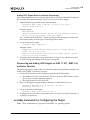
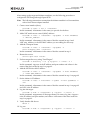
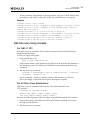
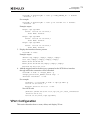
Static FC and FCoE Driver Parameters
Changes to static parameters require a driver reload for the change to take effect.
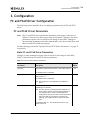
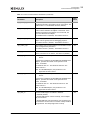
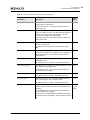
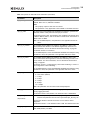
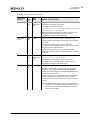
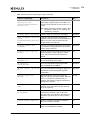
Table 3-1 lists the static FC and FCoE driver parameters.
Table 3-1 Static FC and FCoE Driver Parameters
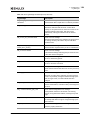
sysfs
Visible
Parameter
Description
lpfc_ack0
When enabled, ACK0 is used for Class 2. The enabled value is
1.
Yes
The disabled value is 0 (default).
lpfc_dev_loss_initiator
When enabled, engage the devloss timeout for initiators. The
enabled value is 1.
Yes
The disabled value is 0 (default).
Note: This parameter is only applicable to the RHEL 5.x
driver.
lpfc_discovery_threads
Specifies the maximum number of ELS commands that can be
outstanding for a discovery.
No
Note: The lpfc_discovery_threads parameter defaults to a
value of 64 for private loop topologies regardless of
the configured value. If there are multiple ports
configured on the host the value of 64 is only used for
those ports that are connected in a private loop
topology. The configured value is used for all other
ports.
The minimum value is 1. The maximum value is 64. The
default value is 32.
Emulex Drivers Version 10.4 for Linux User Manual
P011043-01A Rev. A
24
3. Configuration
FC and FCoE Driver Configuration
Table 3-1 Static FC and FCoE Driver Parameters (Continued)
sysfs
Visible
Parameter
Description
lpfc_enable_da_id
When enabled, the FC and FCoE driver issues a DA_ID CT
command to the fabric when VPorts log out of the fabric. The
enabled value is 1. The disabled value is 0 (default).
No
lpfc_enable_hba_heartbeat When enabled, the heartbeat logic in the FC and FCoE driver
is able to detect whether the adapter is functional. If the
heartbeat logic detects the adapter is not functional, the
driver will shut down the adapter.
Yes
The disabled value is 0 (default). The enabled value is 1.
lpfc_enable_hba_reset
When enabled, the FC and FCoE drivers can pass resets to the
adapter. This is typically used for debugging purposes.
Yes
The enabled value is 1 (default). The disabled value is 0.
lpfc_enable_npiv
When enabled, the FC and FCoE driver can use NPIV to create
VPorts (if supported by the fabric).
Yes
The enabled value is 1 (default). The disabled value is 0.
lpfc_fcp_class
Specifies either FC Class 2 or 3 for FCP data transmission. For
Class 2, the value is 2. For Class 3, the value is 3 (default).
Yes
lpfc_fcp_eq_count
Note: This parameter is deprecated in RHEL 6.x/SLES 11 SPx
drivers.
Yes
For OneConnect adapters and LPe16000 and LPe15000-series
adapters, specifies the number of fast-path FCP event
queues, if available.
The minimum value is 1. The maximum value is 8. The
default value is 4.
Note: For LPe12000 adapters, this parameter is not
applicable and has no effect.
lpfc_fcp_wq_count
Note: This parameter is deprecated in RHEL 6.x/SLES 11 SPx
drivers.
Yes
For OneConnect adapters and LPe16000 and LPe15000-series
adapters, specifies the number of fast-path FCP work
queues, if available.
The minimum value is 1. The maximum value is 32. The
default value is 4.
Note: For LPe12000 adapters, this parameter is not
applicable and has no effect.
lpfc_fdmi_on
Specifies if FDMI support is enabled or disabled.
Yes
0 = Disabled (default)
5 = Enable FDMI without a 60-second delay, use all adapter
and port attributes.
7 = Enable FDMI with a 60-second delay, use all adapter and
port attributes. Use this value to introduce a delay if FDMI is
not operational. The delays begins after a linkup.
Emulex Drivers Version 10.4 for Linux User Manual
P011043-01A Rev. A
25
3. Configuration
FC and FCoE Driver Configuration
Table 3-1 Static FC and FCoE Driver Parameters (Continued)
sysfs
Visible
Parameter
Description
lpfc_lun_queue_depth
Specifies the default maximum number of commands sent to
a single logical unit (disk drive).
Yes
The minimum value is 1. The maximum value is 128. The
default value is 30.
lpfc_max_luns
Specifies the highest available LUN ID that is valid, per
target. For example, a value of 19 means that LUN IDs from 0
to 19 are valid for the target. The SCSI layer scans each
target until it reaches this specified LUN ID.
Yes
The minimum value is 0. The maximum value is 65535. The
default value is 255.
lpfc_max_scsicmpl_time
Uses command completion time to control queue depth. The
units are in milliseconds.
Yes
The minimum value is 0 (default). The maximum value is
6000.
lpfc_multi_ring_rctl
When lpfc_multi_ring_support is enabled, identifies the
routing control (R_CTL) for the additional ring configuration.
Yes
The minimum value is 1. The maximum value is 255. The
default value is 4.
lpfc_multi_ring_support
Determines the number of primary SLI rings over which to
spread IOCB entries.
Yes
The minimum value is 1 (default). The maximum value is 2.
lpfc_multi_ring_type
When lpfc_multi_ring_support is enabled, identifies the TYPE
of the additional ring configuration.
Yes
The minimum value is 1. The maximum value is 255. The
default value is 5 (LLC/SNAP).
lpfc_restrict_login
When enabled, restricts VPorts login to remote initiators.
No
The enabled value is 1 (default). The disabled value is 0.
lpfc_scan_down
When enabled, selects the “scan down” method (scanning
the AL_PA from high to low) to assign a SCSI ID.
Yes
The enabled value is 1 (default). The disabled value is 0.
lpfc_sg_seg_cnt
Controls the scatter/gather maximum segment count passed
to the FC and FCoE driver. This variable is applicable per SCSI
command.
Yes
(sg_tabl
esize)
For LPe12000 adapters, the minimum value is 64 (default),
and the maximum value is 4096.
For OneConnect and LPe16000 and LPe15000-series adapters,
the minimum value is 64 (default), and the maximum value is
510.
Emulex Drivers Version 10.4 for Linux User Manual
P011043-01A Rev. A
26
3. Configuration
FC and FCoE Driver Configuration
Table 3-1 Static FC and FCoE Driver Parameters (Continued)
sysfs
Visible
Parameter
Description
lpfc_sli_mode
For LPe12000 adapters, this parameter allows you to force
the SLI mode requested by the adapter driver. The possible
values are:
• 0 = Auto-select (default)
• 2 = SLI-2
• 3 = SLI-3
No
Note: For OneConnect and LPe16000, and LPe15000-series
adapters, this parameter is not applicable and has no
effect.
lpfc_use_msi
When enabled, determines whether the driver uses MSI or
MSI-X.
• 0 = MSI disabled; INTx mode is used (default for the FC
RHEL 5.x driver).
• 1 = MSI; allows a maximum of 32 interrupts.
• 2 = MSI-X; allows a maximum of 2048 interrupts (default
for FC RHEL 6.x/SLES 11 SPx drivers).
Yes
Note: Default is 2. This value reverts to 1 if the system does
not support MSI-X. This value reverts to 0 if the system
does not support MSI.
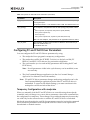
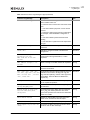
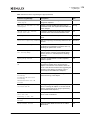
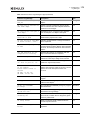
Dynamic FC and FCoE Driver Parameters
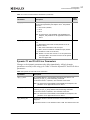
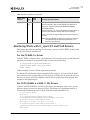
Changes to the dynamic parameters take affect immediately. All lpfc dynamic
parameters are read/write using sysfs. Table 3-2 lists the dynamic FC and FCoE driver
parameters.
Table 3-2 Dynamic FC and FCoE Driver Parameters
Parameter
Description
lpfc_cr_count
For LPe12000 adapters, this parameter determines the value for I/O
coalescing for lpfc_cr_count outstanding commands.
The minimum value is 1 (default). The maximum value is 255.
Note: For OneConnect and LPe16000, and LPe15000-series adapters, this
parameter is not applicable and has no effect.
lpfc_cr_delay
For LPe12000 adapters, this parameter determines the value for I/O
coalescing for lpfc_cr_delay (milliseconds) outstanding commands.
The minimum value is 0 (default). The maximum value is 63.
Note: For OneConnect and LPe16000, and LPe15000-series adapters, this
parameter is not applicable and has no effect.
lpfc_devloss_tmo
Specifies the number of seconds to hold an I/O error when a device
disappears.
The minimum value is 0. The maximum value is 255. The default value is 30.
Emulex Drivers Version 10.4 for Linux User Manual
P011043-01A Rev. A
27
3. Configuration
FC and FCoE Driver Configuration
Table 3-2 Dynamic FC and FCoE Driver Parameters (Continued)
Parameter
Description
lpfc_enable_auth
Specifies whether DHCHAP support is enabled. When set to 1, DHCHAP is
enabled. When set to 0, DHCHAP is disabled.
Notes
• This property requires a link reset to activate.
• This parameter is only applicable to the FC RHEL 5.x and SLES 10 drivers.
lpfc_fcp_imax
For OneConnect and LPe16000 and LPe15000-series adapters, specifies the
maximum number of fast-path FCP interrupts per second.
The minimum value is 636. The maximum value is 651042. The default value
is 5000 for RHEL 6, RHEL 7, SLES 11 and SLES 12. Older driver versions have a
default value of 10000.
Note: For LPe12000 adapters, this parameter is not applicable and has no
effect.
lpfc_fcp_io_channel
For LPe16000 and LPe15000-series adapters using RHEL 6.x/SLES 11 SPx
drivers, defines the number of I/O channels supported by the driver. For
more information, see “FC/FCoE Driver Performance Tuning” on page 81.
The default value is 4 I/O channels.
For LPe12000 adapters, and for LPe16000 and LPe15000-series adapters using
the RHEL 5.x driver, this parameter is not applicable and has no effect.
lpfc_fcp_io_sched
For LPe16000 and LPe15000-series adapters using RHEL 6.x/SLES 11 SPx
drivers, determines which algorithm to use when scheduling an FCoE I/O to
an I/O channel. For more information, see “FC/FCoE Driver Performance
Tuning” on page 81.
The default value is 0, configuration by round-robin scheduling. A value of 1
sets configuration to CPU scheduling.
For LPe12000 adapters, and for LPe16000 and LPe15000-series adapters using
the RHEL 5.x driver, this parameter is not applicable and has no effect.
lpfc_link_speed
Specifies the FC link speed. The possible values are:
• 0 = Auto-select (default)
• 1 = 1 Gbps
• 2 = 2 Gbps
• 4 = 4 Gbps
• 8 = 8 Gbps
• 16 = 16 Gbps
Note: This parameter does not affect FCoE 10 Gbps adapters.
lpfc_log_verbose
Specifies the log verbosity level of the messages posted by the driver. Extra
activity logging (bit mask).
The minimum value is 0x0 (default). The maximum value is 0xFFFFFFFF.
lpfc_nodev_tmo
(deprecated)
Note: This is a deprecated parameter and lpfc_devloss_tmo should be used
instead. This parameter will not work if you altered lpfc_devloss_tmo.
Specifies the number of seconds to hold an I/O error when a device
disappears.
The minimum value is 1. The maximum value is 255. The default value is 30.
lpfc_pci_max_read
Specifies the maximum DMA read byte count. The possible values are 512,
1024, 2048 (default), and 4096.
Emulex Drivers Version 10.4 for Linux User Manual
P011043-01A Rev. A
28
3. Configuration
FC and FCoE Driver Configuration
Table 3-2 Dynamic FC and FCoE Driver Parameters (Continued)
Parameter
Description
lpfc_poll_tmo
Specifies the number of milliseconds that the driver waits between polling
FCP ring interrupts.
The minimum value is 1. The maximum value is 255. The default value is 10.
lpfc_topology
For FC adapters, this parameter sets the link topology. The possible values
are:
• 0x0 = loop first; if loop fails, then point-to-point (default)
• 0x2 = point-to-point only
• 0x4 = loop only
• 0x6 = point-to-point first; if point-to-point fails, then loop
Note: For FCoE adapters, this parameter is not applicable and has no effect.
lpfc_use_adisc
When enabled, an ADISC is sent instead of a PLOGI for device discovery or
RSCN. The enabled value is 1.
The disabled value is 0.
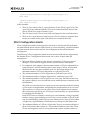
Configuring FC and FCoE Driver Parameters
You can configure the FC and FCoE driver parameters by using:
The modprobe Linux program for temporary configuration
The modprobe.conf file (the FC RHEL 5.x driver) or the lpfc.conf file (FC
RHEL 6.x and SLES 11 SPx drivers) for persistent configuration
The sysfs interface (to view and modify parameters after loading the FC and
FCoE driver)
Note: Not all parameters visible in the sysfs directory can be modified; some
are read-only.
The OneCommand Manager application (see the OneCommand Manager
Application User Manual for more information)
Note: FC and FCoE driver parameter changes made using modprobe.conf or the
OneCommand Manager application persist if the FC and FCoE driver is
uninstalled. To return to the default settings, you must reset them in the
modeprobe.conf file and reload the driver.
Temporary Configuration with modprobe
When you manually load the FC and FCoE driver as a module using the modprobe
command, and you change one or more driver parameter values in the command line,
the configuration is temporary. These changes are considered temporary because they
are valid only for the current session or until the FC and FCoE driver is unloaded.
Modprobe uses the modprobe.conf file, but parameters passed to it using the command
line override the parameters in the modprobe.conf file. Values can be expressed in
hexadecimal or decimal notation.
Emulex Drivers Version 10.4 for Linux User Manual
P011043-01A Rev. A
29
3. Configuration
FC and FCoE Driver Configuration
If you want to temporarily set lun_queue_depth to 20 (the default is 30) for all HBAs in
your system, load the FC and FCoE driver with the following command:
modprobe lpfc lpfc_lun_queue_depth=20
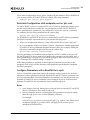
Persistent Configuration with modprobe.conf or lpfc.conf
For the FC RHEL 5.x driver, to make the FC and FCoE driver parameters persist across
module loads and reboots, modify the /etc/modprobe.conf file. The FC and FCoE
driver parameters are specified in /etc/modprobe.conf via the “options” command.
For example, the following command sets the verbose flag:
options lpfc lpfc_log_verbose=0xffffffff
For FC RHEL 6.x and SLES 11 SPx drivers, to make the FC and FCoE driver parameters
persist across module loads and reboots, perform the following steps:
1. In the /etc/modprobe.d directory, create a file with the driver name “lpfc.conf”.
2. In /etc/modprobe.d/lpfc.conf, use the “options” command to add the appropriate
FC and FCoE driver parameters and their desired values. For example, adding the
following command to the lpfc.conf file sets the verbose flag:
options lpfc lpfc_log_verbose=0x3ffff
If driver parameters are modified in the modprobe.conf file or added to the lpfc.conf
file, the FC and FCoE driver must be reloaded for the parameters to take effect. Also, a
new ramdisk image is required if you want the changes to take effect in the next boot.
See “Creating a New Ramdisk Image” on page 32.
If the same parameter is specified on the modprobe command line and also in the
modprobe.conf or lpfc.conf file, then the value specified in the modprobe command
line takes precedence.
Configure Parameters with a Read/Write to sysfs
Sysfs is a virtual file system that exposes the structure of the system. It also includes
interfaces to driver parameters through which the FC and FCoE driver parameters can
be viewed and modified. Since these interfaces are available only after driver load, only
dynamic FC and FCoE driver parameters can be changed. However, both static and
dynamic FC and FCoE driver parameters can be read through sysfs.
Notes
Sysfs changes exist only during driver load and are lost when the FC and FCoE
driver is unloaded or the system is rebooted.
Driver parameters that are set through module parameters are global; setting
them through sysfs is on a scsi host (adapter port) basis.
For example:
‘echo 0x7f >> /sys/class/scsi_host/host7/lpfc_log_verbose’ only affects host 7.
‘modprobe lpfc lpfc_log_verbose=0x7f’ will apply to all scsi host (ports)
managed by the lpfc driver.
Emulex Drivers Version 10.4 for Linux User Manual
P011043-01A Rev. A
30
3. Configuration
FC and FCoE Driver Configuration
Viewing Parameters with sysfs
The sysfs file system is mounted and available as /sys. You must first identify the
scsi_host that represents the adapter for which you want to modify the FC and FCoE
driver parameters. All scsi_hosts bound to the FC and FCoE driver can be viewed with
the following command:
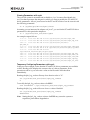
ls -d /sys/bus/pci/drivers/lpfc/*/host*
Assuming you are interested in adapter scsi_host 7, you can list the FC and FCoE driver
parameters for this particular adapter as:
ls -l /sys/class/scsi_host/host7/lpfc*
An example output follows:
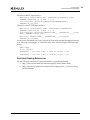
-r--r--r--
1 root root 4096 Feb 28 17:03 /sys/class/scsi_host/host7/lpfc_ack0
-r--r--r--
1 root root 4096 Feb 28 17:03 /sys/class/scsi_host/host7/lpfc_fcp_class
-rw-r--r--
1 root root 4096 Feb 28 17:03 /sys/class/scsi_host/host7/
lpfc_fdmi_on
-r--r--r--
1 root root 4096 Feb 28 17:03 /sys/class/scsi_host/host7/lpfc_link_speed
-rw-r--r--
1 root root 4096 Feb 28 15:34 /sys/class/scsi_host/host7/lpfc_log_verbose
-r--r--r-- 1 root root 4096 Feb 28 17:03
/sys/class/scsi_host/host7/lpfc_lun_queue_depth
-rw-r--r--
1 root root 4096 Feb 28 17:03 /sys/class/scsi_host/host7/lpfc_max_luns
-rw-r--r--
1 root root 4096 Feb 28 17:03 /sys/class/scsi_host/host7/lpfc_nodev_tmo
-rw-r--r--
1 root root 4096 Feb 28 17:03 /sys/class/scsi_host/host7/lpfc_scan_down
-r--r--r--
1 root root 4096 Feb 28 17:03 /sys/class/scsi_host/host7/lpfc_topology
-rw-r--r--
1 root root 4096 Feb 28 17:03 /sys/class/scsi_host/host7/lpfc_use_adisc
Temporary Configuring Parameters with sysfs
In the previous example, notice that the FC and FCoE driver parameters are available
as files. Reading a file displays the current value of a driver parameter. If the
permissions allow it, you can write a value to the file and it will take effect
immediately.
Reading the lpfc_log_verbose file may show that its value is “0”:
cat /sys/class/scsi_host/host7/lpfc_log_verbose
0
To modify the lpfc_log_verbose value to 0xffffffff:
echo 0xffffffff > /sys/class/scsi_host/host7/lpfc_log_verbose
Reading the lpfc_log_verbose file now shows a value of 0xffffffff:
cat /sys/class/scsi_host/host7/lpfc_log_verbose
0xffffffff
Note: Setting the lpfc_log_verbose value to 0xffffffff may cause the system to
experience performance degradation.
Emulex Drivers Version 10.4 for Linux User Manual
P011043-01A Rev. A
31
3. Configuration
FC and FCoE Driver Configuration
Creating a New Ramdisk Image
The lpfc-install script creates a ramdisk image containing the FC and FCoE driver for
the currently running kernel.
Note: You must create a new ramdisk image whenever the lpfc options in
/etc/modprobe.conf are changed and you want the change to take effect on the
next reboot.
To create a new initial ramdisk image for inbox FC and FCoE drivers and installed
binary RPM FC driver kits:
For RHEL 5.x distributions, type
mkinitrd -f /boot/initrd-<kernel-version>.img
<kernel-version>
For RHEL 6.x distributions, type
dracut -f /boot/initramfs-<kernel-version>.img
<kernel-version>
Dynamically Recognizing LUNs and Targets (Using scan)
The FC and FCoE driver enables you to dynamically recognize LUNs and targets
without unloading or reloading the FC/FCoE module and without resetting the
adapter.
To rescan an adapter’s targets with sysfs, given the adapter's host number (in this
example, 3), type
echo "- - -" > /sys/class/scsi_host/host3/scan
To limit the rescan to a particular target, given the adapter's host number (in this
example, 3) and the target number (in this example, 2), type
echo "- 2 -" > /sys/class/scsi_host/host3/scan
You can also use the Emulex lun_scan script in the /usr/sbin/lpfc directory.
Persistent Naming
The generic device manager for the Linux kernel is “udev”, which primarily manages
device nodes in the /dev directory.
Using udev to Discover Logical to Physical Mappings for
sd Devices
In Linux, the driver for SCSI disk drives is “sd”. A disk device name has an sd prefix.
Persistent names for sd devices are provided in the /dev/disk/by-id directory. To find
the persistent udev name for the disk, which is currently “sdc”, type
cd /dev/disk/by-id
ls -l | grep sdc
The sample output is:
lrwxrwxrwx 1 root root 9 2006-08-01 19:08 scsi-32000000c5005d6e6 -> ../../sdc
Emulex Drivers Version 10.4 for Linux User Manual
P011043-01A Rev. A
32
3. Configuration
FC and FCoE Driver Configuration
In the previous example, the disk has no partitions. If the disk had two partitions, the
output would look like the following:
lrwxrwxrwx 1 root root 9 2006-08-01 19:08 scsi-32000000c5005d6e6 -> ../../sdc
lrwxrwxrwx 1 root root 10 2006-08-01 19:08 scsi-32000000c5005d6e6-part1 -> ../../sdc1
lrwxrwxrwx 1 root root 10 2006-08-01 19:08 scsi-32000000c5005d6e6-part2 -> ../../sdc2
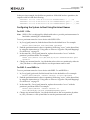
Configuring the System to Boot Using Persistent Names
For SLES 11 SPx
Note: SLES 11 SPx is configured by default with udev to provide persistent names for
hard disks, including FC-attached disks.
To use a persistent name for a boot device with SLES 11 SPx:
1. In /boot/grub/menu.lst, find the kernel line for the default boot. For example:
kernel /boot/vmlinuz root=/dev/sda2 vga=0x314
2. Find the persistent name for the root partition (following “root=” on the kernel line)
by using the instructions in “Using udev to Discover Logical to Physical Mappings
for sd Devices” on page 32.
3. In the same file, /boot/grub/menu.lst, replace the text after “root=” with the
partition’s persistent name. For example:
kernel /boot/vmlinuz root=/dev/disk/by-id/scsi-32000000c5005d6e6-part2
vga=0x314
4. Change any mounts listed in /etc/fstab that refer to this root partition by either its
/dev/sd name or a file system label to use the persistent name as well.
For RHEL 5.x and RHEL 6.x
To use a persistent name for a boot device with RHEL 5.x and RHEL 6.x:
1. In /boot/grub/grub.conf, find the kernel line for the default boot. For example:
kernel /boot/vmlinuz -<kernel version> ro root=/dev/sda2
2. Find the persistent name for the root partition (following “root=” on the kernel line)
by using the instructions in “Using udev to Discover Logical to Physical Mappings
for sd Devices” on page 32.
3. In the same file, /boot/grub/menu.lst, replace the text after “root=” with the
partition's persistent name. For example:
kernel /boot/vmlinuz -<kernel version> ro
root=/dev/disk/by-id/scsi-32000000c5005d6e6-part2
4. Change any mounts listed in /etc/fstab which refer to this root partition by either
its /dev/sd name or a file system label to use the persistent name as well.
Emulex Drivers Version 10.4 for Linux User Manual
P011043-01A Rev. A
33
3. Configuration
FC and FCoE Driver Configuration
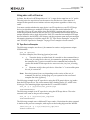
Using udev with st Devices
In Linux, the driver for SCSI tape drives is “st”. A tape device name has an “st” prefix.
The udev rules for tape devices are the same as for disk devices. There must be a
unique ID that persists across initiator reboots and persists regardless of discovery
order.
You must consider whether the tape device is an FC tape device or an FC-SCSI tape
device (in which there are multiple SCSI tape devices that reside behind an FC
controller). If it is an FC tape device, then the WWPN is unique and can be used to
create the persistent name. In this case, the scsi_id command should return this as the
unique identifier with a single digit prefix. If the FC controller has multiple SCSI tape
devices behind it, the WWPN is not unique, and the persistent name must use multiple
information elements to build the unique ID. “FC Tape Device Examples” on page 34
and “FC-SCSI Tape Device Example” on page 35 are examples of each scenario.
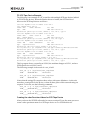
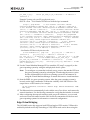
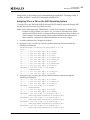
FC Tape Device Examples
The following examples use the scsi_id command to retrieve and generate a unique
SCSI identifier:
scsi_id [options]
For these examples, the following [options] are used:
Treats the device as white listed. It is needed on the command line or
in the scsi_id.config file for the scsi_id command to generate any output. In
the examples, the -g option is needed on the command line because the
vendor and model for this tape device were not in the /etc/scsi_id.config
file.
-s
Generates an id for the sysfs-device. Note that “-s” is an invalid option
for scsi_id version 147.
-g
Note: Since the [options] can vary depending on the version of the scsi_id
command, see the scsi_id man page on your system for the correct and
complete list of the [options].‘
The following example is an FC tape device using the SCSI generic driver (sg) rather
than the SCSI tape driver. The value returned has a leading prefix of 3, which is the
NAA type. The remaining digits represent the FC controller’s WWPN.
scsi_id -g -s /sys/class/scsi_generic/sg0
350060b000029b592
The following example is an FC tape device using the SCSI tape driver. The value
returned is the same as the previous example.
scsi_id -g -s /sys/class/scsi_tape/nst0
350060b000029b592
The following example uses a different FC tape vendor. Notice that the value returned
is similar to the previous examples, with respect to the leading digit and the WWPN.
/sbin/scsi_id -g -s sys/class/scsi_tape/nst0
35005076300015101
Emulex Drivers Version 10.4 for Linux User Manual
P011043-01A Rev. A
34
3. Configuration
FC and FCoE Driver Configuration
FC-SCSI Tape Device Example
The following is an example of a FC controller with multiple SCSI tape devices behind
it (FC-SCSI tape device). When the Emulex driver is loaded, the SCSI mid-level
discovers the SCSI tape devices as follows:
scsi scan: INQUIRY to host 14 channel 0 id 0 lun 0
scsi: unknown device type 12
Vendor: ADIC
Type:
Model: SNC 4000
Rev: 42d4
RAID
ANSI SCSI revision: 03
Attached scsi generic sg5 at scsi14, channel 0, id 0, lun 0,
type 12
scsi scan: INQUIRY to host 14 channel 0 id 0 lun 1
Vendor: ADIC
Type:
Model: Scalar 24
Rev: 227A
Medium Changer
ANSI SCSI revision: 02
Attached scsi generic sg6 at scsi14, channel 0, id 0, lun 1,type 8
scsi scan: INQUIRY to host 14 channel 0 id 0 lun 2
Vendor: IBM
Type:
Model: ULTRIUM-TD2
Sequential-Access
Rev: 38D0
ANSI SCSI revision: 03
Attached scsi tape st0 at scsi14, channel 0, id 0, lun 2
st0: try direct i/o: yes (alignment 512 B), max page reachable by HBA 4503599627370495
Attached scsi generic sg7 at scsi14, channel 0, id 0, lun 2,
type 1
scsi scan: INQUIRY to host 14 channel 0 id 0 lun 3
Vendor: IBM
Type:
Model: ULTRIUM-TD2
Sequential-Access
Rev: 38D0
ANSI SCSI revision: 03
Attached scsi tape st1 at scsi14, channel 0, id 0, lun 3
st1: try direct i/o: yes (alignment 512 B), max page reachable by HBA 4503599627370495
Attached scsi generic sg8 at scsi14, channel 0, id 0, lun 3,
type 1
This log output shows a controller at LUN 0, the medium changer at LUN 1, and two
SCSI tape devices at LUNs 2 and 3.
The following example is the result of a scsi_id call:
scsi_id -g -s /sys/class/scsi_tape/nst0
1IBM
ULTRIUM-TD2
1110133831
scsi_id -g -s /sys/class/scsi_tape/nst1
1IBM
ULTRIUM-TD2
1110133994
Notice that the unique ID comprises three values with space delimiters. A udev rule
must have a unique ID for the device, so that all three parts of this returned string are
required. To do this, use the following command:
scsi_id -u -g -s /sys/class/scsi_tape/nst0
1IBM_____ULTRIUM-TD2_____1110133831
scsi_id -u -g -s /sys/class/scsi_tape/nst1
1IBM_____ULTRIUM-TD2_____1110133994
Creating the udev Persistent Name for SCSI Tape Device
After you know the SCSI ID call needed to extract a unique ID, use the same process to
create a udev persistent name for a SCSI tape device as on a SCSI disk device.
Emulex Drivers Version 10.4 for Linux User Manual
P011043-01A Rev. A
35
3. Configuration
FC and FCoE Driver Configuration
The rule for the FC tape device is
BUS="scsi", SYSFS{vendor}="HP", SYSFS{model}="ULTRIUM 3-SCSI",
PROGRAM="/sbin/scsi_id -p 0x83 -u -g -s
/sys/class/scsi_tape/nst%n",RESULT="350060b000029b592",
SYMLINK="fc_lun_st%n"
The rule for the FC-SCSI tape device is
BUS="scsi", SYSFS{vendor}="IBM", SYSFS{model}="ULTRIUM-TD2",
PROGRAM="/sbin/scsi_id -p 0x83 -u -g -s
/sys/class/scsi_tape/nst%n",RESULT="1IBM_____ULTRIUM-TD2_____111013
3831", SYMLINK="fc_lun_st%n"
BUS="scsi", RESULT="1IBM_____ULTRIUM-TD2_____1110133994",
SYMLINK="fc_lun_st%n"
Create a new file named /etc/udev/rules.d/45-local.rules and put the appropriate rule
in it. Then run “udevtrigger” to reload the udev rules, and the output of the rules will
follow:
udevtrigger
ls -al /dev/fc*
lrwxrwxrwx
1 root root 3 Apr
7 15:03 fc_lun_st0 -> st0
lrwxrwxrwx
1 root root 3 Apr
7 15:03 fc_lun_st1 -> st1
Persistent Naming References
See the following references for more information on persistent naming:
http://www.reactivated.net/udevrules.php by Daniel Drake (dsd)
http://kernel.org/pub/linux/utils/kernel/hotplug/udev_vs_devfs by Greg
Kroah-Hartman
Emulex Drivers Version 10.4 for Linux User Manual
P011043-01A Rev. A
36
3. Configuration
Ethernet Driver Configuration
Ethernet Driver Configuration
The following section describes how to configure parameters for the FC and FCoE
driver.
Ethernet Driver Configuration Parameters
The Ethernet driver supports the configurable parameters described in Table 3-3.
Table 3-3 Ethernet Driver Configuration Parameters
Parameter
Description
gro
Parameter indicates to enable or disable GRO.
The default value is 1 (enabled). The disabled value is 0.
num_vfs
In systems supporting SR-IOV, when IOV is enabled, this parameter indicates the
number of VFs to be enabled per PF. For configuring SR-IOV, see “SR-IOV
Configuration” on page 40.
The default value is 0 (SR-IOV is not enabled). The possible values are 0 to 63.
rss_on_mc
Enables receive-side scaling (RSS) on multi-channel functions that have the
capability.
The default value is 0 (disabled). The enabled value is 1.
Note: Currently, this parameter is ignored by the driver. The driver enables RSS on
multi-channel functions that have the capability by default.
rx_frag_size
The size of fragments used to DMA received data. The possible values are 2048
(default), 4096 and 8192.
You can configure Linux to automatically load the driver with any of these options
after each reboot. To do so, add a line to /etc/modprobe.conf with the required
options. For example, to load the driver with the fragment size of 4096 and create eight
VFs per PF in an SR-IOV–capable system, add the following line:
options be2net rx_frag_size=4096 num_vfs=8
VLAN Support on UMC
In universal multi-channel (UMC) mode, an LPVID for each channel configured in the
BIOS is transparently added in the transmit path and removed in the receive path by
the adapter. When a VLAN is configured in the host using vconfig on any of the
functions, the host VLAN ID overrides the corresponding LPVID channel configured in
the BIOS. Up to 15 VLAN IDs can be configured in the host for each PF using vconfig.
The VLAN IDs configured in the host should be different from the channel VLAN IDs
configured in the BIOS. For additional information on UMC, refer to the Emulex
Universal Multi-Channel Reference Guide.
Notes
LACP is not supported when UMC is enabled.
SR-IOV is not supported when UMC is enabled.
LPe16202 CNAs do not support UMC.
Emulex Drivers Version 10.4 for Linux User Manual
P011043-01A Rev. A
37
3. Configuration
Ethernet Driver Configuration
Support for Ethtool set/get-channels
The Ethtool get-channels command is available in kernel versions of RHEL 6.4,
SLES 11.2, and 3.0.x and higher.
The Ethtool get-channels command – “ethtool -l <ethx>” displays the following
information:
The current number of Rx/Tx/interrupt queue pairs (a “combined channel”)
created by the NIC function
The maximum number of channels supported by the NIC function
The Ethtool set-channels command - "ethtool -L <ethx> combined N" configures the
number of channels requested for the NIC function.
Notes
You can increase (up to the maximum supported limit) or decrease the number
of channels used by the NIC function.
The NIC driver supports only “combined” channels.
The maximum number of channels supported by an interface is also limited to
the number of cpu-cores in the server.
In older Linux distributions, use the sysfs interface as follows:
The maximum number of channels supported by NIC function:
cat /sys/class/net/<ethx>/max_qs
The current number of channels configured:
cat /sys/class/net/<ethx>/num_qs
To configure the 'N' number of channels requested for the NIC function:
echo N > /sys/class/net<ethx>/num_qs
Support for Ethtool set-dump
The Ethtool set-dump command is available in the kernel versions of RHEL 6.4, SLES
11.2, and 3.0.x and higher. It is supported only on LPe16000-series adapters.
The Ethtool set-dump command - "ethtool -W <ethx> N" can be used as follows:
To trigger a FW dump:
ethtool -W <ethx> 1
To delete an existing dump
ethtool -W <ethx> 2
Notes
An existing dump should be deleted first before triggering a new dump.
In older Linux distributions, use the sysfs interface as follows:
To trigger a FW dump:
# echo 1 > /sys/class/net/<ethx>/trigger_dump
To delete an existing dump:
# echo 1 > /sys/class/net/<ethx>/delete_dump
Emulex Drivers Version 10.4 for Linux User Manual
P011043-01A Rev. A
38
3. Configuration
Ethernet Driver Configuration
Transmit/Receive Queue Counts
The number of queue counts created by the NIC driver is provided in Table 3-4.
Note: A default Rx queue is created along with the RSS queues.
Table 3-4 Tx and Rx Queue Counts
Profile/Configuration
Combined IRQs (for example, RSS and Tx queues)
(Initial/Max)
initial: number of queues available on load
max: number of queues that can be set by set-channels
OCe14002
OCe14004
OCe11102
LPe16000
8/31
8/31
8/16
8/17
[1-8]/[1-30]
[1-8]/[1-30]
1/1
8/17
NIC only SR-IOV VF
1/1
1/1
1/1
4/4
NIC only SR-IOV PF (num_vfs=0)
8/31
8/31
8/16
8/17
NIC (only with ARI) (UMC and
NPar)
3/3
7/7
8/16
N/A
NIC only
NIC only SR-IOV PF (num_vfs>0)
(first interface,
1/1 otherwise)
Support for Ethtool set/get-rxfh
The Ethtool get-rxfh and set-rxfh commands are available in kernel versions of RHEL
7.1, 3.16.0 and higher.
The Ethool get-rxfh command – ethtool – x <ethx> shows the following information:
The current indirection table entries
The programmed RSS hash-key
The Ethtool set-rxfh command – ethtool –X <ethx> [hkey aa:bb:cc...] [equal N | weight
W0 W1...] sets the following parameters:
1. Indirection table entries
2. RSS hash-key
Note: In older Linux distributions, use the sysfs interface as follows:
To show the currently configured RSS hash key:
cat /sys/class/net/<ethx>/rss_hashkey
To configure the new RSS hash key
echo -e "aa:bb:cc...." > /sys/class/net/<ethx>/rss_hashkey
Emulex Drivers Version 10.4 for Linux User Manual
P011043-01A Rev. A
39
3. Configuration
Ethernet Driver Configuration
Support for Showing Onboard Die Temperature
Onboard die temperature is exported through the sysfs interface. On kernels which
support the hardware monitoring framework, the temperature is exported using the
hwmon sysfs interface. Temperatures exported using the hwmon interface can also be
read using the lm-sensors utility with the "sensors" command.
To show the current board temperature via the sysfs node:
cat /sysclass/hwmon/<hwmonx>/device/temp1_input
Otherwise, the current board temperature is exported with regular sysfs interface:
cat /sys/class/net/<ethx>/device/temp1_input
SR-IOV Configuration
Introduction
This section contains requirements and instructions to use SR-IOV with the following
host operating systems:
Red Hat Enterprise Linux 6.3 - 64-bit KVM
Red Hat Enterprise Linux 6.4 - 64-bit KVM
Red Hat Enterprise Linux 6.5 - 64-bit KVM
Red Hat Enterprise Linux 6.6 - 64-bit KVM
Red Hat Enterprise Linux 7 - 64-bit KVM
Red Hat Enterprise Linux 7.1 - 64-bit KVM
SuSE Linux Enterprise Server 11 SP2 - 64-bit Xen and KVM
SuSE Linux Enterprise Server 11 SP3 - 64-bit Xen and KVM
SuSE Linux Enterprise Server 12 - 64-bit Xen and KVM
SLES and RHEL supported with Xen
These environments support capabilities of OneConnect to enable multiple PCIe virtual
functions (VFs) for a PCIe physical function (PF). Each of these VFs can be assigned to
virtual machines (VMs). A VF enables the guest operating system direct access to
OneConnect, such that guest performance is not limited by the overheads of the
hypervisor.
With SR-IOV, VMs directly drive I/Os on the NIC. Therefore, SR-IOV has the following
advantages over traditional virtualized I/O:
Improved device performance for virtual guests
Increased scalability
Reduced CPU utilization
Reduced latency
Known issues include:
On RHEL 6.3 (or earlier) and SLES 11 SP2 (or earlier) systems, any attempt to
disable SR-IOV by the driver in hypervisor when VFs are assigned to VMs leads
Emulex Drivers Version 10.4 for Linux User Manual
P011043-01A Rev. A
40
3. Configuration
Ethernet Driver Configuration
to undefined behavior. This known issue needs to be corrected in the kernel. As
a result of this issue in these kernel distributions, after an Ethernet driver is
loaded with a non-zero value for num_vfs, the driver can never be unloaded.
The only way to reload the driver with a different num_vfs value is to reboot
the system.
The Kdump (kernel dump) feature is not supported when SR-IOV is enabled.
Setting Up SR-IOV
Note: SR-IOV is not supported in multi-channel setups.
Prerequisites
To set up SR-IOV on your system, you need the following:
A server or blade with an SR-IOV-capable motherboard BIOS
Note: Configuration mechanisms for parameters such as MAC address,
VLAN, and QoS for VF are supported in RHEL 6 and above, and
SLES 11 and above distributions.
OneConnect OCx11102-xT or later adapter versions, or LPe16202 in FCoE+NIC
mode
If a KVM hypervisor is installed, it must contain the qemu-kvm packages.
Depending on your system, perform one or more of the following tasks to set up your
BIOS. For more information, see the manufacturer’s instructions for your system.
Enable SR-IOV in the system BIOS. This supports SR-IOV functionality.
Enable Intel Virtualization Technology support for Direct I/O VT-d.
You can use the PXESelect utility or the UEFI (HII) utility to set up SR-IOV.
To enable and configure SR-IOV in the OneConnect firmware using either the
UEFIBoot utility or the PXESelect utility, see the Boot for NIC, iSCSI, FCoE, and RoCE
Protocols User Manual.
1. Install the required Linux operating system that serves as a hypervisor.
2. Update the /boot/grub/menu.lst file to include the following command line load
parameter for the Linux kernel:
intel_iommu=on
3. Install the appropriate version of the Emulex Ethernet driver that supports SR-IOV
for the operating system version that you are using.
4. Reboot the server for the new changes to become operational.
5. Use the “lspci -vvv” output command to check if SR-IOV is properly enabled.
The “lspci-vvv” command returns an SR-IOV capability section for each Ethernet
PF. The Initial VFs and Total VFs should be non-zero. Make a note of the lspci
command output in the hypervisor. This output is needed in step 10 on page 44.
Specifically, make note of the pci-id of the VFs that have been created.
The following is an example of the SR-IOV capabilities section output of the PF with
SR-IOV enabled:
Emulex Drivers Version 10.4 for Linux User Manual
P011043-01A Rev. A
41
3. Configuration
Ethernet Driver Configuration
Capabilities: [180] Single Root I/O Virtualization (SR-IOV)
IOVCap: Migration-, Interrupt Message Number: 000
IOVCtl: Enable- Migration- Interrupt- MSE- ARIHierarchyIOVSta: MigrationInitial VFs: 32, Total VFs: 32, Number of VFs: 0, Function Dependency
Link: 00
VF offset: 0, stride: 1, Device ID: 0710
Supported Page Size: 00000557, System Page Size: 00000001
Region 0: Memory at 0000000000000000 (64-bit, non-prefetchable)
VF Migration: offset: 00000000, BIR: 0
The following is an example of the SR-IOV capabilities section output of the PF with
SR-IOV disabled:
Capabilities: [180] Single Root I/O Virtualization (SR-IOV)
IOVCap: Migration-, Interrupt Message Number: 000
IOVCtl: Enable- Migration- Interrupt- MSE- ARIHierarchyIOVSta: MigrationInitial VFs: 0, Total VFs: 0, Number of VFs: 0, Function Dependency
Link: 00
VF offset: 0, stride: 1, Device ID: 0710
Supported Page Size: 00000557, System Page Size: 00000001
Region 0: Memory at 0000000000000000 (64-bit, non-prefetchable)
VF Migration: offset: 00000000, BIR: 0
6. Create a VM using the Virtual Machine Manager utility and install the RHEL 6.x
operating system on the VM.
7. Shut down the VM.
8. Reload the newly installed Ethernet driver in the host (hypervisor) with the number
of VFs/PF as module parameter, where “X” is the number of VFs per PF:
rmmod be2net
modprobe be2net num_vfs=X
The possible values are 0 to 63 per physical port. The default value is 0 (SR-IOV is
not enabled).
The total number of VFs can be distributed among available ports as required, but
each port has a maximum of 63 VFs. Table 3-5 on page 43 lists the total number of
VF counts that are supported for various adapter configurations.
Notes
On 4-port OCx11104 adapters, VFs can be configured only for ports 0 and 1, not
for ports 2 or 3.
Emulex Drivers Version 10.4 for Linux User Manual
P011043-01A Rev. A
42
3. Configuration
Ethernet Driver Configuration
VFs are supported only for network functions; they are not supported for
storage functions.
Table 3-5 Total VF Counts that are Supported for Various Adapter Configurations
Adapter Configuration
Number PF
of Ports Count
2
VF Count
per ASIC Comments
OCe11102 2-port 10Gb NIC,
stand-alone adapter
2
60
Per port VF count is 30.
OCe11102 2-port 10G NIC,
stand-alone, NCSI-enabled IPL
2
OCm11102 2-port 10Gb, HP/IBM
LOM/Mezzanine
2
OCm11102 2-port 10Gb, HP/IBM
LOM/Mezzanine, NCSI-enabled
IPL
2
OCm11104 2-port 10Gb + 2-port
1Gb (4-port), IBM
LOM/Mezzanine
4
OCe11102 2-port 10G HP (All
IPLs)
2
OCe14401 1-port 40G NIC
1
1
63
63 VFs for NIC port.
OCe14102 2-port 10G NIC
2
2
62
Per port VF count is 31.
OCe14104 4-port 10G NIC
4
4
124
Per port VF count is 31.
OCe14401 1-port 40G NIC plus
storage (iSCSI/FCoE)
1
2 (one
NIC, one
storage)
63
63 VFs for NIC port.
OCe14102 2-port 10G NIC plus
storage (iSCSI/FCoE)
2
4 (two
NIC, two
storage)
62
Per NIC port VF count is 31.
P0/P1: 30/30
2
59
VF count per port can be
P0/P1: 30/29 or P0/P1: 29/30.
2
60
Per port VF count is 30.
P0/P1: 30/30
2
59
VF count per port can be
P0/P1: 30/29 or P0/P1: 29/30.
4
55
Per port VF count can be
P0/P1: 28/27 or P0/P1: 27/28.VFs
are not supported on 1G ports.
4/6/8
48
Per port VF count is 24.
VFs will be distributed across the
PFs in multiples of 8.
9. Detach VFs from the host before adding them to the guest.
Example 1 (using only one VF per physical port):
RHEL 6.x KVM: - View Emulex PCI devices with the lspci command:
# lspci | grep Emulex
16:00.0 Ethernet controller: Emulex
Corporation OneConnect 10Gb NIC (be3) (rev 03) <-- LOM Port 0 (Function 0)
16:00.1 Ethernet controller: Emulex Corporation OneConnect 10Gb NIC (be3)
(rev 03) <-- LOM Port 1 (Function 1)
16:04.0 Ethernet controller: Emulex
Corporation OneConnect 10Gb NIC (be3) (rev 03) <-- VF LOM Port 0 (Function
0)
16:08.0 Ethernet controller: Emulex Corporation OneConnect 10Gb NIC
(be3) (rev 03) <-- VF LOM Port 1 (Function 1)
Detach desired VFs:
# virsh nodedev-dettach pci_0000_16_04_0
Device pci_0000_16_04_0
detached <-- VF LOM Port 0 (Function 0)
# virsh nodedev-dettach
Emulex Drivers Version 10.4 for Linux User Manual
P011043-01A Rev. A
43
3. Configuration
Ethernet Driver Configuration
pci_0000_16_08_0
(Function 1)
Device pci_0000_16_08_0 detached <-- VF LOM Port 1
Example 2 (using only one VF per physical port):
SLES 11.x Xen: - View Emulex PCI devices with the lspci command:
# lspci | grep Emulex
16:00.0 Ethernet controller: Emulex
Corporation OneConnect 10Gb NIC (be3) (rev 03) <-- LOM Port 0 (Function 0)
16:00.1 Ethernet controller: Emulex Corporation OneConnect 10Gb NIC (be3)
(rev 03) <-- LOM Port 1 (Function 1)
16:04.0 Ethernet controller: Emulex
Corporation OneConnect 10Gb NIC (be3) (rev 03) <-- VF LOM Port 0 (Function
0)
16:08.0 Ethernet controller: Emulex Corporation OneConnect 10Gb NIC
(be3) (rev 03) <-- VF LOM Port 1 (Function 1)
# lspci -nn | grep Emulex
16:00.0 Ethernet controller: [0200]: Emulex Corporation OneConnect 10Gb NIC
(be3) [19a2:0710] (rev 03) <-- LOM Port 0 (Function 0)
16:00.1 Ethernet
controller: [0200]: Emulex Corporation OneConnect 10Gb NIC (be3)
[19a2:0710] (rev 03) <-- LOM Port 1 (Function 1)
16:04.0 Ethernet
controller: [0200]: Emulex Corporation OneConnect 10Gb NIC (be3)
[19a2:0710] (rev 03) <-- VF LOM Port 0 (Function 0)
16:08.0 Ethernet
controller: [0200]: Emulex Corporation OneConnect 10Gb NIC (be3)
[19a2:0710] (rev 03) <-- VF LOM Port 1 (Function 1)
- List Emulex PCI device by device code
# virsh nodedev-list | grep 19a2
pci_19a2_710 <-- LOM Port 0
(Function 0)
pci_19a2_710_0 <-- LOM Port 1 (Function 1)
pci_19a2_710_1 <-- VF LOM Port 0 (Function 0)
pci_19a2_710_2 <-- VF LOM
Port 1 (Function 1)
# virsh nodedev-dettach pci_19a2_710_1
Device
pci_19a2_710_1 detached <-- VF LOM Port 0 (Function 0)
# virsh
nodedev-dettach pci_19a2_710_2
Device pci_19a2_710_2 detached <-- VF LOM
Port 1 (Function 1)
10. Use the Virtual Machine Manager GUI to attach the VF (step 5 on page 41) to the
guest operating system by using the add physical device option.
Note: To reconfigure a system that is already set up, remove the attached VF from
the guest operating system by selecting the VF and using the remove option.
See the documentation for the host operating system for information on
using the Virtual Machine Manager to attach and remove virtual interfaces.
11. Start the RHEL 6.x guest operating system. After the guest operating system is
booted, use the lspci command to confirm the visibility of the NIC function. The
output shows a NIC function, for example:
03:00.0 Ethernet controller: Emulex Corp. Emulex OneConnect 10Gb
NIC (be3)
12. The Ethernet driver automatically loads with the out-of-box driver, and creates the
network interfaces. Use the ifconfig command to verify that the interface is created.
13. After configuring the network interfaces with proper IP addresses, you can send
and receive network traffic from the VM. See the documentation for the host and
guest operating systems for information on network configuration.
Edge Virtual Bridging
The OCe14000-series chip supports both VEB and tagless VEPA modes. VEB mode is
enabled by default in the chip. Switching to VEB/VEPA mode can be done using the
Emulex Drivers Version 10.4 for Linux User Manual
P011043-01A Rev. A
44
3. Configuration
Ethernet Driver Configuration
bridge utility or the Emulex OneCommand Manager application. The bridge utility is
available in RHEL 7 and SLES 12 and higher distributions.
Assigning VFs to a VM on the SLES Operating System
To assign VFs to the VM in the SLES Xen kernel, the VF must be unbound from the NIC
module and then bound to the pciback module.
Note: In the following steps, “0000:07:0b.5” is used as an example. To match those
instances to the port that you want to use, you need to select the entry which
matches the PCI bus, device, or function which corresponds to the port that you
want to assign. The ethtool utility can be used to determine this information,
such as ethtool -i eth0 (where eth0 is the interface you want to assign).
1. Load the pciback driver “modprobe pciback”.
2. Navigate to the /sys/bus/pci/drivers/pciback directory and ensure that the
following is displayed:
Panama-Sles11sp2:/sys/bus/pci/drivers/pciback # ls -lrt
total 0
--w------- 1 root root 4096 Sep 5 15:29 unbind
--w------- 1 root root 4096 Sep 5 15:29 uevent
-r-------- 1 root root 4096 Sep 5 15:29 slots
--w------- 1 root root 4096 Sep 5 15:29 remove_slot
--w------- 1 root root 4096 Sep 5 15:29 remove_id
-rw------- 1 root root 4096 Sep 5 15:29 quirks
-rw------- 1 root root 4096 Sep 5 15:29 permissive
--w------- 1 root root 4096 Sep 5 15:29 new_id
lrwxrwxrwx 1 root root 0 Sep 5 15:29 module ->
../../../../module/pciback
--w------- 1 root root 4096 Sep 5 15:34 new_slot
--w------- 1 root root 4096 Sep 5 15:34 bind
3. Navigate to the /sys/bus/pci/drivers/be2net directory and ensure that the
following is displayed:
--w------- 1 root root 4096 Sep 5 15:32 uevent
--w------- 1 root root 4096 Sep 5 15:32 remove_id
--w------- 1 root root 4096 Sep 5 15:32 new_id
lrwxrwxrwx 1 root root 0 Sep 5 15:32 module ->
../../../../module/be2net
--w------- 1 root root 4096 Sep 5 15:32 bind
--w------- 1 root root 4096 Sep 5 15:33 unbind
lrwxrwxrwx 1 root root 0 Sep 5 15:32 0000:07:0b.5 ->
../../../../devices/pci0000:00/0000:00:09.0/0000:07:0b.5
lrwxrwxrwx 1 root root 0 Sep 5 15:32 0000:07:0b.4 ->
../../../../devices/pci0000:00/0000:00:09.0/0000:07:0b.4
lrwxrwxrwx 1 root root 0 Sep 5 15:32 0000:07:0b.3 ->
../../../../devices/pci0000:00/0000:00:09.0/0000:07:0b.3
lrwxrwxrwx 1 root root 0 Sep 5 15:32 0000:07:0b.2 ->
../../../../devices/pci0000:00/0000:00:09.0/0000:07:0b.2
Emulex Drivers Version 10.4 for Linux User Manual
P011043-01A Rev. A
45
3. Configuration
Ethernet Driver Configuration
lrwxrwxrwx 1 root root 0 Sep 5 15:32 0000:07:0b.1 ->
../../../../devices/pci0000:00/0000:00:09.0/0000:07:0b.1
lrwxrwxrwx 1 root root 0 Sep 5 15:32 0000:07:0b.0 ->
../../../../devices/pci0000:00/0000:00:09.0/0000:07:0b.0
4. Unbind the VF from the be2net driver.
echo –n “0000:07:0b.5” > /sys/bus/pci/drivers/be2net/unbind
5. Bind the driver to the pciback module.
echo –n “0000:07:0b.5” > /sys/bus/pci/drivers/pciback/new_slot
echo –n “0000:07:0b.5” > /sys/bus/pci/drivers/pciback/bind
6. Navigate to the directory /sys/bus/pci/drivers/pciback and ensure that the
device “0000:07:0b.5” is listed under it. In addition, check that dmesg logs report the
same device.
You can now launch qemu-kvm and attach VF “0000:07:0b.5” to any desired VM.
Link State Reporting with SR-IOV
When VEB is used for switching traffic between the functions of an SR-IOV-enabled
port, the link status reported to the operating system stack when the physical port is not
connected varies with the adapter type. In the older UCNAs (OCe11100 and
LPe16000-series adapters), the VFs continue to indicate the link to be UP even when the
physical port is not linked up. In the newer CNAs (OCe14000-series), by default, the
VFs indicate the link as DOWN when the physical port is not linked up. This changed
behavior in the OCe14000-series adapters enables two or more VFs to be configured in
a bond.
The following table summarizes the default link status of the PFs and VFs in various
adapters when SR-IOV is enabled in BIOS and in the driver.
Table 3-6 Default Link Status of the PFs and VFs
Physical Link is Not Connected
OCe14000
OCe11100
LPe16000
Physical function (PF)
Down
Down
Up
Virtual function (VF)
Down
Up
Up
This default behavior of VFs in OCe14000-series adapters can be changed using the
“ip link” command in distributions of Linux that support iproute version 3.11.0 or later.
For details on configuring the link state for VFs, see “Link State Configuration” on
page 48.
When VEPA is configured to switch traffic between the functions instead of VEB, the
VF link state always reflects the physical state of the associated port and this behavior
cannot be changed.
Configuring VFs
In operating system distributions with newer IP commands that support VF
configuration options, the host administrator can perform the following by using the
“ip link set” command:
Emulex Drivers Version 10.4 for Linux User Manual
P011043-01A Rev. A
46
3. Configuration
Ethernet Driver Configuration
Change the default MAC address
Configure VLAN
Configure the transmission rate
Configure the link state
Set the QoS parameter on VFs
MAC Address Configuration
The OneConnect adapter or LightPulse CNA in FCoE+NIC mode is shipped with
factory-configured MAC addresses for the network interfaces corresponding to the PFs.
The driver generates random MAC addresses for the network interfaces corresponding
to the VFs based on the factory-configured MAC address. Other MAC addresses can be
assigned for the interfaces corresponding to the VF using IP utility commands in the
hypervisor.
To configure the MAC address for the virtual function, run the following command in
the hypervisor:
# ip link set eth<X> vf <VFN> mac <MAC-ADDR>
where:
eth<X> is the interface corresponding to the physical function.
<VFN> is the VF number (0-based) corresponding to the interface for which you
are configuring the MAC address.
<MAC-ADDR> is the MAC address you are configuring.
For example, to configure the MAC address for eth0 for VF number 0, run the following
command in the hypervisor:
# ip link set eth0 vf 0 mac 00:16:88:AA:BB:AA
If the VM is already running and the VF driver is loaded, the VF MAC address can be
directly modified using the ifconfig command (without having to run the IP link set
command in Hypervisor):
# ifconfig eth0 hw ether 00:16:88:AA:BB:AA
where “eth0” is the interface corresponding to the VF in the hypervisor.
VLAN Configuration
This section includes examples for transparent tagging and virtual guest tagging (VGT)
When transparent tagging is configured for a VF, the NIC transparently tags all
non-VLAN traffic from the VF with the configured transparent VLAN ID. The VM is
not aware of the VLAN tag.
To assign a transparent VLAN ID to the VF, run the following IP command in the
hypervisor:
# ip link set eth<X> vf <VFN> vlan <VLAN>
where:
eth<X> is the interface corresponding to the physical function
Emulex Drivers Version 10.4 for Linux User Manual
P011043-01A Rev. A
47
3. Configuration
Ethernet Driver Configuration
<VFN> is the VF number corresponding to the interface for which you are
configuring the VLAN
<VLAN> is the VLAN ID you are configuring
Example:
# ip link set eth0 vf 0 vlan 5
Note: Transparent VLAN tagging does not occur on any VLAN packets that are sent
with VLAN configuration mode in the guest operating system on the VF.
Transmission Rate Configuration
Configure the transmission rate limit (TX-RATE) on a VF interface from the hypervisor
using the following IP command syntax:
# ip link set eth<X> vf <VFN> rate <TX-RATE>
where:
eth<X> is the interface corresponding to the physical function
<VFN> is the VF number corresponding to the interface that you are
configuring the TX-rate
<TX-RATE> is the transmission rate limit, in Mbps
For example, to set a TX-RATE of 5000 Mbps for the VF 0, run the following command:
# ip link set eth0 vf 0 rate 5000
Note: For OCe14000-series adapters, the TX-RATE must be multiples of 400 Mbps on
a 40 Gb port, and multiples of 100 Mbps on a 10 Gb port.
Link State Configuration
This section provides link state configuration for a VF in the newer CNAs (for example,
the OCe14000-series adapters).
Configure the link state on a VF interface from the hypervisor using the following IP
command syntax:
#ip link set eth<X> vf <VFN> state < auto | enable | disable >
where:
eth<X> is the interface corresponding to the physical function
<VFN> is the VF number corresponding to the interface for which the link
state is being configured
auto - VF link state will reflect the PF link state
enable - VF link state will be always up
disable - VF link state will be always down
Viewing VF Properties
To view the properties configured to VFs attached to a PF, use the following IP
command syntax:
Emulex Drivers Version 10.4 for Linux User Manual
P011043-01A Rev. A
48
3. Configuration
Ethernet Driver Configuration
# ip link show eth<X>
where eth<X> is the interface corresponding to the physical function.
For example, to view the properties of a PF at “eth0” (which has VFs 0, 1 associated
with it), run the following command in the hypervisor:
# ip link show eth0
Expected example output:
eth0: <BROADCAST,MULTICAST,UP,LOWER_UP> mtu 1500 qdisc mq state UP qlen 1000
link/ether 00:00:c9:bb:16:ee brd ff:ff:ff:ff:ff:ff
vf 0 MAC 00:00:c9:9d:90:80, tx rate 10000 (Mbps)
vf 1 MAC 00:00:c9:9d:90:81, tx rate 10000 (Mbps)
ARI Considerations for OCe14000-Series Adapters
Alternative routing-ID interpretation (ARI) is supported on the OCe14000-series
adapters. The maximum number of functions allowed on an adapter is controlled by
the adapter's IPL file and the system’s support for ARI.
When universal multi-channel (UMC) is enabled on an OCe14000-series network
adapter, each port can be partitioned into isolated PFs (channels). You can configure
the following number of functions:
Up to 16 functions on a one-port OCe14400-series adapter
Up to eight functions per port on a one or two-port OCe14100-series adapter
Up to four functions per port on a four-port OCe14100-series adapter
Note: Refer to the Emulex Universal Multi-Channel Reference Guide for additional
information on UMC.
ARI must be available to support up to 16 functions on an adapter. OCe14000-series
adapters automatically support ARI. However, the following requirements must be
met in order to support more than eight functions on an adapter:
The system hardware (the motherboard and BIOS) must support ARI.
ARI must be enabled in the system BIOS.
The host or guest operating system must support ARI:
RHEL 6.4 and newer versions
RHEL 7
SLES 11 SP2 and newer versions
The application management tools, including the OneCommand Manager
application, must support ARI.
If these conditions are not met, you may be able to configure more than eight
functions, but only up to eight functions will be running and discovered after a
reboot.
Emulex Drivers Version 10.4 for Linux User Manual
P011043-01A Rev. A
49
3. Configuration
Ethernet Driver Configuration
NIC Partitioning (NPar) Configuration (Dell Only)
Notes
NPar support is only available on OCe14000-series adapters running in 10 Gb
mode.
NPar is tested and supported on Dell 12G servers.
NPar+ARI=NParEP is tested and supported on Dell 13G servers.
SR-IOV must be disabled on the adapter BIOS when NPar is used. See the
following documentation for information on disabling SR-IOV on the adapter
BIOS:
To configure SR-IOV using the adapter BIOS, see the Boot for NIC, iSCSI,
FCoE, and RoCE Protocols User Manual.
To configure SR-IOV using the OneCommand Manager application, see the
OneCommand Manager Application User Manual or the OneCommand Manager
Command Line Interface User Manual.
NPar mode enables the capability to divide a 10 Gb NIC port into multiple PCI
functions, with flexible bandwidth capacity allocation that appear to the operating
system and network as separate NIC ports. A single Ethernet 10 Gb port appears as
multiple physical devices showing in PCI Configuration space as multiple functions.
Adapter Configuration
NPar can be configured on OCe14000-series adapters by using the BIOS or the
OneCommand Manager application.
To configure NPar using the BIOS, refer to the Boot for NIC, iSCSI, FCoE, and
RoCE Protocols User Manual.
To configure NPar using the OneCommand Manager, refer to the latest
OneCommand ManagerTM Application User Manual or the OneCommand Manager
Command Line Interface User Manual.
On the host operating system side, NPar provides up to eight PCI functions per device
using standard PCI configuration space. Four PCI functions can be mapped to a
physical port. Each function or partition will be assigned a unique MAC address.
Partitions will be available for virtual function assignment and for application
segmentation via VLAN or IP subnets.
Adapter Requirements
The partitions can be on separate subnets or VLANs.
Bandwidth allocation is flexible.
No operating system or BIOS changes are required.
No external switch changes are required.
Each partition should have standard NIC properties for stateless offload.
NIC teaming on the same port should be avoided.
Emulex Drivers Version 10.4 for Linux User Manual
P011043-01A Rev. A
50
3. Configuration
Ethernet Driver Configuration
The following items are supported on a per-partition basis:
Per-partition statistics
LSO, LRO, RSS, and TSO needed per partition
MTU per partition
Support for NetQueues
Using NParEP
Notes
NParEP is available only on OCe14000-series adapters.
On a four-port adapter, ARI functionality must be enabled in the PCIe
subsystem on a particular system to support NParEP on all four ports.
NParEP support is available only on Dell 13G or newer systems.
SR-IOV must be enabled in the system BIOS for NParEP to work properly on
Linux systems.
NParEP can be configured on the OCe14000 family of adapters by using the adapter
BIOS utility or the OneCommand Manager application.
To configure NParEP using the adapter BIOS utility, see the Boot for NIC, iSCSI,
FCoE, and RoCE Protocols User Manual.
To configure NParEP using the OneCommand Manager application, see the
OneCommand Manager Application User Manual or the OneCommand Manager
Command Line Interface User Manual.
Emulex Drivers Version 10.4 for Linux User Manual
P011043-01A Rev. A
51
3. Configuration
RoCE Configuration for OCe14000-Series Adapters
RoCE Configuration for OCe14000-Series Adapters
Notes
RoCE is not supported with multi-channel.
RoCE configurations are not supported with SR-IOV.
Emulex recommends enabling PFC as the default mode when possible while
using RoCE. See “Advanced Configuration” on page 58 to enable QoS for RoCE.
In addition, VLAN interfaces must be configured and used for RoCE traffic in
order for PFC to work correctly (see “VLAN Configuration” on page 54).
VLANs greater than 1 should be used for best interoperability.
Basic Configuration
Setting the Profile
RoCE profiles can be specified and enabled using the OneCommand Manager GUI
application, the OneCommand Manager CLI application, and the PXESelect BIOS
utility.
For specific information on selecting RoCE profiles, see the applicable manual:
Boot for NIC, iSCSI, FCoE, and RoCE Protocols User Manual for details on the
PXESelect BIOS utility.
OneCommand Manager Application User Manual for information about setting the
RoCE profiles using the OneCommand Manager application GUI.
OneCommand Manager Command Line Interface User Manual for information on
setting the RoCe profiles using the OneCommand Manager CLI.
Confirming that the RoCE Profile is Enabled
The profile can be confirmed from the Ethernet driver load messages in
/var/log/messages. For example:
Active profile ID 0x14
Note: If the correct profile is not reported, update the profile ID using the
OneCommand Manager application or PXESelect BIOS utility.
Interface Configuration
Identify the RoCE interfaces and their corresponding NIC interfaces by using the
following commands:
To list the ocrdma interfaces.:
ibv_devinfo –l
To list the corresponding NIC interfaces:
ibdev2netdev
Emulex Drivers Version 10.4 for Linux User Manual
P011043-01A Rev. A
52
3. Configuration
RoCE Configuration for OCe14000-Series Adapters
Follow the standard procedure to assign a valid IP address to the desired Ethernet
interface that corresponds to the RoCE port. You can assign an IP address to eth0 to use
‘ocrdma0’ for RoCE.
Example output:
ibv_devinfo –l
2 HBAs found:
ocrdma1
ocrdma2
ibdev2netdev
ocrdma0 port 1 ==> eth0 (Up)
ocrdma1 port 1 ==> eth1 (Up)
ocrdma2 port 1 ==> eth2 (Up)
ocrdma3 port 1 ==> eth3 (Up)
Sample Applications
The RoCE connectivity can be tested using the following OFED inbuilt
tools/applications:
ibv_rc_pingpong
ib_send_bw
ib_read_bw
ib_write_bw
Note: The use of these commands assume that the client (ocrdma0) and server
(ocrdma0) interfaces are configured with IPs 11.192.168.x and 11.192.168.y
respectively.
Examples:
ibv_rc_pingpong
Server: ibv_rc_pingpong -g 0 -d ocrdma0
Client: ibv_rc_pingpong -g 0 -d ocrdma0 11.192.168.x
ib_send_bw
Server: ib_send_bw -d ocrdma0
Client: ib_send_bw -d ocrdma0 11.192.168.x
ib_read_bw
Server: ib_read_bw –d ocrdma0
Client: ib_read_bw –d ocrdma0 11.192.168.x
ib_write_bw
Server: ib_write_bw –d ocrdma0
Client: ib_write_bw –d ocrdma0 11.192.168.x
Emulex Drivers Version 10.4 for Linux User Manual
P011043-01A Rev. A
53
3. Configuration
RoCE Configuration for OCe14000-Series Adapters
VLAN Configuration
To configure a VLAN interface, perform the following steps:
1. Load the 8021q module (if necessary) by typing
modprobe 8021q
2. Create a VLAN interface by typing
vconfig add eth<x><vlan id>
For example:
vconfig add eth4 100
3. Configure an IP address on the VLAN interface by typing
ifconfig eth<x>.<vlan id> x.x.x.x up
For example:
ifconfig eth4.100 11.192.168.2 netmask 255.255.255.0 up
4. Verify the configuration.
From the server, type
ibv_rc_pingpong -g 1 -d ocrdma0
Note:
-g 1 corresponds to the GID index for the first VLAN.
From the client, type
ibv_rc_pingpong -g 1 -d ocrdma0 11.192.168.1
Notes
If QoS is set to use PFC, the interfaces must be configured with VLANs.
RoCE PFC performs best if VLANs other than 0 and 1 are used.
Pinning Interrupts to a CPU Core
On a multi-core system, Emulex recommend distributing RoCE IRQ vectors among
CPU cores to achieve better system utilization.
RoCE interface IRQs can be pinned to different CPU cores by running:
ocrdma_irq_affinity.sh script
(included with Linux RoCE driver package)
To disable irqbalance, you must stop irqbalance and run the ocrdma_irq_affinity.sh
script:
service irqbalance stop
./ocrdma_irq_affinity.sh
<RoCE interface name>
MTU Configuration
The minimum supported MTU RoCE interfaces is 512. However if you are using the
'ifconfig' command to set the MTU value on a corresponding Ethernet interface, 80
bytes must be added to the MTU on the RoCE interface. For example, if 512 is the
Emulex Drivers Version 10.4 for Linux User Manual
P011043-01A Rev. A
54
3. Configuration
RoCE Configuration for OCe14000-Series Adapters
desired MTU on RoCE interface, then 592 is the minimum MTU size to be configured
on the corresponding Ethernet interface.
Note: The MTU values on the RoCE interface can be only powers of 2 with the
maximum MTU value being 4096.This procedure must be performed when
changing the MTU value on a network interface or a switch port:
1. Unmount all the existing NFS RDMA mounts.
2. Change the MTU value (on the host interface and the switch).
3. Remount the NFS RDMA mounts.
Throughput and Performance Measurement
This procedure describes how to measure the line rate with a specific message size,
MTU and Number Of Queue pairs. The server application sets the message size and
MTU through the “modify QP verbs” call to the adapter driver.
1. Load the NIC driver, the OCRDMA driver and the ROCELIB on the Linux host
operating system from the compatible drivers and library packages.
2. Install the latest compatible OFED package and install the Perftest applications
(included in the OFED package).
3. Configure the RDMA interface with the subnet IP address and set the MTU to 4096
bytes.
4. Start the server application with the command:
ib_write_bw -x 0 -t 1024
-s 8192 -m 2048
-d ocrdma0 -i 1 -q 8
or
ib_send_bw -x 0 –r 1024 -t 1024 -s 8192 -m 2048
-d ocrdma0 -i 1 -q 8
With either of the above commands, the MTU is set to 2048 bytes, the message size
is set to 8192 bytes and the number of QPs is set to 8. This is a single thread
application handling 8 QPs.
5. Start the client application with the command:
ib_write_bw -x 0 -t 1024 -s 8192 -m 2048
rdma interface ip address’
-d ocrdma0 -i 1 -q 8 ‘The server
or
ib_send_bw -x 0 –r 1024 -t 1024 -s 8192 -m 2048
server rdma interface ip address’
-d ocrdma0 -i 1 -q 8 ‘The
Note: For a 40Gb link, set –s 65536 –q 2.
All of the 8 QPs are established and the bandwidth is printed after the server
application is returned. For example, a 40Gb adapter, the bandwidth output for 2 QPs
is as follows:
#bytes
65536
#iterations
5000
Emulex Drivers Version 10.4 for Linux User Manual
BW peak[MB/sec]
4549.22
BW average[MB/sec]
4549.17
MsgRate[Mpps]
0.072787
P011043-01A Rev. A
55
3. Configuration
RoCE Configuration for OCe14000-Series Adapters
Advanced Applications
NFS over RDMA
Notes
If enabling NFS over RDMA on RHEL 6.4 systems, and OFED has already been
installed, it must be uninstalled, modified, and reinstalled.
On NFS servers where ‘fsid’ needs to be specified while exporting file systems,
ensure that they are unique for each exported file system.
The rdma-slot-table-entries parameter (ls
/proc/sys/sunrpc/rdma_slot_table_entries) is directly related to the number
memory regions used from the adapter on the client host. The default value for
this parameter is 32. In the situations where the mount commands fail due to
insufficient memory, the rdma-slot-table-entries parameter can be fine tuned to
increase number of mounts.
For example, to set this parameter to 16:
#echo "sysctl -w
sunrpc.rdma_slot_table_entries=16" >>/etc/rc.local
#reboot
See Table 3-7 on page 58 for the information regarding the relationship between
the number of mounts possible for various values of this parameter.
Values below 8 are not recommended to use, due to the steep decline in
nfs-rdma performance.
With four port OCe14000-series adapters, Emulex recommends that you fine tune
rdma-slot-table-entries.
Server Configuration
To configure the server:
1. Load and configure the ocrdma driver/library.
2. Load NFS-RDMA server module:
#modprobe svcrdma
3. Start the NFS server:
#/etc/init.d/start nfs server (for RHEL)
-or#service nfsserver start (for SLES)
4. Configure the server Listen port number for RDMA transport:
#echo “rdma 20050”>/proc/fs/nfsd/portlist
5. Configure the /etc/exports file by adding the required entries:
#echo “<path>*(rw,fsid=0,insecure,no_subtree_check,async,
no_root_squash)”>>/etc/exports
Note: Each fsid value must be unique.
Emulex Drivers Version 10.4 for Linux User Manual
P011043-01A Rev. A
56
3. Configuration
RoCE Configuration for OCe14000-Series Adapters
For example:
#echo“/export*(rw,insecure,no_subtree_check,async,
no_root_squash)”>>/etc/exports
cat/etc/exports
/export*(rw,insecure,no_subtree_check,async,no_root_squash)
6. Export the file system configured in /etc/exports:
#exportfs -a
Client Configuration
To configure the client:
1. Load and configure the ocrdma driver/library.
2. Load the RDMA client module:
#modprobe xprtrdma
3. List the file system exported by the NFS server:
#showmount –e <server_roce_ip>
Note:
<server_roce_ip> is the NIC IP address of the corresponding RoCE
interface on the NFS Server.
For example:
#showmount -e 11.192.168.1
Export list for 11.192.168.1:
/export (everyone)
4.
Mount the file system:
#mount –t nfs4 <server_roce_ip>:<path> -o rdma,port=20050 <mount
point>
For example:
#mount –t nfs4 11.192.168.1:/ -o rdma,port=20050 /mnt
5.
Verify the NFS mount using RDMA:
#cat /proc/mounts | grep <mount point>
The Relationship between RDMA Slot Table Entries and The
Number of Mounts
For a four-port OCe14000-series adapter, Emulex recommends that
rdma-slot-table-entries be set to 16.
If the number of mounts needs to be further adjusted, refer to Table 3-7 on page 58. This
table lists the relation between the number of possible mounts and the
rdma-slot-table-entries value to use.
Emulex Drivers Version 10.4 for Linux User Manual
P011043-01A Rev. A
57
3. Configuration
RoCE Configuration for OCe14000-Series Adapters
Table 3-7 Setting sunrpc.rdma_slot_table_entries
Max Number of NFS
mounts
sunrpc.rdma_slot_table
_entries
3
32
4
31
5
24
6
20
7
17
8
15
9
13
10
12
11
11
12
10
13
9
15
8
Note: Setting sunrpc.rdma_slot_table_entries to a value less than 8 is not
recommended, due to a significant drop in performance.
Advanced Configuration
This section describes the configuration and behavior aspects of RoCE QoS on the
OCe14000-series adapters.
QoS Behavior
Supported:
PFC configuration for b2b
Limited QoS configuration using the OneCommand Manager application
A single traffic class group for RoCE per port
A single RoCE priority in PFC mode
Bandwidth allocation for priority groups
Emulex Drivers Version 10.4 for Linux User Manual
P011043-01A Rev. A
58
3. Configuration
RoCE Configuration for OCe14000-Series Adapters
OCe14000-Series Defaults
Note: If generic pause is used, ensure that the switches in use support this feature. Use
PFC with priority 5 if the switch does not support generic pause.
Adapter boot time
PFC is disabled on all the ports at adapter boot time in the NIC+RoCE
profile.
Generic pause is enabled on all the ports at adapter boot time in the
NIC + RoCE profile.
Back-to-back connection (OCe14000-to-OCe14000)
PFC is enabled by default.
Generic pause is disabled on that port.
DCBX-enabled switch connection
If the OCe14000-series adapter is connected to a DCBX-enabled switch, the
mode is shifted from generic pause to PFC mode.
The OCe14000-series adapter configures RoCE traffic for priority 5.
Priority 5 is manually enabled on a switch under a priority group other than
a FCoE/ISCSI/NIC priority group.
In the absence of priority 5 at the switch side, the OCe14000-series adapter
maintains its configuration for PFC mode for priority 5. This can result in
packet losses, unrecoverable errors, or infinite retries for RoCE traffic.
DCBX disabled switch connection
If the OCe14000-series adapter is connected to a DCBX-disabled switch,
generic pause mode is enabled.
QoS Configuration Guidelines
This section details QoS configuration.
Priority Groups
Emulex recommends splitting traffic into two or more priority groups:
One priority group for RoCE
Other groups for non-RoCE traffic
Many RoCE applications use TCP/IP for out-of-band connection establishment.
Therefore, you should allocate sufficient bandwidth to non-RoCE priority groups.
L2 Flow Control
When a port is operating in generic pause mode, RoCE latencies can be adversely
affected. In this situation, Emulex recommends configuring RoCE to use PFC for better
results.
Emulex Drivers Version 10.4 for Linux User Manual
P011043-01A Rev. A
59
3. Configuration
RoCE Configuration for OCe14000-Series Adapters
For switches and adapters that do not support PFC, RoCE can continue to operate in
generic pause mode. Bandwidth allocation can still be configured for RoCE versus NIC
traffic. However, this allocation cannot be guaranteed, since all of the outgoing traffic
can be paused in case of congestion.
DCBX Enabled Switch Configuration
At this time, none of the known switch vendors (for example, Arista, Brocade, Cisco,
and Juniper) allow configuring priority for RoCE specific traffic. Priority 5 must be
manually enabled on the switch under a priority group other than the
FCoE/iSCSI/NIC priority group.
Note: In the absence of priority 5 at the switch side, the OCe14000-series adapter
maintains its configuration for PFC mode for priority 5. This can result in packet
losses, unrecoverable errors, or infinite retries for RoCE traffic.
To configure the switch:
1.
2.
3.
4.
5.
6.
7.
8.
Create a priority group 1 (PG 1) for RoCE traffic.
Assign priority 5 to PG 1.
Assign the appropriate bandwidth (for example, 90%) to PG 1.
Create PG 2 (or something different from PG 1).
Assign NIC traffic to PG 2.
Assign the remaining bandwidth to PG 2 (for example, 10%).
Enable PFC on the switch ports.
Set both switch ports to pass relevant VLAN traffic.
Note: Some switches have jumbo fame size support disabled by default on the
port or global level. Enable jumbo frame support, or set MTU to at
least 4200.
To configure the host:
1. Enable PFC using the OneCommand Manager (see the OneCommand Manager
Application User Manual).
2. Create a VLAN.
3. Assign an appropriate IP address to the VLAN interface.
Example Switch PFC Configuration
Note: This example is for a Cisco switch that is connected to the OCe14000-series
adapter.
By default, Cisco is configured with two priority groups enabled, which are fixed and
cannot be deleted:
Default group name: default-group
FCoE group name: fcoe-group
Emulex Drivers Version 10.4 for Linux User Manual
P011043-01A Rev. A
60
3. Configuration
RoCE Configuration for OCe14000-Series Adapters
To configure the switch PFC:
1. Use default-group as the non-RoCE priority group (see “DCBX Enabled Switch
Configuration” on page 60, step 4).
2. Create another group for priority 5, such as PG 5 (see “DCBX Enabled Switch
Configuration” on page 60, step 1).
3. Set 90% bandwidth to the PG 5 group and 10% to the default-group. No other
changes are required to the default-group or fcoe-group.
4. Configure the individual ports in trunk mode, enable PFC, allowed vlans and
disable generic pause.
The following are examples of switch PFC configurations:
Cisco Global QoS Configuration
Global QoS configuration on the Cisco Switch
class-map type qos roce
match qos 5
class-map type queuing roce
match qos-group 5
class-map type network-qos roce
match qos-group 5
policy-map type qos roce
class roce
set qos-group 5
class class-fcoe
set qos-group 1
class class-default
policy-map type queuing roce
class type queuing roce
bandwidth percent 90
class type queuing class-fcoe
bandwidth percent 0
class type queuing class-default
bandwidth percent 10
policy-map type network-qos roce
class type network-qos roce
pause no-drop
mtu 4200
class type network-qos class-default
mtu 9216
class type network-qos class-fcoe
pause no-drop
mtu 2158
system qos
Emulex Drivers Version 10.4 for Linux User Manual
P011043-01A Rev. A
61
3. Configuration
RoCE Configuration for OCe14000-Series Adapters
service-policy type qos input roce
service-policy type queuing input roce
service-policy type queuing output roce
service-policy type network-qos roce
#Individual port configuration
interface ethernet 1/13
switchport mode trunk
switchport trunk allowed vlan 4
priority-flow-control mode auto
flowcontrol receive off
flowcontrol send off
DCBX Disabled Switch Connection (generic pause mode)
1. Host configuration:
On the host and peer systems, ensure that Tx and Rx pause flow control is enabled
using the operating system standard tools on all of the ports or interfaces that are
RoCE enabled.
a. To verify status:
ethtool -a ethX
b. To configure:
ethtool -A ethX [ autoneg on|off ]
[ rx on|off ]
[ tx on|off ]
2. Switch configuration:
a. Enable Tx and Rx generic pause flow control on each port.
b. Some switches have jumbo frame size support disabled by default on the port or
global level. Enable jumbo frame support, or set MTU to at least 4200.
Updating the Adapter Firmware for RoCE
Note: This section can be skipped if the adapter already has the required firmware
version and RoCE profile.
Determining the Firmware Version
The adapter firmware should be updated to version 10.4.x.x. You can update the
firmware manually or by using the OneCommand Manager application.
1. Determine if the firmware must be updated. List the ocrdma interfaces by typing
#ibdev2netdev
2. Each ocrdma interface maps to an Ethernet interface ethX. Use ‘ethtool -i ethX’ to
determine the firmware version on the adapter.
Emulex Drivers Version 10.4 for Linux User Manual
P011043-01A Rev. A
62
3. Configuration
iSCSI Driver Configuration
If the reported firmware version does not match the version listed above, then the
firmware for that adapter needs to be updated.
The latest firmware can be downloaded from the Emulex website. The name of the
firmware file has a format of
oc14-x.x.x.x.ufi
oc14 in the filename refers to the OCe14000-series NIC adapter, and x.x.x.x refers to
the version.
Updating the Firmware Manually
Note: These steps need to be performed only once for each adapter.
To update the firmware:
1. The firmware download command needs to be invoked once for each adapter by
specifying any Ethernet interface (ethX) configured on the adapter.
2. List the ocrdma interfaces:
#ibdev2netdev
3. Update the firmware for ethX:
cp oc14-x.x.x.x.ufi /lib/firmware
to
/lib/firmware
# ethtool –f ethX
oc14***.ufi
Note: Multiple ocrdma interfaces can be present on an adapter, so by using the
mapping of ocrdma interfaces to Ethernet interfaces (through ibdev2netdev)
and ‘ethtool -i ethX’, only one Ethernet interface per adapter can be selected.
iSCSI Driver Configuration
Open-iSCSI Support
Open-iSCSI is a high-performance, transport independent, multi-platform
implementation of Request for Comments (RFC) 3720.
The inbox Open-iSCSI driver is supported. However, for distributions of Linux
versions RHEL 5.x and for versions earlier than RHEL 6.3 and SLES 11 SP2, the inbox
driver does not support ISNS or iSCSI boot due to limitations in Open-iSCSI
distribution tools. If you must use ISNS or iSCSI boot, use the out-of-box iSCSI driver
provided by Emulex.
For the inbox Open-iSCSI driver, use the Open-iSCSI tools to configure and manage
Open-iSCSI. For the Emulex out-of-box iSCSI driver, use the Emulex OneCommand
Manager application to configure and manage Open-iSCSI. The applications are not
interchangeable between the drivers.
The iscsiadm utility is a command-line tool allowing discovery of iSCSI targets; logging
into iSCSI targets; as well as, access and management of the open-iSCSI database on all
Emulex Drivers Version 10.4 for Linux User Manual
P011043-01A Rev. A
63
3. Configuration
iSCSI Driver Configuration
Linux installations. This utility presents a set of operations that you can perform on
iSCSI nodes, sessions, connections, and discovery records.
Discovering and Adding iSCSI Targets
When discovering and adding iSCSI targets, there are two sets of instructions
depending on the operating system:
The first set is for RHEL 6.x and SLES 11 SPx.
The second set is for RHEL 5.x.
Discovering and Adding iSCSI Targets on RHEL 6.x and
SLES 11 SPx
For RHEL 6.x and SLES 11 SPx, you can add iSCSI targets using a discovery phase first
or add them directly (see “Adding iSCSI Targets Directly (without Discovering)” on
page 68).
The following steps are used to discover and add a target using the Ethernet adapter for
RHEL 6.x and SLES 11 SPx. In this example, based on the IPL file flashed, the adapter
has two NIC functions and two iSCSI functions.
1. For the iSCSI function, set the IP address using the iSCSI Select utility.
The initiator IP is set to 192.168.65.99. This IP is set for the iSCSI function, but it
does not get set for the Ethernet interface.
The target portal IP is 192.168.65.196.
2. Using the iSCSI Select, iSCSI Target Configuration option, see if the targets can be
discovered, but do not add the targets yet.
3. The following command displays the specific host information:
iscsiadm -m host --print=4
Example output:
Host Number: 8
State: running
Transport: be2iscsi
Initiatorname: <empty>
IPaddress: <empty>
HWaddress: 00:00:c9:f2:73:8d
Netdev: <empty>
Host Number: 9
State: running
Transport: be2iscsi
Initiatorname: <empty>
IPaddress: <empty>
HWaddress: 00:00:c9:f2:73:91
Netdev: <empty>
4. Display the information for all Ethernet interfaces.
ifconfig -a
Emulex Drivers Version 10.4 for Linux User Manual
P011043-01A Rev. A
64
3. Configuration
iSCSI Driver Configuration
Example output:
eth0
Link encap:Ethernet HWaddr 00:25:B3:DF:8D:AC
inet addr:10.192.199.36 Bcast:10.192.207.255 Mask:255.255.240.0
inet6 addr: fe80::225:b3ff:fedf:8dac/64 Scope:Link
UP BROADCAST RUNNING MULTICAST MTU:1500 Metric:1
RX packets:306140 errors:0 dropped:0 overruns:0 frame:0
TX packets:2672 errors:0 dropped:0 overruns:0 carrier:0
collisions:0 txqueuelen:1000
RX bytes:23651804 (22.5 MiB) TX bytes:476993 (465.8 KiB)
Interrupt:169 Memory:f4000000-f4012800
eth1
Link encap:Ethernet HWaddr 00:25:B3:DF:8D:AE
BROADCAST MULTICAST MTU:1500 Metric:1
RX packets:0 errors:0 dropped:0 overruns:0 frame:0
TX packets:0 errors:0 dropped:0 overruns:0 carrier:0
collisions:0 txqueuelen:1000
RX bytes:0 (0.0 b) TX bytes:0 (0.0 b)
Interrupt:154 Memory:f2000000-f2012800
eth2
Link encap:Ethernet HWaddr 00:25:B3:DF:8D:B0
BROADCAST MULTICAST MTU:1500 Metric:1
RX packets:0 errors:0 dropped:0 overruns:0 frame:0
TX packets:0 errors:0 dropped:0 overruns:0 carrier:0
collisions:0 txqueuelen:1000
RX bytes:0 (0.0 b) TX bytes:0 (0.0 b)
Interrupt:210 Memory:f8000000-f8012800
eth3
Link encap:Ethernet HWaddr 00:25:B3:DF:8D:B2
BROADCAST MULTICAST MTU:1500 Metric:1
RX packets:0 errors:0 dropped:0 overruns:0 frame:0
TX packets:0 errors:0 dropped:0 overruns:0 carrier:0
collisions:0 txqueuelen:1000
RX bytes:0 (0.0 b) TX bytes:0 (0.0 b)
Interrupt:218 Memory:f6000000-f6012800
eth4
Link encap:Ethernet HWaddr 00:00:C9:F2:73:8C
BROADCAST MULTICAST MTU:1500 Metric:1
RX packets:0 errors:0 dropped:0 overruns:0 frame:0
TX packets:0 errors:0 dropped:0 overruns:0 carrier:0
collisions:0 txqueuelen:1000
RX bytes:0 (0.0 b) TX bytes:0 (0.0 b)
eth5
Link encap:Ethernet HWaddr 00:00:C9:F2:73:90
BROADCAST MULTICAST MTU:1500 Metric:1
RX packets:42 errors:0 dropped:0 overruns:0 frame:0
TX packets:75 errors:0 dropped:0 overruns:0 carrier:0
collisions:0 txqueuelen:1000
RX bytes:11738 (11.4 KiB) TX bytes:10590 (10.3 KiB)
Emulex Drivers Version 10.4 for Linux User Manual
P011043-01A Rev. A
65
3. Configuration
iSCSI Driver Configuration
5. Use the ethtool to find the interface on the Ethernet adapter for which the link is up.
ethtool eth5
Example output:
Settings for eth5:
Supported ports: [ FIBRE ]
Supported link modes:
10000baseT/Full
Supports auto-negotiation: No
Advertised link modes: Not reported
Advertised auto-negotiation: No
Speed: 10000Mbps
Duplex: Full
Port: FIBRE
PHYAD: 1
Transceiver: external
Auto-negotiation: off
Supports Wake-on: g
Wake-on: d
Link detected: yes
6. Set the IP address for the Ethernet interface.
ifconfig eth5 192.168.65.10 up
7. Display the ifaces that are present.
iscsiadm -m iface
Example output:
default tcp,<empty>,<empty>,<empty>,<empty>
iser iser,<empty>,<empty>,<empty>,<empty>
bnx2i.00:25:b3:df:8d:ad bnx2i,00:25:b3:df:8d:ad,<empty>,<empty>,<empty>
be2iscsi.00:00:c9:f2:73:91
be2iscsi,00:00:c9:f2:73:91,<empty>,<empty>,<empty> "This is the
interface for which IP was set using iSCSI Select"
be2iscsi.00:00:c9:f2:73:8d
be2iscsi,00:00:c9:f2:73:8d,<empty>,<empty>,<empty>
bnx2i.00:00:00:00:00:00 bnx2i,00:00:00:00:00:00,<empty>,<empty>,<empty>
8. Discover the targets using the Ethernet interface for which the IP was set.
iscsiadm -m discovery -t st -p 192.168.65.196:3260 -I
be2iscsi.00:00:c9:f2:73:91
Example output:
192.168.65.196:3260,1
192.168.65.196:3260,1
192.168.65.196:3260,1
192.168.65.196:3260,1
192.168.65.196:3260,1
192.168.65.196:3260,1
192.168.65.196:3260,1
192.168.65.196:3260,1
Emulex Drivers Version 10.4 for Linux User Manual
iqn.tgt0
iqn.tgt1
iqn.tgt2
iqn.tgt3
iqn.tgt4
iqn.tgt5
iqn.tgt6
iqn.tgt7
P011043-01A Rev. A
66
3. Configuration
iSCSI Driver Configuration
The “-I be2iscsi.00:00:c9:f2:73:91” option is passed during discovery so that the
discovered portals are bound with the interface name, and the login occurs through
those ifaces.
9. Log in to the discovered targets.
iscsiadm -m node -p 192.168.65.196:3260 -l
Example output:
Logging in to [iface: be2iscsi.00:00:c9:f2:73:91, target: iqn.tgt7,
portal: 192.168.65.196,3260]
Logging in to [iface: be2iscsi.00:00:c9:f2:73:91, target: iqn.tgt3,
portal: 192.168.65.196,3260]
Logging in to [iface: be2iscsi.00:00:c9:f2:73:91, target: iqn.tgt1,
portal: 192.168.65.196,3260]
Logging in to [iface: be2iscsi.00:00:c9:f2:73:91, target: iqn.tgt0,
portal: 192.168.65.196,3260]
Logging in to [iface: be2iscsi.00:00:c9:f2:73:91, target: iqn.tgt6,
portal: 192.168.65.196,3260]
Logging in to [iface: be2iscsi.00:00:c9:f2:73:91, target: iqn.tgt4,
portal: 192.168.65.196,3260]
Logging in to [iface: be2iscsi.00:00:c9:f2:73:91, target: iqn.tgt2,
portal: 192.168.65.196,3260]
Logging in to [iface: be2iscsi.00:00:c9:f2:73:91, target: iqn.tgt5,
portal: 192.168.65.196,3260]
Login to [iface: be2iscsi.00:00:c9:f2:73:91, target: iqn.tgt7, portal:
192.168.65.196,3260] successful.
Login to [iface: be2iscsi.00:00:c9:f2:73:91, target: iqn.tgt3, portal:
192.168.65.196,3260] successful.
Login to [iface: be2iscsi.00:00:c9:f2:73:91, target: iqn.tgt1, portal:
192.168.65.196,3260] successful.
Login to [iface: be2iscsi.00:00:c9:f2:73:91, target: iqn.tgt0, portal:
192.168.65.196,3260] successful.
Login to [iface: be2iscsi.00:00:c9:f2:73:91, target: iqn.tgt6, portal:
192.168.65.196,3260] successful.
Login to [iface: be2iscsi.00:00:c9:f2:73:91, target: iqn.tgt4, portal:
192.168.65.196,3260] successful.
Login to [iface: be2iscsi.00:00:c9:f2:73:91, target: iqn.tgt2, portal:
192.168.65.196,3260] successful.
Login to [iface: be2iscsi.00:00:c9:f2:73:91, target: iqn.tgt5, portal:
192.168.65.196,3260] successful.
10. Display the session information after a successful login.
After the login is successful, the session information can be dumped with the
following command:
iscsiadm -m session -P 3
11. Log out from the targets.
To log out from a single target, use the following command:
iscsiadm -m node -T <Target_Name> -u
To log out from all targets, use the following command:
iscsiadm -m node -u
Emulex Drivers Version 10.4 for Linux User Manual
P011043-01A Rev. A
67
3. Configuration
iSCSI Driver Configuration
Adding iSCSI Targets Directly (without Discovering)
If the target details are known, you can skip the discovery phase and add the targets to
the iscsiadm node database directly. Then you can log in to those targets.
1. Add individual target details to the nodes database.
iscsiadm -m node -o new -T iqn.tgt1 -p 192.168.65.196:3260 -I
be2iscsi.00:00:c9:f2:73:91
Example output:
New iSCSI node
[be2iscsi:[hw=00:00:c9:f2:73:91,ip=,net_if=,iscsi_if=be2iscsi.00:00:c9:
f2:73:91] 192.168.65.196,3260,-1 iqn.tgt1] added
The “-I be2iscsi.00:00:c9:f2:73:91” option is passed so that the target is bound with
the interface name, and the login occurs through those ifaces.
2. Log in to the specific target.
iscsiadm -m node -T iqn.tgt1 -l
Example output:
Logging in to [iface: be2iscsi.00:00:c9:f2:73:91, target: iqn.tgt1,
portal: 192.168.65.196,3260]
Login to [iface: be2iscsi.00:00:c9:f2:73:91, target: iqn.tgt1, portal:
192.168.65.196,3260] successful.
3. To display the session after a successful login or to log out, see step 10 and step 11
in “Discovering and Adding iSCSI Targets” on page 64.
Discovering and Adding iSCSI Targets on SLES 11 SP1, RHEL 5.8,
and Later Versions
The following steps are used to discover and add a target using the Ethernet adapter for
SLES 11 SP1, RHEL 5.8, and later versions.
1. For the iSCSI function, set the IP address using the iSCSI Select utility.
The initiator IP is set to 192.168.65.99. This IP is set for the iSCSI function, but it
does not get set for the Ethernet interface.
The target portal IP is 192.168.65.196.
2. Discover the targets using the Ethernet interface for which the IP was set.
iscsiadm -m discovery -t st -p 192.168.65.196:3260 -I
be2iscsi.00:00:c9:f2:73:91
3. Log in to the discovered targets.
iscsiadm -m node -p 192.168.65.196:3260 -l
4. To display the session after a successful log in or to log out, see step 10 and step 11
on page 67, respectively.
iscsiadm Commands for Configuring the Target
Note: These commands are supported in the RHEL 5.x operating system.
Emulex Drivers Version 10.4 for Linux User Manual
P011043-01A Rev. A
68
3. Configuration
iSCSI Driver Configuration
After setting up the target and initiator machines, use the following procedure to
configure the iSCSI target through Open-iSCSI.
Note: The following instructions assume that the initiator machine is a Linux machine
with a OneConnect adapter installed.
1. Create a new interface (iface):
iscsiadm -m iface -o new -I <ifacename>
In this command, <ifacename> is the name you provide for the iface.
2. Add a NIC media access control (MAC) address:
iscsiadm -m iface -I <ifacename> --op=update -n iface.hwaddress
-v <NIC mac_address>
In this command, <ifacename> is the name of the iface created in step 1 and
<NIC mac_address> is the NIC MAC address you are adding for discovery.
3. Add the Transport Name:
iscsiadm -m iface -I <ifacename> --op=update -n
iface.transport_name -v be2iscsi
In this command, <ifacename> is the name of the iface created in step 1.
4. Restart the service:
service open-iscsi restart
5. Perform target discovery using “SendTargets”:
iscsiadm -m discovery -t st -p <ip:port> -I <iface> -P 1
In this command, <ip:port> is the IP address and port number and <iface> is the
name of the iface created in step 1 on page 69.
6. Add the iSCSI driver MAC address:
iscsiadm -m iface -I <ifacename> --op=update -n iface.hwaddress
-v <iSCSI MAC Address>
In this command, <ifacename> is the name of the iface created in step 1 on page 69.
7. Set the initiator’s IP address:
iscsiadm -m iface -I <ifacename> -o update -n iface.ipaddress -v
<IP>
In this command, <ifacename> is the name of the iface created in step 1 on page 69
and <IP> is the IP address.
8. Log into the target:
iscsiadm -m node -T <targetname> -p <ip:port> -I <iface> -l
In this command, <targetname> is the target name you want to log into; <ip:port>
is the IP address and port number; and <iface> is the name of the iface created in
step 1 on page 69.
9. Verify that the disk shows:
fdisk -l
10. Log out:
iscsiadm -m node -T <targetname> -p <ip:port> -I <iface> -u
Emulex Drivers Version 10.4 for Linux User Manual
P011043-01A Rev. A
69
3. Configuration
iSCSI Driver Configuration
In this command, <targetname> is the target name, <ip:port> is the IP address and
port number, and <iface> is the name of the iface created in step 1 on page 69.
Example
iscsiadm -m iface -o new -I iface0
iscsiadm -m iface -I iface0 --op=update -n iface.hwaddress -v 00:0F:1F:62:2B:BF
iscsiadm -m iface -I iface0 --op=update -n iface.transport_name -v be2iscsi
service open-iscsi restart
iscsiadm -m discovery -t st -p 20.0.0.107:3260 -I iface0 -P 1
iscsiadm -m iface -I iface0 --op=update -n iface.hwaddress -v 00:0F:1F:92:6B:BF
iscsiadm -m iface -I iface0 -o update -n iface.ipaddress -v 20.0.0.107
iscsiadm -m node -T iqn.tgt0 -p 20.0.0.107:3260 -I iface0 -l fdisk -l
iscsiadm -m node -T iqn.tgt0 -p 20.0.0.107:3260 -I iface0 –u
iSNS Discovery Using iscsiadm
For SLES 11 SP3
iSNS discovery uses a standard NIC interface, but portals that are found will login
using the offload adapter.
To discover targets using iSNS:
1. Ping the iSNS Server IP:
ping -I ethX <iSNS Server IP>
Ping from the Initiator Host machine to the iSNS server IP from the ethX interface of
the operating system. The iSNS server IP address is passed during the discovery
command.
2. Run the discovery command:
iscsiadm -m discoverydb -t isns -p <iSNS Server IP> -I <be2iscsi
interface> --discover -P 1
In this command, <-I be2iscsi_interface_name> is the interface to which the
discovered target is offloaded when login to the target is complete.
For All Other Linux Distributions
iSNS discovery uses a standard NIC interface. The default interface is the
TCP_interface.
localhost:~ # iscsiadm -m iface
default tcp,<empty>,<empty>,<empty>,<empty>
iser iser,<empty>,<empty>,<empty>,<empty>
Perform the following steps to discover targets using iSNS through the NIC interface:
1. Ensure that a ping to the iSNS server IP from the initiator machine is successful
through the NIC interface.
2. Run the discovery command:
Emulex Drivers Version 10.4 for Linux User Manual
P011043-01A Rev. A
70
3. Configuration
VPort Configuration
iscsiadm -m discoverydb -t isns -p <iSNS_SERVER_IP> -I default
--discover -P 1
For example:
iscsiadm -m discoverydb -t isns -p 10.192.204.116 -I default
--discover -P1
Example output:
Target: iqn.tgt:TGT1
Portal: 192.168.65.197:3260,1
Iface Name: default
Target: iqn.tgt:TGT2
Portal: 192.168.65.197:3260,1
Iface Name: default
Target: iqn.tgt:TGT3
Portal: 192.168.65.197:3260,1
Iface Name: default
3. Display the interfaces that are present:
iscsiadm -m iface
Example output:
default tcp,<empty>,<empty>,<empty>,<empty>
iser iser,<empty>,<empty>,<empty>,<empty>
bnx2i.00:25:b3:df:8d:ad
bnx2i,00:25:b3:df:8d:ad,<empty>,<empty>,<empty>
be2iscsi.00:00:c9:f2:73:91
4. Add the targets listed in the discovery command to the iSCSI driver interface
through which the connection will be offloaded:
iscsiadm -m node -T <Target_Name> -p
<Target_Portal:Port_Number,Portal Tag> -I
<be2iscsi Interface> -o new
For example:
localhost:~ # iscsiadm -m node -T iqn.tgt:TGT1 -p
192.168.65.197:3260,1 -I
be2iscsi.00:00:c9:f2:73:91 -o new
New iSCSI node
[be2iscsi:[hw=00:00:c9:f2:73:91,ip=,net_if=,iscsi_if=be2iscsi
.00:00:c9:f2:73:91]
192.168.65.197,3260,1 iqn.tgt:TGT1]
VPort Configuration
This section describes how to create, delete, and display VPorts.
Emulex Drivers Version 10.4 for Linux User Manual
P011043-01A Rev. A
71
3. Configuration
VPort Configuration
VPort Configuration Prerequisites
Before configuring VPorts, consider the following points:
Ensure that you are using the latest recommended firmware for VPort
functionality. Check the Emulex website for the latest firmware.
Note: Before performing a firmware update, driver installation is required. See
“Installing and Uninstalling” on page 14.
Loop devices and NPIV are not supported on the same port simultaneously. If
you are running a loop topology and you create a VPort, the VPort’s link state is
offline.
You can create VPorts only on 4, 8, 10, and 16 Gbps adapters. You cannot create
VPorts on 1 and 2 Gbps adapters.
VPorts do not persist across system reboots.
Creating, Deleting, and Displaying VPorts
VPorts are created through sysfs entries that are presented in the physical port's sysfs
directory. The vport_create and vport_delete sysfs entries are discussed in “VPort sysfs
Entries” on page 75, but there are also three scripts for creating, deleting and displaying
VPorts. The scripts reside in the /usr/sbin/lpfc directory and are part of the
OneCommand Manager application kit.
When NPIV is enabled and VPorts are configured, it can take longer for the adapter to
finish discovery in some cases because each VPort must perform discovery
independently. As more VPorts are configured, the amount of time that the driver and
adapter take to finish discovery of remote ports on the SAN increases. To compensate
for this extended amount of time taken in discovery, set the lpfc_devloss_tmo
parameter to 60 seconds when NPIV is enabled.
Creating VPorts Using the mkvport.sh Script
You can use the mkvport script to create VPorts. To see the usage information, run the
script with no parameters specified. The mkvport.sh script uses the following syntax:
./mkvport.sh <Physical Port's Host number> <Port Name> <Node Name>
You must supply the physical port’s host number, WWPN, and WWNN when using
the mkvport.sh script. For example, to create a VPort with port name of
10000000c94ac63a and a node name of 20010000c94ac63a on the physical port with
scsi_host name “host7”, type
./mkvport.sh host7 10000000c94ac63a 20010000c94ac63a
This script fails if the VPort is not created.
Note: It is possible for a VPort to be created successfully but to be in a failed state. For
example, loop devices and NPIV are not supported on the same port
simultaneously. If you are running a loop topology and you create a VPort, the
VPort’s link state will be offline.
Emulex Drivers Version 10.4 for Linux User Manual
P011043-01A Rev. A
72
3. Configuration
VPort Configuration
Deleting VPorts Using the rmvport.sh Script
Note: You must un-map, un-mount, and flush I/Os to VPort-connected devices before
deleting the VPort.
You can use the rmvport script to delete VPorts. To see the usage information, run the
script with no parameters specified. The rmvport.sh script uses the following syntax:
./rmvport.sh <VPort's Host number>
-or./rmvport.sh <Port Name> <Node Name>
To delete the VPort with a port name of 10000000c94ac63a and a node name of
20010000c94ac63a, type
./rmvport.sh 10000000c94ac63a 20010000c94ac63a
This script may take up to 30 seconds to finish. The script fails if the VPort is not
deleted.
Displaying VPorts Using the lsvport.sh Script
You can use the lsvport script to display the VPorts and physical ports that are present
on the system. Run the script with no parameters to display port information. For
example:
./lsvport.sh
lpfc0: host6 10000000c93a5b5e:20000000c93a5b5e LP10000 NPIV Not Supported
lpfc1: host7 10000000c93a5b5d:20000000c93a5b5d LP10000 NPIV Not Supported
lpfc2: host8 10000000c93cc8dd:20000000c93cc8dd LPe12000 NPIV Physical
lpfc3: host9 10000000c93cc8dc:20000000c93cc8dc LPe12000 NPIV Physical
lpfc4: host10 10000000c94ac63a:20010000c94ac63a
NPIV Virtual (VPI 1)
In reference to the previous example:
For LPFC0 and LPFC1, “NPIV Not Supported” indicates that this
adapter/firmware combination does not support the creation of VPorts.
For LPFC2 and LPFC3, “NPIV Physical” refers to a physical port of this adapter.
For LPFC4, “NPIV Virtual” refers to a VPort of this adapter.
VPort sysfs
This section describes the VPort sysfs structure and VPort sysfs entries.
VPort sysfs Tree
For the FC RHEL 5.x Driver
When a VPort is created, two new directories are created in the class tree:
/sys/class/scsi_host/hostY/
/sys/class/fc_host/hostY/
Creating a new VPort also creates a new sysfs directory in the bus and devices tree:
Emulex Drivers Version 10.4 for Linux User Manual
P011043-01A Rev. A
73
3. Configuration
VPort Configuration
ls /sys/bus/pci/drivers/lpfc/0000:07:00.0/host8/
fc_host:host8 host10 power scsi_host:host8 uevent
ls /sys/bus/pci/drivers/lpfc/0000:07:00.0/host8/host10
fc_host:host10 power scsi_host:host10 uevent
In this example, host 8 is the physical port, and host 10 is a VPort that was created on
host 8.
For FC RHEL 6.x/SLES 11 SPx Drivers
When a VPort is created, three new directories are created in the class tree:
/sys/class/scsi_host/hostY/
/sys/class/fc_host/hostY/
/sys/class/fc_vports/vport-X:0-Z/-
Creating a new VPort also creates a new sysfs directory in the bus and devices tree:
/sys/bus/pci/drivers/lpfc/0000:A:B:C/hostX/vport-X:0-Z/hostY
/sys/devices/pci0000:A/0000:A:B:C/hostX/vport-X:0-Z/hostY
In both directories, there is a hostY directory that contains the remote ports that this
new host can access:
/sys/bus/pci/drivers/lpfc/0000:A:B:C/hostX/vport-X:0-Z/hostY
/sys/bus/pci/drivers/lpfc/0000:A:B:C/hostX/vport-X:0-Z/hostY/rport-Y:0-0
/sys/bus/pci/drivers/lpfc/0000:A:B:C/hostX/vport-X:0-Z/hostY/rport-Y:0-1
/sys/bus/pci/drivers/lpfc/0000:A:B:C/hostX/vport-X:0-Z/hostY/rport-Y:0-2
In this example:
“X” indicates the host value for the parent fc_host that this VPort was created
from.
“Y” indicates the new host value for the VPort that was created.
“Z” indicates the instance of VPort created from the parent fc_host. A, B, and C
indicate the PCI hierarchy for each physical FC/FCoE port.
“hostY” is the new host created for the new VPort. “vport-X:0-Z” uniquely identifies
the VPort and indicates the parent host structure (X) that created this VPort.
For example, if a VPort is created from host5, a new scsi_host, a new fc_host, a new
fc_vport, and a new entry under the bus tree are created as well.
ls /sys/class/scsi_host/
host0 host1 host4 host5
ls /sys/class/fc_host/
host4 host5 host6
ls /sys/class/fc_vports/
vport-5:0-0
Emulex Drivers Version 10.4 for Linux User Manual
host6
P011043-01A Rev. A
74
3. Configuration
VPort Configuration
VPort sysfs Entries
Note: VPort sysfs entries in Table 3-8 are only present if the driver was loaded with
lpfc_enable_npiv enabled.
Table 3-8 VPort sysfs Entries
VPort sysfs
Entries
Type
lpfc_peer_
port_login
Read/
Write
Range
/Input
Location and Description
0=Off(default) /sys/class/scsi_host/hostX/lpfc_peer_port_login
1=On
This entry sets the port’s behavior when discovering targets in
the SAN. The default behavior (value=0) will log in only to
N_Ports that are physically located on a different port. The
port will still attempt to log in to targets on all other ports
(including the other port in a dual-port adapter).
If this parameter is turned on (value=1), then the port
attempts to log in to all N_Ports, even if they are physically
located on the same port.
Note: This parameter was created to reduce the amount of
hardware resources (for example, RPIs) that the driver
requires. In a configuration where there are many VPorts
on one physical port, this capability greatly reduces the
number of RPIs that the driver uses.
lpfc_restrict_
login
Read/
Write
0=Off
/sys/class/scsi_host/hostX/lpfc_restrict_login
1=On (default) (VPorts only)
This entry sets the VPort’s behavior when discovering targets in
the SAN. The default behavior (value=1) prevents the VPort
from logging into other initiator ports in the SAN. It also rejects
logins from other ports in the SAN, because it assumes that all
ports that send a PLOGI are initiators.
If this sysfs entry is turned off, the driver attempts to log in to
every port that it can access in the SAN, and accepts logins
from all ports.
Note: This parameter was created to reduce the amount of
hardware resources (for example, RPIs) that the driver
requires. In a SAN where there are other initiators, this
capability greatly reduces the number of RPIs that the
driver uses.
max_npiv_
vports
Readonly
integers
/sys/class/fc_host/hostX/max_npiv_vports
This entry displays the maximum number of VPorts that are
supported by the fc_host’s underlying hardware.
This sysfs entry exists only if the vport_create and
vport_delete sysfs entries exist. If an fc_host does not support
NPIV, this sysfs entry may not exist.
Use this sysfs entry with the npiv_vports_inuse entry to
determine whether the maximum number of VPorts have been
created on this fc_host.
Emulex Drivers Version 10.4 for Linux User Manual
P011043-01A Rev. A
75
3. Configuration
VPort Configuration
Table 3-8 VPort sysfs Entries (Continued)
VPort sysfs
Entries
node_name
Type
Readonly
Range
/Input
16-byte
hexadecimal
value
Location and Description
For the FC RHEL 5.x driver:
/sys/class/fc_host/hostX/node_name
For FC RHEL 6.x/SLES 11 SPx drivers
/sys/class/fc_host/hostX/node_name/sys/class/fc
_vports/vport-X:0-Z/node_name
These entries display the physical or VPort's node name. You
assign this value when the VPort is created, and it is
transmitted to the fabric upon fabric login.
npiv_vports_
inuse
Readonly
integers
/sys/class/fc_host/hostX/npiv_vports_inuse
This entry displays the number of VPorts that were created on
this fc_host.
This sysfs entry exists only if the vport_create and
vport_delete sysfs entries exist. If an fc_host does not support
NPIV, this sysfs entry may not exist.
Use this sysfs entry with max_npiv_vports to determine
whether the maximum number of VPorts have been created on
this fc_host.
port_name
Readonly
16-byte
hexadecimal
value
/sys/class/fc_host/hostX/port_name/sys/class/fc
_vports/vport-X:0-Z/port_name
This entry displays the physical or VPort's port name.
You assign this value when the VPort is created, and it is
transmitted to the fabric upon fabric login.
vport_create
Write- WWPN; WWNN /sys/class/fc_host/hostX/vport_create
only
This entry creates a VPort on the physical port that hostX is
located on. The new VPort will have a WWPN and WWNN
present on the fabric based on the WWPN and WWNN that are
entered with this sysfs entry.
This entry returns a “0” if the VPort creation was successful. A
non-zero value indicates that the VPort was not created.
If an fc_host does not support NPIV, then this sysfs entry may
not exist.
Note: It is possible for the VPort creation to succeed but for
the VPort to be in a failed or inoperative state. Use the
new sysfs tree created by the new VPort to check the
state of the new VPort.
Emulex Drivers Version 10.4 for Linux User Manual
P011043-01A Rev. A
76
3. Configuration
VPort Configuration
Table 3-8 VPort sysfs Entries (Continued)
VPort sysfs
Entries
vport_delete
Type
Range
/Input
Location and Description
Write- WWPN; WWNN /sys/class/fc_host/hostX/vport_delete
only
This entry deletes a VPort on the physical port that hostX is
located on. The VPort matching the WWPN and WWNN is
immediately deleted.
This entry returns a “0” if the VPort deletion was successful. A
non-zero value indicates that the VPort was not deleted.
If an fc_host does not support NPIV, then this sysfs entry may
not exist.
Note: This entry deletes the VPort even if there are mounted
file systems being accessed through this VPort, or if
there are open files on it.
Monitoring VPorts with fc_vport (FC and FCoE Drivers)
This section describes monitoring VPorts using fc_vport for the FC RHEL 5x driver and
the FC/FCoE driver for RHEL 6x.
For the FC RHEL 5.x Driver
In the FC RHEL 5.x driver, the fc_vport directory does not exist (yet) so a link from the
physical port to the VPort is present in the fc_host’s device directory.
ls /sys/class/fc_host/host5/device/
fc_host:host5 power scsi_host:host5
host6 uevent
In this example, host6 is a VPort of physical port host5.
To find the VPorts that have been created by a physical port, you can list the fc_host’s
device directory for the physical port. This gives you a link to the fc_host and scsi_host
directory as usual, and it also displays a list of VPorts (in the form of hostx) that were
created on this physical port.
For FC/FCoE RHEL 6.x/SLES 11 SPx Drivers
In the FC and FCoE RHEL 6.x/SLES 11 SPx driver, the transport creates an fc_vports
directory that you can use to monitor VPorts. This directory is populated entirely of
VPorts and has links from each to the fc_host associated with that VPort.
ls /sys/class/fc_vports/
vport-5:0-0
ls -d /sys/bus/pci/drivers/lpfc/*/host*/*/host*
/sys/bus/pci/drivers/lpfc/0000:03:06.1/host5/vport-5:0-0/host6
ls /sys/devices/pci*/*/host5/vport-5*/host6
power rport-6:0-0 rport-6:0-1 rport-6:0-2 uevent
ls /sys/devices/pci*/*/host5/vport-5*/host6/rport-*
/sys/devices/pci00:03/00:03:06.1/host5/vport-5:0-0/host6/rport-6:0-0:
power uevent
Emulex Drivers Version 10.4 for Linux User Manual
P011043-01A Rev. A
77
3. Configuration
VPort Configuration
/sys/devices/pci00:03/00:03:06.1/host5/vport-5:0-0/host6/rport-6:0-1:
power uevent
/sys/devices/pci00:03/00:03:06.1/host5/vport-5:0-0/host6/rport-6:0-2:
power target6:0:0 uevent
In this example:
There is a new entry in the fc_vports directory for the VPort (vport-5:0-0). The
vport-5:0-0 entry indicates that the VPort was created from host5 and it is the
first (0) VPort to be created on that fc_host.
The new host for the VPort is host6, and it will appear in the usual directories.
There is also a new directory in the bus tree. This new directory indicates that
host6 was created under vport-5:0-0 (which was created from host5).
VPort Configuration Limits
VPort configuration limits are designated as enforced or unenforced. Enforced limits
are limits that the driver enforces and prevents you from exceeding. Unenforced limits
are limits that the driver cannot enforce, but configurations that exceed them are
unsupported.
The following VPort configuration limits have been tested with and are supported by
the Emulex driver. Configurations that exceed one or more of these limits are
unsupported.
Before the VPort is deleted or the driver is unloaded, I/O devices accessed
through a VPort must be stopped and file systems must be unmounted.
For enterprise-class adapters, the maximum number of VPorts configurable on
a physical port is 64. The hardware allows more than 64 VPorts to be created,
but the driver has only been qualified at 64. For mid-range adapters, the
maximum number of VPorts configurable on a physical port is 16.
The maximum number of LUNs supported on each driver port is 256.
The maximum number of targets supported for each driver port is 255.
The maximum number of driver ports in one zone is 64. This limit is based on
the system’s ability to recover from link events within the time constraints of the
default timers.
The NPIV use-cases that involve virtual server environment include associating
a VPort with a virtual machine, and placing the virtual machine in its own zone.
This results in one VPort per zone. In the case of load balanced environments,
this can increase typically to two VPorts per virtual machine, to a practical limit
of something far less than 50.
In the NPIV cases not related to virtual server environments, zoning is typically
initiator-zoning, again resulting in one VPort, or a low number of VPorts in the
case of load-balancing, within a given zone. If there are too many VPorts within
a single zone, expected behavior includes devices being lost after link events.
The minimum lifetime of a VPort is 60 seconds. There is an unenforced limit of
60 seconds between the creation of a VPort and the deletion of the same VPort.
VPorts are designed to exist for a long time in the system, and the creation of
Emulex Drivers Version 10.4 for Linux User Manual
P011043-01A Rev. A
78
3. Configuration
DHCHAP Authentication and Configuration
VPorts is asynchronous. This means that a VPort might not be finished with FC
or SCSI discovery when the command to create a VPort is finished.
DHCHAP Authentication and Configuration
Note: This section is only applicable to the FC RHEL 5.x driver.
To activate FC-SP/Authentication between the adapter host port and fabric F_Port
using DHCHAP, modify the DHCHAP-associated driver properties in the driver
configuration file.
The LPFC driver for Linux version RHEL 5.x supports MD5 and SHA-1 hash functions
and supports the following DH groups: Null, 1024, 1280, 1536, and 2048.
Enabling Authentication
Enabling authentication is a two-step process. To enable authentication:
1. Start the fcauthd daemon.
2. Set the lpfc_enable_auth module parameter to 1 (enabled).
fcauthd Daemon
The LPFC driver requires the fcauthd daemon to perform authentication tasks for it. To
enable authentication, you must have this daemon running. If you want to load the
FC/FCoE driver with authentication enabled, the fcauthd daemon should be running
before the driver is loaded. The FC/FCoE driver can start with authentication enabled
if the daemon is not running, but all ports are placed into an error state.
When the daemon is started, the FC/FCoE driver should discover the daemon and
reset the adapter to enable the FC/FCoE driver to perform authentication. To test if this
daemon is running, start the daemon, or stop the daemon, you must use the
/etc/init.d/fcauthd script.
The script syntax is /etc/init.d/fcauthd <parameter>.
fcauthd Daemon Parameters
The fcauthd daemon supports the following parameters:
start – To start the fcauthd daemon, pass the start command to the fcauthd
script. This command loads the daemon into memory, opens a netlink
connection for the driver, and reads the authentication configuration database
into memory for use by the FC/FCoE driver.
stop – To stop the fcauthd daemon, pass the stop command to the fcauthd
script. This command takes down the netlink connection between the fcauthd
daemon and the FC/FCoE driver, and stops the fcauthd daemon.
reload – The reload command reloads the authentication configuration database
into memory. This is done whenever the database is changed by another
application (such as the OneCommand Manager application) or by you. If the
Emulex Drivers Version 10.4 for Linux User Manual
P011043-01A Rev. A
79
3. Configuration
DHCHAP Authentication and Configuration
database is changed, the new configuration information is not used until the
fcauthd daemon reloads the database.
status – This command displays the current status of the fcauthd daemon. The
status should be either running or stopped.
restart – The restart command stops the fcauthd daemon and then restarts it.
condrestart – The conditional restart command checks the status of the fcauthd
daemon. If it is running, it issues a stop and then a start command. If the
fcauthd daemon is not running, nothing happens.
lpfc_enable_auth Module Parameter
Use the lpfc_enable_auth module parameter to enable or disable authentication
support. This module parameter can be set when the FC/FCoE driver is loaded to
enable or disable authentication on all Emulex adapters in the system, or it can be set
dynamically after the FC/FCoE driver is loaded to enable or disable authentication for
each port (physical and virtual). The default setting for the lpfc-enable-auth module
parameter is disabled. See “Dynamic FC and FCoE Driver Parameters” on page 27.
Authentication Configuration Parameters
You can configure each port’s authentication parameters using the OneCommand
Manager application. See the latest OneCommand Manager Application User Manual.
Setting Remote and Local Passwords
You can configure each port’s password using the OneCommand Manager application.
See the latest OneCommand Manager Application User Manual.
Emulex Drivers Version 10.4 for Linux User Manual
P011043-01A Rev. A
80
3. Configuration
FC/FCoE Driver Performance Tuning
FC/FCoE Driver Performance Tuning
This section describes how to tune the FC/FCoE driver for best performance.
Overview
The RHEL 6.x/7.x/SLES 11 SPx/SLES 12 FC/FCoE drivers include the following
configurable parameters that can enhance performance:
lpfc_fcp_io_channel
lpfc_fcp_io_sched
lpfc_fcp_imax
These features are available through module parameters that are defined in the
FC/FCoE driver as well as sysfs entries defined by the Linux kernel.
In addition, you can use the lpfc_vector_map.sh script to map a specific I/O channel to
a specific CPU. Determination of the mapping of the I/O channel to a specific CPU is
also handled by the driver.
This section provides more information about how the tuning parameters and script
can improve Emulex adapter performance.
lpfc_fcp_io_channel
The lpfc_fcp_io_channel module parameter can be configured at driver load time. It
defines the number of I/O channels supported by the driver. The driver is capable of
supporting parallel I/O paths, and each I/O path is capable of posting and completing
FCP commands independent of the other.
OneConnect and LPe16000 and LPe15000-series adapters that are running in MSI-X
interrupt mode can use more than one I/O path. Each I/O channel is composed of a
unique MSI-X vector- EQ/CQ/WQ tuple. This parameter will override the value of the
lpfc_fcp_eq_channel and the lpfc_fcp_wq_count parameters.
Note: LPe12000 adapters only support one I/O path, so this parameter has no effect
on them.
By default, the driver is configured for four I/O channels per port. The driver will also
limit the number of I/O channels to not exceed the number of online “logical” CPUs (as
reported by /proc/cpuinfo).
lpfc_fcp_io_sched
The lpfc_fcp_io_sched module parameter can be configured at driver load time. It can
also be set dynamically as an sysfs entry. The driver uses the parameter to determine
which algorithm to use when scheduling an FCP I/O to an I/O channel.
Note: This parameter is only applicable for OneConnect adapters and LPe16000 and
LPe15000-series adapters.
Emulex Drivers Version 10.4 for Linux User Manual
P011043-01A Rev. A
81
3. Configuration
FC/FCoE Driver Performance Tuning
When multiple I/O channels are in use, I/Os can be scheduled to an I/O channel in a
round-robin fashion, or by determining which CPU is running when the I/O is
submitted.
The default value (0) configures the driver for round-robin scheduling. A value of 1
configures scheduling by CPU.
lpfc_fcp_imax
The lpfc_fcp_imax can be configured at driver load time. It can also be set dynamically
as an sysfs entry. This parameter defines the maximum number of interrupts per
second that each adapter port will support.
Note: This parameter is only applicable for OneConnect adapters and LPe16000 and
LPe15000-series adapters.
Considerations
The lower the value set, the more completions are coalesced by the adapter,
which causes the driver to handle multiple completions under the context of
one interrupt. The higher the value, the faster an interrupt is generated for a
completed command. Therefore, a balanced or “tuned” system must be found.
A lower value equals higher interrupt latency; a higher value equals lower
interrupt latency.
Faster completions consume more system resources and CPU cycles, as the
overhead of one interrupt completes fewer commands. The value is divided by
the number of I/O channels, and each I/O channel is separately configured for
its own interrupt latency.
By default, the module parameter is configured for 50,000 interrupts per second per
adapter port. Older driver versions have a default value of 10,000.
lpfc_vector_map.sh
The lpfc_vector_map.sh script uses kernel sysfs entry points to map a specific I/O
channel (MSI-X vector-EQ/CQ/WQ tuple) to a specific CPU. The script should be run
immediately after the driver is loaded.
This script resides in /usr/sbin/lpfc. The Emulex recommends running this script by
adding the following line to /etc/modprobe.d/lpfc.conf and through /etc/rc.d for the
initial boot:
install lpfc /sbin/modprobe --ignore-install lpfc;
/usr/sbin/lpfc/lpfc_vector_map.sh
The script maps each interrupt vector allocated by the driver to a CPU, thereby
spreading the interrupt load of the ports across multiple CPUs. Each vector, with its
associated I/O channel, is sequentially mapped to a CPU in a round-robin fashion. The
number of vectors assigned to each adapter port is defined by the lpfc_fcp_io_channel
module parameter.
I/O channels, which correspond to vectors, are typically mapped to unique CPUs to
enhance the ability of the driver to run multiple FCP commands in parallel. In addition,
Emulex Drivers Version 10.4 for Linux User Manual
P011043-01A Rev. A
82
3. Configuration
FC/FCoE Driver Performance Tuning
running this script forces I/O scheduling to be by CPU (lpfc_fcp_io_sched = 1) which
increases performance when a specific I/O channel is mapped to a specific CPU.
The script has two modes of operation: Driver mode and HBA mode. By default, the
script runs in Driver mode.
Driver Mode
Driver mode maps all vectors for all driver ports, starting with CPU0, sequentially
assigning a new CPU for each vector belonging to the entire driver. If there are
more interrupt vectors than CPUs, the vector assignment wraps back to CPU0 as
needed.
HBA Mode
HBA mode maps all vectors for each specific adapter port, starting with CPU0,
sequentially assigning a new CPU for each vector belonging to that adapter port.
Emulex Drivers Version 10.4 for Linux User Manual
P011043-01A Rev. A
83
3. Configuration
Network Performance Tuning
Network Performance Tuning
This section describes optimizing network performance.
Memory Bandwidth Considerations
The availability of higher memory bandwidth leads to better network performance.
The following sections describe how memory bandwidth can be increased.
Enabling Optimal Bandwidth Options
Most computers offer multiple distinct memory channels, or memory interleaves,
which may not be enabled by default. Check the manufacturer's documentation and
BIOS parameters for details on enabling optimal memory bandwidth options.
Populating DIMM Slots
Typically, all the dual in-line memory module (DIMM) slots must be populated to
make use of all the memory channels. As a general rule, using more DIMMs provides
better performance by allowing a higher degree of memory-access interleaving to
occur.
Disabling Memory Mirroring
Some servers may allow memory mirroring, where the total memory is divided in half
and each location is stored twice. This allows fault recovery if one memory location
detects an error, but it greatly reduces the perceived memory bandwidth of the system.
Consider disabling memory mirroring if it is not needed.
Using a Fast Clock Speed for the Front Side Bus (FSB)
Nearly any desktop or low-end server has enough memory bandwidth for OneConnect
adapters and LPe16202 CNAs in NIC mode to support DMA at 20 Gbps of data
(10 Gbps read, 10 Gbps write). However, most of the memory demands come from the
processor accessing the data for either packet copies in the non-offloaded networking
stack or application accesses. All processor memory accesses use the FSB. The clock
speed of this bus is critical for allowing efficient memory bandwidth. A system with a
faster processor FSB clock speed performs better than a system with a slower FSB clock
speed.
Network Memory Limits
The default values of tunable parameters in the Linux network stack are optimal for
most network applications involving several TCP/UDP streams. The optimal size for
the network queues and buffers depend on several factors such as protocol, number of
streams (connections), request size, and application behavior.
The following network configuration settings are a good combination to get the best
uni-directional transmit and receive performance with six or more TCP
connections/UDP streams:
Emulex Drivers Version 10.4 for Linux User Manual
P011043-01A Rev. A
84
3. Configuration
Network Performance Tuning
echo 4096 87380 4194304 > /proc/sys/net/ipv4/tcp_rmem
echo 4096 16384 4194304 > /proc/sys/net/ipv4/tcp_wmem
echo 64000000 > /proc/sys/net/core/rmem_default
echo 64000000 > /proc/sys/net/core/rmem_max
echo 32000000 > /proc/sys/net/core/wmem_default
echo 32000000 > /proc/sys/net/core/wmem_max
These settings assume ideal conditions such as low latency, zero (or close-to-zero)
packet loss in the network, enough free memory, and 10 Gbps path-to-peer system.
These tcp_rmem and tcp_wmem values are also the default values in recent RHEL 5
distributions. If your application requires best throughput with very small number of
connections (less than four), it may help to increase the tcp_rmem and tcp_wmem to
much larger values:
echo 4096 87380 16777216 > /proc/sys/net/ipv4/tcp_rmem
echo 4096 65536 16777216 > /proc/sys/net/ipv4/tcp_wmem
TCP Segmentation Offload (TSO)
In low-loss networks, TSO considerably improves performance, and therefore must be
enabled. TSO is enabled by default in the OneConnect network driver.
The /proc/sys/net/ipv4/tcp_tso_win_divisor process variable controls how
aggressive the network stack can be in making TSO requests. For low-loss networks,
Emulex recommends TSO divisor values in the range of 2 to 16. In most distributions,
the default value of 3 seems to be the optimal choice for a no-loss network.
Smaller divisor values result in larger TSO chunks and better throughput, as well as
better CPU utilization. However, if the receiver or the network is dropping frames (too
many re-transmits on the transmit side as indicated by netstat -st), it may help to make
TSO chunks smaller (by increasing the divisor value) or to turn TSO off. For example, to
set the divisor level to a value of 8, run
echo 8 > /proc/sys/net/ipv4/tcp_tso_win_divisor
To turn TSO on or off, run one of the following ethtool commands:
ethtool -K eth<N> tso on
ethtool -K eth<N> tso off
where eth<N> is the name of the Ethernet device you are working on (for example,
eth0).
Flow Control
The OneConnect adapters and LPe16202 CNAs in NIC mode support IEEE 802.3x
standard flow control, which uses control packets to temporarily pause the
transmission of packets between two endpoints. These control messages are
point-to-point, and are not forwarded by switches or routers. The adapter can respond
to flow control packets by temporarily pausing transmits. The adapter can send flow
control pause packets when the transmitter is overwhelming the system’s receive
bandwidth.
Emulex Drivers Version 10.4 for Linux User Manual
P011043-01A Rev. A
85
3. Configuration
Network Performance Tuning
Flow control can greatly improve performance, as described in the following examples:
The adapter is installed in 4x PCIe slot or an underpowered server system.
If the PCIe bus does not provide 10 Gbps of throughput due to chipset
limitations or the bus width, the adapter cannot maintain 10 Gbps of incoming
receive data. It starts dropping packets quickly. In this situation, it may be
beneficial to enable receive flow control in the adapter, and enable flow control
in the attached switch for all devices. This helps to slow down the transmitters.
The adapter transmits to 1 Gbps devices, especially when using a non-TCP
protocol.
If the adapter transmits to a 10 Gbps switch with attached 1 Gbps clients, the
adapter may overwhelm the switch. The switch is then forced to start dropping
packets because, although it may receive a 10 Gbps stream, the client can only
sink a 1 Gbps stream. In this situation, it may be beneficial to enable transmit
flow control in the adapter, and enable flow control for the 10 Gbps switch port.
You can configure the adapter to respond to flow control pause frames from the other
side (switch or router) using the following ethtool commands:
ethtool -A eth<N> pause rx on
ethtool -A eth<N> pause rx off
where eth<N> is the name of the Ethernet device you are working on (for example,
eth0).
You can configure the adapter to send flow control pause frames using the following
ethtool commands:
ethtool -A eth<N> pause tx on
ethtool -A eth<N> pause tx off
where eth<N> is the name of the Ethernet device you are working on (for example,
eth0).
RX and TX flow control are enabled by default in the adapter and CNA. When priority
flow control is enabled in the adapter, normal flow control cannot be enabled.
Refer to the switch or router documentation to determine how link level flow control
can be configured on the switch or router to which the adapter or CNA port is
connected.
Note: In multichannel configurations where multiple PCI functions are exposed for a
single 10G Ethernet port, the flow control parameter for a port can be
configured through any interface associated with the physical port, and the
configured property will apply to all interfaces associated with the port.
Emulex Drivers Version 10.4 for Linux User Manual
P011043-01A Rev. A
86
3. Configuration
Network Performance Tuning
RX Frame Coalescing
The Ethernet driver coalesces regular-sized TCP segments to a large frame before
passing it to the network stack, which may improve TCP receive performance. RX
frame coalescing is implemented using the GRO mechanism (in Linux driver versions
that support GRO) or the LRO mechanism (in older Linux driver versions).
RX frame coalescing is enabled by default. In some configurations where the end point
for the TCP connection to which the packets belong is not in the current server (for
example, the end point is a router), RX coalescing should not be enabled.
GRO can be disabled using the –K option with the ethtool command:
ethtool –K eth<N> gro off
LRO can be disabled using the –C option with the ethtool command:
ethtool -C eth<N> rx-frames 1
where eth<N> is the name of the Ethernet device you are working on (for example,
eth0).
Maximum Transmission Unit (MTU)
The Ethernet driver supports MTUs between 256 bytes and 9000 bytes. The default
MTU is set to 1500. If other elements in the network path support a larger MTU, you
can increase the MTU up to 9000 using the ifconfig command. To do this run:
ifconfig <ethN> mtu 9000
where eth<N> is the name of the Ethernet device you are working on (for example,
eth0).
Interrupt Coalescing
The Ethernet driver tries to reduce the number of interrupts by delaying the interrupts
from the adapter or CNA. This reduces CPU utilization during a high traffic rate. The
interrupt delay duration can be set to change dynamically within a range of values,
depending on the receive rate (known as Adaptive Interrupt Coalescing (AIC)), or can
be set to a constant value.
Setting the Interrupt Delay Duration to a Range of Values (AIC)
For receive interrupts, AIC is enabled by default. When AIC is enabled, the default low
limit is 0 microseconds and the default high limit is 96 microseconds. In low traffic, the
interrupt delay is set to 0 for best latency. As the number of interrupts per second
increases, the delay is increased to higher values proportional to the receive rate, up to
the default high limit of 96 microseconds. You can change the low and high limits using
ethtool. For example, to set a low limit of 8 and a high limit of 40, run
ethtool -C eth<N> rx-usecs-low 8
ethtool -C eth<N> rx-usecs-high 40
where eth<N> is the name of the Ethernet device you are working on (for example,
eth0).
Emulex Drivers Version 10.4 for Linux User Manual
P011043-01A Rev. A
87
3. Configuration
Network Performance Tuning
For transmit interrupts, AIC is not supported.
To disable AIC and set the interrupt delay duration to a constant value, see the
following section.
Setting the Interrupt Delay Duration to a Constant Value
The interrupt delay duration can be set to a constant value for both receive and transmit
interrupts. The possible interrupt delay duration values are 0 to 96 microseconds, in 8
microsecond increments.
For receive interrupts, disable AIC (since it is enabled by default) and set the interrupt
delay duration using ethtool. For example, to disable AIC and set the constant RX
interrupt delay to 8 microseconds, run
ethtool -C eth<N> adaptive-rx off rx-usec 8
where eth<N> is the number of the Ethernet interface you are working on.
If your application requires low or predictive latency, Emulex recommends that you
turn off AIC and set rx-usecs to 0.
For transmit interrupts, the default interrupt delay duration is 96 microseconds. You
can change this value using ethtool. For example, to set the transmit interrupt delay to
64 microseconds run
ethtool -C eth<N> tx-usec 64
where eth<N> is the number of the Ethernet interface you are working on.
Receive Side Scaling (RSS)
Distributing the incoming traffic across several receive rings with separate interrupt
vectors helps to distribute the receive processing across several CPU cores. This could
reduce the packet drop and improve the packet rate in certain applications. RSS is
enabled in non-SR-IOV and non-multi-channel configurations. In multi-channel
configurations, RSS is enabled in the first section of each port.
Analyzing Performance Issues
MSI-x interrupts are required for RSS to work. If your motherboard and operating
system version supports MSI-X, the Ethernet driver automatically uses MSI-X
interrupts. If there are not enough MSI-X vectors available, the Ethernet driver uses
INTx interrupts, which may decrease performance. The proc node /proc/interrupts
shows the interrupts and their types.
The Linux performance utility “top” can monitor the CPU utilization while
troubleshooting performance issues. A low idle CPU percentage in any CPU core is an
indication of excessive processing load for that CPU. The proc node/proc/interrupts
shows the distribution of the interrupts across the CPU cores. If you see too many
interrupts per second directed to one CPU, check to see if the irqbalance program is
running. The irqbalance program is normally started at system boot. In some cases, you
can get better performance by disabling irqbalance and manually distributing
interrupts. You can manually distribute the interrupt load across the available CPU
Emulex Drivers Version 10.4 for Linux User Manual
P011043-01A Rev. A
88
3. Configuration
Network Performance Tuning
cores by setting the CPU affinity for any interrupt vector by setting the mask in the proc
node/proc/irq/<int-vector>/smp_affinity.
Use the netstat command to look for excessive TCP retransmits or packet drops in the
network stack.
In systems having more than one NUMA node, you can get better performance by
pinning interrupts to the NUMA node local to the PCIe device.
Use the –S option of ethtool to see all statistics counters maintained by the Ethernet and
driver. Excessive drop or error counters are an indication of a bad link or defective
hardware. See Table E-1, Ethtool -S Option Statistics, on page 196, and Table E-2,
Transmit/Receive Queue Statistics, on page 198.
Turning off auditing and SELinux can improve CPU utilization, and in some cases
increase throughput. You can disable auditing by appending audit=0 in the boot
command line. You can turn off SELinux by specifying selinux=0 in the boot command
line. For example, the following command boots the Linux kernel with the SELinux and
auditing options disabled:
kernel /boot/vmlinux-2.6.18 ro root=/dev/md0 selinux=0 audit=0
You can get better CPU utilization, and in some cases better throughput, by disabling
kernel debug options such as CONFIG_DEBUG_SLAB. This requires you to build the
kernel image and modules. Turning off the firewall and disabling Hyper-Threading
can also improve performance.
Emulex Drivers Version 10.4 for Linux User Manual
P011043-01A Rev. A
89
4. Troubleshooting
4. Troubleshooting
This section explains some of the situations in which your system can operate in an
unexpected manner, and some possible resolutions.
Hardware Situations and Resolutions
Table 4-1 Hardware Situations and their Resolutions
Situation
Resolution
An unapproved optical
transceiver is used to
connect the adapter.
Unapproved optical transceivers include:
10 GBASE-SR
10 GBASE-LR
40 GBASE-SR
The system log can generate one or more of these events if an unapproved
optical transceiver is detected:
• Unsupported module
• Optics faulted/incorrectly installed/not installed
• Incompatible optics.
• Unknown port SFB status
To
1)
2)
3)
resolve this issue, do the following:
Power the system off.
Replace the unapproved optical transceiver with an approved on.
Power the system on.
Note: For more information on replacing an optical transceiver, see the
adapter’s hardware manual available on the Emulex website.
FC and FCoE Driver Situations and their Resolutions
Table 4-2 lists the FC and FCoE driver situations and their resolutions.
Table 4-2 FC and FCoE Driver Situations and their Resolutions
Situation
Resolution
FC link fails to come up.
If an FC link fails to come up, verify that an 8 or 16 Gbps
adapter is not attempting to connect to a 1 Gbps device. Only
2, 4, and 8 Gbps devices are supported on 8 Gbps adapters.
Only 2, 4, 8, and 16 Gbps devices are supported on 16 Gbps
adapters.
“Authentication is enabled but
If you see this message in /var/log/messages and the adapter is
authentication service is not running.” in an error state, the fcauthd daemon probably is not running.
Error Message
To determine whether fcauthd is running, run
/etc/init.d/fcauthd status.
To start fcauthd, run
/etc/init.d/fcauthd start.
Emulex Drivers Version 10.4 for Linux User Manual
P011043-01A Rev. A
90
4. Troubleshooting
Table 4-2 FC and FCoE Driver Situations and their Resolutions (Continued)
Situation
Resolution
If a SAN configuration has 256 targets
mapped by the FC and FCoE driver, any
additional added targets do not get a
target ID mapping by the driver and
cause target discovery to fail.
Removing targets or re-initializing the link does not solve this
issue.
Unload and reload the driver to reset available target IDs.
Ensure that the SAN configuration is correct prior to rebooting
the driver. This clears the driver’s consistent binding table and
frees target IDs for new target nodes.
rmmod fails to unload FC and FCoE
This message can appear when you attempt to remove the
driver module due to “ERROR: Module driver and there is a Logical Volume Group dependent on the
lpfc is in use.”
driver.
If you have configured boot from a SAN, you must reboot the
system. Otherwise, use these steps to resolved this situation:
1) Make the Logical Volume Group unavailable. Type
lvchange -a n xxxxxxx
The “xxxxxxx” parameter is the Volume Group Name.
2) Stop the OneCommand Manager application.
3) Stop Device Mapper.
rmmod of LPFC driver hangs and
module reference count is 0.
Due to a small race condition in the kernel, it is possible for an
rmmod command to hang. Issue the “rmmod -w” command. If
this does not help, reboot the computer.
rmmod fails to unload driver due to
device or resource busy.
This message occurs when you attempt to remove the driver
without first stopping the OneCommand Manager application or
the fcauthd daemon when the OneCommand Manager
application is installed and running, or when FC disks
connected to a LightPulse adapter are mounted. To resolve this
situation:
1) Stop the OneCommand Manager application before
attempting to unload the driver. The script is located in the
/usr/sbin/ocmanager directory. Type
./stop_ocmanager
2) Unmount any disks connected to the adapter.
3) Unload the driver. Type
rmmod lpfc
An lspci shows recent Emulex adapters This situation occurs because of the delay of getting new
as unknown.
product IDs into the Linux development cycle.
There is no resolution at this time.
Slow targets or extended link faults on
the storage side may result in storage
being marked offline by the mid-level
and remaining offline (not recovered)
when the link faults are corrected.
This version of the driver should eliminate this issue. However,
if you experience offline device issues, increase the SCSI
command timeout to a value greater than or equal to 60
seconds. Emulex also provides a script which addresses this
issue.
To access the lun_change_state.sh script, go to
http://www.emulex.com/files/downloads/linux/tools.html.
Emulex Drivers Version 10.4 for Linux User Manual
P011043-01A Rev. A
91
4. Troubleshooting
Table 4-2 FC and FCoE Driver Situations and their Resolutions (Continued)
Situation
Resolution
Under certain conditions of an I/O
load, some targets cannot complete an
I/O issued by a Linux initiator within
the default timeout of 30 seconds
given by the SCSI mid-level.
If the situation is not corrected, the initiator-to-target
condition deteriorates into abort/recovery storms, leading to
I/O failures in the block layer. These types of failures are
preceded by a SCSI I/O error of hex 6000000.
Emulex provides a script that addresses this issue.
To access the set_target_timeout.sh script, go to
http://www.emulex.com/files/downloads/linux/tools.html.
The FC or FCoE driver fails to
recognize an adapter and logs
“unknown IOCB” messages in the
system log during driver load.
The adapter is running outdated firmware.
Install the latest firmware on the adapter.
Note: Before performing a firmware update, driver installation
is required. See “Installing the Binary RPM FC and FCoE
Driver Kit” on page 14.
Loading the FC and FCoE driver on
This message is logged by the kernel whenever a module that is
SLES 11 SPx reports “unsupported
not shipped with the kernel is loaded.
module, tainting kernel” in system log. This message can be ignored.
The system panics when it is booted
with a failed adapter installed.
Remove the failed adapter and reboot the system.
Unloading the FC and FCoE driver on
These messages are normal output from the SLES 11 SPx
SLES 11 SPx may cause a message to be hotplug scripts and can be safely ignored.
logged in the system log such as the
following:
umount:
/dev/disk/bypath/pci-0000:02:
04.0-scsi-0:0:1:0: not
mounted
Driver installation fails.
The lpfc-install script fails to install the driver. The install
script may fail for the following reasons:
• A previous version of the driver is installed. Run the
lpfc-install --uninstall script and then try to install the
driver.
• The current driver is already installed.
• Run a supported RHEL or SLES kernel.
“No module lpfc found for kernel
KERNELVERSION” RPM error message
when upgrading the kernel.
These three situations can be resolved by upgrading the kernel.
There are two ways to install the driver into an upgraded
kernel. The method you use depends on whether you are
updating the driver.
A recently upgraded kernel cannot find
• Upgrade the kernel using the same version of the driver.
the ramdisk. After upgrading the
• Upgrade the kernel using a new version of the driver.
kernel, the kernel cannot find the
See chapter 2., “Installing and Uninstalling,” on page 14 for
ramdisk, which halts or panics the
these procedures.
system.
The driver is not loaded after a system
reboot after upgrading the kernel.
Emulex Drivers Version 10.4 for Linux User Manual
P011043-01A Rev. A
92
4. Troubleshooting
Table 4-2 FC and FCoE Driver Situations and their Resolutions (Continued)
Situation
Resolution
Driver uninstallation fails.
The lpfc-install --uninstall script fails with an error.
Try the following solutions:
• Uninstall the OneCommand Manager application; see the
OneCommand Manager Application User Manual for
instructions.
• Unmount all FC disk drives.
• Unload the lpfcdfc and FC and FCoE driver.
• Use rpm -e lpfcdriver and -e ocmanager and uninstall the
new kits.
lpfc-install script exit code.
The lpfc-install script contains exit codes that can be useful in
diagnosing installation issues. See the lpfc-install script for a
complete listing of codes and definitions.
The Emulex driver for Linux does not
load in ramdisk for a custom-built
kernel.
Custom built kernels are not supported by Emulex. However,
the Emulex install script attempts to install the driver into a
ramdisk that follows the naming scheme used by Red Hat or
SLES kernels.
• The Red Hat naming scheme for ramdisk images is:
/boot/initrd-KERNELVERSION.img.
• The SLES naming scheme for ramdisk images is:
/boot/initrd.
If a custom built kernel has a ramdisk image that does not
follow the appropriate naming scheme, the name of the image
can be changed using the following procedure:
1) Change the name of the ramdisk image to match the SLES
naming scheme.
2) Update any file links to the ramdisk image.
3) Edit the boot loader configuration file (for example,
/etc/lilo.conf, /etc/yaboot.conf, /boot/grub/grub.conf,
/boot/grub/menu.lst), find any references to the old
ramdisk image name, and replace them with the new name.
4) Reboot the system to verify the changes.
5) Install the Emulex LPFC Linux driver kit.
The Linux SCSI subsystem sees only
eight LUNs when more are present.
Some SCSI drivers do not scan past eight LUNs when the target
reports itself as a SCSI-2 device.
To resolve this situation, force a SCSI bus scan with the
following command:
/usr/sbin/lpfc/lun_scan.
SUSE supplies a /bin/rescan-scsi-bus.sh script, which can be
changed to scan everything.
Emulex Drivers Version 10.4 for Linux User Manual
P011043-01A Rev. A
93
4. Troubleshooting
Ethernet Driver Situations and their Resolutions
Table 4-3 lists the Ethernet driver situations and their resolutions.
Table 4-3 Ethernet Driver Situations and their Resolutions
Situation
Resolution
ethtool configuration settings are not
restored after system reboot.
The ethtool settings are not designed to persist across reboot.
For persistence, configuration commands should be invoked
from a boot script that is executed at system start such as
/etc/rc.local.
The Ethernet driver works but the
transmit and receive data rates are
not near a 10 Gbps line rate.
There could be several reasons for poor performance. For best
performance practices, see “Network Performance Tuning” on
page 84.
When MILI and SNMP daemons start,
they trigger warning messages within
SELinux for certain operations.
This is a known issue and no solution is available. However, to
avoid SElinux warning messages, you can disable SELinux. To
disable SELinux, open a terminal and enter the following
command at the prompt:
echo 0 > /selinux/enforce
To enable SELinux, use the following command:
echo 1 > /selinux/enforce
In addition, see “Analyzing Performance Issues” on page 88.
Emulex Drivers Version 10.4 for Linux User Manual
P011043-01A Rev. A
94
4. Troubleshooting
iSCSI Driver Situations and their Resolutions
Table 4-4 lists the iSCSI driver situations and their resolutions for the OneConnect
CNA.
Table 4-4 iSCSI Driver Situations and their Resolutions
Situation
Resolution
When you log out of a target while an
I/O is running and you log into the
target again, you will get an error
trace in “/var/log/messages”
beginning with the error message,
“trying to free buffer.”
No solution available.
With SLES11 SP1, you cannot update
an iSCSI v2.0 driver to an iSCSI v2.3 or
iSCSI v2.4 driver using the
./elx_iscsi_install.sh script provided
with the package.
The script indicates the installation is complete, but modinfo or
the OneCommand Manager application still displays the older
version of the driver. A system reboot does not update the
driver either.
To work around this issue, follow these steps:
1) Determine whether your current iSCSI driver is a v2.0 driver
by running the following command:
modinfo be2iscsi
The version 2.0 driver usually has a format of “2.102.xxx.x”.
2) Find the location of the driver module under /lib by typing:
find /lib -name be2iscsi.ko -print
For example, the output may look like this:
/lib/modules/2.6.32.12-0.7default/updates/be2iscsi.ko
/*this is the module file to remove
2.102.348.0*/
/lib/modules/2.6.32.12-0.7default/kernel/drivers/scsi/be2iscsi/be2
iscsi.ko
/*this is the open be2iscsi, do not
remove*/
3) Remove the old module by typing:
rm –f /lib/modules/2.6.32.12-0.7default/updates/be2iscsi.ko
Install the latest driver via rpm or elx_iscsi_install.sh.
Emulex Drivers Version 10.4 for Linux User Manual
P011043-01A Rev. A
95
4. Troubleshooting
Log Messages
Log Messages
FC and FCoE Driver Log Messages
The following section describes retrieving and interpreting FC and FCoE driver log
messages.
Retrieving FC and FCoE Driver Log Messages
LPFC error log messages are logged in the /var/log/messages file.
An example of an LPFC message:
Jul 2 04:23:34 daffy kernel: lpfc 0000:03:06.0: 0:1305 Link Down
Event x2f2 received Data: x2f2 x20 x110
In this example:
lpfc 0000:03:06.0 – identifies the PCI location of the particular LPFC
hardware port.
0: – indicates Emulex adapter 0
1305 – indicates a log message number of 1305.
Notes
If “Data:” is present in a log message, any information following “Data:” is
intended only for Emulex technical support/engineering use.
If an error message instructs you to perform a firmware update, ensure that the
driver is installed first. See “Installing and Uninstalling” on page 14.
LPFC Error Log Messages and their Descriptions
Table 4-5 lists LPFC error log messages and their descriptions.
Table 4-5 LPFC Error Log Messages and their Descriptions
0111: Dropping received ELS cmd
The driver
Data:
Severity:
Log:
Action:
decided to drop an ELS Response ring entry.
(1) ulpStatus (2) ulpWord[4] (3) ulpTimeout
Error
Always
This error could indicate a software driver or firmware issue. If this issue persists, report
these errors to Technical Support.
0113: An FLOGI ELS command <elsCmd> was received from DID <did> in Loop Mode
While in Loop Mode an unknown or unsupported ELS command was received.
Data:
None
Severity: Error
Log:
Always
Action: Check device DID.
Emulex Drivers Version 10.4 for Linux User Manual
P011043-01A Rev. A
96
4. Troubleshooting
Log Messages
Table 4-5 LPFC Error Log Messages and their Descriptions (Continued)
0115: Unknown ELS command <elsCmd> received from NPORT <did>
Received an unsupported ELS command from a remote N_Port.
Data:
None
Severity: Error
Log:
Always
Action: Check the remote N_Port for a potential issue.
0125: FDISC Failed (x%x). Fabric out of resources
The fabric rejected an FDISC because the switch cannot support additional virtual ports.
Data:
lsRjtError
Severity: Error
Log:
Always
Action: Reconfigure the switch to support more NPIV logins. If this issue persists, contact
Technical Support.
0126: FDISC failed ulpStatus ulpWord4
Data:
lsRjtError
Severity: Error
Log:
Always
Action: Reconfigure the switch to support more NPIV logins. If this issue persists, contact
Technical Support.
0127: ELS timeout
An ELS IOCB command was posted to a ring and did not complete within ULP timeout seconds.
Data:
(1) elscmd (2) remote_id (3) ulpcommand (4) ulpIoTag
Severity: Error
Log:
Always
Action: If no ELS command is going through the adapter, reboot the system; If the issue persists,
contact Technical Support.
0133: PLOGI: no memory for reg_login
Memory allocation error.
Data:
(1) nlp_DID (2) nlp_state (3) nlp_flag (4) nlp_rpi
Severity: Error
Log:
LOG_ELS
Action: Memory allocation error. Check system resources. Unload unused modules.
0134: PLOGI cannot issue reg_login
The ELS PLOGI mailbox command has failed.
Data:
(1) nlp_DID (2) nlp_state (3) nlp_flag (4) nlp_rpi
Severity: Error
Log:
LOG_ELS
Action: Check the port and switch configuration.
0135: cannot format reg_login
Could not allocate an RPI or DMA buffer for the mailbox command.
Data:
(1) nlp_DID (2) nlp_state (3) nlp_flag (4) nlp_rpi
Severity: Error
Log:
LOG_ELS
Action: None required.
Emulex Drivers Version 10.4 for Linux User Manual
P011043-01A Rev. A
97
4. Troubleshooting
Log Messages
Table 4-5 LPFC Error Log Messages and their Descriptions (Continued)
0136: PLOGI completes to NPort <DID> completion
A PLOGI has completed for which there is no NDLP.
Data:
(1) ulpStatus (2) ulpWord[4]
Severity: Error
Log:
LOG_ELS
Action: None required.
0137: No retry ELS command <ELS_CMD> to remote
Data:
(1) ulpStatus (2) ulpWord[4]
Severity: Error
Log:
LOG_ELS
Action: None required.
0138: ELS rsp: Cannot issue reg_login for <DID>
REG_LOGIN mailbox command failed.
Data:
(1) nlp_DID (2) nlp_state (3) nlp_flag (4) nlp_rpi
Severity: Error
Log:
LOG_ELS
Action: None required.
0139: Ignoring ELS cmd tag <ioTag> completion Data
This ELS command was aborted.
Data:
(1) ulpStatus (2) ulpWord[4] (3) ulpTimeout
Severity: Error
Log:
LOG_ELS
Action: None required.
0140: PLOGI Reject: invalid name
Invalid node WWN provided.
Data:
None
Severity: Error
Log:
LOG_ELS
Action: None required.
0141: PLOGI Reject: invalid pname
Invalid port WWN provided.
Data:
None
Severity: Error
Log:
LOG_ELS
Action: None required.
0142: PLOGI RSP: Invalid WWN
The PLOGI sent to the port by a remote port had an invalid WWN.
Data:
None
Severity: Error
Log:
LOG_ELS
Action: None required.
Emulex Drivers Version 10.4 for Linux User Manual
P011043-01A Rev. A
98
4. Troubleshooting
Log Messages
Table 4-5 LPFC Error Log Messages and their Descriptions (Continued)
0143: SLI4 Adapter Hardware Error Data: <status0>/<status1>
The HBA has encountered an unrecoverable error.
Data:
None
Severity: Error
Log:
LOG_INIT
Action: Use hbacmd to retrieve a dump file.
0144: Not a valid WCQE code: <Completion Code>
The completion queue handler detected an invalid type.
Data:
None
Severity: Error
Log:
LOG_SLI
Action: None required.
0147: Failed to allocate memory for RSCN event
Memory could not be allocated to send the RSCN event to the management application.
Data:
None
Severity: Error
Log:
LOG_ELS
Action: None required.
0148: Failed to allocate memory for LOGO event
Memory could not be allocated to send the LOGO event to the FC transport.
Data:
None
Severity: Error
Log:
LOG_ELS
Action: None required.
0149: Failed to allocate memory for ELS event
Memory could not be allocated to send the ELS event to the FC transport.
Data:
None
Severity: Error
Log:
LOG_ELS
Action: None required.
0154: Authentication not complete
Authentication was restarted because the previous authentication did not complete.
Data:
None
Severity: Error
Log:
LOG_DISCOVERY
Action: Check the switch configuration.
0200: CONFIG_LINK bad hba state <hba_state>
A CONFIG_LINK mailbox command completed and the driver was not in the right state.
Data:
None
Severity: Error
Log:
Always
Action: Software driver error. If this issue persists, report these errors to Technical Support.
Emulex Drivers Version 10.4 for Linux User Manual
P011043-01A Rev. A
99
4. Troubleshooting
Log Messages
Table 4-5 LPFC Error Log Messages and their Descriptions (Continued)
0203: Devloss timeout on WWPN <address> NPort <nlp_DID>
A remote N_Port that was discovered by the driver disappeared for more than lpfc_devloss_tmo
seconds.
Data:
(1) nlp_flag (2) nlp_state (3) nlp_rpi
Severity: Error
Log:
Always
Action: If the device generating this message is not a target to which the HBA is connected, this
error will not affect the data integrity of the I/O between the HBA and the attached
storage and can be ignored.
0206: Device discovery completion error
This indicates that an uncorrectable error was encountered during device (re)discovery after a link
up. FC devices will not be accessible if this message is displayed.
Data:
None
Severity: Error
Log:
Always
Action: Reboot the system. If this issue persists, report the error to Technical Support. Run with
verbose mode enabled for more information.
0207: Device <DID> (<WWN>) sent invalid service parameters. Ignoring device.
Invalid service parameters were received from DID. Ignoring this remote port.
Data:
DID, WWN
Severity: Error
Log:
Always
Action: Verify the remote port's configuration. If this issue persists, report the error to Technical
Support. Run with verbose mode on for more details.
0217: Block sgl registration required DMAsize <reqlen> great than a page
The request to post SGL pages does not fit on a page.
Data:
None
Severity: Warning
Log:
LOG_INIT
Action: None required.
0221: FAN timeout
A link up event was received without the login bit set, so the driver waits E_D_TOV for the Fabric to
send a FAN. If no FAN if received, a FLOGI will be sent after the timeout.
Data:
None
Severity: Warning
Log:
LOG_DISCOVERY verbose
Action: None required. The driver recovers from this condition by issuing a FLOGI to the fabric.
0222: Initial FLOG/FDISKI timeout
The driver
Data:
Severity:
Log:
Action:
sent the initial FLOGI or FDISK to the fabric and never got a response back.
None
Error
Always
Check Fabric configuration. The driver recovers from this and continues with device
discovery.
Emulex Drivers Version 10.4 for Linux User Manual
P011043-01A Rev. A
100
4. Troubleshooting
Log Messages
Table 4-5 LPFC Error Log Messages and their Descriptions (Continued)
0223: Timeout while waiting for NameServer login
Our login request to the NameServer was not acknowledged within R_A_TOV.
Data:
None
Severity: Error
Log:
Always
Action: Check the fabric configuration. The driver recovers from this and continues with device
discovery.
0224: NameServer Query timeout
Node authentication timeout, node Discovery timeout. A NameServer Query to the Fabric or
discovery of reported remote N_Ports is not acknowledged within R_A_TOV.
Data:
(1) fc_ns_retry (2) fc_max_ns_retry
Severity: Error
Log:
Always
Action: Check Fabric configuration. The driver recovers from this and continues with device
discovery.
0226: Device discovery completion error
This indicates that an uncorrectable error was encountered during device (re)discovery after a link
up. FC devices will not be accessible if this message is displayed.
Data:
None
Severity: Error
Log:
Always
Action: Reboot the system. If this issue persists, report the error to Technical Support. Run with
verbose mode on for more details.
0227: Node Authentication timeout
The driver
Data:
Severity:
Log:
Action:
has lost track of what N_Ports are being authenticated.
None
Error
Always
None required. The driver should recover from this event.
0228: CLEAR LA timeout
The driver
Data:
Severity:
Log:
Action:
issued a CLEAR_LA that never completed.
None
Error
Always
None required. The driver should recover from this event.
0230: Unexpected timeout, hba linkstate <link_state>
Discovery has timed out and the HBA state is not ready.
Data:
None
Severity: Error
Log:
LOG_DISCOVERY
Action: None required.
0231: RSCN timeout
The driver
Data:
Severity:
Log:
Action:
has lost track of what N_Ports have RSCNs pending.
(1) fc_ns_retry (2) lpfc_max_ns_retry
Error
Always
None required. The driver should recover from this event.
Emulex Drivers Version 10.4 for Linux User Manual
P011043-01A Rev. A
101
4. Troubleshooting
Log Messages
Table 4-5 LPFC Error Log Messages and their Descriptions (Continued)
0233: Nodelist not empty
Driver unloaded or hotplug detected a node still in use.
Data:
None
Severity: Error
Log:
LOG_DISCOVERY
Action: None required.
0237: Pending Link Event during Discovery: State <hba_state>
Received link event during discovery. Causes discovery restart.
Data:
None
Severity: Warning
Log:
LOG_DISCOVERY verbose
Action: None required, unless this issue persists. If persistent, check cabling.
0241: NameServer rsp error
The driver
Data:
Severity:
Log:
Action:
received a NameServer response containing a status error.
(1) CommandResponse.bits.CmdRsp (2) ReasonCode (3) Explanation (4) fc_flag
Error
LOG_DISCOVERY verbose
Check the fabric configuration. The driver recovers from this and continues with device
discovery.
0246: RegLogin failed
The firmware returned a failure for the specified RegLogin.
Data:
(1) Did (2) mbxStatus (3) hbaState
Severity: Error
Log:
Always
Action: This message indicates that the firmware could not do RegLogin for the specified DID.
There may be a limitation on how many nodes an HBA can see.
0249: Cannot issue Register Fabric login: Err %d\
Could not issue the fabric reg login, the err value is unique for each possible failure.
Data:
None
Severity: Error
Log:
LOG_ELS
Action: None required.
0251: NameServer login: no memory
Could not allocate memory for the NDLP structure.
Data:
None
Severity: Error
Log:
LOG_ELS
Action: None required.
0252: Cannot issue NameServer login
Could not issue an ELS PLOGI to the NameServer DID.
Data:
None
Severity: Error
Log:
LOG_ELS
Action: Check the port connection and the switch configuration.
Emulex Drivers Version 10.4 for Linux User Manual
P011043-01A Rev. A
102
4. Troubleshooting
Log Messages
Table 4-5 LPFC Error Log Messages and their Descriptions (Continued)
0253: Register VPI: Can’t send mbox\
Could not issue the REG_VPI mailbox command for this VPort.
Data:
None
Severity: Error
Log:
LOG_MBOX
Action: None required.
0254: Register VPI: no memory” goto mbox_err_exit
Could not allocate memory for the REG_VPI mailbox command.
Data:
None
Severity: Error
Log:
LOG_MBOX
Action: None required.
0255: Issue FDISC: no IOCB
All of the pre-allocated IOCBs are in use.
Data:
None
Severity: Error
Log:
LOG_ELS
Action: None required.
0256: Issue FDISC: Cannot send IOCB\
Unable to send the fabric IOCB.
Data:
None
Severity: Error
Log:
LOG_ELS
Action: None required.
0257: GID_FT Query error
The GID_FT CT request for the NameServer has failed.
Data:
None
Severity: Error
Log:
LOG_ELS
Action: Check the switch configuration.
0258: Register Fabric login error:
The REG_LOGIN for the fabric has failed.
Data:
None
Severity: Error
Log:
LOG_MBOX
Action: Check the port connection and the switch configuration.
0259: No NPIV Fabric support
The switch to which the port is connected does not support NPIV.
Data:
None
Severity: Error
Log:
LOG_ELS
Action: Check the switch configuration.
Emulex Drivers Version 10.4 for Linux User Manual
P011043-01A Rev. A
103
4. Troubleshooting
Log Messages
Table 4-5 LPFC Error Log Messages and their Descriptions (Continued)
0260: Register NameServer error:
The REG_LOGIN mailbox command has failed for the NameServer.
Data:
None
Severity: Error
Log:
LOG_ELS
Action: Check the switch configuration
0261: Cannot register NameServer login:
Either a memory allocation issue or an invalid parameter was sent to the REG_LOGIN.
Data:
None
Severity: Error
Log:
LOG_ELS
Action: At least one message (0142 0121 0133 0134 0135) should precede this message.
0262: No NPIV Fabric support
The switch to which the port is connected does not support NPIV.
Data:
None
Severity: Error
Log:
LOG_ELS
Action: Check the switch configuration.
0263: Discovery Mailbox error: state:
Either the driver could not allocate resources or it could not send sparam_mbox or cfglink_mbox.
Data:
(1) address of sparam_mbox command (2) address of cfglink_mbox command
Severity: Error
Log:
LOG_MBOX
Action: Attempt to unload and reload the driver when it is convenient.
0264: No NPIV Fabric support
The switch to which the port is connected does not support NPIV.
Data:
None
Severity: Error
Log:
LOG_ELS
Action: Check the switch configuration.
0266: Issue NameServer Req <cmdcode> err <rc> Data: <fc_flag> <fc_rscn_id_cnt>
The driver
Data:
Severity:
Log:
Action:
was unable to send the NameServer CT command.
(1) vports fc_flag (2) vports fc_rscn_id_cnt
Error
LOG_DISCOVERY
Check the port and switch configurations.
0267: NameServer GFF Rsp <did> Error (<ulpStatus> <un.ulpWord[4]>) Data:
<fc_flag> <fc_rscn_id_cnt>
The NameServer GFF CT request failed.
Data:
(1) vports fc_flag (2) vports fc_rscn_id_cnt
Severity: Error
Log:
LOG_DISCOVERY
Action: Check the port and switch configurations.
Emulex Drivers Version 10.4 for Linux User Manual
P011043-01A Rev. A
104
4. Troubleshooting
Log Messages
Table 4-5 LPFC Error Log Messages and their Descriptions (Continued)
0268: NS cmd <cmdcode> Error (<ulpStatus> <un.ulpWord[4]>)
The NameServer CT request failed.
Data:
None
Severity: Error
Log:
LOG_DISCOVERY
Action: Check the port and switch configurations.
0271: Illegal State Transition: node <nlp_DID> event <evt>, state <nlp_state>
Data: <nlp_rpi> <nlp_flag>
The current node state does not have a handler for this event.
Data:
(1) nlp_rpi (2) nlp_flag
Severity: Error
Log:
LOG_DISCOVERY
Action: Verify that all targets are still visible to the SCSI mid-layer.
0272: Illegal State Transition: node <nlp_DID> event <evt>, state <nlp_state>
Data: <nlp_rpi> <nlp_flag>
The driver
Data:
Severity:
Log:
Action:
is completing a PLOGI but do not have the rcv_plogi flag set.
(1) nlp_rpi (2) nlp_flag
Error
LOG_DISCOVERY
Verify that all targets are still visible to the SCSI mid-layer.
0273: Unexpected discovery timeout, vport State x%x
The discovery process has timed out.
Data:
None
Severity: Error
Log:
LOG_DISCOVERY
Action: Verify that all targets are still visible.
0274: lpfc_nlp_put: ndlp:x%pusgmap:x%x refcnt:%d, void *)ndlp,
ndlp->nlp_usg_map, atomic_read(&ndlp->kref.refcount)
Data:
None
Severity: Warning
Log:
LOG_NODE
Action: None required.
0275: lpfc_nlp_put: ndlp:x%pusgmap:x%x refcnt:%d, void *)ndlp,
ndlp->nlp_usg_map, atomic_read(&ndlp->kref.refcount)
A kref_put
Data:
Severity:
Log:
Action:
was called again after the node was already inactive.
None
Warning
LOG_NODE
None required.
0276: lpfc_nlp_get: ndlp:x%pusgmap:x%x refcnt:%d, void *)ndlp,
ndlp->nlp_usg_map, atomic_read(&ndlp->kref.refcount)
A kref_get
Data:
Severity:
Log:
Action:
was attempted on a node that was being released.
None
Warning
LOG_NODE
None required.
Emulex Drivers Version 10.4 for Linux User Manual
P011043-01A Rev. A
105
4. Troubleshooting
Log Messages
Table 4-5 LPFC Error Log Messages and their Descriptions (Continued)
0277: lpfc_enable_node: ndlp:x%pusgmap:x%x refcnt:%d, void *)ndlp,
ndlp->nlp_usg_map, atomic_read(&ndlp->kref.refcount)
Enable node was attempted on an inactive node.
Data:
None
Severity: Warning
Log:
LOG_NODE
Action: None required.
0278: lpfc_enable_node: ndlp:x%pusgmap:x%x refcnt:%d, void *)ndlp,
ndlp->nlp_usg_map, atomic_read(&ndlp->kref.refcount)
Enable node was attempted on an inactive node.
Data:
None
Severity: Warning
Log:
LOG_NODE
Action: None required.
0280: lpfc_cleanup_node: ndlp:x%pusgmap:x%x refcnt:%d, void *)ndlp,
ndlp->nlp_usg_map, atomic_read(&ndlp->kref.refcount)
Node clean-up was attempted on a node that has already been marked for memory free.
Data:
None
Severity: Warning
Log:
LOG_NODE
Action: None required.
0281: lpfc_cleanup_node: ndlp:x%pusgmap:x%x refcnt:%d, void *)ndlp,
ndlp->nlp_usg_map, atomic_read(&ndlp->kref.refcount)
Node clean-up was called to prepare the node for release.
Data:
None
Severity: Warning
Log:
LOG_NODE
Action: None required.
0282: ldid:x%x ndlp:x%pusgmap:x%x refcnt:%d, ndlp->nlp_DID, (void *)ndlp,
lpfc_init.c-ndlp->nlp_usg_map,
Driver clean-up has found a node that is still on the node list during driver unload or PCI hotplug
removal.
Data:
None
Severity: Error
Log:
LOG_NODE
Action: None required.
0283: Failed to allocate mbox cmd memory
Mailbox allocation error.
Data:
None
Severity: Error
Log:
LOG_INIT
Action: None required.
Emulex Drivers Version 10.4 for Linux User Manual
P011043-01A Rev. A
106
4. Troubleshooting
Log Messages
Table 4-5 LPFC Error Log Messages and their Descriptions (Continued)
0285: Allocated DMA memory size <alloclen> is less than the requested DMA
memorysize<reqlen>
Memory allocation was truncated.
Data:
None
Severity: Error
Log:
LOG_INIT
Action: None required.
0286: lpfc_nlp_state_cleanup failed to allocate statistical data buffer
<nlp_DID>
Memory allocation failed for node’s statistical data.
Data:
None
Severity: Error
Log:
LOG_INIT
Action: None required.
0287: lpfc_alloc_bucket failed to allocate statistical data buffer DID
<nlp_DID>
Memory allocation failed for node’s statistical data.
Data:
None
Severity: Error
Log:
LOG_NODE
Action: None required.
0288: Unknown FCoE event type <event_type> event tag <event_tag>
The firmware has detected an unknown FCoE event.
Data:
None
Severity: Error
Log:
LOG_SLI
Action: Check the FCoE switch configuration and the HBA DCBX mode.
0289: Issue Register VFI failed: Err <rc>
The driver
Data:
Severity:
Log:
Action:
could not register the Virtual Fabric Index for the FCFI.
None
Error
LOG_ELS
Check the switch and port configurations.
0290: The SLI4 DCBX asynchronous event is not handled yet
The SLI-4 DCBX asynchronous event is not handled yet.
Data:
None
Severity: Error
Log:
LOG_SLI
Action: None required.
0291: Allocated DMA memory size (x%x) is less than the requested DMA memory size
(x%x)
The asynchronous DCBX events are not handled in the driver.
Data:
None
Severity: Error
Log:
LOG_INIT
Action: Check the switch configuration.
Emulex Drivers Version 10.4 for Linux User Manual
P011043-01A Rev. A
107
4. Troubleshooting
Log Messages
Table 4-5 LPFC Error Log Messages and their Descriptions (Continued)
0293: PM resume failed to start worker thread: error=<error>
The PCI resume (hotplug) could not start the worker thread for the driver.
Data:
None
Severity: Error
Log:
LOG_INIT
Action: Unload and reload the driver.
0294: PM resume Failed to enable interrupt
The PCI resume (hotplug) could not get an interrupt vector.
Data:
None
Severity: Error
Log:
LOG_INIT
Action: Unload and reload the driver.
0297: Invalid device group<pci_dev_grp>
While unloading the driver, the driver detect a PCI device that it should not have claimed.
Data:
None
Severity: Error
Log:
LOG_INIT
Action: None required.
0299: Invalid SLI revision <sli_rev>
While processing a host attention or unrecoverable error, the driver detected an invalid SLI revision.
Data:
None
Severity: Error
Log:
LOG_INIT
Action: None required.
0300: LATT: Cannot issue READ_LA: Data:<rc>
The link attention handler could not issue a READ_LA mailbox command.
Data:
None
Severity: Error
Log:
LOG_MBOX
Action: None required.
0301: READ_SPARAM: no buffers
The driver attempted to issue a READ_SPARAM mailbox command to the adapter, but there were no
buffers available.
Data:
None
Severity: Warning
Log:
LOG_MBOX verbose
Action: This message indicates: (1) Kernel virtual memory is depleted. Check that the system
meets minimum RAM requirements for the Emulex FC adapter. Try closing other
applications to free some memory. (2) A possible driver buffer management issue. If this
issue persists, report the error to Technical Support.
Emulex Drivers Version 10.4 for Linux User Manual
P011043-01A Rev. A
108
4. Troubleshooting
Log Messages
Table 4-5 LPFC Error Log Messages and their Descriptions (Continued)
0302: REG_LOGIN: no buffers
The driver attempted to issue a REG_LOGIN mailbox command to the adapter, but there no buffers
were available.
Data:
(1) Did, (2) flag
Severity: Warning
Log:
LOG_MBOX verbose
Action: This message indicates: (1) Kernel virtual memory is depleted. Check that the system
meets minimum RAM requirements for the Emulex FC adapter. Try closing other
applications to free some memory. (2) A possible driver buffer management issue. If this
issue persists, report the error to Technical Support.
0313: Ring <ringno> handler: unexpected Rctl <Rctl> Type <Type> received
The RCTL/Type of a received frame did not match any for the configured masks for the specified
ring.
Data:
None
Severity: Warning
Log:
LOG_SLI verbose
Action: This error could indicate a software driver, firmware, or hardware issue. Report these
errors to Technical Support.
0303: Ring <ringno> handler: portRspPut <portRspPut> is bigger then rsp ring
<portRspMax>
The port rsp ring put index is larger than the size of the rsp ring.
Data:
None
Severity: Error
Log:
Always
Action: This error could indicate a software driver, firmware or hardware issue. Report these
errors to Technical Support.
0304: Stray mailbox interrupt, mbxCommand <mbxcommand> mbxStatus <mbxstatus>
Received a
Data:
Severity:
Log:
Action:
mailbox completion interrupt and there are no outstanding mailbox commands.
None
Error
Always
This error could indicate a hardware or firmware issue. If this issue persists, report the
error to Technical Support.
0306: CONFIG_LINK mbxStatus error <mbxStatus> HBA state <hba_state>
The driver
Data:
Severity:
Log:
Action:
issued a CONFIG_LINK mailbox command to the HBA that failed.
None
Error
Always
This error could indicate a firmware or hardware issue. Report these errors to Technical
Support.
0310: Mailbox command <mbxcommand> timeout
A mailbox command was posted to the adapter and did not complete within 30 seconds.
Data:
(1) hba_state (2) sli_flag (3) mbox_active
Severity: Error
Log:
Always
Action: This error could indicate a software driver or firmware issue. If no I/O is going through
the adapter, reboot the system. If this issue persists, report the error to Technical
Support.
Emulex Drivers Version 10.4 for Linux User Manual
P011043-01A Rev. A
109
4. Troubleshooting
Log Messages
Table 4-5 LPFC Error Log Messages and their Descriptions (Continued)
0312: Ring <ringno> handler: portRspPut <rspPutInx> is bigger then rsp ring
<numRiocb>
The IOCB command rings put pointer is ahead of the get pointer.
Data:
None
Severity: Error
Log:
LOG_SLI
Action: None required.
0313: Ring <ringno> handler: unexpected Rctl <Rctl> Type <Type> received
The RCTL/Type of a received frame did not match any for the configured masks for the specified
ring.
Data:
None
Severity: Warning
Log:
LOG_SLI verbose
Action: This error could indicate a software driver, firmware or hardware issue. Report these
errors to Technical Support.
0315: Ring <ringno> issue: portCmdGet <local_getidx> is bigger then cmd ring
<max_cmd_idx>
The port command ring get index is greater than the size of the command ring.
Data:
None
Severity: Error
Log:
Always
Action: This error could indicate a software driver, firmware or hardware issue. Report these
errors to Technical Support.
0317: iotag <ulp_IoTag> is out of range: max iotag <max_iotag> wd0 <wd0>
The IoTag in the completed IOCB is out of range.
Data:
None
Severity: Error
Log:
Always
Action: This error could indicate a software driver, firmware or hardware issue. Report these
errors to Technical Support.
0318: Failed to allocate IOTAG. last IOTAG is <last_allocated_iotag>
The driver
Data:
Severity:
Log:
Action:
cannot allocate an IoTag. Display the last value used.
None
Error
Always
This message indicates the adapter HBA I/O queue is full. Typically this happens when
heavy I/O is running on a low-end (3 digit) adapter. We suggest you upgrade to a
higher-end adapter.
0319: READ_SPARAM mbxStatus error <mbxStatus> hba state <hba_state>
The driver
Data:
Severity:
Log:
Action:
issued a READ_SPARAM mailbox command to the HBA that failed.
None
Error
Always
This error could indicate a firmware or hardware issue. Report these errors to Technical
Support.
Emulex Drivers Version 10.4 for Linux User Manual
P011043-01A Rev. A
110
4. Troubleshooting
Log Messages
Table 4-5 LPFC Error Log Messages and their Descriptions (Continued)
0320: CLEAR_LA mbxStatus error <mbxStatus> hba state <hba_state>
The driver
Data:
Severity:
Log:
Action:
issued a CLEAR_LA mailbox command to the HBA that failed.
None
Error
Always
This error could indicate a firmware or hardware issue. Report these errors to Technical
Support.
0322: Ring <ringno> handler: unexpected completion IoTag <IoTag>
The driver
Data:
Severity:
Log:
Action:
could not find a matching command for the completion received on the specified ring.
(1) ulpStatus, (2) ulpWord[4], (3) ulpCommand, (4) ulpContext
Warning
LOG_SLI verbose
This error could indicate a software driver or firmware issue. If this issue persists, report
these errors to Technical Support.
0323: Unknown Mailbox command <mbxCommand> Cmpl
A unknown mailbox command completed.
Data:
None
Severity: Error
Log:
Always
Action: This error could indicate a software driver, firmware or hardware issue. Report these
errors to Technical Support.
0324: Config port initialization error, mbxCmd <mbxCommand> READ_NVPARM,
mbxStatus <mbxStatus>
READ_NVPARMS mailbox command failed during port configuration.
Data:
None
Severity: Error
Log:
Always
Action: This error could indicate a software driver, firmware or hardware issue. Report these
errors to Technical Support.
0328: Rsp Ring <ring number> error: IOCB Data:
The firmware has returned an error for this IOCB.
Data:
(1) <iocb word[0]:iocb word[7]>, (2) <rsp word[0]:rsp[word[7]>
Severity: Warning
Log:
LOG_SLI
Action: None required.
0330: IOCB wake NOT set
The completion handler associated with the IOCB was never called.
Data:
(1) timeout (2) timeleft/jiffies
Severity: Error
Log:
Always
Action: This error could indicate a software driver, firmware or hardware issue. If this issue
persists, report the error to Technical Support.
Emulex Drivers Version 10.4 for Linux User Manual
P011043-01A Rev. A
111
4. Troubleshooting
Log Messages
Table 4-5 LPFC Error Log Messages and their Descriptions (Continued)
0334: Unknown IOCB command
Received an unknown IOCB command completion.
Data:
(1) type (2) ulpCommand (3) ulpStatus (4) ulpIoTag (5) ulpContext)
Severity: Error
Log:
Always
Action: This error could indicate a software driver or firmware issue. If this issue persists, report
these errors to Technical Support.
0335: Unknown IOCB command
Received an unknown IOCB command completion.
Data:
(1) ulpCommand (2) ulpStatus (3) ulpIoTag (4) ulpContext)
Severity: Error
Log:
Always
Action: This error could indicate a software driver or firmware issue. If this issue persists, report
these errors to Technical Support
0336: Rsp Ring <ringno> error: IOCB
An IOCB error has occurred on the specified ring.
Data:
(1) ulpWord[0], (2) ulpWord[1], (3) ulpWord[2], (4) ulpWord[3], (5) ulpWord[4], (6)
ulpWord[5], (7) irsp+6, (8) irsp+7
Severity: Warning
Log:
LOG_SLI verbose
Action: If this issue persists, check the targets. If the targets are okay, report the error to
Technical Support.
0340: Adapter temperature is OK now
Adapter temperature has reverted to normal range.
Data:
Temperature in Celsius
Severity: Error
Log:
LOG_TEMP verbose
Action: No action needed, informational
0341: Ring <ringno> Cannot find buffer for an unsolicited iocb tag
<un.ulpWord[3]>
There are no more pre-allocated buffers available to handle unsolicited buffers.
Data:
None
Severity: Error
Log:
LOG_SLI
Action: Ensure this port is not being managed by multiple ports.
0342: Ring <ringno> Cannot find buffer for an unsolicited iocb tag
<unsli3.sli3Words>
This is a multiple IOCB unsolicited command and sufficient buffer space cannot be allocated for it.
Data:
None
Severity: Error
Log:
LOG_SLI
Action: None required.
Emulex Drivers Version 10.4 for Linux User Manual
P011043-01A Rev. A
112
4. Troubleshooting
Log Messages
Table 4-5 LPFC Error Log Messages and their Descriptions (Continued)
0343: Ring <ringno> Cannot find buffer for an unsolicited iocb tag
<un.ulpWord[3]>
There are no more pre-allocated buffers available to handle unsolicited buffers.
Data:
None
Severity: Error
Log:
LOG_SLI
Action: None required.
0344: Ring <ringno> Cannot find buffer for an unsolicited iocb tag
<unsli3.sli3Words[7]>
There are no more pre-allocated buffers available to handle unsolicited buffers.
Data:
None
Severity: Error
Log:
LOG_SLI
Action: None required.
0345: Resetting board due to mailbox timeout iocb. tag 0x%x
A mailbox command failed to complete. The driver is resetting the port.
Data:
None
Severity: Error
Log:
LOG_MBOX, LOG_SLI
Action: If the mailbox command fails again, set the lpfc_log_verbose to LOG_MBOX and retry.
0346: Ring <ring number> handler: unexpected ASYNC_STATUS evt_code <evt code>
W0 <hex w0> W1 <hex w1> W2 <hex W2> W3 <hex W3> W4 <hex W4> W5 <hex W5> W6 <hex
W6> W7 <hex W7> W8 <hex W8> W9 <hex W9> W10 <hex W10> W11<hex W11>
The HBA received an asynchronous event that was not a temperature event.
Data:
None
Severity: Error
Log:
LOG_SLI
Action: None required.
0347: Adapter is very hot, please take corrective action
Adapter temperature is above normal range.
Data:
Temperature in Celsius
Severity: Error
Log:
LOG_TEMP verbose
Action: Shutdown and remove the HBA. Contact Technical Support.
0348: NameServer login: node freed
The enable mode failed to free up the NameServer login.
Data:
None
Severity: Error
Log:
LOG_ELSI
Action: None required.
0349: rc should be MBX_SUCCESS
The next mailbox command on the mailbox queue has failed.
Data:
None
Severity: Error
Log:
LOG_MBOX, LOG_SLI
Action: None required.
Emulex Drivers Version 10.4 for Linux User Manual
P011043-01A Rev. A
113
4. Troubleshooting
Log Messages
Table 4-5 LPFC Error Log Messages and their Descriptions (Continued)
0350: rc should have been MBX_BUSY
Attempting to unregister a default RPI from an interrupt context and the mailbox state is not busy.
Data:
None
Severity: Error
Log:
LOG_MBOX, LOG_SLI
Action: None required.
0351: Config MSI mailbox command failed, mbxCmd <u.mb.mbxComm>, mbxStatus
<u.mb.mbxStatus>
The mailbox command sent to the firmware to configure the adapter to use MSI-X has failed.
Data:
None
Severity: Warning
Log:
LOG_MBOX
Action: Ensure the hardware platform supports MSI-X.
0352: Config MSI mailbox command failed, mbxCmd <u.mb.mbxCommand>, mbxStatus
<u.mb.mbxStatus>
The mailbox command sent to the firmware to configure the HBA to use MSI-X has failed.
Data:
None
Severity: Error
Log:
LOG_MBOX
Action: Ensure the hardware platform supports MSI-X.
0353: Active Mailbox cleared - mailbox timeout exiting
The mailbox timeout handler has determined that the driver is in the process of completing this
mailbox command.
Data:
None
Severity: Error
Log:
LOG_MBOX, LOG_SLI
Action: None required.
0357: MSI-X interrupt with no EQE
SLI-4 adapter interrupt on the slow path but there is no associated EQE.
Data:
None
Severity: Warning
Log:
LOG_SLI
Action: None required.
0358: MSI-X interrupt with no EQE
SLI-4 adapter interrupt on the fast path but there is no associated EQE.
Data:
None
Severity: Warning
Log:
LOG_SLI
Action: None required.
0359:Not a valid slow-path completion " event: majorcode=x%x, minorcode=x%x\n",
bf_get(lpfc_eqe_major_code, eqe), bf_get(lpfc_eqe_minor_code, eqe));
SLI-4: The EQE is invalid.
Data:
None
Severity: Error
Log:
LOG_SLI
Action: None required.
Emulex Drivers Version 10.4 for Linux User Manual
P011043-01A Rev. A
114
4. Troubleshooting
Log Messages
Table 4-5 LPFC Error Log Messages and their Descriptions (Continued)
0360:Unsupported EQ count. <entry_count>
Cannot create an event queue of this size.
Data:
None
Severity: Error
Log:
LOG_SLI
Action: None required.
0361:Unsupported CQ count. <entry_count>
Cannot create an completion queue of this size.
Data:
None
Severity: Error
Log:
LOG_SLI
Action: None required.
0362:Unsupported MQ count. <entry_count>
Cannot create MQ of this size.
Data:
None
Severity: Error
Log:
LOG_SLI
Action: None required.
0364:Invalid param:
SLI-4: The post-SGL function was passed an invalid XRI.
Data:
None
Severity: Error
Log:
LOG_SLI
Action: None required.
0365:Slow-path CQ identifier <CQID> does not exist:
The Completion Queue ID passed in the event queue entry does not reference a valid completion
queue.
Data:
None
Severity: Error
Log:
LOG_SLI
Action: None required.
0366:Not a valid fast-path completion event: majorcode=<major code hex>,
minor-code=<minor code hex>
The major
Data:
Severity:
Log:
Action:
or minor code in the Event Queue field is invalid.
None
Error
LOG_SLI
None required.
0367: Fast-path completion queue does not exist
The fast path completion queue referenced by the CQID does not exist.
Data:
None
Severity: Error
Log:
LOG_SLI
Action: None required.
Emulex Drivers Version 10.4 for Linux User Manual
P011043-01A Rev. A
115
4. Troubleshooting
Log Messages
Table 4-5 LPFC Error Log Messages and their Descriptions (Continued)
0368: Mis-matched fast-path completion queue identifier: eqcqid=%d, fcpcqid=%d
The CQID in the event queue entry does not match the fcp_cqid that was passed into the routine.
Data:
None
Severity: Error
Log:
LOG_SLI
Action: None required.
0369: No entry from fast-path completion queue fcpcqid=<queue_id>
There were no completions in the completion queue referenced by fcp_cqid.
Data:
None
Severity: Error
Log:
LOG_SLI
Action: None required.
0370: Invalid completion queue type <type>
The event queue entry is not for a mailbox or a work queue entry.
Data:
None
Severity: Error
Log:
LOG_SLI
Action: None required.
0371: No entry from the CQ: identifier <queue_id>, type <type>
There was
Data:
Severity:
Log:
Action:
no completion queue event for this event queue entry.
None
Error
LOG_SLI
None required.
0372: iotag <iotag> is out of range: max iotag (<sli.last_iotag>)
The IOCB lookup cannot be performed because the iocb_tag is out of range.
Data:
None
Severity: Error
Log:
LOG_SLI
Action: None required.
0373: FCP complete error: status=<status> hw_status=<hw status>,
total_data_specified=<total data transferred>, parameter=<rsp word[4]>,
word3=<wcqe word 3>
Logs the FCP failure. Status and parameter are equivalent to ulpStatus and ulpWord[4].
Data:
None
Severity: Warning
Log:
LOG_SLI
Action: None required.
0374: FCP complete with no corresponding cmdiocb: iotag <iocb iotag>
There was
Data:
Severity:
Log:
Action:
no IOCB on the in-progress list that matched this iotag.
None
Warning
LOG_SLI
None required.
Emulex Drivers Version 10.4 for Linux User Manual
P011043-01A Rev. A
116
4. Troubleshooting
Log Messages
Table 4-5 LPFC Error Log Messages and their Descriptions (Continued)
0375: FCP cmdiocb not callback function iotag: <iocb iotag>
The IOCB found for this iotag does not have a completion handler set in it.
Data:
None
Severity: Warning
Log:
LOG_SLI
Action: None required.
0377: Error <rc> parsing vpd. Using defaults.
Could not parse the VPD data, so the driver is using the default values.
Data:
None
Severity: Error
Log:
Always
Action: None required.
0378: No support for fcpi mode.
Could not configure the port to run in FCP initiator mode.
Data:
None
Severity: Warning
Log:
LOG_MBOX, LOG_SLI
Action: None required.
0379: Feature Mismatch Data: <req ftr word2 hex> <req_ftr word3 hex>
<cfg_enable_npiv> <max vpi hex>
The features passed in to the driver as module parameters do not match what the firmware can do.
Setting to default values.
Data:
None
Severity: Warning
Log:
LOG_MBOX, LOG_SLI
Action: None required.
0381: Error %d during queue setup.
Could not set up all the queues that the driver requires to exchange I/Os with the HBA.
Data:
None
Severity: Error
Log:
LOG_MBOX, LOG_SLI
Action: Reload the driver.
0382: READ_SPARAM command failed status <issue status>, mbxStatus <mailbox
status>
The READ_SPARAM mailbox command has failed during initialization. The HBA has been set to error
state.
Data:
None
Severity: Error
Log:
LOG_MBOX, LOG_SLI:
Action: Take a dump with hbacmd and then try reloading the driver.
0383: Error <rc> during scsi sgl post operation
The SGL entries could not be registered with the adapter.
Data:
None
Severity: Warning
Log:
LOG_MBOX, LOG_SLI
Action: Reset the adapter using hbacmd.
Emulex Drivers Version 10.4 for Linux User Manual
P011043-01A Rev. A
117
4. Troubleshooting
Log Messages
Table 4-5 LPFC Error Log Messages and their Descriptions (Continued)
0384: There is pending active mailbox cmd
The mailbox commands have overlapped. This command should have been added to the mailbox
queue.
Data:
None
Severity: Error
Log:
LOG_MBOX, LOG_SLI
Action: None required.
0385: rc should have been MBX_BUSY
The completion handler for REG_LOGIN detected the IMMED_UNREG flag and tried to issue the
UNREG_LOGIN command from an interrupt level. The mailbox status should still be busy.
Data:
None
Severity: Error
Log:
LOG_MBOX, LOG_SLI
Action: None required.
0386: ELS complete with no corresponding cmdiocb: iotag <iotag>
The completion that the ISR is handling cannot find a tag associated with the IOTAG.
Data:
None
Severity: Warning
Log:
LOG_SLI
Action: None required.
0387:Failed to allocate an iocbq
Failed to get an IOCBQ from the list of available IOCBQs.
Data:
None
Severity: Error
Log:
LOG_SLI
Action: None required.
0388:Not a valid WCQE code: x<hex cqe_code>
The event code is invalid. This event will be dropped.
Data:
None
Severity: Error
Log:
LOG_SLI
Action: Ensure the adapter’s firmware is current.
0391:Error during rpi post operation
The driver was trying to post pages to the firmware to be used to keep target login information and
encountered a failure.
Data:
None
Severity: Error
Log:
LOG_MBOX, LOG_SLI
Action: Unload and reload the driver.
0393:Error <rc> during rpi post operation
The driver was trying to post pages to the firmware to keep target login information and
encountered a failure.
Data:
None
Severity: Error
Log:
LOG_MBOX, LOG_SLI
Action: Unload and reload the driver.
Emulex Drivers Version 10.4 for Linux User Manual
P011043-01A Rev. A
118
4. Troubleshooting
Log Messages
Table 4-5 LPFC Error Log Messages and their Descriptions (Continued)
0394: Failed to allocate CQ_EVENT entry
The asynchronous event handler was unable to allocate an event queue entry to which to transfer
the asynchronous event.
Data:
None
Severity: Error
Log:
LOG_MBOX, LOG_SLI
Action: This could be a V-LINK clear from the switch or a fatal error from the firmware. Perform
a dump from the OneCommand Manager application.
0395: The mboxq allocation failed
The asynchronous link event handler could not allocate a mailbox command to issue the READ_LA
(read link attention) mailbox command.
Data:
None
Severity: Error
Log:
LOG_SLI
Action: None required.
0396:The lpfc_dmabuf allocation failed
The asynchronous link event handler could not allocate a mailbox command to issue the READ_LA
mailbox command.
Data:
None
Severity: Error
Log:
LOG_SLI
Action: None required.
0397:The mbuf allocation failed
The asynchronous link event handler could not allocate DMA-able memory for the READ_LA mailbox
command.
Data:
None
Severity: Error
Log:
LOG_SLI
Action: None required.
0398 Invalid link fault code: <hex link_fault>
The attempt to read the link attention register has returned an unknown value.
Data:
None
Severity: Error
Log:
LOG_INIT
Action: None required.
0399 Invalid link attention type: <hex link_type>
The READ_LA mailbox command has returned an invalid link type.
Data:
None
Severity: Error
Log:
LOG_INIT
Action: None required
Emulex Drivers Version 10.4 for Linux User Manual
P011043-01A Rev. A
119
4. Troubleshooting
Log Messages
Table 4-5 LPFC Error Log Messages and their Descriptions (Continued)
0400: lpfc_nodev_tmo attribute cannot be set to <val>, allowed range is
[<LPFC_MIN_DEVLOSS_TMO>, <LPFC_MAX_DEVLOSS_TMO>
The attempt to set the devloss timeout value failed because the value is out of the allowable range.
Data:
None
Severity: Error
Log:
LOG_INIT
Action: Use a value between the minimum and maximum values.
0401: Ignoring change to nodev_tmo because devloss_tmo is set
Attempting to change the nodev timeout when the devloss has already been set.
Data:
None
Severity: Error
Log:
LOG_INIT
Action: None required.
0402:Cannot find virtual addr for buffer tag on ring <ringno>
A DMA buffer is unavailable for this unsolicited command.
Data:
(1) tag (2) next (3) prev (4) postbufq_cnt
Severity: Error
Log:
LOG_INIT
Action: None required.
0403: lpfc_nodev_tmo attribute cannot be set to <val>, allowed range is
[<LPFC_MIN_DEVLOSS_TMO>, <LPFC_MAX_DEVLOSS_TMO>]
Attempt to set the nodev timeout value is outside the range of the devloss timeout range.
Data:
None
Severity: Error
Log:
LOG_INIT
Action: Set the nodev timeout between the minimum and maximum timeout range.
0404: lpfc_devloss_tmo attribute cannot be set to <val>, allowed range is
[<LPFC_MIN_DEVLOSS_TMO>, <LPFC_MAX_DEVLOSS_TMO>]
Attempt to set the devloss timeout value is outside the allowed range.
Data:
None
Severity: Error
Log:
LOG_INIT
Action: Set the devloss timeout between the minimum and maximum devloss range.
0405: lpfc_link_speed attribute cannot be set to %d, allowed values are
["LPFC_LINK_SPEED_STRING"]
Attempt to set the link speed value is outside the allowed range.
Data:
None
Severity: Error
Log:
LOG_INIT
Action: Set the link speed between 0 and the maximum.
Emulex Drivers Version 10.4 for Linux User Manual
P011043-01A Rev. A
120
4. Troubleshooting
Log Messages
Table 4-5 LPFC Error Log Messages and their Descriptions (Continued)
0406: Adapter maximum temperature exceeded <temperature>, taking this port
offline
The driver has received an error for the HBA indicating that the maximum allowable temperature
has been exceeded.
Data:
(1) work_hs (2) work_status[0] (3) work_status[1]
Severity: Error
Log:
LOG_INIT
Action: Ensure the server fans are not blocked. Shut down the server if the airflow is restricted.
0407: Ignoring nodev_tmo module parameter because devloss_tmo is set.
Both module parameters (nodev and devloss) were set so the driver is ignoring the nodev parameter.
Data:
None
Severity: Error
Log:
LOG_INIT
Action: Only one of these parameters must be set.
0410: Cannot find virtual addr for mapped buf on ring <ringno>
The driver cannot find the specified buffer in its mapping table. Therefore, it cannot find the virtual
address needed to access the data.
Data:
(1) phys (2) next (3) prev (4) postbufq_cnt
Severity: Error
Log:
Always
Action: This error could indicate a software driver or firmware issue. If this issue persists report
these errors to Technical Support.
0421: MSI-X slow-path request_irq failed <rc>
The kernel
Data:
Severity:
Log:
Action:
API to request an IRQ has failed.
None
Warning
LOG_INIT
Use module parameter lpfc_use_msi=0 (INTx).
0422: lpfc_restrict_login attribute cannot be set to <val>, allowed range is
[0, 1]
Attempt to set the restrict login parameter to something other than on or off.
Data:
None
Severity: Error
Log:
LOG_INIT
Action: Use 0 (Off) or 1 (On)
0423: lpfc_"#attr" attribute cannot be set to %d, allowed range is ["#minval",
"#maxval"]
This is a compile time macro that is used by several module parameters during initialization. Each
module parameter has its own minimum and maximum values that are displayed.
Data:
None
Severity: Error
Log:
LOG_INIT
Action: Set the module parameter between the minimum and maximum values.
Emulex Drivers Version 10.4 for Linux User Manual
P011043-01A Rev. A
121
4. Troubleshooting
Log Messages
Table 4-5 LPFC Error Log Messages and their Descriptions (Continued)
0424:lpfc_"#attr" attribute cannot be set to %d, allowed range is ["#minval",
"#maxval"]
This is a compile time macro that is used by several module parameters to set the value.
Data:
None
Severity: Error
Log:
LOG_INIT
Action: Set the module parameter between the minimum and maximum values.
0425:lpfc_restrict_login attribute cannot be set to %d, allowed range is [0, 1]
The module parameter lpfc_restrict_login can only be set to 0 (off) or 1 (on).
Data:
None
Severity: Error
Log:
LOG_INIT
Action: Set lpfc_restrict_login=[0,1].
0426: Failed to enable interrupt
The driver
Data:
Severity:
Log:
Action:
failed to start the interrupt.
None
Error
LOG_INIT
Unload and reload the driver.
0427: Cannot re-enable interrupt after slot reset
The driver
Data:
Severity:
Log:
Action:
was unable to enable the interrupt after an HBA reset.
None
Error
LOG_INIT
Unload and reload the driver.
0429: MSI-X fast-path request_irq failed (<rc>)
The driver
Data:
Severity:
Log:
Action:
received an error for the request_irq_call.
None
Warning
LOG_INIT
Unload and reload the driver.
0430: PM resume Failed to enable interrupt
The driver’s power management resume function could not enable the interrupt.
Data:
None
Severity: Error
Log:
LOG_INIT
Action: Perform another PM suspend and resume or HBA reset.
0431: Failed to enable interrupt.
The driver
Data:
Severity:
Log:
Action:
failed to start the interrupt.
None
Error
LOG_INIT
Unload and reload the driver.
Emulex Drivers Version 10.4 for Linux User Manual
P011043-01A Rev. A
122
4. Troubleshooting
Log Messages
Table 4-5 LPFC Error Log Messages and their Descriptions (Continued)
0433: Wakeup on signal: rc=<rc>
A signal other than the LPFC_DATA_READY was received on the worker thread.
Data:
None
Severity: Error
Log:
LOG_ELS
Action: Unload and reload the driver.
0434: PM resume failed to start worker thread: error=<error>
The driver's power management resume function could not start the worker thread.
Data:
None
Severity: Error
Log:
LOG_INIT
Action: Unload and reload the driver.
0435: Adapter failed to get Option ROM version status <rc>
The driver
Data:
Severity:
Log:
Action:
could not read the HBA’s option ROM.
None
Error
LOG_INIT
Reset the HBA. Ensure the adapter’s firmware is current.
0436: Adapter failed to init, timeout, status reg <status>
The adapter failed during power-up diagnostics after it was reset.
Data:
None
Severity: Error
Log:
Always
Action: This error could indicate a hardware or firmware issue. If this issue persists, report the
error to Technical Support.
0437: Adapter failed to init, chipset, status reg <status>
The adapter failed during power-up diagnostics after it was reset.
Data:
None
Severity: Error
Log:
Always
Action: This error could indicate a hardware or firmware issue. If this issue persists, report the
error to Technical Support.
0438: Adapter failed to init, chipset, status reg <status>
The adapter failed during power-up diagnostics after it was reset.
Data:
None
Severity: Error
Log:
Always
Action: This error could indicate a hardware or firmware issue. If this issue persists, report the
error to Technical Support.
0439: Adapter failed to init, mbxCmd <mbxCommand> READ_REV, mbxStatus
<mbxStatus>
Adapter initialization failed when issuing a READ_REV mailbox command.
Data:
None
Severity: Error
Log:
Always
Action: This error could indicate a hardware or firmware issue. If this issue persists, report the
error to Technical Support.
Emulex Drivers Version 10.4 for Linux User Manual
P011043-01A Rev. A
123
4. Troubleshooting
Log Messages
Table 4-5 LPFC Error Log Messages and their Descriptions (Continued)
0440: Adapter failed to init, READ_REV has missing revision information
A firmware revision initialization error was detected.
Data:
None
Severity: Error
Log:
Always
Action: This error could indicate a hardware or firmware issue. Install the latest firmware
revision. If this issue persists, report the error to Technical Support.
0442: Adapter failed to init, mbxCmd <mbxCommand> CONFIG_PORT, mbxStatus
<mbxStatus>
Adapter initialization failed when issuing a CONFIG_PORT mailbox command.
Data:
(1) hbainit
Severity: Error
Log:
Always
Action: This error could indicate a hardware or firmware issue. If this issue persists, report the
error to Technical Support.
0443: Adapter failed to set maximum DMA length mbxStatus <u.mb.mbxStatus>
Cannot set
Data:
Severity:
Log:
Action:
the maximum DMA length to reflect cfg_pci_max_read.
None
Error
LOG_INIT
Set module parameter lpfc_pci_max_read to 512, 1024, 2048, or 4096.
0446: Adapter failed to init, mbxCmd <mbxCommand> CFG_RING, mbxStatus
<mbxStatus>, ring <num>
Adapter initialization failed when issuing a CFG_RING mailbox command.
Data:
None
Severity: Error
Log:
Always
Action: This error could indicate a hardware or firmware issue. If this issue persists, report the
error to Technical Support.
0447: Adapter failed init, mbxCmd <mbxCommand> CONFIG_LINK mbxStatus
<mbxStatus>
Adapter initialization failed when issuing a CONFIG_LINK mailbox command.
Data:
None
Severity: Error
Log:
Always
Action: This error could indicate a hardware or firmware issue. If this issue persists, report the
error to Technical Support.
0448: Adapter failed to init, mbxCmd <mbxCommand> READ_SPARM, mbxStatus
<mbxStatus>
Adapter initialization failed when issuing a READ_SPARM mailbox command.
Data:
None
Severity: Error
Log:
Always
Action: This error could indicate a hardware or firmware issue. If this issue persists, report the
error to Technical Support.
Emulex Drivers Version 10.4 for Linux User Manual
P011043-01A Rev. A
124
4. Troubleshooting
Log Messages
Table 4-5 LPFC Error Log Messages and their Descriptions (Continued)
0449: lpfc_%attr attribute cannot be initialized to %d, allowed range is [%min,
%max]
The sysfs attribute value written exceeds attribute range.
Data:
(1) attribute name (2) value written (3) minimum value (3) maximum value
Severity: Error
Log:
Always
Action: Write a value within the supported range.
0450: lpfc_%attr attribute cannot be set to %d, allowed range is [%min, %max]
The sysfs attribute value written exceeds attribute range.
Data:
(1) attribute name (2) value written (3) minimum value (3) maximum value
Severity: Error
Log:
Always
Action: Write a value within the supported range.
0451: Enable interrupt handler failed
The driver attempted to register the HBA interrupt service routine with the host operating system,
but failed.
Data:
None
Severity: Error
Log:
Always
Action: This error could indicate a hardware or driver issue. If this issue persists, report the error
to Technical Support.
0453: Adapter failed to init, mbxCmd <mbxCommand> READ_CONFIG, mbxStatus
<mbxStatus>
Adapter initialization failed when issuing a READ_CONFIG mailbox command.
Data:
None
Severity: Error
Log:
Always
Action: This error could indicate a hardware or firmware issue. If this issue persists, report the
error to Technical Support.
0454: Adapter failed to init, mbxCmd <mbxCommand> INIT_LINK, mbxStatus
<mbxStatus>
Adapter initialization failed when issuing an INIT_LINK mailbox command.
Data:
None
Severity: Error
Log:
Always
Action: This error could indicate a hardware or firmware issue. If this issue persists, report the
error to Technical Support.
0456: Adapter failed to issue ASYNCEVT_ENABLE mbox status x%x
The mailbox command to enable an asynchronous event notification failed.
Data:
None
Severity: Error
Log:
LOG_INIT
Action: Ensure the adapter firmware is current. Reload the driver.
Emulex Drivers Version 10.4 for Linux User Manual
P011043-01A Rev. A
125
4. Troubleshooting
Log Messages
Table 4-5 LPFC Error Log Messages and their Descriptions (Continued)
0457: Adapter Hardware Error
The driver
Data:
Severity:
Log:
Action:
received an interrupt indicating a possible hardware issue.
(1) status (2) status1 (3) status2
Error
Always
This error could indicate a hardware or firmware issue. If this issue persists, report the
error to Technical Support.
0458: Bring adapter online
The FC driver has received a request to bring the adapter online. This may occur when running
lputil.
Data:
None
Severity: Warning
Log:
LOG_INIT verbose
Action: None required.
0459: Adapter heartbeat failure, taking this port offline.
The Heartbeat mailbox command failed.
Data:
None
Severity: Error
Log:
LOG_INIT
Action: Ensure the adapter firmware is current. Reload the driver.
0460: Bring adapter offline
The FC driver has received a request to bring the adapter offline. This may occur when running
lputil.
Data:
None
Severity: Warning
Log:
LOG_INIT verbose
Action: None required.
0466: Outstanding IO when bringing Adapter offline
The I/O is still pending while attempting to stop the driver.
Data:
None
Severity: Warning
Log:
LOG_INIT
Action: None required.
0467: lpfc_topology attribute cannot be set to %d, allowed range is [0, 6],
phba->brd_no, val.
The lpfc_topology module parameter is invalid.
Data:
None
Severity: Error
Log:
LOG_INIT
Action: Use a value in the valid range.
0468: lpfc_restrict_login must be 0 for Physical ports.
“vport->cfg_restrict_login = 0;
Cannot restrict the login for the physical port.
Data:
None
Severity: Error
Log:
LOG_INIT
Action: None required.
Emulex Drivers Version 10.4 for Linux User Manual
P011043-01A Rev. A
126
4. Troubleshooting
Log Messages
Table 4-5 LPFC Error Log Messages and their Descriptions (Continued)
0469: lpfc_link_speed attribute cannot be set to %d, allowed range is [0, 8]
The link speed module parameter is invalid.
Data:
None
Severity: Error
Log:
LOG_INIT
Action: Use a link speed parameter in the valid range.
0472: PCI channel I/O permanent failure
The PCI bus has detected an error.
Data:
None
Severity: Error
Log:
LOG_INIT
Action: Issue an HBA reset.
0474: Unable to allocate memory for issuing MBOX_CONFIG_MSI command
Mailbox memory pool allocation error.
Data:
None
Severity: Error
Log:
LOG_INIT
Action: None required.
0475: Not configured for supporting MSI-X cfg_use_msi: 0x%x
The lpfc_use_msi module parameter should have been set to 2.
Data:
None
Severity: Error
Log:
LOG_INIT
Action: Set module parameter lpfc_use_msi = 2.
0476: HBA not supporting SLI-3 or later SLI Revision: <sli_rev>
The HBA does not support SLI-3 or SLI-4.
Data:
None
Severity: Error
Log:
LOG_INIT
Action: This HBA does not support msi. Set lpfc_use_msi=0.
0478: MSI request_irq failed (<rc>).
The request_irq kernel API has failed.
Data:
None
Severity: Warning
Log:
LOG_INIT
Action: Set lpfc_use_msi=0.
0479: Deferred Adapter Hardware Error
An adapter hardware error was sent to the driver.
Data:
(1) work_hs, (2) work_status[0], (3) work_status[1]
Severity: Error
Log:
LOG_INIT
Action: Perform a dump using hbacmd.
Emulex Drivers Version 10.4 for Linux User Manual
P011043-01A Rev. A
127
4. Troubleshooting
Log Messages
Table 4-5 LPFC Error Log Messages and their Descriptions (Continued)
0483:Invalid link-attention link speed: x%x", bf_get(lpfc_acqe_link_speed,
acqe_link).
The link speed reported in the link attention interrupt is invalid.
Data:
None
Severity: Error
Log:
LOG_INIT
Action: Check the switch configuration.
0485: MSI-X slow-path request_irq failed (<rc>).
The request_irq kernel API has failed.
Data:
None
Severity: Warning
Log:
LOG_INIT
Action: Set module parameter lpfc_use_msi=0.
0486: MSI-X fast-path (<index>) request_irq failed (<rc>).
The request_irq kernel API has failed.
Data:
None
Severity: Warning
Log:
LOG_INIT
Action: Set module parameter lpfc_use_msi=0.
0490: MSI request_irq failed (<rc>).
The request_irq kernel API has failed.
Data:
None
Severity: Warning
Log:
LOG_INIT
Action: Set module parameter lpfc_use_msi=0.
0492: Unable to allocate memory for issuing SLI_CONFIG_SPECIAL mailbox command
Mailbox memory pool allocation error.
Data:
None
Severity: Error
Log:
LOG_INIT
Action: None required.
0493: SLI_CONFIG_SPECIAL mailbox failed with status<rc>
Mailbox command failed.
Data:
None
Severity: Error
Log:
LOG_INIT
Action: Ensure the adapter’s firmware is current. Unload and reload the driver.
0494: Unable to allocate memory for issuing "SLI_FUNCTION_RESET mailbox
command"
Mailbox memory pool allocation error.
Data:
None
Severity: Error
Log:
LOG_INIT
Action: None required.
Emulex Drivers Version 10.4 for Linux User Manual
P011043-01A Rev. A
128
4. Troubleshooting
Log Messages
Table 4-5 LPFC Error Log Messages and their Descriptions (Continued)
0495: SLI_FUNCTION_RESET mailbox failed with status <shdr_status> add_status
<shdr_add_status>, mbx status <rc>.
Mailbox command failed.
Data:
None
Severity: Error
Log:
LOG_INIT
Action: Reset the HBA.
0496: Failed allocate slow-path EQ
The event queue for the slow path was not allocated.
Data:
None
Severity: Error
Log:
LOG_INIT
Action: Unload and reload the driver.
0497: Failed allocate fast-path EQ
The event queue for the fast path was not allocated.
Data:
None
Severity: Error
Log:
LOG_INIT
Action: Unload and reload the driver.
0499: Failed allocate fast-path FCP CQ (<fcp_cqidx>).
The completion queue event for the fast path could not be allocated.
Data:
None
Severity: Error
Log:
LOG_INIT
Action: Unload and reload the driver.:
0500: Failed allocate slow-path mailbox CQ
Failed to allocate slow-path mailbox CQ.
Data:
None
Severity: Error
Log:
LOG_INIT
Action: None required.
0501: Failed allocate slow-path ELS CQ
Failed to allocate slow-path ELS CQ.
Data:
None
Severity: Error
Log:
LOG_INIT
Action: None required.
0503: Failed allocate fast-path FCP
Failed to allocate fast-path FCP.
Data:
None
Severity: Error
Log:
LOG_INIT
Action: None required.
Emulex Drivers Version 10.4 for Linux User Manual
P011043-01A Rev. A
129
4. Troubleshooting
Log Messages
Table 4-5 LPFC Error Log Messages and their Descriptions (Continued)
0504: Failed allocate slow-path ELS WQ
Failed to allocate slow-path ELS WQ.
Data:
None
Severity: Error
Log:
LOG_INIT
Action: None required.
0505: Failed allocate slow-path ELS MQ
Data:
None
Severity: Error
Log:
LOG_INIT
Action: None required.
0506: Failed allocate receive HRQ\n
Data:
None
Severity: Error
Log:
LOG_INIT
Action: None required.
0507: Failed allocate receive DRQ
Failed to allocate receive DRQ.
Data:
None
Severity: Error
Log:
LOG_INIT
Action: None required.
0520: Slow-path EQ not allocated
The slow-path EQ not allocated.
Data:
None
Severity: Error
Log:
LOG_INIT
Action: None required.
0522: Fast-path EQ <fcp_eqidx> not allocated
The fast-path EQ is not allocated.
Data:
None
Severity: Error
Log:
LOG_INIT
Action: None required.
0523: Failed setup of fast-path EQ <fcp_eqidx>, rc = <rc>
The fast-path EQ setup failed.
Data:
None
Severity: Error
Log:
LOG_INIT
Action: None required.
0526: Fast-path FCP CQ <fcp_cqidx> not allocated
The fast-path FCP is not allocated.
Data:
None
Severity: Error
Log:
LOG_INIT
Action: None required.
Emulex Drivers Version 10.4 for Linux User Manual
P011043-01A Rev. A
130
4. Troubleshooting
Log Messages
Table 4-5 LPFC Error Log Messages and their Descriptions (Continued)
0527: Failed setup of fast-path FCP CQ <fcp_cqidx>, rc = <rc>
The fast-path FCP CQ setup failed.
Data:
None
Severity: Error
Log:
LOG_INIT
Action: None required.
0528: Mailbox CQ not allocated
The mailbox CQ is not allocated.
Data:
None
Severity: Error
Log:
LOG_INIT
Action: None required.
0530: ELS CQ not allocated
The ELS CQ is not allocated
Data:
None
Severity: Error
Log:
LOG_INIT
Action: None required.
0534: Fast-path FCP WQ <fcp_wqidx> not allocated
The fast-path FCP WQ is not allocated.
Data:
None
Severity: Error
Log:
LOG_INIT
Action: None required.
0535: Failed setup of fast-path FCP WQ <fcp_wqidx>, rc = <rc>
The fast-path FCP WQ setup failed.
Data:
None
Severity: Error
Log:
LOG_INIT
Action: None required.
0536: Slow-path ELS WQ not allocated
The slow-path ELS WQ is not allocated.
Data:
None
Severity: Error
Log:
LOG_INIT
Action: None required.
0538: Slow-path MQ not allocated
The slow-path MQ is not allocated.
Data:
None
Severity: Error
Log:
LOG_INIT
Action: None required.
Emulex Drivers Version 10.4 for Linux User Manual
P011043-01A Rev. A
131
4. Troubleshooting
Log Messages
Table 4-5 LPFC Error Log Messages and their Descriptions (Continued)
0540: Receive Queue not allocated
The Receive Queue is not allocated.
Data:
None
Severity: Error
Log:
LOG_INIT
Action: None required.
0542: lpfc_create_static_vport failed to allocate mailbox memory
Failed to allocate mailbox memory for VPort creation.
Data:
None
Severity: Error
Log:
LOG_INIT
Action: None required.
0543: lpfc_create_static_vport failed to allocate vport_info\n"))
Failed to allocate vport_info.
Data:
None
Severity: Error
Log:
LOG_INIT
Action: None required.
0544: lpfc_create_static_vport failed to issue dump mailbox command ret <rc>
status <mbxStatus>
Failed to issue a dump mailbox command for static VPort creation.
Data:
None
Severity: Warning
Log:
LOG_INIT
Action: None required.
0545: lpfc_create_static_vport bad information header 0x%x 0x%x\n"\,
le32_to_cpu(vport_info->signature), le32_to_cpu(vport_info->rev) &
VPORT_INFO_REV_MASK);
Invalid information header; the signature or revision is invalid.
Data:
None
Severity: Error
Log:
LOG_INIT
Action: None required.
0546: lpfc_create_static_vport failed to create vport
Failed to create a VPort.
Data:
None
Severity: Warning
Log:
LOG_INIT
Action: None required.
0560: lpfc_enable_auth attribute cannot be set to <val>, allowed range is [0, 1]
The lpfc_enable_auth attribute can only be 0 or 1.
Data:
None
Severity: Error
Log:
LOG_INIT
Action: None required.
Emulex Drivers Version 10.4 for Linux User Manual
P011043-01A Rev. A
132
4. Troubleshooting
Log Messages
Table 4-5 LPFC Error Log Messages and their Descriptions (Continued)
0582: Error <rc> during sgl post operation
The SGL post operation failed.
Data:
None
Severity: Error
Log:
LOG_MBOX, LOG_IP verbose
Action: None required.
0602: Failed to allocate CQ_EVENT entry
Failed to allocate a CQ_EVENT entry.
Data:
None
Severity: Error
Log:
LOG_SLI
Action: None required.
0603: Invalid work queue CQE subtype (x%x)\n", cq-<subtype>
Invalid work queue CQE.
Data:
None
Severity: Error
Log:
LOG_SLI
Action: None required.
0700: Bus Reset on target <i> failed
The bus reset for the specified target failed.
Data:
None
Severity: Error
Log:
LOG_FCP
Action: None required.
0704: At limitation of <total> preallocated command buffers
The maximum number of command buffers have already been allocated.
Data:
None
Severity: Warning
Log:
LOG_FCP verbose
Action: None required.
0705: Allocation request of <num> command buffers will exceed max of
<hba_queue_depth>. Reducing allocation request to <size>
The number of command buffers requested will exceed the maximum so a smaller quantity will be
allocated.
Data:
None
Severity: Warning
Log:
LOG_FCP verbose
Action: None required.
0708: Allocation request of <num_to_alloc> command buffers did not succeed.
Allocated <num_allocated> buffers.
The allocation request for the specified command buffers did not succeed. However, the specified
number of buffers has been allocated.
Data:
None
Severity: Warning
Log:
LOG_FCP
Action: None required.
Emulex Drivers Version 10.4 for Linux User Manual
P011043-01A Rev. A
133
4. Troubleshooting
Log Messages
Table 4-5 LPFC Error Log Messages and their Descriptions (Continued)
0711: detected queue full - lun queue depth adjusted to%d
The driver
reported.
Data:
Severity:
Log:
Action:
detected a queue full status on a SCSI command response. New LUN queue depth is
(1) New LUN queue depth
Warning
LOG_FCP verbose
This may indicate an oversubscribed target array. Check your SAN configuration and I/O
workload.
0713: SCSI layer issued Device Reset (%d, %d)
A device reset was issued.
Data:
None
Severity: Error
Log:
LOG_FCP
Action: None required.
0714: SCSI layer issued bus reset
The SCSI layer is requesting the driver to abort all I/Os to all targets on this HBA.
Data:
(1) ret
Severity: Error
Log:
Always
Action: Check the state of the targets in question.
0720: FCP command <cmnd[0]> residual overrun error
A residual overrun error has occurred while processing the specified FCP command.
Data:
(1) request_bufflen (2) resid
Severity: Warning
Log:
LOG_FCP verbose
Action: If this issue persists, check the targets for errors.
0721: Device Reset rport failure: rdata <rdata>
The reset of the R_Port failed.
Data:
None
Severity: Error
Log:
LOG_FCP
Action: None required.
0722: Target Reset rport failure: rdata <rdata>
The reset of the target failed.
Data:
None
Severity: Error
Log:
LOG_FCP
Action: None required.
0723: SCSI layer issued Target Reset (%d, %d)
The SCSI layer issued a target reset.
Data:
None
Severity: Error
Log:
LOG_FCP
Action: None required.
Emulex Drivers Version 10.4 for Linux User Manual
P011043-01A Rev. A
134
4. Troubleshooting
Log Messages
Table 4-5 LPFC Error Log Messages and their Descriptions (Continued)
0724: I/O flush failure for context <“LUN”,”TGT”,”HOST”,”Unknown”>: cnt <cnt>
The I/O flush to the LUN, target, or host has failed.
Data:
None
Severity: Error
Log:
LOG_FCP
Action: None required.
0727: TMF <cmd> to TGT <TGT#> LUN <LUN#> failed (<ulpStatus>, <ulpWord[4]>)
The task management command failed.
Data:
None
Severity: Error
Log:
LOG_FCP
Action: None required
0729: FCP cmd <cmnd> failed <target>/<lun> status: <status> result: <result>
The specified device failed an FCP command.
Data:
(1) ulpContext (2) iotag
Severity: Warning
Log:
LOG_FCP verbose
Action: Check the state of the target in question.
0730: FCP command failed: RSP
The FCP command failed with a response error.
Data:
(1) resp_info (2) scsi_status (3) ResId (4) SnsLen (5) RspLen (6)rspInfo3
Severity: Warning
Log:
LOG_FCP verbose
Action: Check the state of the target in question.
0734: FCP read check error
The issued
Data:
Severity:
Log:
Action:
FCP command returned a read check error.
(1) fcpDl (2) rspResId (3) fcpi_parm (4) cmd[0]
Warning
LOG_FCP verbose
Check the state of the target in question.
0735: FCP Read Check Error and Underrun Data
HBA reported under run from storage array.
Data:
(1) vpi (2) fcpDI (3) res_id (4) fcpi_parm
Severity: Warning
Log:
LOG_FCP_ERROR verbose
Action: No action needed, informational.
0748: Abort handler timed out waiting for abort to complete:ret <status> D
<target id> LUN <lun id>
The abort handler timed out waiting for abort to complete.
Data:
None
Severity: Error
Log:
Always
Action: None required.
Emulex Drivers Version 10.4 for Linux User Manual
P011043-01A Rev. A
135
4. Troubleshooting
Log Messages
Table 4-5 LPFC Error Log Messages and their Descriptions (Continued)
0749: SCSI layer issued abort device
The SCSI layer aborted a device.
Data:
(1) ret, (2) id, (3) lun, (4) snum
Severity: Warning
Log:
LOG_FCP verbose
Action: None required.
0915 Register VPI failed:<mbxStatus>
Could not register the VPI.
Data:
None
Severity: Error
Log:
LOG_MBOX
Action: None required.
1005: AUTHENTICATION_FAILURE Nport:<port>
The system detected DHCHAP authentication failure on a port.
Data:
(1) nlp_DID
Severity: Error
Log:
LOG_SECURITY
Action: Verify authentication settings and keys on local and remote port.
1006: Bad Name tag in auth message < message >
DHCHAP Authentication process failed when invalid tag was detected.
Data:
(1) message
Severity: Error
Log:
LOG_SECURITY
Action: Software driver Error. If this issue persists, report errors to the Technical Support.
1007: Bad Name length in auth message < message >
DHCHAP Authentication process failed when invalid name was detected.
Data:
(1) message
Severity: Error
Log:
LOG_SECURITY
Action: Software driver Error. If this issue persists, report errors to the Technical Support.
1008: Bad Number of Protocols <message>
DHCHAP Authentication process failed due to unexpected protocol number.
Data:
(1) message
Severity: Error
Log:
LOG_SECURITY
Action: Software driver Error. If this issue persists, report errors to the Technical Support.
1009: Bad param type <message>
DHCHAP Authentication process failed when invalid protocol was detected.
Data:
(1) message
Severity: Error
Log:
LOG_SECURITY
Action: Software driver Error. If this issue persists, report errors to the Technical Support.
Emulex Drivers Version 10.4 for Linux User Manual
P011043-01A Rev. A
136
4. Troubleshooting
Log Messages
Table 4-5 LPFC Error Log Messages and their Descriptions (Continued)
1010: Bad Tag 1 <message>
DHCHAP Authentication process failed when bad Tag was detected.
Data:
(1) message
Severity: Error
Log:
LOG_SECURITY
Action: Software driver Error. If this issue persists, report errors to the Technical Support.
1011: Auth_neg no hash function chosen
DHCHAP Authentication process failed when an incorrect hash function was specified.
Data:
(1) message
Severity: Error
Log:
LOG_SECURITY
Action: Software driver Error. If this issue persists, report errors to the Technical Support.
1012: Auth_negotiate Bad Tag <message>
DHCHAP Authentication process failed due to bad Tag for auto negotiation.
Data:
(1) message
Severity: Error
Log:
LOG_SECURITY
Action: Software driver Error. If this issue persists, report errors to the Technical Support.
1013: Auth_negotiate no DH_group found
DHCHAP Authentication process failed when incorrect or missing DH Group was detected.
Data:
(1) message
Severity: Error
Log:
LOG_SECURITY
Action: Software driver Error. If this issue persists, report errors to the Technical Support.
1014: dhchap challenge bad name tag <message>
DHCHAP Authentication process failed when incorrect Challenge name tag was detected.
Data:
(1) message
Severity: Error
Log:
LOG_SECURITY
Action: Software driver Error. If this issue persists, report errors to the Technical Support.
1015: dhchap challenge bad name length <message>
DHCHAP Authentication process failed due to unexpected Challenge name length.
Data:
(1) message
Severity: Error
Log:
LOG_SECURITY
Action: Software driver Error. If this issue persists, report errors to the Technical Support.
1016: dhchap challenge Hash ID not Supported <message>
DHCHAP Authentication process failed due to uncorroborated Challenge Hash ID.
Data:
(1) message
Severity: Error
Log:
LOG_SECURITY
Action: Software driver Error. If this issue persists, report errors to the Technical Support.
Emulex Drivers Version 10.4 for Linux User Manual
P011043-01A Rev. A
137
4. Troubleshooting
Log Messages
Table 4-5 LPFC Error Log Messages and their Descriptions (Continued)
1017: dhchap challenge could not find DH Group
DHCHAP Authentication process failed due to uncorroborated Challenge Group.
Data:
None
Severity: Error
Log:
LOG_SECURITY
Action: Software driver Error. If this issue persists, report errors to the Technical Support.
1018: dhchap challenge No Public key for non-NULL DH Group
There is no Public key for the non-NULL DH Group.
Data:
None
Severity: Error
Log:
LOG_SECURITY
Action: None required.
1019: Request tranid <tran_id> timed out
A transaction with storage array could not complete due to timeout.
Data:
(1) tran_id
Severity: Warning
Log:
LOG_SECURITY verbose
Action: Software driver warning. If this issue persists, report these errors to Technical Support.
1021: ERROR: attempted to queue security work, when no workqueue created
Driver encountered missing queue required for processing security information.
Data:
None
Severity: Error
Log:
LOG_SECURITY
Action: Software driver Error. If this issue persists, report these errors to Technical Support.
1022: Security request does not exist
A security request operation failed because there was no match found for such request.
Data:
None
Severity: Warning
Log:
LOG_SECURITY
Action: Software driver warning. If this issue persists, report these errors to Technical Support.
1023: Warning - data may have been truncated. Data: <data> reqdl: <data_len>
mesdl:<data_len>
A security message exchange operation failed because the response was missing or unreliable.
Data:
None
Severity: Warning
Log:
LOG_SECURITY
Action: Software driver warning. If this issue persists, report these errors to Technical Support.
1028: Start Authentication: No buffers
The authentication failed because some memory resources were not allocated.
Data:
None
Severity: Error
Log:
LOG_SECURITY
Action: Software driver Error. If this issue persists, report errors to the Technical Support.
Emulex Drivers Version 10.4 for Linux User Manual
P011043-01A Rev. A
138
4. Troubleshooting
Log Messages
Table 4-5 LPFC Error Log Messages and their Descriptions (Continued)
1029: Reauthentication Failure
The driver
Data:
Severity:
Log:
Action:
encountered errors and there was a failure to re-authenticate.
None
Error
LOG_SECURITY
Software driver Error. If this issue persists, report errors to the Technical Support.
1031: Start Authentication: Get config failed
The authentication failed due to some error during port configuration.
Data:
None
Severity: Error
Log:
LOG_SECURITY
Action: Software driver Error. If this issue persists, report errors to the Technical Support.
1032: Start Authentication: get config timed out
The node authentication was aborted because waiting for port configuration to complete, timed
out.
Data:
None
Severity: Error
Log:
LOG_SECURITY
Action: Software driver Error. If this issue persists, report errors to the Technical Support.
1033: Received auth_negotiate from Nport: < nlp_DID>
Unsolicited authentication negotiation message received from a port.
Data:
(1) nlp_DID
Severity: Warning
Log:
LOG_SECURITY
Action: No action, this message is informational.
1034: Not Expecting Challenge - Rejecting Challenge
Unsolicited authentication challenge received from a port, was rejected.
Data:
None
Severity: Warning
Log:
LOG_SECURITY
Action: Software driver warning. If this issue persists, report errors to the Technical Support.
elx_mag1036: Authentication transaction reject - re-auth request reason
<reason> exp <explanation>
An authentication was rejected and requested again due to reason as displayed with explanation.
Data:
(1) reason (2) explanation.
Severity: Error
Log:
LOG_SECURITY
Action: Software driver Error. If this issue persists, report errors to the Technical Support.
1037: Authentication transaction reject - restarting authentication, reason
<reason> exp <explanation>
An authentication process was rejected then restarted and authentication requested again due to
reason as displayed with explanation.
Data:
(1) reason (2) explanation.
Severity: Error
Log:
LOG_SECURITY
Action: Software driver Error. If this issue persists, report errors to the Technical Support.
Emulex Drivers Version 10.4 for Linux User Manual
P011043-01A Rev. A
139
4. Troubleshooting
Log Messages
Table 4-5 LPFC Error Log Messages and their Descriptions (Continued)
1039: Not Expecting Reply - rejecting. State <state>
An unanticipated reply was received during authentication and was subsequently rejected.
Data:
(1) auth_state.
Severity: Error
Log:
LOG_SECURITY
Action: Software driver Error. If this issue persists, report errors to the Technical Support.
1040: Bad Reply trans_id- rejecting. Trans_id < trans_id > Expecting: <
trans_id>
Unexpected transaction id was received during authentication and was subsequently rejected.
Data:
(1) auth_state
Severity: Error
Log:
LOG_SECURITY
Action: Software driver Error. If this issue persists, report errors to the Technical Support.
1043: Authentication LS_RJT
The authentication request was rejected.
Data:
None
Severity: Error
Log:
LOG_ELS
Action: None required.
1045: Issue AUTH_NEG failed Status:%x
The authentication negotiation failed.
Data:
None
Severity: Error
Log:
LOG_ELS
Action: None required.
1048: Issue AUTH_REJECT failed
Could not issue the reject for the authentication request.
Data:
None
Severity: Error
Log:
LOG_ELS
Action: None required.
1049: Authentication is enabled but authentication service is not running
Discovery failed because DHCHAP Authentication was enabled while no authentication service was
established.
Data:
None
Severity: Error
Log:
LOG_SECURITY
Action: Start the authentication daemon (fcauthd).
elx_ msg1050: Authentication mode is disabled, but is required by the fabric
Discovery failed because the switch fabric required authentication, but authentication was not
configured or the authentication mode for this port pair is disabled.
Data:
None
Severity: Error
Log:
LOG_SECURITY
Action: Configure the driver to authenticate with the switch or disable authentication on the
switch to this port.
Emulex Drivers Version 10.4 for Linux User Manual
P011043-01A Rev. A
140
4. Troubleshooting
Log Messages
Table 4-5 LPFC Error Log Messages and their Descriptions (Continued)
1053: Start Authentication: Security service offline
The authentication failed because security service was unavailable.
Data:
None
Severity: Error
Log:
LOG_SECURITY
Action: Software driver Error. If this issue persists, report errors to the Technical Support.
1055: Authentication parameter is disabled, but is required by the fabric
FLOGI failed because the fabric has indicated that authentication is required, but authentication has
not yet been configured or enabled on the HBA.
Data:
None
Severity: Error
Log:
LOG_SECURITY
Action: Configure authentication on this HBA.
1057: Authentication transaction reject. reason <reason> exp <explanation>
An authentication was rejected and requested again due to the reason as displayed with the
explanation.
Data:
(1) reason (2) explanation.
Severity: Error
Log:
LOG_SECURITY
Action: Software driver Error. If this issue persists, report errors to the Technical Support.
1058: Waiting for authentication service
There was
Data:
Severity:
Log:
Action:
a delay when the authentication service was not initially available as expected.
None
Warning
LOG_SECURITY
Software driver warning. If this issue persists, report these errors to Technical Support.
1059: Authentication became available
The authentication service came online but was not initially available as expected.
Data:
None
Severity: Warning
Log:
LOG_SECURITY
Action: Software driver warning. If this issue persists, report these errors to Technical Support.
1201: Failed to allocate dfc_host
Failed to allocate memory for the dfc_host_struct.
Data:
None
Severity: Error
Log:
LOG_ELS
Action: None required.
1210: Invalid cmd size: cmd <cmd> cmdsz <cmdsize> rspsz <rspsize>
The management command for LPFC 2100 has failed.
Data:
None
Severity: Error
Log:
LOG_LIBDFC
Action: None required.
Emulex Drivers Version 10.4 for Linux User Manual
P011043-01A Rev. A
141
4. Troubleshooting
Log Messages
Table 4-5 LPFC Error Log Messages and their Descriptions (Continued)
1211: genreq alloc failed\n");
Resource allocation failure.
Data:
(1) return code
Log:
LOG_LIBDFC
Severity: Error
Action: Kernel memory resources too low.
1213: FCoE cmd overflow: off <#> + cnt <#> > cmdsz <#>
Application has tried to read more data than originally requested.
Data:
(1) response offset (2) size (3) cmd size
Log:
LOG_LIBDFC
Severity: Error
Action: Application may have sent a invalid command.
1214: Cannot issue FCoE cmd SLI not active: <#> rc= -EACCESS
The SLI layer has not been initialized.
Data:
(1) offset
Log:
LOG_LIBDFC
Severity: Error
Action: Restart the HBA.
1215: Cannot issue FCoE cmd: not ready or not in maint mode"
Either the external link is unplugged, link down, and the FCoE is not in maintenance mode.
Data:
(1) current offset (2) return code.
Log:
LOG_LIBDFC
Severity: Error
Action: Plug external cable in or set FCoE in maintenance mode.
1216: FCoE IOCB failed: off <#> rc <#>
FCoE command generated by the application has failed.
Data:
(1) offset (2) return code.
Log:
LOG_LIBDFC
Severity: Error
Action: Application should retry the command.
1223: menlo_write: couldn't alloc genreq
Resource allocation failure.
Data:
None
Log:
LOG_LIBDFC
Severity: Error
Action: Kernel memory resources too low.
1224: FCoE iocb failed off <#> rc=<#>",
FCoE command failed in SLI.
Data:
(1) offset (2) return code
Log:
LOG_LIBDFC
Severity: Informational.
Action: Retry the command, if it fails again, reset HBA when convenient.
Emulex Drivers Version 10.4 for Linux User Manual
P011043-01A Rev. A
142
4. Troubleshooting
Log Messages
Table 4-5 LPFC Error Log Messages and their Descriptions (Continued)
1227: FCoE IOCB TMO: handler set for <context3>
The management command for the LPFC 2100 has timed out.
Data:
None
Severity: Warning
Log:
LOG_LIBDFC
Action: None required.
1228: FCoE IOCB TMO: handler set for <context3>
A management IOCB for the LPFC 2100 has timed out
Data:
None.
Severity: Warning
Log:
LOG_LIBDFC
Action: None required.
1229: Waiting for menlo mnt
Waiting for the LPFC 2100 to enter maintenance method.
Data:
None.
Severity: Warning
Log:
LOG_LIBDFC
Action: None required.
1230: Could not find buffer for FCoE cmd:off <#> indmp <addr> off <#>
Could not find resources associated with this FCoE command.
Data:
(1) current offset (2) buffer desc pointer (3) size.
Severity: Error
Log:
LOG_LIBDFC
Action: Try reloading the driver when convenient.
1231: bad bpl:
A invalids buffer list was detected upon completion.
Data:
None.
Severity: Error
Log:
LOG_LIBDFC
Action: None required.
1235: Could not find buffer for FCoE cmd: off:<#> poff:<#> cnt:<#> mlastcnt:<#>
addl:<x> addh:<x> mdsz:<#>
FCoE command failed because it could not find the resource.
Data:
(1) current offset (2)previous offset (3) count (4) last count (5) address low (6) address
high
Severity: Error
Log:
LOG_LIBDFC
Action: No action needed, informational.
1238: FCoE IOCB failed: off <#> rc=<#>
The command generated by the driver to check the FCoE has failed.
Data:
(1) offset (2) return code
Log:
LOG_LIBDFC
Severity: Error
Action: Make sure link is up or the adapter has set menlo in maintenance mode.
Emulex Drivers Version 10.4 for Linux User Manual
P011043-01A Rev. A
143
4. Troubleshooting
Log Messages
Table 4-5 LPFC Error Log Messages and their Descriptions (Continued)
1240: Unable to allocate command buffer memory
Could not allocate memory for the command buffer.
Data:
None.
Severity: Error
Log:
LOG_LINK_EVENT
Action: None required.
1243: Menlo command error. code=%d.\n", mlorsp->code
The Menlo maintenance command failed.
Data:
None.
Severity: Error
Log:
LOG_LINK_EVENT
Action: None required.
1244: Unable to allocate response buffer memory.
Could not allocate memory for the management command response.
Data:
None.
Severity: Error
Log:
LOG_LINK_EVENT
Action: None required.
1246: FCoE chip is running golden firmware. Update FCoE chip firmware
immediately <fw_type>
The FCoE is running the golden firmware.
Data:
(1) firmware-type
Severity: Error
Log:
LOG_LINK_EVENT
Action: Try resetting the FCoE to operational mode and disable maintenance mode.
1247: FCoE chip is running diagnostic firmware. Operational use suspended.
<fw_type>
The FCoE is running a diagnostic.
DATA:(1) firmware-type
Severity: Error
Log:
LOG_LINK_EVENT
Action: Try resetting the FCoE to operational mode.
1248: FCoE chip is running unknown firmware. <fw_type>
The FCoE is running an unknown firmware version.
Data:
(1) firmware-type
Severity: Error
Log:
LOG_LINK_EVENT
Action: Try resetting the FCoE to operational mode. Try loading latest FCoE firmware.
1249: Invalid FRU data found on adapter. Return adapter to Emulex for repair.
The FRU data on the FCoE chip is invalid.
Data:
(1) firmware-type
Severity: Error
Log:
LOG_LINK_EVENT
Action: Try resetting the FCoE to operational mode. Try loading latest FCoE firmware or send the
HBA back to Emulex for repair.
Emulex Drivers Version 10.4 for Linux User Manual
P011043-01A Rev. A
144
4. Troubleshooting
Log Messages
Table 4-5 LPFC Error Log Messages and their Descriptions (Continued)
1250: Menlo command error. code=<#>
The IOCB driver sent to check FCoE state has bad header size.
Data:
(1) return code
Log:
LOG_LINK_EVENT
Severity: Error
Action: Try resetting the FCoE to operational mode.
1251: Menlo command error. code=<#>
The IOCB driver sent to check FCoE state has failed, no resources.
Data:
(1) return code
Log:
LOG_LINK_EVENT
Severity: Error
Action: Try resetting the FCoE to operational mode.
1252: Menlo command error. code=<#>
The IOCB driver sent to check FCoE state has failed.
Data:
(1) return code
Log:
LOG_LINK_EVENT
Severity: Error
Action: Try resetting the FCoE to operational mode.
1257: lpfc_menlo_issue_iocb: handler set for <context3>.
Data:
None
Log:
LOG_LIBDFC
Severity: Warning
Action: None required.
1259: mbox: Issued mailbox cmd <u.mb.mbxCommand> while in stopped state.
Only the dump mailbox command and reset adapter mailbox command are allowed when in the
stopped state.
Data:
None
Severity: Warning
Log:
LOG_MBOX
Action: None required.
1262: Failed to allocate dfc_host
Could not allocate memory the dfc_host_struct.
Data:
None
Log:
LOG_LIBDFC
Severity: Error
Action: None required.
1268: Find ndlp returned NULL for oxid:x%x SID:x%x, oxid, sid.(int)off, rc.
Could not find the node for this DID.
Data:
None
Severity: Warning
Log:
LOG_ELS
Action: None required.
Emulex Drivers Version 10.4 for Linux User Manual
P011043-01A Rev. A
145
4. Troubleshooting
Log Messages
Table 4-5 LPFC Error Log Messages and their Descriptions (Continued)
1302: Invalid speed for this board: Reset link speed to auto: <cfg_link_speed>
The driver
Data:
Severity:
Log:
Action:
is re-initializing the link speed to auto-detect.
None
Warning
LOG_LINK_EVENT verbose
None required.
1303: Link Up Event <eventTag> received
A link up event was received. It is possible for multiple link events to be received together.
Data:
(1) fc_eventTag (2) granted_AL_PA (3) UlnkSpeed (4) alpa_map[0]
Detail:
If link events received, log (1) last event number received, (2) ALPA granted, (3) Link
speed (4) number of entries in the loop init LILP ALPA map. An ALPA map message is also
recorded if LINK_EVENT verbose mode is set. Each ALPA map message contains 16
AL_PAs.
Severity: Error
Log:
Always
Action: If numerous link events are occurring, check the physical connections to the FC network.
1304: Link Up Event ALPA map
A link up event was received.
Data:
(1) wd1, (2) wd2, (3) wd3, (4) wd4
Severity: Warning
Log:
LOG_LINK_EVENT verbose
Action: If numerous link events are occurring, check the physical connections to the FC network.
1305: Link Down Event <eventTag> received
A link down event was received.
Data:
(1) fc_eventTag (2) hba_state (3) fc_flag
Severity: Error
Log:
Always
Action: If numerous link events are occurring, check the physical connections to the FC network.
1306: Link Up Event in loop back mode x%x received Data: x%x x%x x%x x%x
Link up notification; configured for loopback.
Data:
(1) fc_eventTag (2) granted_AL_PA (3) UlnkSpeed (4) alpa_map[0]
Severity: Error
Log:
LOG_LINK_EVENT
Action: None required.
1308: Menlo Maint Mode Link up Event x%x rcvd Data: x%x x%x x%x
Link down notification; configured for loopback.
Data:
(1) fc_eventTag (2) port_state (3) vport fc_flag
Severity: Error
Log:
LOG_LINK_EVENT
Action: None required.
1309: Link Up Event npiv not supported in loop topology
NPIV is not supported in loop topology.
Data:
None
Severity: Error
Log:
LOG_LINK_EVENT
Action: None required.
Emulex Drivers Version 10.4 for Linux User Manual
P011043-01A Rev. A
146
4. Troubleshooting
Log Messages
Table 4-5 LPFC Error Log Messages and their Descriptions (Continued)
1310: Menlo Maint Mode Link up Event <eventTag> rcvd
The link is up in maintenance mode; only management commands are allowed.
Data:
(1) fc_eventTag (2) port_state (3) vport fc_flag
Severity: Error
Log:
LOG_LINK_EVENT
Action: None required.
1312: Link Down Event <eventTag> received
Maintenance mode link up notification received without entering link down.
Data:
(1) fc_eventTag (2) port_state (3) vport fc_flag
Severity: Error
Log:
LOG_LINK_EVENT
Action: None required.
1400: Failed to initialize sgl list.
Failed to initialize SGL list during initialization.
Data:
None
Severity: Error
Log:
LOG_INIT
Action: None required.
1401: Failed to enable pci device.
Failed to enable PCI device during initialization.
Data:
None
Severity: Error
Log:
LOG_INIT
Action: None required.
1402: Failed to set up pci memory space.
PCI initialization failed.
Data:
None
Severity: Error
Log:
LOG_INIT
Action: None required.
1403: Failed to set up driver resource.
Driver resource initialization failed.
Data:
None
Severity: Error
Log:
LOG_INIT
Action: None required.
1404: Failed to set up driver resource.
Driver resource initialization failed.
Data:
None
Severity: Error
Log:
LOG_INIT
Action: None required.
Emulex Drivers Version 10.4 for Linux User Manual
P011043-01A Rev. A
147
4. Troubleshooting
Log Messages
Table 4-5 LPFC Error Log Messages and their Descriptions (Continued)
1405: Failed to initialize iocb list.
Driver resource initialization failed.
Data:
None
Severity: Error
Log:
LOG_INIT
Action: None required.
1406: Failed to set up driver resource.
Initialization failed to set up driver resource.
Data:
None
Severity: Error
Log:
LOG_INIT
Action: None required.
1407: Failed to create scsi host.
Initialization failed to create SCSI host.
Data:
None
Severity: Error
Log:
LOG_INIT
Action: None required.
1408: Failure HBA POST Status: sta_reg=0x%x, ""perr=x%x, sfi=x%x, nip=x%x,
ipc=x%x, xrom=x%x, ""dl=x%x, pstatus=x%x\n", sta_reg.word0,
bf_get(lpfc_hst_state_perr, &sta_reg),
The HBA’s power on self test has failed.
Data:
None
Severity: Error
Log:
LOG_INIT
Action: None required.
1409: Failed to enable pci device.
Failed to enable PCI device during initialization.
Data:
None
Severity: Error
Log:
LOG_INIT
Action: None required.
1410: Failed to set up pci memory space.
Initialization failed to set up PCI memory space.
Data:
None
Severity: Error
Log:
LOG_INIT
Action: None required.
1411: Failed to set up driver resource.
Data:
None
Severity: Error
Log:
LOG_INIT
Action: None required.
Emulex Drivers Version 10.4 for Linux User Manual
P011043-01A Rev. A
148
4. Troubleshooting
Log Messages
Table 4-5 LPFC Error Log Messages and their Descriptions (Continued)
1412: Failed to set up driver resource.
Initialization failed to set up driver resource.
Data:
None
Severity: Error
Log:
LOG_INIT
Action: None required.
1413: Failed to initialize iocb list.
Initialization failed to initialize the IOCB list.
Data:
None
Severity: Error
Log:
LOG_INIT
Action: None required.
1414: Failed to set up driver resource.
Initialization failed to set up driver resource.
Data:
None
Severity: Error
Log:
LOG_INIT
Action: None required.
1415: Failed to create scsi host.
Initialization failed to create SCSI host.
Data:
None
Severity: Error
Log:
LOG_INIT
Action: None required.
1416: Failed to allocate sysfs attr
Initialization failed to sysfs attribute.
Data:
None
Severity: Error
Log:
LOG_INIT
Action: None required.
1418: Invalid HBA PCI-device group: <dev_grp>
Invalid HBA PCI-device group detected.
Data:
None
Severity: Error
Log:
LOG_INIT
Action: None required.
1419: Invalid HBA PCI-device group: <dev_grp>
Invalid HBA PCI-device group detected.
Data:
None
Severity: Error
Log:
LOG_INIT
Action: None required.
Emulex Drivers Version 10.4 for Linux User Manual
P011043-01A Rev. A
149
4. Troubleshooting
Log Messages
Table 4-5 LPFC Error Log Messages and their Descriptions (Continued)
1420: Invalid HBA PCI-device group:<dev_grp>
Invalid HBA PCI-device group detected.
Data:
None
Severity: Error
Log:
LOG_INIT
Action: None required.
1421: Failed to set up hba
Initialization failed to set up the HBA.
Data:
None
Severity: Error
Log:
LOG_INIT
Action: None required.
1422: HBA Unrecoverable error: uerr_lo_reg=<ue lo>, uerr_hi_reg=<ue hi>,
online0_reg=<Online0>, online1_reg=<Online1>
The HBA has notified the driver that it has encountered an unrecoverable error.
Data:
None
Severity: Error
Log:
LOG_INIT
Action: A dump from the OneCommand Manager application should be taken. Then, the driver
should be unloaded and reloaded.
1423: HBA Unrecoverable error: uerr_lo_reg=<ue lo>, uerr_hi_reg=<ue hi>,
online0_reg=<Online0>, online1_reg=<Online1>
The HBA has notified the driver that it has encountered an unrecoverable error.
Data:
None
Severity: Error
Log:
LOG_INIT
Action: A dump from the OneCommand Manager application should be taken. Then, the driver
should be unloaded and reloaded.
1424: Invalid PCI device group:<pci_dev_grp>
Invalid HBA PCI-device group detected.
Data:
None
Severity: Error
Log:
LOG_INIT
Action: None required.
1425: Invalid PCI device group: <pci_dev_grp>
Invalid HBA PCI-device group detected.
Data:
None
Severity: Error
Log:
LOG_INIT
Action: None required.
1426: Invalid PCI device group: <pci_dev_grp>
Invalid HBA PCI-device group detected.
Data:
None
Severity: Error
Log:
LOG_INIT
Action: None required.
Emulex Drivers Version 10.4 for Linux User Manual
P011043-01A Rev. A
150
4. Troubleshooting
Log Messages
Table 4-5 LPFC Error Log Messages and their Descriptions (Continued)
1427: Invalid PCI device group: <pci_dev_grp>
Invalid HBA PCI-device group detected.
Data:
None
Severity: Error
Log:
LOG_INIT
Action: None required.
1428: Invalid PCI device group: <pci_dev_grp>
Invalid HBA PCI-device group detected.
Data:
None
Severity: Error
Log:
LOG_INIT
Action: None required.
1429: Invalid PCI device group: <pci_dev_grp>
Invalid HBA PCI-device group detected.
Data:
None
Severity: Error
Log:
LOG_INIT
Action: None required.
1430: Failed to initialize sql list
Failed to initialize SQL list.
Data:
None
Severity: Error
Log:
LOG_INIT
Action: None required.
1431: Invalid HBA PCI-device group: <pci_dev_grp>
Invalid HBA PCI-device group detected.
Data:
None
Severity: Error
Log:
LOG_INIT
Action: None required.
1432: Failed to initialize rpi headers.
Failed to initialize RPI headers.
Data:
None
Severity: Error
Log:
LOG_INIT
Action: None required.
1476: Failed to allocate sysfs attr
Failed to allocate sysfs attrIbutes.
Data:
None
Severity: Error
Log:
LOG_INIT
Action: None required.
Emulex Drivers Version 10.4 for Linux User Manual
P011043-01A Rev. A
151
4. Troubleshooting
Log Messages
Table 4-5 LPFC Error Log Messages and their Descriptions (Continued)
1477: Failed to set up hba
Failed to set up the HBA.
Data:
None
Severity: Error
Log:
LOG_INIT
Action: None required.
1603: Loopback test did not receive expected data length. actual length
<len>expected length <full_size>.
The loopback test did not receive the same amount of data that it transmitted.
Data:
None
Severity: Error
Log:
LOG_LIBDFC
Action: None required.
1800: Could not issue unreg_vpi
Driver attempt to unregister VPI failed.
Data:
None
Severity: Error
Log:
LOG_VPORT verbose
Action: Software driver error. If this issue persists, report these errors to Technical Support.
1801: Create vport work array FAILED: cannot do scsi_host_get
The driver
Data:
Severity:
Log:
Action:
was unable to get a reference to a SCSI host.
None
Warning
LOG_VPORT verbose
Software driver warning. If this issue persists, report these errors to Technical Support.
1816: FLOGI NPIV supported, response data <port>
The fabric reports support for NPIV upon FLOGI.
Data:
(1) response_multiple_NPort
Severity: Warning
Log:
LOG_VPORT verbose
Action: No action needed, informational.
1817: Fabric does not support NPIV - configuring single port mode
The fabric reports no support for NPIV upon FLOGI.
Data:
None
Severity: Warning
Log:
LOG_VPORT verbose
Action: No action needed, informational.
1818: VPort failed init, mbxCmd <mailbox command> READ_SPARM mbxStatus <mailbox
status> , rc = <status>
A pending mailbox command that was issued to initialize the port failed.
Data:
(1) mbxCommand (2) mbxStatus (3) rc
Severity: Error
Log:
LOG_VPORT verbose
Action: Software driver error. If this issue persists, report these errors to Technical Support.
Emulex Drivers Version 10.4 for Linux User Manual
P011043-01A Rev. A
152
4. Troubleshooting
Log Messages
Table 4-5 LPFC Error Log Messages and their Descriptions (Continued)
1819: Unrecognized lpfc_sli_mode parameter: <mode>
An attempt was made to set the SLI mode to an invalid value. The valid values for the SLI mode are
0, 2, and 3.
Data:
(1) lpfc_sli_mode
Severity: Error
Log:
LOG_VPORT verbose
Action: The lpfc_sli_mode driver parameter setting must be corrected. Valid values are 0, 2,
and 3.
1820: Unable to select SLI-3. Not supported by adapter.
The HBA is incapable of operating in a given mode.
Data:
None
Severity: Error
Log:
LOG_VPORT verbose
Action: SLI-3 mode is only available on some HBAs. Do not attempt to force the SLI mode to 3 on
HBAs that do not support SLI-3 mode. This is an informational message. HBAs that do not
support SLI-3 will be configured to run in SLI-2 mode, but it is recommended to use the
auto setting (0).
1821: Create VPORT failed. Invalid WWN format
The port could not be created due to an invalid WWNN or WWPN format.
Data:
None
Severity: Error
Log:
LOG_VPORT verbose
Action: Provide a valid WWN when creating Vports.
1822: Invalid <name>: <xx: xx: xx: xx: xx: xx: xx: xx>
An invalid WWN was used when creating a VPort.
Data:
(1) type_name (2) wwn[1] (3) wwn[3] (3) wwn[5] (4) wwn[7]
Severity: Error
Log:
LOG_VPORT verbose
Action: When creating a VPort you must furnish a valid WWN.
1823: Create VPORT failed. Duplicate WWN on HBA.
The port could not be created because it would duplicate an existing WWNN HBA address. The
resources for the port had to be discarded.
Data:
None
Severity: Error
Log:
LOG_VPORT verbose
Action: Provide a WWN that is unique.
1824: NPIV enabled: Override lpfc_sli_mode parameter (<mode>) to auto(0)
The lpfc_enable_npiv and lpfc_sli_mode driver parameter settings conflict. The HBA must be
configured for SLI-3 mode to support NPIV.
Data:
(1) lpfc_sli_mode
Severity: Error
Log:
LOG_VPORT verbose
Action: This is an informational message that indicates that the lpfc_enable_npiv and
lpfc_sli_mode parameter settings are not compatible. Resolve the parameter conflict by
setting the SLI mode to 0 or 3 or, if SLI-2 mode is required then disable NPIV.
Emulex Drivers Version 10.4 for Linux User Manual
P011043-01A Rev. A
153
4. Troubleshooting
Log Messages
Table 4-5 LPFC Error Log Messages and their Descriptions (Continued)
1825: Vport Created.
This message is displayed to indicate that a port was created in the system. It is displayed at this
level to ensure it is always appears at all log levels.
Data:
None
Severity: Error
Log:
LOG_VPORT verbose
Action: No action, informational.
1826: Vport Disabled.
The port had to be disabled in the system.
Data:
None
Severity: Error
Log:
LOG_VPORT verbose
Action: No action, informational.
1827: Vport Enabled
The port had to be enabled after possible recovery from some errors.
Data:
None
Severity: Error
Log:
LOG_VPORT verbose
Action: No action, informational.
1828: Vport Deleted
A Vport was deleted.
Data:
None
Severity: Error
Log:
LOG_VPORT verbose
Action: No action, informational.
1829: CT command failed to delete objects on fabric.
A command issued to the fabric to delete an associated resource for an object, such as for a port,
failed.
Data:
None
Severity: Error
Log:
LOG_VPORT verbose
Action: Software driver error. If this issue persists, report these errors to Technical Support.
1830: Signal aborted mbxCmd <command>
A pending mailbox command was aborted because the thread received a signal.
Data:
None
Severity: Error
Log:
LOG_VPORT verbose
Action: You should retry the attempted command.
1831: Create VPORT Interrupted
The port creation process was unexpectedly interrupted at a critical time and the operation was
unsuccessful.
Data:
None
Severity: Error
Log:
LOG_VPORT verbose
Action: The process was interrupted while creating a VPort. Retry the command.
Emulex Drivers Version 10.4 for Linux User Manual
P011043-01A Rev. A
154
4. Troubleshooting
Log Messages
Table 4-5 LPFC Error Log Messages and their Descriptions (Continued)
1832: No pending MBOX command to handle
Data:
None
Severity: Error
Log:
LOG_MBOX
Action: None required.
1835: Vport discovery quiesce failed: state <port_state> fc_flags <fc_flag>
wait msecs <jiffies_to_msecs(jiffies - start_time)>
Could not pause discovery on this VPort.
Data:
None
Severity: Error
Log:
LOG_VPORT
Action: None required.
1836: Could not issue unreg_login(all_rpis) status <rc>
The unreg_login cannot be issued.
Data:
None
Severity: Error
Log:
LOG_MBOX, LOG_VPORT
Action: None required.
1837: Vport_delete failed: Cannot delete static vport
Static VPorts cannot be deleted.
Data:
None
Severity: Error
Log:
LOG_VPORT
Action: None required.
1838: Failed to INIT_VPI on vpi <vpi> status <rc>
Failed to INIT_VPI.
Data:
None
Severity: Error
Log:
LOG_VPORT
Action: None required.
2000: Failed to allocate mbox for read_FCF cmd
Failed to allocate mailbox for READ_FCF command.
Data:
None
Severity: Error
Log:
LOG_INIT
Action: None required.
2001: Unable to allocate memory for issuing SLI_CONFIG_SPECIAL mailbox command
Unable to allocate memory for issuing the SLI_CONFIG_SPECIAL mailbox command.
Data:
None
Severity: Error
Log:
LOG_SLI
Action: None required.
Emulex Drivers Version 10.4 for Linux User Manual
P011043-01A Rev. A
155
4. Troubleshooting
Log Messages
Table 4-5 LPFC Error Log Messages and their Descriptions (Continued)
2002: Error Could not grow rpi count
An error occurred because the RPI count could not be increased.
Data:
None
Severity: Error
Log:
LOG_SLI
Action: None required.
2004: Failed to allocate XRI.last XRITAG is <XRI> Max XRI is <MAX_XRI>, Used
XRI is <USED_XRI>.
All XRIs are in use.
Data:
None
Severity: Warning
Log:
LOG_SLI
Action: None required.
2005: Unable to deregister pages from HBA: <rc>
The SGL pages could not be unregistered from the firmware.
Data:
None
Severity: Error
Log:
LOG_SLI
Action: None required.
2007: Only Limited Edition cmd Format supported <iocb.ulpCommand>
The SGL pages could not be unregistered from the firmware.
Data:
None
Severity: Error
Log:
LOG_SLI
Action: None required.
2008: Error <rc> posting all rpi headers
The RPI headers could not be posted to the firmware.
Data:
None
Severity: Error
Log:
LOG_SLI
Action: None required.
2009: Failed to allocate mbox for ADD_FCF cmd
Failed to allocate mailbox for ADD_FCF command.
Data:
None
Severity: Error
Log:
LOG_INIT
Action: None required.
2010: Resume RPI Mailbox failed status <status>, mbxStatus <mbx status>
Data:
None
Severity: Error
Log:
LOG_SLI
Action: None required.
Emulex Drivers Version 10.4 for Linux User Manual
P011043-01A Rev. A
156
4. Troubleshooting
Log Messages
Table 4-5 LPFC Error Log Messages and their Descriptions (Continued)
2011: Unable to allocate memory for issuing SLI_CONFIG_SPECIAL mailbox command
Unable to allocate memory for issuing SLI_CONFIG_SPECIAL mailbox command.
Data:
None
Severity: Error
Log:
LOG_SLI
Action: None required.
2012: Mailbox failed , mbxCmd <mbx_cmd> READ_CONFIG, mbxStatus <mbx status>
The READ_CONFIG mailbox command failed.
Data:
None
Severity: Error
Log:
LOG_SLI
Action: None required.
2013: Could not manually add FCF record 0, status <rc>
Could not add FCF record to the FCF list.
Data:
None
Severity: Error
Log:
LOG_MBOX, LOG_SLI
Action: None required.
2014: Invalid command <iocb.ulpCommand>
The IOCB command is invalid.
Data:
None
Severity: Error
Log:
LOG_SLI
Action: None required.
2015: Invalid CT %x command <iocb.ulpCommand>
Invalid Command-Type in the IOCB is not supported.
Data:
None
Severity: Error
Log:
LOG_SLI
Action: None required.
2017: REG_FCFI mbxStatus error <mbx status> HBA state <port_state>
The REG_FCFI mailbox command has failed.
Data:
None
Severity: Error
Log:
LOG_MBOX
Action: None required.
2018: REG_VFI mbxStatus error <mbx status> HBA state <port_state>
The REG_VFI mailbox command has failed.
Data:
None
Severity: Error
Log:
LOG_MBOX
Action: None required.
Emulex Drivers Version 10.4 for Linux User Manual
P011043-01A Rev. A
157
4. Troubleshooting
Log Messages
Table 4-5 LPFC Error Log Messages and their Descriptions (Continued)
2020: Failed to allocate mbox for ADD_FCF cmd
Failed to allocate mailbox for ADD_FCF command.
Data:
None
Severity: Error
Log:
LOG_INIT
Action: None required.
2022: VPI Mailbox failed status <status>, mbxStatus <mbxStatus>
The INIT VPI mailbox command has failed.
Data:
None
Severity: Error
Log:
LOG_SLI
Action: None required.
2401: Failed to allocate memory for ELS XRI management array of size
<els_xri_cnt>.
Initialization failed to allocate memory for the ELS XRI management array.
Data:
None
Severity: Error
Log:
LOG_SLI
Action: None required.
2500: EQ_CREATE mailbox failed with status <shdr_status> add_status
<shdr_add_status>, mbx status <rc>
The mailbox command sent to create the event queue has failed.
Data:
None
Severity: Error
Log:
LOG_INIT
Action: None required.
2501: CQ_CREATE mailbox failed with status <shdr_status> add_status
<shdr_add_status>, mbx status <rc>
The mailbox command sent to create the completion queue has failed.
Data:
None
Severity: Error
Log:
LOG_INIT
Action: None required.
2502: MQ_CREATE mailbox failed with status <shdr_status> add_status
<shdr_add_status>, mbx status <rc>
The mailbox command sent to create the mailbox queue has failed.
Data:
None
Severity: Error
Log:
LOG_INIT
Action: None required.
2503: WWQ_CREATE mailbox failed with status <shdr_status> add_status
<shdr_add_status>, mbx status <rc>
The mailbox command sent to create the work queue has failed.
Data:
None
Severity: Error
Log:
LOG_INIT
Action: None required.
Emulex Drivers Version 10.4 for Linux User Manual
P011043-01A Rev. A
158
4. Troubleshooting
Log Messages
Table 4-5 LPFC Error Log Messages and their Descriptions (Continued)
2504: RQ_CREATE mailbox failed with status <shdr_status> add_status
<shdr_add_status>, mbx status <rc>
The mailbox command sent to create the receive queue has failed.
Data:
None
Severity: Error
Log:
LOG_INIT
Action: None required.
2505: EQ_DESTROY mailbox failed with status <shdr_status> add_status
<shdr_add_status>, mbx status <rc>
The mailbox command sent to delete the event queue has failed.
Data:
None
Severity: Error
Log:
LOG_INIT
Action: None required.
2506: CQ_DESTROY mailbox failed with status <shdr_status> add_status
<shdr_add_status>, mbx status <rc>
The mailbox command sent to delete the completion queue has failed.
Data:
None
Severity: Error
Log:
LOG_INIT
Action: None required.
2507: MQ_DESTROY mailbox failed with status <shdr_status> add_status
<shdr_add_status>, mbx status <rc>
The mailbox command sent to delete the mailbox queue has failed.
Data:
None
Severity: Error
Log:
LOG_INIT
Action: None required.
2508: WQ_DESTROY mailbox failed with status <shdr_status> add_status
<shdr_add_status>, mbx status <rc>
The mailbox command sent to delete the work queue has failed.
Data:
None
Severity: Error
Log:
LOG_INIT
Action: None required.
2509: RQ_DESTROY mailbox failed with status <shdr_status> add_status
<shdr_add_status>, mbx status <rc>
The mailbox command sent to delete the work queue has failed.
Data:
None
Severity: Error
Log:
LOG_INIT
Action: None required.
Emulex Drivers Version 10.4 for Linux User Manual
P011043-01A Rev. A
159
4. Troubleshooting
Log Messages
Table 4-5 LPFC Error Log Messages and their Descriptions (Continued)
2510: RQ_DESTROY mailbox failed with status <shdr_status> add_status
<shdr_add_status>, mbx status <rc>
The mailbox command sent to delete the work queue has failed.
Data:
None
Severity: Error
Log:
LOG_INIT
Action: None required.
2511: POST_SGL mailbox failed with status <shdr_status> add_status
<shdr_add_status>, mbx status <rc>n
The mailbox command sent to post the SGL pages to the firmware has failed.
Data:
None
Severity: Error
Log:
LOG_INIT
Action: None required.
2512: REMOVE_ALL_SGL_PAGES mailbox failed with status <shdr_status> add_status
<shdr_add_status>, mbx status <rc>
The mailbox command sent to delete the SGL pages from the firmware has failed.
Data:
None
Severity: Error
Log:
LOG_INIT
Action: None required.
2513: POST_SGL_BLOCK mailbox command failed status <shdr_status> add_status
<shdr_add_status> mbx status <rc>
The mailbox command sent to post the SGL pages to the firmware has failed.
Data:
None
Severity: Error
Log:
LOG_INIT
Action: None required.
2514: POST_RPI_HDR mailbox failed with status <shdr_status> add_status
<shdr_add_status>, mbx status <rc>
The mailbox command sent to post the RPUI header pages to the firmware has failed.
Data:
None
Severity: Error
Log:
LOG_INIT
Action: None required.
2515: ADD_FCF_RECORD mailbox failed with status <rc>
The mailbox command to add the FCF record has failed.
Data:
None
Severity: Error
Log:
LOG_INIT
Action: None required.
Emulex Drivers Version 10.4 for Linux User Manual
P011043-01A Rev. A
160
4. Troubleshooting
Log Messages
Table 4-5 LPFC Error Log Messages and their Descriptions (Continued)
2516: DEL FCF of default FCF Index failed mbx status <rc>, status <shdr_status>
add_status<shdr_add_status>
The mailbox command to delete the FCF record has failed.
Data:
None
Severity: Error
Log:
LOG_SLI
Action: None required.
2517: Unregister FCFI command failed status %d, mbxStatus x%x", rc,
bf_get(lpfc_mqe_status, &mbox->u.mqe)
The driver
Data:
Severity:
Log:
Action:
was unable to unregister the FCFI from the firmware.
None
Error
LOG_SLI
None required.
2518: Requested to send 0 NOP mailbox cmd
Data:
None
Severity: Warning
Log:
LOG_INIT
Action: None required.
2519: Unable to allocate memory for NOP mailbox command
Memory allocation for this mailbox command has failed.
Data:
None
Severity: Error
Log:
LOG_INIT
Action: None required.
2520: NOP mailbox command failed status x%x add_status x%x mbx status x%x,
shdr_status, shdr_add_status, rc.
The NOP mailbox command has failed.
Data:
None
Severity: Warning
Log:
LOG_INIT
Action: None required.
2521: READ_FCF_RECORD mailbox failed with status <shdr_status> add_status
<shdr_add_status>, mbx
The READ_FCF_RECORD mailbox command failed.
Data:
None
Severity: Error
Log:
LOG_INIT
Action: None required.
2523: Allocated DMA memory size (<alloc_len>) is less than the requested DMA
memory size (<req_len>)
The ADD_FCF_RECORD mailbox command failed to retrieve the length required from the firmware.
Data:
None
Severity: Error
Log:
LOG_INIT
Action: None required.
Emulex Drivers Version 10.4 for Linux User Manual
P011043-01A Rev. A
161
4. Troubleshooting
Log Messages
Table 4-5 LPFC Error Log Messages and their Descriptions (Continued)
2524: Failed to get the non-embedded SGE virtual address
The READ_FCF_RECORD mailbox command could not retrieve the SGE that was requested.
Data:
None
Severity: Error
Log:
LOG_MBOX
Action: None required.
2527: Failed to allocate non-embedded SGE array.
Failed to allocate the non-embedded SGE array.
Data:
None
Severity: Error
Log:
LOG_MBOX
Action: None required.
2528: Mailbox command <vpi> cannot issue
The mailbox command could not be issued because the mailbox interrupt is disabled.
Data:
(1) mbxCommand (2) sli_flag (3) flag
Severity: Error
Log:
LOG_MBOX, LOG_SLI
Action: None required.
2529: Mailbox command <vpi> cannot issue
Data:
(1) mbxCommand (2) sli_flag (3) flag
Severity: Error
Log:
LOG_MBOX, LOG_SLI
Action: None required.
2530: Mailbox command <vpi> cannot issue
The SLI layer in the driver is inactive.
Data:
(1) mb.mbxCommand (2) sli_flag (3) flag
Severity: Error
Log:
LOG_MBOX, LOG_SLI
Action: None required.
2531: Mailbox command <cpi> cannot issue
Data:
(1) mb.mbxCommand (2) sli_flag (3) flag
Severity: Error
Log:
LOG_MBOX, LOG_SLI
Action: None required.
2532: Mailbox command <vpi> (<mbxCommand>) cannot issue
The mailbox bootstrap code detected that the SLI layer is active.
Data:
(1) sli4_mbox_opcode (2) sli_flag,(3) MBX_POLL
Severity: Error
Log:
LOG_MBOX, LOG_SLI
Action: None required.
2533: Mailbox command <vpi> (<mbxCommand>) cannot issue
Data:
(1) sli4_mbox_opcode (2) sli_flag (3) MBX_NOWAIT
Severity: Error
Log:
LOG_MBOX, LOG_SLI
Action: None required.
Emulex Drivers Version 10.4 for Linux User Manual
P011043-01A Rev. A
162
4. Troubleshooting
Log Messages
Table 4-5 LPFC Error Log Messages and their Descriptions (Continued)
2535: Unsupported RQ count. (<entry_count>)
The receive queue ring can only be 512, 1024, 2048, or 4096.
Data:
None
Severity: Error
Log:
LOG_SLI
Action: None required.
2536: Unsupported RQ count. (<entry_count>)
The receive queue ring can only be 512, 1024, 2048, or 4096.
Data:
None
Severity: Error
Log:
LOG_SLI
Action: None required.
2537: Receive Frame Truncated!
The receive unsolicited handler detected a truncated frame.
Data:
None
Severity: Error
Log:
LOG_SLI
Action: None required.
2539: Dropped frame rctl:%s type:%s\n
An unsupported frame was received by the port and dropped.
Data:
(1) rctl_names[fc_hdr->fh_r_ctl], (2) type_names[fc_hdr->fh_type]
Severity: Error
Log:
Always
Action: No action needed, informational.
2540: Ring <ring #> handler: unexpected Rctl <fh_rctl> Type <fh_type>
The received frame has an unsupported RCTL or FH_TYPE.
Data:
None
Severity: Warning
Log:
LOG_SLI
Action: None required.
2541: Mailbox command <vpi> (<mbxCommand>) cannot issue
Data:
(1) sli_mbox_opcode (2) sli_flag (3) flag
Severity: Error
Log:
LOG_MBOX, LOG_SLI
Action: None required.
2542: Try to issue mailbox command <vpi> (<mbxCommand>) synchronously ahead of
async mailbox command queue
Attempting to send a synchronous mailbox command ahead of the asynchronous mailbox commands.
Data:
(1) sli4_mbx_opcode or sli_mbox_opcode, (2) sli_flag, (3) flag
Severity: Warning
Log:
LOG_MBOX, LOG_SLI
Action: None required.
Emulex Drivers Version 10.4 for Linux User Manual
P011043-01A Rev. A
163
4. Troubleshooting
Log Messages
Table 4-5 LPFC Error Log Messages and their Descriptions (Continued)
2543: Mailbox command <vpi> (<mbxCommand>) cannot issue
The mailbox command does not have all of the fields set correctly.
Data:
(1) sli_mbox_opcode (2) sli_flag (3) flag
Severity: Error
Log:
LOG_MBOX, LOG_SLI
Action: None required.
2544: Mailbox command <vpi> (<mbxCommand>) cannot issue
The HBA cannot be accessed on the PCI bus.
Data:
(1) sli_mbox_opcode (2) sli_flag (3) flag
Severity: Error
Log:
LOG_MBOX, LOG_SLI
Action: None required.
2546: New FCF found index <index> tag <event_tag>
A new FCF
Data:
Severity:
Log:
Action:
has been found.
None
Error
LOG_DISCOVERY
None required.
2547: Read FCF record failed
Could not read the FCF record from the firmware.
Data:
None
Severity: Error
Log:
LOG_DISCOVERY
Action: None required.
2548: FCF Table full count <count> tag <event_tag>
The FCF table is full.
Data:
None
Severity: Error
Log:
LOG_SLI
Action: None required.
2549: FCF disconnected from network index <index> tag <event_tag>
The FCF has disconnected from the network.
Data:
None
Severity: Error
Log:
LOG_DISCOVERY
Action: None required.
2550: UNREG_FCFI mbxStatus error <u.mb.mbxStatus> HBA state <port_state>.
The UNREG_FCFI mailbox command has failed.
Data:
None
Severity: Error
Log:
LOG_DISCOVERY. LOG_MBOX
Action: None required.
Emulex Drivers Version 10.4 for Linux User Manual
P011043-01A Rev. A
164
4. Troubleshooting
Log Messages
Table 4-5 LPFC Error Log Messages and their Descriptions (Continued)
2551: UNREG_FCFI mbox allocation failed HBA state <port_state>
The allocation for the UNREG_FCFI mailbox command has failed.
Data:
None
Severity: Error
Log:
LOG_DISCOVERY, LOG_MBOX
Action: None required.
2552: UNREG_FCFI issue mbox failed rc <rc> HBA state <port_state>.
The UNREG_FCFI mailbox command has failed.
Data:
None
Severity: Error
Log:
LOG_DISCOVERY, LOG_MBOX
Action: None required.
2553: lpfc_unregister_unused_fcf failed to read FCF record HBA state.
Data:
None
Severity: Error
Log:
LOG_DISCOVERY, LOG_MBOX
Action: None required.
2554: Could not allocate memory for fcf record
Data:
None
Severity: Error
Log:
LOG_MBOX, LOG_SLI
Action: None required.
2555: UNREG_VFI mbxStatus error <u.mb.mbxStatus> HBA state <port_state>
The UNREG_VFI mailbox command has failed.
Data:
None
Severity: Error
Log:
LOG_DISCOVERY, LOG_MBOX
Action: None required.
2556: UNREG_VFI mbox allocation failed HBA state <port_state>
Could not allocate memory for UNREG_VFI mailbox command.
Data:
None
Severity: Error
Log:
LOG_DISCOVERY, LOG_MBOX
Action: None required.
2557: UNREG_VFI issue mbox failed rc <rc> HBA state <port_state>
Could not issue the UNREG_VFI mailbox command.
Data:
None
Severity: Error
Log:
LOG_DISCOVERY, LOG_MBOX
Action: None required.
Emulex Drivers Version 10.4 for Linux User Manual
P011043-01A Rev. A
165
4. Troubleshooting
Log Messages
Table 4-5 LPFC Error Log Messages and their Descriptions (Continued)
2558: ADD_FCF_RECORD mailbox failed with status<shdr_status> add_status
<shdr_add_status>
The ADD_FCF_RECORD mailbox command has failed.
Data:
None
Severity: Error
Log:
LOG_INIT
Action: None required.
2559: Block sgl registration required DMA size <reqlen> great than a page.
Attempting to register more SGEs with the firmware than can fit in a page.
Data:
None
Severity: Warning
Log:
LOG_INIT
Action: None required.
2560: Failed to allocate mbox cmd memory\n
Failed to allocate mailbox command memory.
Data:
None
Severity: Error
Log:
LOG_INIT
Action: None required.
2561: Allocated DMA memory size (<alloclen>) is less than the requested DMA
memory size (<reqlen>)
Could not get the memory required for the number of XRIs that are attempting to be posted.
Data:
None
Severity: Error
Log:
LOG_INIT
Action: None required.
2562: No room left for SCSI XRI allocation
max_xri=<sli4_hba.max_cfg_param.max_xri>, els_xri=<els_xri_cnt>n
The number of allocated XRIs has reached the max_xri value.
Data:
None
Severity: Error
Log:
LOG_SLI
Action: None required.
2563: Failed to allocate memory for SCSI XRI management array of size
<sli4_hba.scsi_xri_max>.
Initialization could not allocate memory to hold the XRIs.
Data:
None
Severity: Error
Log:
LOG_SLI
Action: None required.
2564: POST_SGL_BLOCK mailbox command failed status <shdr_status> add_status
<shdr_add_status> mbx status <rc>
The list of
Data:
Severity:
Log:
Action:
XRI SGEs failed to be registered with the firmware.
None
Error
LOG_SLI
None required.
Emulex Drivers Version 10.4 for Linux User Manual
P011043-01A Rev. A
166
4. Troubleshooting
Log Messages
Table 4-5 LPFC Error Log Messages and their Descriptions (Continued)
2566: Failed to allocate table entry
Failed to allocate connection table entry.
Data:
None
Severity: Error
Log:
LOG_INIT
Action: None required.
2567: Config region 23 has bad signature
The driver
Data:
Severity:
Log:
Action:
was unable to read Config Region 23 because it has an invalid signature.
None
Error
LOG_INIT
None required.
2568: Config region 23 has bad version
The driver
Data:
Severity:
Log:
Action:
was unable to read Config Region 23 because it is an invalid version.
None
Error
LOG_INIT
None required.
2569: lpfc_dump_fcoe_param: memory allocation failed
Memory allocation has failed.
Data:
None
Severity: Warning
Log:
LOG_MBOX
Action: None required
2570: Failed to read FCoE parameters
The driver
Data:
Severity:
Log:
Action:
failed to read FCoE parameters.
None
Error
LOG_MBOX, LOG_INIT
None required.
2572: Failed allocate memory for fast-path per-EQ handle array
Failed to allocate memory for the fast-path per-EQ handle array.
Data:
None
Severity: Error
Log:
LOG_INIT
Action: None required.
2573: Failed allocate memory for msi-x interrupt vector entries
The driver
Data:
Severity:
Log:
Action:
was unable to allocate memory during initialization of the MSI-X interrupt array.
None
Error
LOG_INIT
None required.
Emulex Drivers Version 10.4 for Linux User Manual
P011043-01A Rev. A
167
4. Troubleshooting
Log Messages
Table 4-5 LPFC Error Log Messages and their Descriptions (Continued)
2574: Not enough EQs (<sli4_hba.max_cfg_param.max_eq>) from the pci function
for supporting FCP EQs (<cfg_fcp_eq_count>)
Failed to create the minimum fast-path event queues.
Data:
None
Severity: Error
Log:
LOG_INIT
Action: None required.
2575: Not enough EQs (<max_eq>) from the pci function for supporting the
requested FCP EQs (<cfg_fcp_eq_count>), the actual FCP EQs can be supported:
<eq_count>
The driver
Data:
Severity:
Log:
Action:
was not configured with enough fast-path event queues.
None
Warning
LOG_INIT
None required.
2576: Failed allocate memory for fast-path EQ record array
Failed to allocate memory for the fast-path EQ record array.
Data:
None
Severity: Error
Log:
LOG_INIT
Action: None required.
2577: Failed allocate memory for fast-path CQ record array
Failed to allocate memory for the fast-path EQ record array.
Data:
None
Severity: Error
Log:
LOG_INIT
Action: None required.
2578: Failed allocate memory for fast-path WQ record array
Failed to allocate memory for the fast-path EQ record array.
Data:
None
Severity: Error
Log:
LOG_INIT
Action: None required.
2579: Slow-path wqe consume event carries miss-matched qid:
wcqe-qid=<wcqe_quid>, sp-qid=<sp_quid>
The consumed entry does not have the slow path’s queueID.
Data:
None
Severity: Warning
Log:
LOG_SLI
Action: None required.
2580: Fast-path wqe consume event carries miss-matched qid:
wcqe-qid=<fcp_wqid>.
The consumed entry does not have the fast path’s queueID.
Data:
None
Severity: Warning
Log:
LOG_SLI
Action: None required.
Emulex Drivers Version 10.4 for Linux User Manual
P011043-01A Rev. A
168
4. Troubleshooting
Log Messages
Table 4-5 LPFC Error Log Messages and their Descriptions (Continued)
2581: Not enough WQs (<sli4_hba.max_cfg_param.max_wq>) from the pci function
for supporting FCP WQs (<cfg_fcp_wq_count>)
The driver
Data:
Severity:
Log:
Action:
was not configured with the minimum number of fast-path work queues.
None
Error
LOG_INIT
None required.
2582: Not enough WQs (<max_wq>) from the pci function for supporting the
requested FCP WQs (<cfg_wq_count>), the actual FCP WQs can be supported:
<wq_count>
The driver
Data:
Severity:
Log:
Action:
was not configured with enough fast-path work queues.
None
Warning
LOG_INIT
None required.
2593: The FCP EQ count(<cfg_fcp_eq_count>) cannot be greater than the FCP WQ
count(<cfg_fcp_wq_count>), limiting the FCP EQ count to <cfg_fcp_wq_count>
The fast-path event queue cannot be greater than the fast-path work queue count.
Data:
None
Severity: Warning
Log:
LOG_INIT
Action: None required.
2597: Mailbox command <vpi> (<mbxCommand>) cannot issue
Synchronou(2) sli_flag (3) flag
Data:
None
Severity: Error
Log:
LOG_MBOX, LOG_SLI
Action: None required.
2598: Adapter Link is disabled.
The adapter link has been disabled.
Data:
None
Severity: Error
Log:
LOG_INIT
Action: None required.
2599: Adapter failed to issue DOWN_LINK mbox command rc <rc>
The driver
Data:
Severity:
Log:
Action:
was unable to issue the DOWN_LINK mailbox command.
None
Error
LOG_INIT
None required.
2600: lpfc_sli_read_serdes_param failed to allocate mailbox memory
Failed to allocate mailbox memory.
Data:
None
Severity: Error
Log:
LOG_INIT
Action: None required.
Emulex Drivers Version 10.4 for Linux User Manual
P011043-01A Rev. A
169
4. Troubleshooting
Log Messages
Table 4-5 LPFC Error Log Messages and their Descriptions (Continued)
2605: lpfc_dump_static_vport: memory allocation failed
Failed to allocate mailbox memory.
Data:
None
Severity: Error
Log:
LOG_MBOX
Action: None required.
2606: No NPIV Fabric support
No NPIV Fabric support.
Data:
None
Severity: Error
Log:
LOG_ELS
Action: None required.
2607: Failed to allocate init_vpi mailbox
Failed to allocate the INIT_VPI mailbox command.
Data:
None
Severity: Error
Log:
LOG_MBOX
Action: None required.
2608: Failed to issue Init VPI mailbox
The driver
Data:
Severity:
Log:
Action:
was unable to send an INIT_VPI mailbox command.
None
Error
LOG_MBOX
None required.
2609: Init VPI mailbox failed <u.mb.mbxStatus>
The INIT_VPI mailbox command failed.
Data:
None
Severity: Error
Log:
LOG_MBOX
Action: None required.
2610: UNREG_FCFI mbox allocation failed
Failed to allocate mailbox memory.
Data:
None
Severity: Error
Log:
LOG_DISCOVERY, LOG_MBOX
Action: None required.
2611: UNREG_FCFI issue mbox failed
Could not issue the UNREG_FCFI mailbox command.
Data:
None
Severity: Error
Log:
LOG_DISCOVERY, LOG_MBOX
Action: None required.
Emulex Drivers Version 10.4 for Linux User Manual
P011043-01A Rev. A
170
4. Troubleshooting
Log Messages
Table 4-5 LPFC Error Log Messages and their Descriptions (Continued)
2619: Config region 23 has bad signature
Configuration region 23 has an invalid signature.
Data:
None
Severity: Error
Log:
LOG_INIT
Action: None required.
2620: Config region 23 has bad version
Configuration region 23 has an invalid version.
Data:
None
Severity: Error
Log:
LOG_INIT
Action: None required.
2621: Failed to allocate mbox for query firmware config cmd
Failed to allocate mailbox memory.
Data:
None
Severity: Error
Log:
LOG_INIT
Action: None required.
2622: Query Firmware Config failed mbx status <rc>, status <shdr_status>
add_status <shdr_add_status>
Could not read the firmware configuration.
Data:
None
Severity: Error
Log:
LOG_SLI
Action: None required.
2623: FCoE Function not supported by firmware. Function mode = <function_mode>>
FCoE is not supported by this firmware.
Data:
None
Severity: Error
Log:
LOG_SLI
Action: Use the OneCommand Manager application to update to the latest firmware.
2707: Ring <Ring#> handler: Failed to allocate iocb Rctl <fh_rctl> Type
<fh_type> received
The driver
Data:
Severity:
Log:
Action:
was unable to allocate memory to send a query config mailbox command.
None
Error
LOG_SLI
None required.
2717: CT context array entry [<index>] over-run: oxid:<fh_ox_id>, sid:<fh_SID>
All of the array slots to hold buffers that are passed to the application are in use.
Data:
None
Severity: Warning
Log:
LOG_ELS
Action: None required.
Emulex Drivers Version 10.4 for Linux User Manual
P011043-01A Rev. A
171
4. Troubleshooting
Log Messages
Table 4-5 LPFC Error Log Messages and their Descriptions (Continued)
2718: Clear Virtual Link Received for VPI <index> tag <event_tag>
A Clear virtual link was received from the Fabric for this VPI.
Data:
None
Severity: Error
Log:
LOG_DISCOVERY
Action: None required.
2719: Invalid response length: tgt <TGT_ID> lun <LUN> cmnd <CMD> rsplen <RSPLEN>
The response length for this FCP command is not supported.
Data:
None
Severity: Error
Log:
LOG_FCP
Action: None required.
2721: ndlp null for oxid %x SID %x\n, icmd->ulpContext,
dfchba->ct_ctx[tag].SID);
The Node value for this SID is not in the node list.
Data:
None
Severity: Warning
Log:
LOG_ELS
Action: None required.
2726: READ_FCF_RECORD Indicates empty FCF table
The driver requested the firmware provide a list of FCF entries to connect to and the firmware
responded that the FCF table is empty.
Data:
None
Severity: Error
Log:
LOG_INIT
Action: None required.
Emulex Drivers Version 10.4 for Linux User Manual
P011043-01A Rev. A
172
4. Troubleshooting
Log Messages
Ethernet Driver Log Messages
The following section describes how to retrieve and interpret Ethernet log messages.
Retrieving Ethernet Driver Log Messages
Ethernet driver messages are logged in the /var/log/messages file. This log file is an
ASCII text file and can be viewed and searched with a text editor such as vim. A log file
automatically rotates as it gets larger. Rotated log files are named messages.x, where
“x” is an integer.
To search the log file for error messages, at the command prompt type:
# cd /var/log
# vim messages
A message is displayed similar to the following:
Aug 15 09:57:48 S74 kernel: Invalid MTU requested. Must be between
256 and 8974 bytes
Ethernet Driver Log Messages and their Descriptions
When reporting an issue with the adapter, check the kernel message log using the
dmesg command or the /var/log/messages file, and report any of these entries that
may be present.
There are three types of Ethernet log messages: error, information, and warning.
Ethernet driver warning messages logged by an adapter start with “be2net <BID>”,
where <BID> is the PCI bus identifier string. For example:
be2net 0000:0d:00.1: MTU must be between 256 and 9000 bytes.
Note: In the following table, <D>, <DD>, or <DDD> refers to decimal values that
appear in the log messages, and <S> refers to strings.
Table 4-6 Ethernet Driver Log Messages of Type
Ethernet Log Message
Description
Type
<S> initialization failed
Initialization of the adapter or allocation of a
Error
resource for initializing the driver failed. In most
cases, this message is accompanied by a more
specific error message. Try rebooting the system
after power cycling. If the issue persists, this could
be a symptom of a hardware issue or corrupted
firmware.
<S>: Physical link <S>
This is an informational message about a change in Information
physical link status.
Adapter busy, could not reset After flashing firmware on the adapter, the adapter Error
FW. Reboot server to activate is busy activating the new firmware. Reboot the
new FW
machine for the new firmware to be active.
Adapter in non recoverable
error
Emulex Drivers Version 10.4 for Linux User Manual
Resetting the adapter failed, as adapter has gone
Error
into non-recoverable state. (Only if reported by the
LPe16000-series adapters.)
P011043-01A Rev. A
173
4. Troubleshooting
Log Messages
Table 4-6 Ethernet Driver Log Messages of Type (Continued)
Ethernet Log Message
Description
Type
Adapter recovery failed
Adapter error recovery failed.
Error
(Only if reported by the LPe16000-series adapters.)
Adapter recovery succeeded
Adapter has successfully recovered after an error.
Information
(Only if reported by the LPe16000-series adapters.)
Cannot set rx filter flags
<XX>
Interface is capable of <XX>
flags only
Failed to change RX filter settings on an interface
as requested, as interface does not have the
capability.
Can't load BE3 UFI on BE3R
The UFI image can only be flashed on the OCx111xx Information
chip but not on the OCx111xxR chip.
Could not create sysfs group The creation of the “flash_fw” entry under the
/sys/class/net/eth<x> failed. The driver is fully
functional but you cannot install later firmware
versions on the adapter.
Warning
Error
Could not enable VLAN
Promiscuous mode
Firmware command failed to enable VLAN
promiscuous mode.
Error
Could not enable Wake-on-lan
Enabling Wake-on-LAN on the adapter failed.
Error
Could not get CRC for the
<DD> region
The driver could not get enough information from Error
the adapter to decide whether a region from a
firmware image should be flashed. The driver skips
updating this section. This is a very unlikely error.
Could not get <DD> MSI-x
vector(s)
Using <DD> vector(s)
Enabled only a subset of MSI-x vector(s) requested. Information
Could not set PCI DMA Mask
The operating system call to set the DMA mask
failed.
Error
created <DD> RSS queue(s) and This is an information message reporting how many Information
1 default RX queue
receive rings with RSS capability were created. In
addition, a default receive ring is created to
receive non-IP traffic.
created <DD> TX queue(s)
Information
An informational message logging number of
transmit rings created.
<DD> VFs are already enabled When unloading the driver while a VF is still
assigned to VM, the VFs remain enabled. When the
driver is re-loaded, this message is logged the
number of VFs that are enabled and active.
Emulex Drivers Version 10.4 for Linux User Manual
Information
P011043-01A Rev. A
174
4. Troubleshooting
Log Messages
Table 4-6 Ethernet Driver Log Messages of Type (Continued)
Ethernet Log Message
Description
Type
Debug data event - <DDDD>,
<DDDD>, <DDDD>, <DDDD>
These log messages are generated by firmware to
identify certain infrequent hardware and firmware
events and aid further analysis if required. These
messages by themselves are not indicative of any
problem. Data from these logs may help Emulex
troubleshoot other problems, if any, that are
observed along with these messages.
Information
enabled <D> (out of <DD>)
MSI-x vector(s) for NIC
The number of MSI-x vectors enabled for the NIC
function.
Information
Enable VLAN Promiscuous mode This is an informational log message when the
driver enables/disables VLAN promiscuous mode.
Disabling VLAN Promiscuous
mode
Information
Error detected in the card
There is an SLIPORT error detected in the adapter,
ERR: sliport status <DDDDDD> followed by status and error messages.
ERR: sliport error1 <DDDDDD>
ERR: sliport error2 <DDDDDD>
Error
Error in mapping PCI BARs
Initialization of the adapter failed due to an error
while mapping PCI BARs
Error
Exhausted VLAN HW filters
When VLAN filters are exhausted, the driver
enables VLAN promiscuous mode.
Warning
Failed to optimize SR-IOV
resources
When the adapter is in SRIOV capable configuration, Error
driver failed to re-distribute the PF-pool resources
among the PF and requested number of VFs.
FW config:
function_mode=<DD>,
function_caps=<DD>
Message indicating the function mode and function Information
capabilities set on the adapter during initialization.
FW dump deleted successfully Previously generated FW dump is successfully
deleted
Information
FW dump initiated
successfully
FW dump is successfully initiated on the adapter.
Information
FW dump not generated
Failed to initiate FW dump on the adapter.
Error
Firmware flashed
successfully
This is an informational message that the firmware Information
on the adapter has been updated.
Firmware load error
Updating the adapter with new firmware failed.
Usually this message is accompanied by a detailed
message on the failure.
Error
Firmware load not allowed
(interface is down)
Flashing firmware failed, as the status of the
interface is down.
Error
Emulex Drivers Version 10.4 for Linux User Manual
P011043-01A Rev. A
175
4. Troubleshooting
Log Messages
Table 4-6 Ethernet Driver Log Messages of Type (Continued)
Ethernet Log Message
Description
Type
Firmware on card is old <S>,
IRQs may not work.
Please upgrade firmware to
version >= 4.0
On the OCx10xxx chip, firmware is too old to
support IRQs. To support IRQs on this adapter, the
firmware version should be at least version 4.0.x.x
or later.
Error
Note: Before performing a firmware update, driver
installation is required. See “Installing and
Uninstalling” on page 14.
Firmware update in progress
Firmware update is in progress on the adapter.
Information
Flash incomplete. Reset the
server
Download FW image again after
reset
If firmware older than version 10.0.xx.xxx is
Error
upgraded to a newer version on an OCe14000-series
adapter, the server must be rebooted and the
firmware flashed a second time.
Flashing firmware file
<filename>
This is an informational message that the firmware Information
in the adapter is being updated with the firmware
image in the file indicated.
Flashing section type <DD>
failed
The driver could not get enough information from
the FW UFI image, to flash a section in the UFI
image. After which the FW download will be
aborted.
Error
FW image size should be
multiple of 4
The FW UFI image size is invalid. Please download
the correct FW image and try again.
Error
FW version is
<DD.DD.DDD.DDD>
This is an informational log to log the FW
version loaded on the adapter.
Information
HW Flow control - TX:<D> RX
<D>
This is an informational message to log the TX Information
and RX flow control settings during driver
initialization.
Ignoring num_vfs=<DD>
setting
When unloading the driver while a VF is still
assigned to VM, the VFs remain enabled. When the
driver is re-loaded with a different num_vfs
argument, this message is logged to indicate that
the argument is ignored.
Warning
INTx request IRQ failed – err The request for INTx interrupt registration failed.
<DDD>
The driver is non-functional if the INTx interrupt
cannot be registered.
Error
Invalid cookie. FW image may
be corrupted
The firmware image under
/lib/firmware/<filename> does not have the
expected cookie. The firmware in this file will not
be flashed. Copy the proper file and try flashing
again.
Error
invalid mailbox completion
The driver received an unexpected completion
status for a firmware command.
Error
Lancer FW download timed out FW command timed out, while downloading FW
image on an LPe16000-series adapter.
Emulex Drivers Version 10.4 for Linux User Manual
Error
P011043-01A Rev. A
176
4. Troubleshooting
Log Messages
Table 4-6 Ethernet Driver Log Messages of Type (Continued)
Ethernet Log Message
Description
Type
Link down event type: <DD>
The reason that the ASIC signaled the link status as Information
down. Possible values are:
0 = Link down due to reasons other than those listed
here.
1 = Link down caused by Dynamic Control channel
protocol.
3 = Link down triggered by Virtual NIC configuration
(for example: a zero bandwidth is assigned to a
VNIC).
4 = Link down caused by Ethernet Pause frame
flooding.
5 = Link down due to physical thermal temperature
going up.
Link down/Link up
This is an informational message about a change in Information
Link status.
LPVID <DD>
VLAN filter configured in BIOS in multichannel
configuration.
Mac address assignment
failed for VF <DD>
MAC <S>M set on VF <DD>
Failed
Firmware command fails to add a MAC address to a Error
virtual function during initialization, or when
requested.
MAC address change to <S>
failed
Failed to change to new MAC address as requested. Warning
Mac hash table alloc failed
Hash table to remember learned MAC addresses
could not be allocated.
Max: txqs <DD>, rxqs <DD>,
rss <DD>, eqs <DD>, vfs <DD>
Max: uc-macs <DD> , mc-macs
<DD>, vlans <DD>
An information message logging maximum resources Information
available to the function. TX rings, RX rings, RX
rings with RSS capability, number of VFs supported,
unicast MACs, multicast MACs and VLAN filters,
respectively.
Memory allocation failure
The driver could not allocate the memory required Error
for the requested operation.
Memory allocation failure
during GET_MAC_LIST
Failed to allocate memory to issue GET_MAC_LIST
FW command
Module param rx_frag_size
must be 2048/4096/8192.
Using 2048
An unsupported receive buffer size was passed for Warning
the rx_frag_size module parameter. The driver
ignores the specified value and uses the default RX
buffer size of 2048.
MSIx enable failed
Request for enabling MSIx interrupts registration
failed. Driver will then use INTx interrupts.
Warning
MAC address changed to <S>
MAC address is changed successfully as requested.
Information
MSIX request IRQ failed –err
<DDD>
The request for MSI-X interrupt registration failed.
The driver will use INTx interrupts.
Warning
Emulex Drivers Version 10.4 for Linux User Manual
Information
Error
Error
P011043-01A Rev. A
177
4. Troubleshooting
Log Messages
Table 4-6 Ethernet Driver Log Messages of Type (Continued)
Ethernet Log Message
Description
Type
MTU changed from <DDD> to
<DDD> bytes
This is an informational message that the MTU value Information
changed as requested.
MTU must be between 256 and
9000 bytes
Request to change the MTU was issued with an
Warning
invalid MTU value. The request failed and MTU will
not be changed.
opcode <DDD>-<D> failed:
status <DD>-<DD>
A firmware command with opcode failed with the
indicated status code and extended status code.
Pause param set failed
The firmware command to set pause frame settings Warning
failed.
PCIe error reporting enabled PCIe error reporting is successfully enabled on this
function.
Error
Information
POST timeout; stage=<DD>
The power-on self test of the adapter failed. This is Error
an indication of a hardware or firmware issue. Try
rebooting the system after a reset.
Previous dump not cleared,
not forcing dump
Initiating dump on the adapter failed, as previous
dump is present. Clear the previous dump (Using
ethtool -W eth<x> 2 command) before initiating
new dump.
Error
queue_setup failed
Firmware command failed to create requested
number of queues.
Error
Reboot server to activate new After upgrading the firmware when virtual
Information
FW
functions are loaded, driver cannot reset the
adapter to activate the new firmware. Reset the
server to activate new firmware after upgrading the
firmware on the adapter successfully. (Only if
reported by the LPe16000 series adapters.)
Re-Enabling HW multicast
filtering
Disabling HW multicast
filtering
Exhausted multicast HW
filters
This is an information log about a change in
multicast filtering in the adapter.
Information
Resetting adapter to
activate new FW
After upgrading the FW image on the adapter,
driver is resetting the adapter to activate new FW
without resetting the server. (Only if reported by
the LPe16000 series adapters.)
Information
Resources unavailable to
init <DD> VFs
Limiting to <DD> VFs
The requested number of VFs cannot be initialized
due to resource limitations
Information
Setting HW VLAN filtering
failed
Adding a VLAN filter to HW failed.
Error
SRIOV enable failed
Could not enable SRIOV since the call to enable
SRIOV failed.
Error
Emulex Drivers Version 10.4 for Linux User Manual
P011043-01A Rev. A
178
4. Troubleshooting
Log Messages
Table 4-6 Ethernet Driver Log Messages of Type (Continued)
Ethernet Log Message
Description
Type
SRIOV is disabled. Ignoring
num_vfs
Could not enable VFs as SRIOV is disabled in the
adapter.
Warning
TX-rate must be between 100
and <DDDD> Mbps
Request to change transmission rate was issued
with an invalid TX rate value. Request failed and
speed will not be changed.
Error
TX-rate must be a multiple of Transmission rate on a virtual function should be
<DDD> Mbps
given as multiples of %1 Mbps of link speed
Error
TX-rate setting not allowed
when link is down
Transmission rate on a virtual function cannot be
modified when physical link is down
Error
Tx-rate setting of <DDD>Mbps
on VF<DD> failed : <DDD>
Firmware command failed to change transmission
rate as requested.
Error
txq<D>: cleaning <D> pending
tx-wrbs
The driver did not get completions for some
Error
transmit requests from the adapter while unloading
the driver. This usually indicates an issue with the
adapter.
UFI and Interface are not
compatible for flashing
Requested UFI image is not compatible with the
chip on which the flash was requested.
Error
Unknown debug event <DD>
Other than QNQ type debug event, driver logs as
unknown for other async debug events received
Warning
Unqualified SFP+ detected on
<D> from <S> part no: <S>
The SFP module indicated in the message is not
qualified or supported by Emulex.
Information
Unrecoverable Error detected
in the adapter
Please reboot server to
recover
UE LOW: <S> bit set
UE HIGH: <S> bit set
There is an unrecoverable error detected in the
Error
adapter that requires a reboot to recover. Low and
high bits set in the data path in which error
occurred.
User has aborted FW download User requested abort when FW download is in
progress.
Error
Using profile <DD>
An informational message of profile type currently
enabled in the adapter.
Information
VF<DD> has FILTMGMT
privilege
VF is provided with FILTMGMT privilege to program
MAC/VLAN filters.
Information
VF is not privileged to issue VF does not have enough privileges to issue opcode Warning
opcode <DD>-<DD>
mentioned in the log message.
VFs are assigned to VMs: not
disabling VFs
Do not disable virtual functions on the port during
driver unload, on which VFs are assigned to guests
which are powered ON.
Warning
VF setup failed
Failed to create VFs as FW commands failed to
provide required resources.
Error
VLAN <DDDD> config on VF <DD> Firmware command failed to set VLAN filter as
failed
requested.
Error
Emulex Drivers Version 10.4 for Linux User Manual
P011043-01A Rev. A
179
4. Troubleshooting
Log Messages
Table 4-6 Ethernet Driver Log Messages of Type (Continued)
Ethernet Log Message
Description
Type
Waiting for FW to be ready
after EEH reset
After a PCI EEH reset, wait until firmware becomes Information
ready.
Waiting for POST aborted
Waiting for power-on self-test of the adapter is
aborted.
Error
Waiting for POST, <D>s
elapsed
This is an informational log which logs the seconds
elapsed while waiting for power-on self-test of the
adapter.
Information
RoCE Error Log Messages
Table 4-7 lists the RoCE error log messages and their descriptions.
Table 4-7 RoCE Error Log Messages
RoCE Log Message
Description
Type
ocrdma_check_qp_params(<D>)
unsupported inline data
size=0x<DD> requested
ocrdma_check_qp_params(<D>)
supported inline data
size=0x<DD>
Validation checks during QP create.
Error
ocrdma_check_qp_params(<D>)
unsupported send_sge=0x<DD>
requested
ocrdma_check_qp_params(<D>)
supported send_sge=0x<DD>
Validation checks during QP create.
Error
<pci bus info> <hca_name>:
<speed> "<model_number> port
<port_num>
Prints the information about the RoCE PCI
function. For example:
Information
0000:04:00.1 Emulex OneConnect RoCE HCA:
10 Gbps “OneConnect OCe14000” port 1
<pci bus info> ocrdma<D> driver Driver loaded successfully on the device.
loaded successfully
crdma_mbx_cmd()
cqe_status=0x<D>,
ext_status=0x<DD>
Completion and Extended status in case of
mailbox errors.
ocrdma is using default service Using the default service level.
level
Information
Error
Information
ocrdma_add_stat: No space in
stats buff
Response data for debugfs request has exceeded Error
the stats buffer size.
ocrdma_add() leaving. ret=<D>
Adding device failed with Error = D.
Error
ocrdma_alloc_resources(<D>)
error
Failed to allocate driver resources.
Error
ocrdma_alloc_stats_mem: stats
debugfs mem allocation failed
Failed to allocate memory for debugfs.
Error
Emulex Drivers Version 10.4 for Linux User Manual
P011043-01A Rev. A
180
4. Troubleshooting
Log Messages
Table 4-7 RoCE Error Log Messages (Continued)
RoCE Log Message
Description
Type
ocrdma_alloc_stats_mem: stats
mbox allocation failed
Failed to allocate memory for statistics
command.
Error
ocrdma_build_inline_sges()
Failed to build inline SGEs.
supported_len=0x<L>,unspported
len req=0x<LL>
Error
ocrdma_check_qp_params(<D>)
Consumer QPs should not use the CQ of GSI QP.
Consumer QP cannot use GSI CQs
Error
ocrdma_check_qp_params(<D>)
Validation checks during QP create.
GSI special QPs already created
Error
ocrdma_check_qp_params(<D>)
unsupported recv_sge=0x<DD>
requested
ocrdma_check_qp_params(<D>)
supported recv_sge=0x<DD>
Validation checks during QP create.
Error
ocrdma_check_qp_params(<D>)
unsupported recv_wr=0x<DD>
requested
ocrdma_check_qp_params(<D>)
supported recv_wr=0x<DD>
Validation checks during QP create.
Error
ocrdma_check_qp_params(<D>)
unsupported send_wr=0x<DD>
requested
ocrdma_check_qp_params(<D>)
supported send_wr=0x<DD>
Validation checks during QP create.
Error
ocrdma_check_qp_params(<D>)
unsupported qp type=0x<DD>
requested
Validation checks during QP create.
Error
ocrdma_check_qp_params(<D>)
Userspace can't create special
QPs of type=0x<DD>
Validation checks during QP create.
Error
ocrdma_copy_cq_uresp(<D>) copy Failed to copy CQ create response.
error cqid=0x<DD>
Error
ocrdma_copy_qp_uresp(<D>) user Failed to copy the QP create response back to
copy error
the user.
Error
ocrdma_create_qp(<D>)
error=<DD>
Failed QP create command.
Error
ocrdma_dealloc_ucontext_pd(D)
Freeing in use pdid=0x<DD>
Dealloc ucontext requested on a PD that is in
use.
Information
ocrdma_dereg_mr(<D>) fw not
responding
De-registration of MR failed because the
firmware is not responding.
Information
ocrdma_dispatch_ibevent ()
unknown type=0x<D>
Received unknown event from the hardware.
Error
Emulex Drivers Version 10.4 for Linux User Manual
P011043-01A Rev. A
181
4. Troubleshooting
Log Messages
Table 4-7 RoCE Error Log Messages (Continued)
RoCE Log Message
Description
Type
ocrdma_dispatch_ibevent: Fatal Device reported a fatal event.
event received
Error
ocrdma_get_dma_mr err, invalid Invalid access rights while allocating lkey.
access rights
Error
ocrdma_init_hw() status=<D>
Initialization of the hardware failed.
Error
ocrdma_init_service_level():
status=<D>
Failed to get the DCBX configuration from the
adapter.
Error
ocrdma_irq_handler(): Fatal
Error, EQ full eq_id =
0x<D>,eqe = 0x<DD>
EQ full detected.
Error
ocrdma_mbx_create_cq (<D>)
max_cqe=0x<DD>,
requester_cqe=0x<DDD>
Requesting more CQ entries than what the device Error
supports.
ocrdma_mbx_create_qp(<D>)
rq_err
Failed to create QP.
Error
ocrdma_mbx_create_qp(<D>)
sq_err
Failed to create QP.
Error
ocrdma_mbx_create_srq() req.
max_wr=0x<D>
The total number of SRQ entries requested is
greater than what the device supports
Error
ocrdma_modify_port(D)
invalid_port=0x<DD>
Invalid port specified in Modify port.
Error
ocrdma_modify_qp(<D>) invalid Parameter error while trying to modify the QP.
attribute mask=0x<M> specified
for qpn=0x<QP> of type=0x<T>
old_qps=0x<OS>, new_qps=0x<NS>
Error
ocrdma_parse_dcbxcfg_rsp():
DCBX state is disabled.
DCBX state is disabled in the adapter.
Information
ocrdma_parse_dcbxcfg_rsp():
pfc is disabled.
PFC is disabled in the adapter.
Information
ocrdma_process_acqe(<D>)
invalid evt code=0x<DD>
Invalid event code <DD> reported on the device
<D>.
Error
ocrdma_process_mcqe() cqe for
invalid tag0x<D>
expected=0x<DD>
Invalid completion tag reported.
Error
ocrdma_query_port(<D>)
invalid_port=0x<DD>
Invalid port specified in Query port.
Error
ocrdma_reg_mr() status=<D>
Failed to register MR.
Error
ocrdma_resolve_dmac () fail to
resolve mac_addr
Failed to resolve MAC address.
Error
ocrdma_set_create_qp_rq_cmd()
req. max_recv_wr=0x<D>
The total number of RQ entries requested is
greater than what the device supports.
Error
Emulex Drivers Version 10.4 for Linux User Manual
P011043-01A Rev. A
182
4. Troubleshooting
Log Messages
Table 4-7 RoCE Error Log Messages (Continued)
RoCE Log Message
Description
Type
ocrdma_set_create_qp_sq_cmd:() The total number of SQ entries requested is
req. max_send_wr=0x<D>
greater than what the device supports.
Error
ocrdma_update_stats: stats
mbox failed with status = <D>
The Statistics command failed from the
hardware.
Error
ocrdma_update_wc() invalid
opcode received = 0x%x
Invalid opcode received from the hardware
completion.
Information
ocrdma_wait_mqe_cmpl(<D>)
mailbox timeout: fw not
responding
Mailbox failed because of timeout.
Error
opcode=0x<D>, subsystem=0x<DD> Opcode and subsystem IDs of the failed mailbox
commands.
Unable to allocate ib device
ib_alloc_device failed.
Error
Error
iSCSI Driver Log Messages
The following section describes how to retrieve and interpret iSCSI log messages.
Retrieving iSCSI Driver Error Log Messages
Note: These error log messages are specific to the open-iscsi be2iscsi driver.
For Linux systems, the iSCSI driver generates log messages to the /var/log/messages
file. The log file is an ASCII text file and can be viewed and searched with your
preferred text editor.
To search the log file for error messages, at the command prompt type
# cd /var/log
# vim messages
There are also archived files for older logs in the same directory.
You can view the latest recently generated messages for the current system boot by
running
#dmesg
iSCSI Driver Error Log Messages and their Descriptions
Table 4-8 iSCSI Log Messages and Descriptions
Log Message
Description
beiscsi_module_init - Unable to register
beiscsi transport.
Driver registration failure.
beiscsi_module_init - Unable to register
beiscsi pci driver.
Driver registration failure.
Emulex Drivers Version 10.4 for Linux User Manual
P011043-01A Rev. A
183
4. Troubleshooting
Log Messages
Table 4-8 iSCSI Log Messages and Descriptions (Continued)
Log Message
Description
BM_# : mgmt_invalidate_icds could not be
submitted
Driver error messages for error handling.
BM_# : Unsupported fw version
Driver init error message.
Cannot submit abort request due to no memory available.
This failure indicates that the driver version that is
running on the system does not match the version of the
firmware flashed on the board. This issue can be
addressed by running the installer from the desired
version.
BM_# : hwi_init_controller failed
Driver init error message.
This failure may be due to the firmware not being present
or running currently. This failure may also indicate a
hardware issue.
BM_# : beiscsi_dev_probe -Failed in
beiscsi_alloc_memory
Driver init error message.
BM_# : No boot session
Driver init error message.
Cannot allocate required memory for driver initialization.
Informational message indicating this port does not have
a boot-able session configured.
BM_# : EEH error detected
Driver pci error message.
PCI error detected by system.
BM_# : EEH : State PERM Failure
Driver pci error message.
PCI error cannot be recovered.
BM_# : AER EEH Resume Failed
Driver pci error message.
Driver failed to resume after PCI error recovery via a chip
reset.
beiscsi_ep_connect shost is NULL
Driver session management error message.
This host no longer exists. Indication of system trying to
connect to previously configured sessions through a port
that no longer exists, or its MAC address has been
changed.
BS_# : PCI_ERROR Recovery
Driver session management error message.
Cannot create session, controller is busy recovering from
PCI error.
BS_# : Failed in beiscsi_open_conn
Driver session management error message.
Some possible reasons for this include: non-existing
targets, wrong destination address, and target rejected
login.
BS_# : The Adapter Port state is Down!!!
Driver session management error message.
An attempt was made to login to a target through a port
with link down.
BS_# : upload failed for cid #
Driver session management error message.
Failed to properly disconnect.
Emulex Drivers Version 10.4 for Linux User Manual
P011043-01A Rev. A
184
Appendix A. iSCSI Driver
Appendix A. iSCSI Driver
The following section describes configuring iSCSI driver parameters, error handling,
and log messages.
Configuring the iSCSI Driver Parameters
This section describes configuring iSCSI driver parameters.
Configuring the ETO and LDTO Parameters
ETO and LDTO values are configurable during insmod time. The ETO value specified
during insmod is the default ETO value that is applied to all targets.
The following example configures the LDTO and ETO during insmod of the driver.
These settings must be used every time the iSCSI driver is loaded by insmod.
insmod be2iscsi.ko ldto=25 eto=20
To pass module parameters to the iSCSI driver when it is being used as a boot
controller, edit the file or the /etc/modprobe.conf file. For example, add the following
line:
options be2iscsi ldto=25 eto=20
Then type
# mkinitrd
The change takes effect the next time the system is booted.
For information on these parameters in relation to SCSI error handling, see “Error
Handling using ETO and LDTO Parameters” on page 187.
Configuring the large_io Parameter
The large I/O (large_io) parameter specifies the maximum transfer size in a single SCSI
command of 128 or 512 KB.
By default, large_io=128, which means the iSCSI driver supports up to 128 KB and 32
scatter gather entries in a single SCSI command. If applications issue I/O requests that
are larger than 128 KB or need more than 32 scatter gather entries, the request is split
into multiple requests by the driver.
When large_io=512, the iSCSI driver can support up to 512 KB of data and a total of 128
scatter gather entries in a single SCSI command. In this case, the iSCSI driver supports a
larger maximum transfer size, but also consumes a larger amount of physical memory.
Intermediate sizes between 64 and 512 KB are accepted, but the memory used by the
driver is the same as for a value of 512. If applications issue I/O requests that are larger
than 512 KB or need more than 128 scatter gather entries, the request is split into
multiple requests by the driver.
Manually Setting the large_io Parameter
To manually set the large_io parameter, type
insmod be2iscsi.ko large_io=512
Emulex Drivers Version 10.4 for Linux User Manual
P011043-01A Rev. A
185
Appendix A. iSCSI Driver
Permanently Setting the large_io Parameter
To permanently set large_io on every iSCSI boot, edit the /etc/modprobe.conf file. In
the following example, note that the lines beginning with “alias” are added
automatically when the driver is installed. The lines beginning with “options” need to
be added manually for non-default parameters, such as large_io.
alias eth0 tg3
alias scsi_hostadapter ata_piix
alias scsi_hostadapter1 usb-storage
alias scsi_hostadapter2 be2iscsi
options be2iscsi eto=0 ldto=0 large_io=512
alias eth1 be2net
alias eth2 be2net
After adding the options line, save the file, and then rebuild initrd.
Configuring the im_policy Parameter
The interrupt moderation policy setting (im_policy parameter) controls the rate of
interrupts for the OneConnect adapter. Table A-1 defines the available im_policy
settings.
Table A-1 Interrupt Moderation Policy (im_policy) Settings
im_policy Value Setting Type
Description
0
Disabled
Interrupt moderation algorithm is turned off in the driver.
1
Aggressive
Highest interrupt rate among available settings.
2
Moderate
Default value; The interrupt rate varies between 3500 to
10000 interrupts per second.
3
Conservative
Lower interrupt rate than Moderate.
4
Very conservative
The minimum interrupt rate among available settings.
By default, the driver implements an interrupt moderation scheme that is based on the
I/O load and the interrupt rate. Changing the interrupt moderation policy setting
should be based on the initiator system configuration, the number of connected iSCSI
targets, the I/O load, and the throughput and latency offered by these iSCSI targets.
The default Moderate setting (im_policy = 2) varies the interrupt rate between 3500 to
10000 interrupts per second. While the Moderate setting may work for most
configurations, there are instances when the setting may need to be altered.
On systems capable of sustaining a higher interrupt rate and when a few number of
targets are connected (up to 8), the Aggressive setting (im_policy = 1) results in lower
latency and higher values of I/O operations per second (IOPs). However, this higher
interrupt rate could also result in system stalls and freezes, especially during higher
values of queue depth and smaller sized I/O requests.
In a configuration that involves a large number of iSCSI targets (more than 32 or 64)
and higher values of queue depth, the Conservative (im_policy = 3) or Very
Emulex Drivers Version 10.4 for Linux User Manual
P011043-01A Rev. A
186
Appendix A. iSCSI Driver
Conservative (im_policy = 4) setting may be more desirable. Though these settings
increase the latency of an I/O request, the lowered interrupt rate may allow the system
to be functional under a high load.
For example, to manually set the im_policy parameter for the highest interrupt rate
(aggressive), type
insmod be2iscsi.ko im_policy=1
To permanently set large_io on every iSCSI boot, edit the /etc/modprobe.conf file, type
options be2iscsi eto=0 ldto=0 large_io=512 im_policy=1
After adding the options line, save the file, and then rebuild initrd.
iSCSI Error Handling
This section describes iSCSI error handling.
Error Handling using ETO and LDTO Parameters
The goal of iSCSI error handling is to be tolerant of link-level and target-level failures
up to configured timeout values so that I/O errors are not seen by the application or
operating system.
The error handling is triggered under the following conditions:
Loss of connection to the target due to target or network disconnection at the
target.
If the driver has I/O requests pending with the target and the target becomes
unavailable (due to the target going down or failing over, or network issues at
the target), the driver queues up the I/O requests internally for a configured
period of time. The threshold value of this period is the ETO value.
Loss of immediate link to the initiator (such as cable disconnect or port failure).
The adapter firmware detects and notifies the driver of a loss of the link. When
this happens, the driver queues up the I/O requests internally to a configured
period of time so that the operating system does not see I/O errors. The
threshold value of this period is the LDTO value.
When the configured ETO or LDTO value is reached, and the initiator is still unable to
connect to the target, the driver fails all I/O requests. At this point, I/O errors are seen
by the application and operating system.
Note: Following a link up, switch ports can take a long time to initialize and go to the
forwarding state. Because of this, additional time should be added to the ETO
and LDTO settings to eliminate I/O disruption or target unavailability. If the
switch port is connected to a single host, then the PortFast mode can be enabled
on the switch port to eliminate delays when it transitions to the forwarding
state.
Emulex Drivers Version 10.4 for Linux User Manual
P011043-01A Rev. A
187
Appendix A. iSCSI Driver
Error Handling Under MultiPath I/O (MPIO) and Cluster
Configurations
In an MPIO or cluster configuration, fault tolerant software is present on the system
that makes the iSCSI driver error handling redundant. These configurations also
require that I/O errors be reported as soon as they are detected so that the software can
fail over to an alternate path or an alternative node as quickly as possible.
When the iSCSI driver runs under these configurations, the error handling
implemented in the driver must be turned off by setting the default values of LDTO
and ETO to zero. The changes take effect during the next driver load.
iSCSI Driver Log Messages
This section describes retrieving and interpreting iSCSI log messages.
Retrieving iSCSI Driver Error Log Messages
Note: These error log messages are specific to the proprietary be2iscsi driver.
For Linux systems, the iSCSI driver generates log messages to the /var/log/messages
file. The log file is an ASCII text file and can be viewed and searched with your
preferred text editor.
To search the log file for error messages, at the command prompt type:
# cd /var/log
# vim messages
iSCSI Driver Error Log Messages and their Descriptions
All iSCSI driver error log messages are preceded by a prefix of “scsiX:” (if the SCSI host
controller can be determined, with “X” being a number representing the Linux SCSI
host controller) and “OneConnect iSCSI Driver:”, for example:
scsi2: OneConnect iSCSI Driver: Rejected IOCTL since buffer size
limit exceeded
scsi2: OneConnect iSCSI Driver: Subsystem / Opcode = 0x12345678 /
0x11223344
scsi2: OneConnect iSCSI Driver: Payload Length = 0x1000
Notes
Some error log entries may be followed by additional entries that provide
further information.
In the following table, “0xX” refers to a hexadecimal value that appears in the
log messages.
Emulex Drivers Version 10.4 for Linux User Manual
P011043-01A Rev. A
188
Appendix A. iSCSI Driver
Table A-2 lists iSCSI driver error log messages and their descriptions.
Table A-2 iSCSI Driver Error Log Messages
iSCSI Error Log Message
Description
Did not receive an iSCSI Command
window update from Target for at
least 25 Secs.
Session Handle
Check for any errors reported at the target. The Emulex
iSCSI initiator is only supported with certified targets.
Check for software updates at the target vendor’s
website and the Emulex website. If this fails, contact
technical support.
Driver version does not match
Firmware. Please run Installer.
This failure indicates that the driver version that is
running on the system does not match the version of the
firmware flashed on the board. This issue can be
addressed by running the installer from the desired
version.
Error during iSCSI offload Session
Handle / Firmware Error code
This may indicate a target is in error or may point to
transient network connectivity issues. It may also
indicate a firmware error.
Extended Timeout Expired. Loss of
connection to target exceeded ETO
limits.
Session ID = 0xX
Check the connection to the target or the state of the
target device. If the target is made available, any
sessions that existed previously will be reestablished and
the devices will be available for I/O.
Initialization Failure
This failure may be due to the firmware not being
present or running currently. This failure may also
indicate a hardware issue.
Initialization failure during
Power Management Bootup
This failure may be due to the firmware not being
present or running currently. This failure may also
indicate a hardware issue.
Internal API failed during
Initialization
This failure may indicate a low memory condition.
Hardware Initialization Failed.
Either Hardware/Firmware is not
initialized or is malfunctioning.
This failure indicates that the hardware has not been
initialized or is malfunctioning. This may also indicate
that the firmware is not running correctly.
LinkDown Timeout Expired. Please
check the Physical Link to
OneConnect.
Check the links to the adapter. If the link is
reestablished, any sessions that existed previously will
be reestablished and the devices will be available for
I/O.
OSM Hardware Initialization
Failure
This failure indicates that the hardware has not been
initialized or is malfunctioning. This may also indicate
that the firmware is not running correctly.
OSM Resource Allocation Failure
The operating system failed to allocate resources for the
device. Check low memory conditions and operating
system hardware resource conflicts.
Received a TMF Abort for an I/O
that is not present with the
driver.
This may indicate a slow connection to the target. Check
network connectivity to the target for any errors.
Emulex Drivers Version 10.4 for Linux User Manual
P011043-01A Rev. A
189
Appendix A. iSCSI Driver
Table A-2 iSCSI Driver Error Log Messages (Continued)
iSCSI Error Log Message
Description
Received invalid iSCSI Command
Sequence Number update from
Target.
Session Handle = 0xX
MaxCmdSN = 0xX
ExpCmdSN = 0xX
Check for any errors reported at the target. The Emulex
iSCSI initiator is only supported with certified targets.
Check for software updates at the target vendor’s
website and the Emulex website. If this fails, contact
technical support.
Received unsupported Task
The operating system version is not supported.
Management Function.
Task Management Function code = 0xX
Rejected IOCTL since buffer size
limit exceeded.
Subsystem / Opcode = 0xX / 0xX
Payload Length = 0xX
This error may indicate an incorrect configuration option
for the iSCSI driver. It may also indicate a low memory
condition.
Unrecoverable Error
UE_LOW = 0xX
UE_HIGH = 0xX
Firmware Line Number = 0xX
This may be due to hardware errors or due to unhandled
exceptions in the hardware or firmware.
Emulex Drivers Version 10.4 for Linux User Manual
P011043-01A Rev. A
190
Appendix B. Configuring iSCSI Through DHCP
IP Address Reservation
Appendix B. Configuring iSCSI Through DHCP
This section describes configuring iSCSI using DHCP.
IP Address Reservation
If you are using the Dynamic Host Configuration Protocol (DHCP) server to obtain an
IP address for your iSCSI initiator, Emulex recommends that you set up a reservation.
A reservation assigns a specific IP address based on the MAC address of your iSCSI
function.
If you do not reserve an IP address through DHCP, you must set the lease length for the
iSCSI initiator’s IP address to unlimited. This allows the IP address lease not to expire.
DHCP Option 43 (Vendor-Specific Information)
This section describes the format for the data returned in DHCP option 43. The method
and format for specifying the Vendor ID is outside the scope of this document and is
not included here. The initiator offers this Vendor ID to the DHCP server to retrieve
data in the format as described in “DHCP Option 43 Format” on page 192.
DHCP Option 43 Parameter Descriptions
Table B-1 describes the parameters used in the format (data string) for option 43.
Table B-1 DHCP Option 43 (Vendor-Specific Information)
Parameter
Description
Field Type
<AuthenticationType> If applicable, replace with “D”, “E”, or “M”.
Optional
• “D” denotes that authentication is disabled.
• “E” denotes that one-way CHAP is enabled (the username and
secret to be used for one way CHAP must be specified by
non-DHCP means).
• “M” denotes that mutual CHAP is enabled (user name and
passwords required for mutual CHAP authentication must be
specified by non-DHCP means).
If a value is not specified, this field defaults to authentication
disabled.
<DataDigest>
Replace with either “E” or “D”.
• “E” denotes that the data digest is enabled.
• “D” denotes that the data digest is disabled.
Optional
If a value is not provided, it is assumed that the Data Digest is
disabled by default.
<HeaderDigest>
Replace with either “E” or “D”.
• “E” denotes that the header digest is enabled.
• “D” denotes that the header digest is disabled.
Emulex Drivers Version 10.4 for Linux User Manual
Optional
P011043-01A Rev. A
191
Appendix B. Configuring iSCSI Through DHCP
DHCP Option 43 (Vendor-Specific Information)
Table B-1 DHCP Option 43 (Vendor-Specific Information) (Continued)
Parameter
Description
Field Type
<InitiatorName>
Replace with a valid initiator IQN of up to 223 characters.
Optional
If a value is not provided, the default initiator name (generated
by the OneConnect adapter based on the board’s MAC address) is
used.
<LUN>
A hexadecimal representation of the Logical Unit Number of the Optional
boot device. Replace with an eight-byte number that should be
specified as a hexadecimal number consisting of 16 digits, with an
appropriate number of zeros padded to the left, if required.
If a value is not provided, LUN 0 is assumed to be the boot LUN.
<TargetIP>
Replace with a valid IPv4 address in dotted decimal notation.
Mandatory
<TargetName>
Replace with a valid target iSCSI Qualified Name (IQN) name of up Mandatory
to 223 characters.
<TargetTCPPort>
Replace with a decimal number ranging from 1 to 65535
(inclusive). The default TCP port (3260) is assumed, if a value is
not specified.
Optional
DHCP Option 43 Format
The following is the format of DHCP option 43 and its guidelines for creating the data
string:
‘iscsi:’<TargetIP>’:’<TargetTCPPort>’:’<LUN>’:’<TargetName>’:’<Init
iatorName>’:’<HeaderDigest>’:’<DataDigest>’:’ <AuthenticationType>
Strings shown in quotes are part of the syntax and are mandatory.
Fields enclosed in angular brackets (including the angular brackets) should be
replaced with their corresponding values. Some of these fields are optional and
may be skipped.
If an optional field is skipped, a colon must be used as a placeholder to indicate
the default value for that field.
When specified, the value of each parameter should be enclosed in double
quotes.
All options are case sensitive.
Default Initiator Name and Data Digest Settings Example
The following is an example of default initiator name and data digest settings.
iscsi:”192.168.0.2”:”3261”:”000000000000000E”:”iqn.2009-4.com:12345
67890”::”E”::”E”
In this example, the field values are:
TargetIP: 192.168.0.2
TargetTCPPort: 3261
LUN: 0x0E
TargetName: iqn.2009-04.com:1234567890
Emulex Drivers Version 10.4 for Linux User Manual
P011043-01A Rev. A
192
Appendix B. Configuring iSCSI Through DHCP
DHCP Option 43 (Vendor-Specific Information)
InitiatorName: Not specified. Use the Initiator name already configured. Use
the default name if none was configured.
HeaderDigest: Enabled
DataDigest: Not specified. Assume disabled.
AuthenticationType: One-way CHAP is enabled.
Default TCP and Mutual CHAP Settings Example
The following is an example of default TCP port and mutual CHAP settings.
iscsi:”192.168.0.2”::”000000000000000E”:”iqn.2009-4.com:1234567890”
::”E”:”D”:”M”
In this example, the field values are:
TargetIP: 192.168.0.2
TargetTCPPort: Use default from RFC 3720 (3260).
LUN: 0x0E
TargetName: iqn.2009-04.com:1234567890
InitiatorName: Not specified. Use the Initiator name already configured. Use
the default name if none was configured.
HeaderDigest: Enabled
DataDigest: Disabled
AuthenticationType: Mutual CHAP is enabled.
Emulex Drivers Version 10.4 for Linux User Manual
P011043-01A Rev. A
193
Appendix C. OneConnect 10 GbE Adapter Port Speed Specifications
Port Speed Negotiation on Non-Mezzanine Cards
Appendix C. OneConnect 10 GbE Adapter Port
Speed Specifications
This section describes how to negotiate port speed on non-mezzanine and mezzanine
cards.
Port Speed Negotiation on Non-Mezzanine Cards
OneConnect 10 GbE adapters can support only one Ethernet port speed at a time. On
non-mezzanine cards, its preference is 10 Gbps. The type of module used
(copper/optical) does not make a difference. If a 10 Gbps module is plugged into one of
the ports, the adapter runs at a 10 Gbps speed regardless of its other port’s speed, even
if I/Os are running on that port. This behavior is an adapter constraint; another adapter
can be running on a different speed.
Table C-1 lists negotiated speed specifications per OneConnect 10 GbE adapter port
connection.
Table C-1 OneConnect 10 GbE Adapter Negotiated Speed Specifications
Port 0 Speed
(Gbps)
Port 1 Speed
(Gbps)
Port Link Status
OneConnect 10 GbE Speed
(Gbps)
10
10
Both ports are link up
10
10
1
Only Port 0 is link up
10
1
10
Only Port 1 is link up
10
1
1
Both ports are link up
1
1
-
Only Port 0 is link up
1
-
1
Only Port 1 is link up
1
10
-
Only Port 0 is link up
10
-
10
Only Port 1 is link up
10
Port Speed on Mezzanine Cards
For mezzanine cards, only one Ethernet port speed is supported at a time. Its speed is
the first negotiated speed (either 1 Gbps or 10 Gbps), depending on the switch that is
connected.
To change the speed on these cards:
1. Remove the switch from both of the ports.
2. Insert the switch for one port and wait for the link to come up.
The mezzanine card retains this speed until both links are down.
Emulex Drivers Version 10.4 for Linux User Manual
P011043-01A Rev. A
194
Appendix D. Updating Ethernet Firmware
Appendix D. Updating Ethernet Firmware
Note: Driver installation is required before performing a firmware update. See
“Installing the Ethernet Driver Kit” on page 16.
The Emulex Ethernet driver supports updating the firmware image in the adapter flash
through the request_firmware interface in Linux. You can perform this update when
the adapter is online and passing network/storage traffic.
To update the Ethernet firmware image:
1. Copy the latest firmware image under the /lib/firmware directory:
# cp
be3flash.ufi /lib/firmware
2. Start the update process.
In Linux distributions that support the flash option in ethtool (for example,
SLES 11 SPx and RHEL 6.x), use the following command:
# ethtool -f eth<X>
be3flash.ufi 0
In older Linux distributions (for example, RHEL 5.x), write the name of the flash
image file in the sysfs node:
# echo 60 > /sys/class/firmware/timeout
# echo be3flash.ufi > /sys/class/net/eth<X>/flash_fw
3. Reboot the system to enable the new firmware image to take effect.
Emulex Drivers Version 10.4 for Linux User Manual
P011043-01A Rev. A
195
Appendix E. Ethtool -S Option Statistics
Appendix E. Ethtool -S Option Statistics
Table E-1 contains a list of ethtool -S option statistics and their descriptions. Table E-2
contains a list of transmit/receive statistics per receive queue basis.
Table E-1 Ethtool -S Option Statistics
Name
Description
dma_map_errors
The number of packets dropped due to DMA mapping errors.
eth_red_drops
Received packets dropped due to ASIC’s Random Early Drop policy.
forwarded_packets
The number of packets generated by ASIC internally. These packets
are not handed to the host. This counter is shared across ports and
all functions (NIC/FCoE/iSCSI).
jabber_events
The number jabber packets received. Jabber packets are packets
that are longer than the maximum size Ethernet frames and that
have bad CRC.
link_down_reason
The reason ASIC signaled the link status as down. The various values
are:
0 – Link down due to reasons other than those listed here.
1 – Link down caused by Dynamic Control channel protocol.
3 - Link down triggered by Virtual NIC configuration (for example:
zero bandwidth assigned to a VNIC).
4 – Link down caused by Ethernet Pause frame flooding.
5 – Link down due to physical thermal temperature going up.
pmem_fifo_overflow_drop
Received packets dropped when an internal FIFO going into main
packet buffer tank (PMEM) overflows.
rx_address_filtered
Received packets dropped when they don't pass the unicast or
multicast address filtering.
rx_alignment_symbol_errors
The number of packets dropped due to L1 alignment errors. This
counter is on a per-port basis.
rx_compl_err
The number of RX completion errors received.
rx_control_frames
The number of control frames received.
rx_crc_errors
The number of packets dropped due to CRC errors.
rx_dropped_header_too_small
Received packets dropped when the IP header length field is less
than 5.
rx_dropped_runt
Dropped receive packets due to runt packets (for example, packets
shorter than the Ethernet standard).
rx_dropped_tcp_length
Received packets dropped when the TCP header length field is less
than 5 or the TCP header length + IP header length is more than IP
packet length.
rx_dropped_too_short
Received packets dropped when IP length field is greater than the
actual packet length.
rx_dropped_too_small
Received packets dropped when IP packet length field is less than the
IP header length field.
Emulex Drivers Version 10.4 for Linux User Manual
P011043-01A Rev. A
196
Appendix E. Ethtool -S Option Statistics
Table E-1 Ethtool -S Option Statistics (Continued)
Name
Description
rx_drops_mtu
Received packets dropped when the frame length is more than 9018
bytes.
rx_drops_no_erx_descr
Received packets dropped due to the input receive buffer descriptor
FIFO overflowing.
rx_drops_no_pbuf
Packets dropped due to lack of available HW packet buffers used to
temporarily hold the received packets.
rx_drops_no_tpre_descr
Packets dropped because the internal FIFO to the offloaded TCP
receive processing block is full. This could happen only for offloaded
iSCSI or FCoE traffic.
rx_drops_too_many_frags
Received packets dropped when they need more than 8 receive
buffers. This counter will always be 0.
rx_frame_too_long
Received packets dropped when they are longer than 9216 bytes.
rx_in_range_errors
Received packets dropped when the Ethernet length field is not
equal to the actual Ethernet data length.
rx_ip_checksum_errs,
rx_tcp_checksum_errs,
rx_udp_checksum_errs
Packets dropped due to TCP/IP/UDP checksum errors.
rx_out_range_errors
Received packets dropped when their length field is >= 1501 bytes
and <= 1535 bytes.
rx_pause_frames
The number of Ethernet pause frames (flow control) received.
rx_priority_pause_frames
The number of Ethernet priority pause frames (priority flow control)
received per port.
rx_switched_unicast_packets,
rx_switched_multicast_packets,
rx_switched_broadcast_packets
The number of unicast, multicast, and broadcast packets switched
internally.
rxpp_fifo_overflow_drop,
rx_input_fifo_overflow_drop
Number of received packets dropped when a FIFO for descriptors
going into the packet demux block overflows. In normal operation,
this FIFO must never overflow.
tx_controlframes
The number of Ethernet control frames transmitted per port.
tx_dma_err
The number of errors occurred in the DMA operation associated with
the transmit request from the host to the device.
tx_hdr_parse_err
The number of errors while parsing the packet header of a transmit
request.
tx_internal_parity_err
The number of parity errors in the transmit request.
tx_pauseframes
The number of Ethernet pause frames (flow control) transmitted per
port.
tx_priority_pauseframes
The number of Ethernet priority pause frames transmitted per port.
tx_qinq_err
The number of transmit requests with Q-in-Q style VLAN tagging,
when such tagging is not expected on the outgoing interface
Emulex Drivers Version 10.4 for Linux User Manual
P011043-01A Rev. A
197
Appendix E. Ethtool -S Option Statistics
Table E-1 Ethtool -S Option Statistics (Continued)
Name
Description
tx_spoof_check_err
The number of spoof TX request failures, when MAC or VLAN spoof
checking is enabled on the interface
tx_tso_err
The number of transmit request errors, while performing TSO
offload.
Table E-2 Transmit/Receive Queue Statistics
Statistic
Description
rxq<x>:rx_bytes
The number bytes received by the driver.
rxq<x>:rx_pkts
The number of packets received by the driver.
rxq<x>:rx_compl
The number of receive completions signaled to the driver by ASIC.
rxq<x>:rx_mcast_pkts
The number of multicast packets received by the driver.
rxq<x>:rx_post_fail
The number of times the driver could not post received buffers to
ASIC.
rxq<x>:rx_drops_no_skbs
The number of times the driver could not allocate socket buffers.
rxq<x>:rx_drops_no_frags
Packets dropped due to insufficient buffers posted by the driver.
txq<x>:tx_compl
The number of transmit completions signaled by ASIC.
txq<x>:tx_bytes
The number of bytes transmitted by the driver.
txq<x>:tx_pkts
The number of packets transmitted by the driver.
txq<x>:tx_reqs
The number of transmit request generated by the driver.
txq<x>:tx_stops
The number of times the driver requests the host to stop giving
further transmit requests since the hardware transmit queue is filled
up.
txq<x>:tx_drv_drops
The number of transmit packets dropped by the driver.
Emulex Drivers Version 10.4 for Linux User Manual
P011043-01A Rev. A
198
Appendix F. lpfc Driver BlockGuard Functionality
Overview
Appendix F. lpfc Driver BlockGuard
Functionality
This section describes how to enable BlockGuard and set lpfc Driver Module
Parameters.
Overview
Emulex BlockGuard™ provides a way to check the integrity of data read and written
from the host to the disk and back through the SAN. This check is implemented
through the Data Integrity Field (DIF) defined in the ANSI T10 standard.
The Emulex lpfc driver supports T10 DIF Type 1. In the Type 1 implementation, the
8-byte DIF consists of a Ref Tag (or LBA), an App Tag, and a Guard Tag (or CRC). A
Type 1 DIF is defined as a having a 2-byte Guard Tag, a 2-byte App tag, and a 4-byte
Ref tag, which consists of the lower 32 bits of the logical block address.
Figure F-1 shows a data block (with a 512 byte sector) with the 8-byte footer attached to
the end. The contents of the 8-byte footer are shown with the fields which make up the
Type 1 DIF; the Guard Tag, the App Tag, and the Ref Tag. The App Tag is not used by
the lpfc driver.
Figure F-1 Data Block showing Type 1 DIF
When data is written, the DIF is generated by the Host, or by the adapter, based on the
block data and the logical block address. The DIF field is added to the end of each data
block, and the data is sent through the SAN to the storage target. The storage target
validates the CRC and Ref tag and, if correct, stores both the data block and DIF on the
physical media. If the CRC does not match the data, then the data was corrupted
during the write. A Check Condition is returned back to the host with the appropriate
error code. The host records the error and retransmits the data to the target. In this way,
data corruption is detected immediately on a write and never committed to the
physical media. On a read, the DIF is returned along with the data block to the host,
which validates the CRC and Ref tags. Since this validation is done by the hardware, it
adds a very small amount of latency to the I/O.
Emulex Drivers Version 10.4 for Linux User Manual
P011043-01A Rev. A
199
Appendix F. lpfc Driver BlockGuard Functionality
Enabling BlockGuard
The format of the Guard Tag can optionally be an IP Checksum instead of the CRC
mandated by T10 DIF. This can be beneficial because the Initiator Host uses less CPU
overhead to generate an IP Checksum than it does with a CRC. The IP Checksum is
typically passed as the Guard Tag between the Initiator Host and the adapter. The
adapter hardware will translate the IP Checksum into a CRC, or visa versa, on data
being sent/received on the wire. The CRC is called a DIF protection type, and the IP
Checksum is referred to as DIX protection type.
Enabling BlockGuard
BlockGuard is disabled by default. To enable it, the parameter lpfc_enable_bg must be
passed to the driver as follows:
insmod lpfc.ko lpfc_enable_bg=1
For a permanent configuration that will persist across system reboots, create the file
/etc/modprobe.d/lpfc and place the following line into it:
options lpfc lpfc_enable_bg=1
Additional module parameters may be added to this line, separated by spaces.
SCSI Command Support
This section describes SCSI operation codes.
SCSI Operation Codes
When there are both READ and WRITE requests, the command descriptor block (CDB)
passed to the adapter from the Initiator Host has a read protect/write protect
(RDPROTECT/WRPROTECT) field which indicates to the target whether data
integrity verification is to be performed. It also indicates whether to transfer protection
data between initiator and target. The adapter does not know if a target supports
protection information or which type of protection it is formatted with. The Initiator
Host, which has this knowledge, will always prepare a CDB with the appropriate
RDPROTECT/WRPROTECT information, depending on target format and capabilities.
The request will also include information about which protection type the target has
been formatted with.
In addition, the Initiator Host will also provide the adapter with an operation code
which tells the controller how to place the protection data for the type of I/O to
perform. Each I/O is logically a two-step process. The data is transferred between the
Initiator Host and the adapter (over the PCI Bus) and between the adapter and the
target (over the SAN) (see Figure F-2). The type of operation defines whether the data
transfer has protection data or not.
Emulex Drivers Version 10.4 for Linux User Manual
P011043-01A Rev. A
200
Appendix F. lpfc Driver BlockGuard Functionality
SCSI Command Support
Figure F-2 Data Transfer between Initiator Host and the Adapter
The Initiator Operations are listed in Table F-1.
Table F-1 Initiator Operations
Initiator
Operation
Initiator Host <->
Adapter
Adapter <->
Target
Comment
NORMAL
Unprotected
Unprotected
Used for unprotected I/O
READ_INSERT
Protected
Unprotected
Reads the data from the target. The
adapter then generates the
protection data and transfers both
data and protection data to the
Initiator host. No protection data is
sent on the SAN. The adapter can
insert the protection data guard tag
as CRC or IP CSUM.
READ_PASS
Protected
Protected
Reads the data and protection data
from the target on the SAN. The
adapter will verify data integrity
and transfer both data and
protection data to the Initiator
host. The adapter can convert the
protection data guard tag from CRC
to IP CSUM.
READ_STRIP
Unprotected
Protected
Reads data and protection data
from the target. The adapter will
verify data integrity, discard
protection data, and only transfers
the data to the Initiator host. It
does not send the protection data
to the Initiator host. Protection data
is only sent on the SAN.
WRITE_INSERT
Unprotected
Protected
Transfers the data from the Initiator
host. The adapter will then
generate protection data and write
both the data and protection data
to the target. Protection data is
only sent on the SAN.
Emulex Drivers Version 10.4 for Linux User Manual
P011043-01A Rev. A
201
Appendix F. lpfc Driver BlockGuard Functionality
lpfc Driver Module Parameters
Table F-1 Initiator Operations (Continued)
Initiator
Operation
Initiator Host <->
Adapter
Adapter <->
Target
WRITE_PASS
Protected
Protected
Transfers the data and protection
data from the Initiator host to the
adapter. The adapter will verify
protection data and write both data
and protection data to the target on
the SAN. The adapter can convert
the protection data guard tag from
IP CSUM to CRC.
WRITE_STRIP
Protected
Unprotected
Transfers data and protection data
from the Initiator host. The adapter
will verify data integrity, discard
protection data, and only writes the
data to the target. No protection
data is sent on the SAN.
Comment
lpfc Driver Module Parameters
The lpfc driver has two module parameters: lpfc_prot_mask and lpfc_prot_guard.
Using these parameters, you can control which DIF capabilities the lpfc driver registers
with the Linux SCSI subsystem. This in turn controls which initiator operations
(BlockGuard profiles) are used during I/O operations. These parameters are set up
when the driver loads and cannot be changed while the driver is running.
lpfc_prot_mask
This parameter controls the DIF operations that the driver registers with the operating
system. The operating system selects an operation to use for each I/O command that
matches the adapter DIF capability. The driver indicates its capabilities by the
operations it registers with the operating system.
If the parameter is not passed to the driver, the default DIX_TYPE0 is used.
The SCSI layer will typically use the bit masks in Table F-2 to determine how to place
the protection data associated with I/Os to the SCSI Host. The default value for
lpfc_prot_mask is to allow all of the options. Table F-3 shows how protection data gets
placed for each supported profile.
Table F-2 lpfc_prot_mask Protection Types
Flag
Value Indicates
Description
SHOST_DIF_TYPE1_PROTECTION
1
Adapter supports T10 DIF
Type 1
Adapter to Target Type 1
Protection
SHOST_DIX_TYPE0_PROTECTION
8
Adapter supports DIX Type 0
Host to adapter protection
only
SHOST_DIX_TYPE1_PROTECTION
16
Adapter supports DIX Type 1
Host to adapter Type 1
protection
Emulex Drivers Version 10.4 for Linux User Manual
P011043-01A Rev. A
202
Appendix F. lpfc Driver BlockGuard Functionality
lpfc Driver Module Parameters
Table F-3 Protection Data Placement for Supported Profiles
Flag
Value BlockGuard Profile
Operation
SHOST_DIF_TYPE1_PROTECTION
1
A1
READ_STRIP / WRITE_INSERT
SHOST_DIX_TYPE0_PROTECTION
8
AST2
READ_INSERT / WRITE_STRIP
SHOST_DIX_TYPE1_PROTECTION
SHOST_DIF_TYPE1_PROTECTION
17
AST1 / C1
READ_PASS / WRITE_PASS
lpfc_prot_guard
This parameter correlates to the SCSI_host_guard_type of the Linux kernel. This
specifies the type of CRC the Linux operating system will pass to the lpfc driver. There
are two guard types: CRC, and IP-CSUM, with values of 0x1 and 0x2, respectively (see
Table F-4).
Table F-4 lpfc_prot_guard Guard Types
Flag
Value
Indicates
SHOST_DIX_GUARD_CRC
1
Adapter supports T10 DIF CRC
SHOST_DIX_GUARD_IP
2
Adapter supports both T10 DIF CRC and IP-CSUM
The default value for lpfc_prot_guard is SHOST_DIX_GUARD_IP. This defines the
format for the guard tag when the data is transferred between the Host and the adapter.
When data is transferred on the wire, the protection data guard tag is always translated
into a T10 DIF CRC. To override the default, you can pass a module parameter value
with either insmod or modprobe.
The SCSI layer will typically use an IP-CSUM as the method for computing the
protection data guard tag because it uses less CPU overhead.
Emulex Drivers Version 10.4 for Linux User Manual
P011043-01A Rev. A
203
Appendix G. Setting Up and Configuring VXLAN
Setting up VXLAN Networks Across Two Systems
Appendix G. Setting Up and Configuring VXLAN
VXLAN technology allows a physical layer 3 network to host multiple logical, or
virtual, layer 2 networks. This allows for these key advantages over non-virtualized
networks:
Expands the number of isolated network segments that can exist on a single
wire beyond what VLANs alone can provide (significantly beyond 4096).
Physical switches no longer have to track virtual machine MAC addresses that
reside on VXLAN segments.
VXLANs are seamless to the virtual machines that reside on them (for example,
the virtual machines are unaware of the VXLAN's presence, reducing
complexity in deployment).
Emulex's OCe14000-series converged network adapters support this technology, and
also provide offloading capabilities of some of the VXLAN functions, decreasing CPU
utilization and potentially increasing I/O throughput, depending on the configuration
of the network. This VXLAN offloading technology is only supported in Red Hat
Enterprise Linux 7 and SUSE Linux Enterprise Server 12.
Setting up VXLAN Networks Across Two Systems
To set up VXLAN networks across two systems:
1. Install all required Emulex software on both systems, such as the NIC driver and
the OneCommand Manager application. Verify that your NIC is recognized.
2. Configure the desired NIC ports with IP addresses and verify that they can
communicate. Set the Maximum Transmission Unit (MTU) option to the desired
size.
3. Once the physical network has been setup, set up the VXLAN interface on top of it.
a. From a console, type the following to create the VXLAN function:
Note: The default UDP port is 8472.
For SLES 12
ip link add <vxlan_name> type vxlan id <vxlan_id> group <multicast_group>
dev <ethernet_interface>
For RHEL 7.0
ip link add <vxlan_name> type vxlan id <vxlan_id> group
<multicast_group>dstport <port> dev <ethernet_interface>
Example for RHEL 7.0
ip link add vxlan0 type vxlan id 100 group 239.1.1.1 dstport 0 dev eth1
This example creates the VXLAN function and associates it with the parent
physical function (PF). The MTU automatically adjusts itself based on the PF’s
MTU size and the dstport option to 0 defaults to the standard port of 8472. For
VXLAN functions to talk to each other, the ID and multicast group must match.
Emulex Drivers Version 10.4 for Linux User Manual
P011043-01A Rev. A
204
Appendix G. Setting Up and Configuring VXLAN
Setting up VXLAN Networks Across Two Systems
You can have multiple VXLAN functions on the same port, but they must have
separate IDs. You cannot use the same ID multiple times in one system.
b. Verify that the switch you are using supports multicasting. You may have to
configure it to do so. Multicast address ranges can be from 224.0.0.0 to
239.255.255.255. Make sure the range matches up with the one you specified in
the VXLAN network earlier
c. Associate an IP address to the tenant and activate it. Type the following:
ip address add <ip/subnet> dev <vxlan_name>
ip link set <vxlan_name> up
Example:
ip address add 20.0.0.1/24 dev eth1
ip link set vxlan0 up
You can now ping between IP addresses from within the VXLAN tenant.
4. For VM functionality, you must link the VXLAN function to a macvtap function
and connect that to a VM as a NIC or network bridge. The following is an example
of creating the macvtap and attaching it directly to a VM from the KVM hypervisor.
a. From a console, type the following to create a macvtap and link it to your
VXLAN function:
ip link add link <vxlan_name> name <macvtap_name> type macvtap
Example:
ip link add link vxlan0 name macvtapvxlan0 type macvtap
b. Next, you must give the macvtap a MAC address and enable it:
ip link set <macvtap_name> address <MAC_address> up
Example:
ip link set macvtapvxlan0 address 00:11:22:33:44:55 up
c. Install your VM using whatever operating system you want and shut it down.
d. From the Virtual Machine Manager, right-click on your VM and select open.
a. Select View and Details.
b. At the bottom, click on Add Hardware.
c. Select Network and choose the macvtap interface you created from the Host
Device drop-down menu and select “virtio” from the Device Model
drop-down.
d. Click Finish to save the changes.
e. Click on the newly create NIC, select Bridge from the Source Mode drop-down
menu and click Apply.
f. Power on your VM. The new NIC is detected and you can configure it as
normal.
Note: You must adjust the MTU size of your virtual NIC to accommodate the
MTU size of the VXLAN network. For instance, if the VXLAN network
is set to 1450, then you must adjust your virtual NIC's MTU to 1450.
Emulex Drivers Version 10.4 for Linux User Manual
P011043-01A Rev. A
205
Appendix G. Setting Up and Configuring VXLAN
Setting up VXLAN Networks Across Two Systems
g. Complete Steps 4a–4f on both systems. The two VMs can now to ping each
other.
Emulex Drivers Version 10.4 for Linux User Manual
P011043-01A Rev. A
206