1
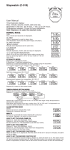
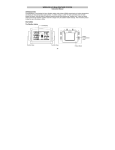
3. Outdoor Thermo Sensor D1: Transmission Indication LED D2: Outdoor Temperature display D3: Outdoor Humidity display D4: Wall Mount Hole D5: “C/F” button D6: Battery Compartment D7: Stand 4. Getting Started: 4.1 Main Unit: Open main unit battery compartment cover [C1] Insert 2 x AA batteries observing polarity [ “+” and “ –“ marks] Replace main unit battery compartment cover Use a pin to press the RESET [B5] button on the rear of the main unit, the main unit is now ready for use 4.2 Outdoor Thermo Sensor Batteries compartment (D6) of thermo sensor is locating behind the back cover, Insert 2 x AAA batteries observing polarity [ “+” and “–“ marks] 5. Installation 5.1 Main Unit The main unit can be placed onto any flat surface. 5.2 Outdoor Thermo sensor The remote sensor should be securely mounted onto a horizontal surface. Note: Transmissions between receiver and transmitter can reach up to 100m in open area. Open Area: there are no interfering obstacles such as buildings, trees, 3