1
connect the IP camera point to point by AP mode and then set up Wi-Fi.
If no network cable or Wi-Fi connected, the camera will be in Wi-Fi Setting Mode for 90
seconds after booting. After 90 seconds’ Wi-Fi Setting Mode, the camera will reboot and be
in AP Mode automatically. When the camera in AP mode, the indicator will flicker, indicator
will be on 1.5 second and off 0.3 second in each flickering period. Then connect the camera’s
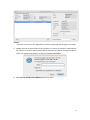
Wi-Fi signal of Network Name (SSID) by your PC with wireless adapter, run search tool and
then set up Wi-Fi in web browser. For more details of Search Camera and Set up Wi-Fi
connection, please check the manual above.
Notice:
1. For security concern, enter a password is necessary.
2. The camera will disconnect Wi-Fi after enable AP mode.
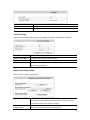
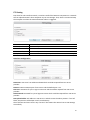
P2P Setting
Change P2P password, P2P password is used to view the camera’s live video by mobile
device. The default P2P password is 8888.
21