1
INTREPID User Manual
Library | Help | Top
Spatial Convolution Grid Filters (T34)
2
| Back |
Choose Specify Output File from the File menu. (See Specifying input and output
files for detailed instructions.)
5
Specify the convolution filter you wish to use from the User Defined Kernels
menu, Preset Kernels or Tensor menu.
If you select a statistical filter from the Preset Kernels menu, specify the window
size and any other parameters required (See Specifying a preset kernel for
details).
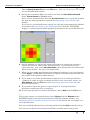
If you select a user defined kernel, specify the edge processing option and whether
to normalise (See Specifying a user defined kernel for details). INTREPID
displays a coloured pattern which graphically illustrates the user defined kernel.
6
Specify whether you require the output grid dataset to contain the convolved
(corrected) values or values of the corrections only. If you wish to save the
corrections only, turn on the Save Residuals box in the Spatial Convolution Grid
Filters main window. See Apply for instructions.
7
When you have made specifications and settings according to your requirements,
choose Apply. INTREPID will perform the Spatial Convolution process and save
the results to the specified output dataset.
8
If you wish to record the specifications for this process in a task specification
(.job) file in order to repeat a similar task later or for some other reason, use
Save Options from the File menu. (See Specifying input and output files for
detailed instructions.)
9
If you wish to repeat the process, repeat steps 2–8, varying the kernels,
parameters and/or data files as required.
10 To exit from Spatial Convolution Grid Filters, choose Quit from the File menu.
___
To view the current set of specifications choose Report from the Window menu.
INTREPID displays the Spatial Convolution Grid Filters Report window. See
Displaying options and using task specification files for details and an example of a
set of specifications.
You can view Help information by choosing options from the Help menu (See Help).
You can execute Spatial Convolution Grid Filters in batch mode using a task
Library | Help | Top
© 2012 Intrepid Geophysics
| Back |