1
SGX-120L User Manual, rev2.0
Page 21 of 21
Type this:
Purpose/effect
[cntl L]
Clear screen
[esc] F 0 [space]
Set 4x20 font
[space] MENU ITEM 1 [return]
Text
[space] MENU ITEM 2 [return]
Text
[space] MENU ITEM 3 [return]
Text
[space] MENU ITEM 4 [return]
Text
[esc] R 1 [space]
Highlight (reverse) the first line
[esc] R 2 [space]
Highlight (reverse) the second line
[esc] R 4 [space]
Highlight (reverse) the third line
[esc] R 8 [space]
Highlight (reverse) the fourth line
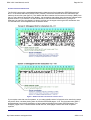
Recipe 5: Drawing a Box
This recipe shows how to use the line and line-to instructions.
Type this:
Purpose/effect
[cntl L]
Clear screen
[esc] L 5,2,114,2[space]
Draw a line from xy coords 5,2 to 114,2
[esc] T 114,27[space]
Draw a line to xy coords 114,27
[esc] T 5,27[space]
Draw a line to xy coords 1,27
[esc] T 5,2[space]
Draw a line to xy coords 5,2 (completes box)
That example has you enter the coordinates as number strings followed by a throwaway character
[space]. You can also send data as a one-byte shortcut by adding 64 to the desired coordinate. The byte
value is the number + 64. In the following example, 10 is represented by a byte value of 74, which is the
ASCII code for "J". In a program, you'd send a byte value as a byte - an unsigned char in C, or a CHR$( )
in BASIC. Any number up to 191 can be sent as a one-byte shortcut. Here's an example that uses
shortcuts:
Type this:
Purpose/effect
[cntl L]
Clear screen
[esc] LJJzJ
Draw a line from xy coords 10,10 to 58,10
[esc] TzV
Draw a line to xy coords 58,22
[esc] TJV
Draw a line to xy coords 10,22
[esc] TJJ
Draw a line to xy coords 10,10 (completes box)
http://www.seetron.com/sgxmnl.htm
2002-11-13