1
SGX-120L User Manual, rev2.0
Page 2 of 21
period of 90 days. If you discover a defect, we will, at our option, repair, replace, or refund the purchase
price. Return the product with a description of the problem. We will return your product or its replacement
via standard shipping. Expedited shipping is available at the customer's expense. Note: Physically abusing
the module, removing the daughterboard from the LCD, or attempting to repair or modify the module or
the daughterboard, voids this warranty.
Trademarks
Windows® is a registered trademark of Microsoft, Inc. Other trademarked names that may be mentioned
in the body of this document are the property of their respective holders.
Contacting the Manufacturer
Scott Edwards Electronics, Inc.
1939 S. Frontage Road, Suite F
Sierra Vista, AZ 85635 USA
phone: 520-459-4802
fax: 520-459-0623
web: www.seetron.com
email: [email protected]
Quick Checkout and Demonstration
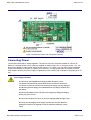
You can demonstrate the G12032 without a serial connection. Put the RUN/SET switch into the SET
position and connect a 9V battery (or 7 to 10Vdc source) to the terminals marked 9V on the serial
daughterboard. Connect the red wire to +. Alternatively, connect regulated 5Vdc to the terminals marked
+5 and GND at the left edge of the board.
Important: make sure polarity is correct! Reversed power will damage the G12032 and/or your 5V
power supply!
With power connected, the display will run a slide show of the factory-loaded font and images in its
EEPROM memory. The slide show demo runs until the unit receives serial input or is shut off. Upon
receiving serial input, the G12032 discontinues the slide show and responds normally, printing text and
processing instructions as described later in this manual.
Since SET mode allows you to change startup settings stored in EEPROM, you should set the unit to RUN
mode before sending serial data to it. Disconnect power, move the switch to RUN, and reconnect power.
With the display in RUN mode, connect serial input to the terminals marked SER and GND. Set your
terminal software to 2400 or 9600 bps (matching switch 2 on the G12032 ) with no parity, 8 data bits, 1
stop bit. Connect power and type some text. Browse this manual and try typing the various text and
graphics instructions. See the Recipes section for exercises that explore some of the display's
capabilities.
Configuring the G12032
A pair of switches on the G12032 configure the display. Set switches with power off.
Run/Set:
Set the display to receive and display serial data (run), or to cycle through a slide show of preloaded
graphics (set). The slide show stops when the display receives serial data. SET mode enables use
of the instruction ESC-W (write startup data to EEPROM). Startup settings that can be configured
with ESC-W include backlight on/off, EEPROM write protection, startup screen, font size, and
location of the vertical origin. See the detailed description for further information on using ESC-W.
In normal operation, this switch should be set to RUN to prevent accidental reconfiguration of the
startup data.
2400/9600:
Set the serial data rate to 2400 or 9600 bps. The serial parameters are: no parity, 8 data bits, 1 stop
bit.
http://www.seetron.com/sgxmnl.htm
2002-11-13