1
CHARGING INFORMATION
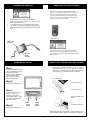
REMOTE BATTERY REPLACEMENT
The remote unit utilizes a standard CR2032 lithium
button cell. In normal use, it will provide 1 to 2 years of
operation. To replace the battery, remove the access
cover by pressing down firmly on the label area and
sliding it off. Once the unit is open, remove the battery
by sliding it from beneath the holder.
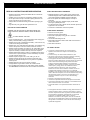
Charger should
only be used in
grounded outlet
•
•
•
•
Charger should only be used in grounded outlet.
When the Charger is plugged in to a wall outlet the
Green light will illuminate.
A completed charge cycle is indicated by the red LED.
The charger can be left on the battery without damage,
and keeps the battery fully charged, ready for use at all
times.
Green LED
Power On
There may be the risk of explosion if the battery is
replaced by the wrong type. Replace it with the same
type of battery while observing the polarity shown in the
adjacent figure.
Red LED
Battery
Charged
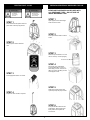
POWERING ON THE UNIT
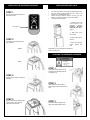
MAIN BATTERY INFORMATION & REPLACEMENT
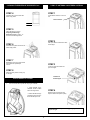
Step 1
In order to provide power to the
unit it is necessary to activate
the Main Power Switch.
Locate the switch beneath the
Stereo and Video Access
Zipper and just below the
stereo on the left side.
Step 2
•
Under normal operating conditions, four or five years of
dependable service life can be expected in stand-by
applications, or between 200 and 1000 charge/discharge
cycles depending on the average depth of discharge.
•
To replace battery:
1. Remove from unit
Press switch to ON position.
2. Remove springs.
Step 3
In order to allow the remote
control to function, it is
necessary to activate the
Ejector Safety Switch. Locate
the switch to the right of the
Main Power Switch.
Step 4
3. Slip pull tab off of the
battery
Main
Power
Switch
Ejector
Safety
Switch
4. Reverse to reinstall
Press switch to ON position.
Replacement batteries are available at www.toocooltoys.net or
your local battery retailer. Replace only with exact size battery.
4