1
Product User Manual
Appendix A
Privileged mode
Command
Example
Description
?
?
List all the items
disable (dis)
disable
Exit the priviledged mode
exit (ex)
exit
Exit the CLI interface
ip
IP address setup
ifset
ip ifset INTF1
Display or set the interface negotiation mode
ping
ip ping 202.11.22.33
Sending ICMP for network debugging
set
ip set
Setting up network addresses
show
ip show
Display all network settings
tftp
(upgrade)
ip tftp upgrade image
<FILENAME>
192.168.168.170.
Upgrade firmware by the tftp protocol
traceroute
ip traceroute 202.11.22.33
Tracing the routes for network debugging
sys
Setting up system parameters
date
sys date
Display or configure the system time
halt
sys halt now
Shutdown the system
module
sys module
Updating/Restoring module settings
password
sys password
Changing the system password
reboot
sys reboot now
Rebooting the system
resetconf
sys resetconf now
Resetting the configuration
sessionlog
sys ressionlog on
Turing on/off session logging
status (st)
sys status
Display the system status
tcpdump
sys tcpdump management
Dumping passing packets
version (ver)
sys version
Display system firmware/patter versions
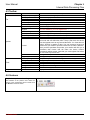
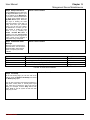
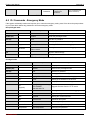
The complete “sys tcpdump” commands are listed as below:
Main
2nd
3rd
last
Example
dump
sys tcpdump external
dump
Dump external port packets
interactive
sys tcpdump external
interactive
Dump external port packets
interactively
dump
sys tcpdump internal
dump
Dump internal port packes
interactive
sys tcpdump internal
interactive
Dump internal port packets
interactively
dump
sys tcpdump
management dump
Dump management port
packts
Description
External
sys
tcpdump
Internal
Management
L7 Networks Inc.
159