1
Glossary
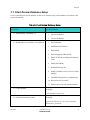
Initial memory pool: 1024 MB
Maximum memory pool: 2048 MB;
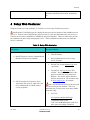
3) Enable Native Operating System Functions
(random, etc.) for performance
1. Put tcnative-1.dll in the tomcat/bin
directory.
1. Put a chart-review.xml file in
tomcat/conf/Catalina/localhost OR
4) Define the chart-review context
2. Set deployXML=”true” copyXML=”true”
in the attributes of the Host defined in
tomcat/config/server.xml and the default
chart-review.xml will be copied into the
tomcat/conf/Catalina/localhost
automatically when the tomcat service is
started.
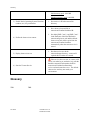
5) Deploy chart-review.war
1. Put chart-review.war in the
tomcat/webapps directory – tomcat will
explode this war when it is started.
6) Start the Tomcat Service
If the service does not start, or it starts with
errors (see stderr.log or stacktrace.log), edit the
database connection information found in
tomcat/conf/Catalina/localhost/chartreview.xml and restart the server. The default
chart-review.xml may not match your
environment.
Glossary
TBD
Oct 2014
TBD
Chart Review 1.0
Installation Guide
14