1
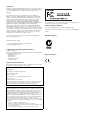
7 Remove the option card from its packing material. Hold the
card by its edges.
Mounting
guide pin
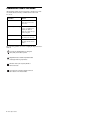
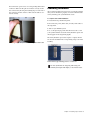
9 When the option card is seated in its slot, secure it to the
Stage Rack chassis from the back of the Stage Rack with a provided mounting screw.
Guide pins
Ribbon cable
connector
Mounting
bracket
Stage Rack option card showing brackets and connector
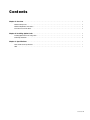
8 Gently slide the option card into the option card slot. Use
two hands, one to guide the card from the back of the Stage
Rack, and the other to push the card in from the front of the
Stage Rack. Align the guide pin at the top rear of the card with
the corresponding hole in the back of the Stage Rack chassis.
Securing a Stage Rack option card to the Stage Rack chassis
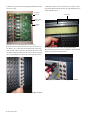
10 Secure the option card to the front panel of the Stage Rack
using four provided mounting screws.
Securing a Stage Rack option card to the Stage Rack front panel
Installing a Stage Rack option card in the Stage Rack (SRO card shown)
4 DSO Option Card