1
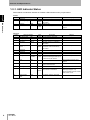
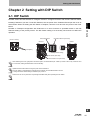
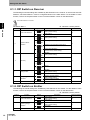
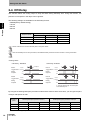
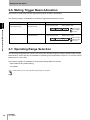
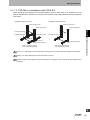
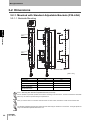
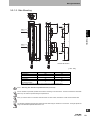
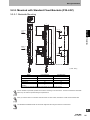
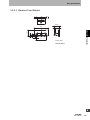
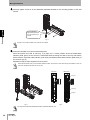
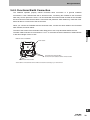
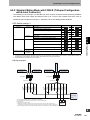
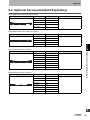
Setting with DIP Switch 2-1-1. DIP Switch on Receiver The following functional settings are available by DIP Switches on the receiver. A receiver has two DIP Switches, DIP Switch Bank 1 must be configured based on the table below. For the details of each function, refer to the chapters written in the "Functional Details" column on the table below. DIP Switch Bank 2 is not used. 2 Chapter DIP Switch Bank 1 Position DIP Switch 1 Function Scan Code Selection 2,3 4, 5 6 Operation Mode Selection Off-Delay Muting Enable Muting Trigger Beam Allocation 7 8 : Indicates a switch position. Setting: DIP-SW1 Description Scan Code B (factory default setting) 1 ON 1 ON Scan Code A 2 3 ON ON Point to Point Detection (factory default setting) 2 3 ON ON 2 3 ON ON 2 3 ON ON Point to Point Detection (same as factory default setting) 4 5 ON ON Disabled (factory default setting) 4 5 ON ON 4 5 ON ON 4 5 ON ON 6 ON 6 ON 7 ON 7 ON Reserved Functional Details 2-2. Chattering and Void Space Prevention 1 Chattering and Void Space Prevention 2 2-3. 100 ms 2-4. 250 ms 500 ms Disabled (factory default setting) 2-5. Enabled MUTE A TOP-Side Pattern (factory default setting) 2-6. MUTE A BTM-Side Pattern - - - 2-1-2. DIP Switch on Emitter The following functional settings are available by DIP Switches on the emitter. For the details of each function, refer to the chapters written in the "Functional Details" column on the table below. : Indicates a switch position. Position 1 2 3, 4 12 F3W-MA User’s Manual Function Scan Code Selection Operating Range Selection Reserved Setting 1 ON 1 ON 2 ON 2 ON - Description Scan Code B (factory default setting) Functional Details 2-2. Scan Code A Short Mode (factory default setting) 2-7. Long Mode - -