1
Application Note
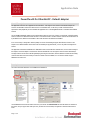
Enter the the data as shown above, and click the Execute button. Unfortunately this doesn’t reset the drive to defaults every time
you use it, therefore try again in 30s until it works.
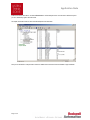
The adapter values will be reset as shown in the DriveExplorer screen shot below.
Now you can use BOOTP to setup the new IP address as detailed in the user manual for the 22-COMM-P or app note #39161
Page 2 of 2