1
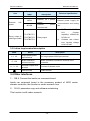
Contents
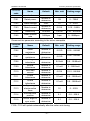
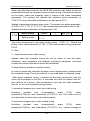
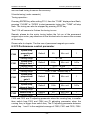
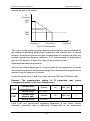
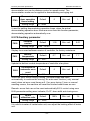
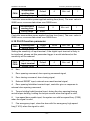
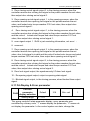
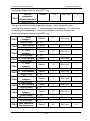
Chapter 1 Safety and Precautions................................................... - 2 1.1 Safety Items ............................................................................ - 2 1.2 Attention Items........................................................................ - 5 Chapter 2 Product information ......................................................... - 8 2.1 Name designation & nameplate .............................................. - 8 2.2 Technical specification............................................................ - 9 2.3 Product appearance and install hole dimension. ................... - 10 2.4 Daily maintenance ................................................................ - 10 Chapter 3 Electric installation......................................................... - 14 3.1 Installing environment .......................................................... - 14 3.2 Electric installation ............................................................... - 14 3.4 Other interfaces..................................................................... - 16 Chapter 4 Door machine controller & Trial run ............................ - 18 4.1 Operation & display .............................................................. - 18 4.2 The basic operation of controller........................................... - 19 Chapter 5 Function parameter table.............................................. - 24 5.1 function parameter table........................................................ - 24 5.2 function table ........................................................................ - 25 Chapter 6 Function parameter specification ................................ - 44 6.1 F0 Basic function parameter ................................................. - 44 6.2 F1- motor parameter.............................................................. - 46 6.3 F3 Performance control parameter........................................ - 49 6.4 F3 – open-door run parameter. .............................................. - 52 6.5 F4- Door closing run curve ................................................... - 55 6.6 F5-Door auxiliary parameter................................................. - 58 6.7 F6-Distance control parameter.............................................. - 59 6.8 F7-Demonstrating function parameter .................................. - 61 6.9 F8-Auxilary parameter.......................................................... - 62 6.10 F9-I/O function parameter .................................................. - 63 6.11 FA-Display & Error parameter............................................ - 65 6.12 FP-user parameter ............................................................... - 72 Chapter 7 Application and adjustment .......................................... - 74 7.1 Door machine controller adjustment..................................... - 74 7.2 Typical application ................................................................ - 78 Chapter 8 Fault – Causes - remedies ........................................... - 84 -
Safety and Precautions
Safety and Precautions
NICE900 User Manual
Chapter 1 Safety and Precautions
Safety definition:
There are two kinds of safety items in this manual:
Danger
Failure to follow the instructions will result in death or serious injury.
Note
Failure to follow these instructions can result in medium hurt or equipment
damage.
Please read this manual carefully and operate strictly according to the
safety tips while installing, debugging, maintaining the system. MONARCH
company is free of charge to any damage or loss caused by any operations
that not performed according to the requirements.
1.1 Safety Items
1.1.1 Before Installation
Danger
z
z
Do not install in the condition of water seepage in the control system,
components scarcity or damage while opening the case!
Do not install while the packing list is not in the accordance with the
products!
Note
z
z
Please uplift and drop gently in the portage otherwise the equipment will
be damaged!
Do not touch the elements of the controller with your hands, otherwise
the static electricity hurt may be caused!
1.1.2 During Installation
Danger
z
z
Please mount the controller on incombustible surface like metal, and
keep away from flammable substances! Otherwise it may cause fire!
Do not twist the fixing bolts of the components, especially the bolts with
red marks!
-2-
NICE900 User Manual
Safety and Precautions
Note
z
z
Do not let wiring terminal or screw enter the controller, otherwise the
controller will be damaged!
Install the controller where there’s less shaking and no direct sunshine.
1.1.3 Wiring
Danger
z
z
z
Only the qualified electrical engineer can perform the wiring, otherwise
there will be danger of electric shock.
A circuit breaker must be installed between the power supply and the
controller; otherwise there will be danger of fire.
Please connect the controller to the ground according to the
requirements, otherwise it will be dangerous
Danger
z
z
z
z
Do not connect the input current with the controller’s output terminals
(U, V, W). Please note the marks and do not connect the wrong wires
otherwise the controller may be damaged!
Ensure the wiring meet the EMC requirements and the local safety
standard. The wire size shall be determined according to the manual,
otherwise accidents may occur!
Encode connection must use Shielded line, shielding layer must be one
side connected to earth reliably!
Communication wires must use STP with the lay of 20mm~30mm,
shielding layer must be connected to earth!
1.1.4 Before Power-on
Note
z
z
z
Please confirm the mains voltage level is consistent with that of the
controller ;the input (L1,L2) and output (U,V,W) wirings are correct; and
check if there is any short circuit in peripheral circuit and if the wiring is
fixed and fasten; otherwise the controller may be damaged!
Please do the motor parameter tuning before first running. Otherwise
there will be danger of reveling over-speed.
No part of controller needs further withstand voltage testing since it has
been done in the factory; Otherwise accidents will occur!
-3-
Safety and Precautions
NICE900 User Manual
Danger
z
z
Mount the cover plate properly before power-on the controller; otherwise
there will be danger of electric shock!
All the external parts wirings must be connected according to the
instruction of this manual, otherwise accidents may occur!
1.1.5 After Power-on
Danger
z
z
Do not open the cover of the controller after power-on, otherwise there
will be danger of electric shock!
Do not touch the controller terminals; otherwise there will be danger of
electric shock.
Danger
z
z
If parameter identification is required, please pay attention that the
rotating motor may injure people, otherwise accident may occur!
Do not change the factory settings; otherwise the equipment may be
damaged!
1.1.6 Running
Danger
z
Do not touch the fan and the discharging resistor to check the
temperature, otherwise burning will occur!
z
Only the qualified technician can check the signal while it’s running.
Otherwise there will be danger of personal injury or equipment damage!
Note
z
Do not let objects fall in a running controller; otherwise the controller
may be damaged!
z
Do not start and stop the controller by on/off of the contactor, otherwise
the controller may be dangerous.
-4-
NICE900 User Manual
Safety and Precautions
1.1.7 Maintenance
Danger
z
Please do not repair or maintain the controllers with power on, otherwise
there will be danger of electric shock!
z
Only qualified electrical engineer can repair or maintain the controller,
otherwise there will be danger of human injury or damaging the
equipment.
z
Reset the parameters after changing the controller; all the insets must
be unplugged while the power is switch-off!
1.2 Attention Items
1.2.1 Motor insulation check
When the motor is used for the first time, or reused after storing for a long
time, or in a regular checkup, the user must check the insulation of the
motor to prevent the poor insulation of the windings of motor from
damaging the controller. The motor connection must be divided from the
controller during the insulation check. It is recommended to use a 500V
Mega-Ohm-Meter to check and the insulation resistance shall not be less
than 5MΩ.
1.2.2 Motor Heat and Noise
Since the output voltage of the controller is in PWM wave with some
harmonic wave, the temperature may raise, the noise and vibration may
increase compared with the controller running at main frequency.
1.2.3 Pressure-sensitive Device or Capacitor at the Output Side of the
Controller
Because the controller outputs PWM wave, the capacitor used for
improving power factor and pressure-sensitive resistor used for
lightening-proof shouldn’t be installed at the output side of the controller.
Otherwise the controller may have transient over-current and may be
damaged.
1.2.4 Usage out of the Range of Rated Voltage
The NICE1000 controller shall not be used out of the specified range of
-5-
Safety and Precautions
NICE900 User Manual
operation voltage. Otherwise the internal components of the controller may
be damaged. If needed, please use corresponding voltage regulation
device to change the voltage.
1.2.5 Lightning Strike Protection
There are lightning protection devices inside the controller, but the user
should install other lightning protection device at the front end of the
controller if lightning strike occurs frequently.
1.2.6 Altitude and De-rating
When the altitude is higher than 1000m, the cooling effect of consult is
deteriorated because of the rarefaction of air, then it is a necessity to derate
the use of controller and please contact our company for detailed technical
support in this circumstance.
1.2.7 Cautions for Scrap of controller
The electrolytic capacitors in the main circuits and PCB may explode when
they are burned and poisonous gas may be generated when the plastic
parts are burned. Please dispose the controller as industrial rubbish.
1.2.8 About Applicable Motor
1) The controller is applicable to squirrel-cage Asynchronous motor and
AC permanent-magnet Synchronous motor. Please be sure to select
the applicable controller according to the Data plate of the motor.
2) The controller has already been configured with default parameters
which is applicable to squirrel-cage Asynchronous motor. To perform
the motor parameter identification according to the actual conditions
will promote the operation effect. Synchronous motor must carry out
parameter tuning.
3) The output part of controller should not be short. Otherwise the
controller may alarm or be damaged. Therefore, before Power-on, we
must execute short-circuit-test for new elevator. Please make sure that
the controller be cut from the testing parts when the testing is
undergoing.
-6-
NICE900 User Manual
Safety and Precautions
Product information
-7-
Product information
NICE900 User Manual
Chapter 2 Product information
2.1 Name designation & nameplate
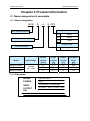
2.1.1 Name designation
NICE – D – A – S OP2
Adoptable motor power
NICE series controller
Door machine specialized
OP2
200W
OP4
400W
OP7
700W
Voltage Level
Structure number
Model
Input voltage
NICE-D-A-S0P2
1 phase
NICE-D-A-S0P4
187~264V
NICE-D-A-S0P7
Single phase
S
Power
Input
Output
capacity
current
current
motor
(kVA)
(A)
(A)
(W)
0.5
2.7
1.3
200
1.0
5.4
2.3
400
1.5
8.2
4.0
750
2.1.2 Nameplate
MODEL
NICE-D-A-S0P2
POWER
200W
INPUT
1PH AC220V 2.7A 50Hz/60Hz
OUTPUT
S/N
3PH AC0V~220V 1.3A 0Hz~99Hz
Adoptable
NICE900 User Manual
Product Information
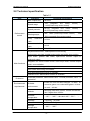
2.2 Technical specification
Table 2-1
Item
Sub-item
Max. output freq.
Speed range
Speed precision
Performance
control
Starting torque
Freq.
resolution
ratio
Current resolution
ratio
Carrier wave freq.
Technical specification
99.00Hz
1:50
(magnetic
flux
vector
control) ,
1:1000(close-loop vector control)
±0.5%(
magnetic
flux
vector
control) ,
±0.05%(close-loop vector control)
0Hz
180% (close-loop vector control)
1Hz
150% (magnetic flux vector control)
0.01Hz
0.01A
2K~16K
Asynchronous motor : static/dynamic motor tuning
Sync motor: non-load, loaded motor tuning and coder zero position
Sync motor: general AB2 coder, open-circuit collector output or
push-pull output
Main functions
Magnetic flux vector control mode: auto torque hoist, manual torque
hoist, over-excitation.
Distance control, support direct stop.
Door width auto-tuning is available.
Auto demonstrating function is available
Obstacle auto- identification function is available
Protection
Overload protection, rated current 150% 1 minute protection,180% 1 s
protection.
Environmental
Suitable
requirements
environment
altitude
Ambient
temperature
Inside of a room no direct sunlight,no dust、no
corrosive gases、no combustible gases、oil dust、
no reek、salt etc.
Normally lower than 1000m. Please de-rate the
use if higher than 1000m.
-10℃~+40℃(de-rate in 40℃~50℃, )
humidity
< 95%RH,no bead
Vibration
< 5.9m/s2(0.6g)
Storage
temperature
-20℃~+60℃
-9-
Product information
Item
NICE900 User Manual
Sub-item
Cooling method
Technical specification
0.2kW self-cooling、0.4kW and 0.75kW
air-cooling
Protection level
IP21
Store place
Stored in dry and clean place。
Can be transported by car , train , plane ,ship in
Conveyance
a standard packing box.
Convey vibration
When sin vibration is 9- 200 Hz, 15m/s2(1.5g)
66
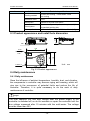
2.3 Product appearance and install hole dimension.
Fan
197
2-6.5
*5
147
MONARCH
129
2-Ø5
Mounting
hole
Unit:mm
205
Fig 2-3 Product appearance
2.4 Daily maintenance
2.4.1 Daily maintenance
Since the influence of ambient temperature, humidity,
the components in controller may become aging and
give rise to the occurrence of potential faults and
controller. Therefore, it is quite necessary to do
maintenance of controller.
dust, and vibration,
wearing, which will
reduce the life of
the work of daily
Danger
The filter capacitor still has high voltage after the power supply to the
controller is switched off, so do not maintain or repair the controller until the
bus voltage measured after 10 minutes with the multi-meter. The voltage
must be lower than 36V.
- 10 -
NICE900 User Manual
Product Information
2.5.1 Daily Maintenance
1) Daily checking items:
a) Check if there is any abnormal noise during the running of motor;
b) Check if there is any vibration of motor ;
c) Check if the installation environment of controller changes ;
d) Check if the cooling fan of controller works normally ;
e) Check if the controller is over heated.
2) Daily Cleaning:
a) Keep the controller in a clean status;
b) Clean the dust from the controller and prevent the dust especially the
metal powder from entering the controller;
c) Clean the oil dirt in the cooling fan of the controller.
2.5.2 Periodical Checking
Periodically check the places that are hardly checked during the running.
1) Periodical Checking Items
a) Check the ventilation channels and clean them periodically;
b) Check if the screws are loose;
c) Check if the controller is rusted;
d) Check if the input / output terminals has scratch marks;
e) Check the insulating in main circuit.
Note: Insulation test (use 500V Mega-Ohm-Meter) should be done
separately after disconnecting the input power cables from the controller; or
else, the controller will be damaged. Do not use the Mega-Ohm-Meter to
test the insulation of control circuits. Dielectric strength test had been done
at factory. Therefore, user need not do this test again.
1) Replacement of Wearing Parts
The wearing parts of controller mainly include the cooling fan and filtering
electrolytic capacitor. Their lifetime is closely related to the operating
environment and maintenance.
- 11 -
Product information
NICE900 User Manual
General lifetime as follows:
Component
Fan
Electrolytic
capacitor
Lifetime
2 ~ 3 years
4 ~ 5 years
Uses could determine when to replace them according to their work time.
1) Cooling fan
Possible damage causes: shaft bearing attrition and blade aging.
Criteria: no crack on fan blade, no abnormal vibration noise at start.
2) Filtering electrolytic capacitor
Possible damage causes: high ambient temperature, big pulsating current
due to frequent load fluctuation, electrolyte aging.
Criteria: no liquid leak, no protrusion of safety valve, electrostatic
capacitance measurement, and insulation resistance measurement.
2.5.3 Controller Storage
The following points must be noticed in controller storage:
1) It is recommended to store the controller in its original packing box.
2) Long-term storage will cause deterioration of electrolytic capacitor.
Therefore, controllers not in service for a long time must be powered
for at least once within 2 years for testing purpose, at least for 5 hours ;
in the test , the input voltage must be boosted gradually with voltage
regulator to the rated value.
2.5 option units – brake unit model
Controller model
NICE-D-A-S0P2
NICE-D-A-SOP4
NICE-D-A-SOP7
Recommended
power
80W
80W
80W
- 12 -
Recommended
resistance
≥250Ω
≥200Ω
≥150Ω
Product information
NICE900 User Manual
Electric installation
Electric installation
NICE900 User Manual
Chapter 3 Electric installation
This chapter will give the introduction of setting, specification, wiring
of different I/O terminals.
3.1 Installing environment
1) Temperature: The ambient temperature will bring great affect to the life
of controller. The allowable extent is -10℃~+50℃.
2) Mount the controller on incombustible surface (such as metal) with
enough space to spread heat. And use screw to mount it vertically on
the bracket.
3) Avoid places with direct sunshine or dampness.
4) Avoid place with corrosive, flammable, explosive gas
5) Avoid places with oil dirt, dust or metal powder.
3.2 Electric installation
3.2.1 Periphery electric unit instruction
Unit name
Air breaker
switch
AC input
reactor
position
Function details
The most front-end of
controller drive power
input
Cut off the power and provide short protection.
This switch is essential.
1)
Improve input power factor;
2)
Eliminate high-frequency harmonics in input
3)
Eliminate current unbalance due to input
System input side
side; protect the rectifier bridge.
phase unbalance;
Between output side
AC output
of controller and
Add AC output reactor if the distance between
reactor
motor, and near
vector driver and motor is bigger than 100m .
controller
3.2.2 Wiring terminal introduction
Control loop terminal layout shown below:
PGA PGB PGZ COM DI1
DI2
DI3
DI4 COM DI5
DI6
DI7
DI8 COM +24V
NICE900 User Manual
MP24
MCOM
TA1
TC1
Electric installation
CAN+
TB1
TA2
CANTC2
485+
485-
TB2
TA3
CZA1
TC3
GND
TB3
\
Drive loop terminal layout shown below:
\
P
L1
L2
PB
U
V
W
3.2.3 Control loop terminal description
Sort
Terminal
Terminal function
label
description
485+
Communication
485-
(under
research )
CAN+
CAN-
MODBUS
differential
signal positive end
MODBUS
differential
signal negative end
CAN bus differential
signal positive end
CAN bus differential
signal negative end
Technical specification
standard
MODBUS
communication
interface
STP recommended
CAN
bus
communication
interface
STP
recommended
1)
Optocoupler isolation
2)
Input voltage range:
input
DI1~DI8
Digit input
Digit signal input
DC9V~30V
3)
Input impedance:3.3K
1)
Power
supply
of
no-contact switch or
Inside
24V
+24V
Outside connect 24V
power
Analog input
Max.
output
current
200mA
COM
Encoder input
coder disc
2)
24V power common
end
PGA
Encoder A phase
PGB
Encoder B phase
PGZ
Encoder Z signal
CZA1
Weighing analog input
- 15 -
Isolated from inner GND
support collector open-loop
output or push-pull output
Input voltage range DC0V~
Electric installation
Sort
NICE900 User Manual
Terminal
Terminal function
label
description
Technical specification
GND
External
24V
power
MP24
MCOM
10V
External 24 v power
External power supply for
supply
External
communication and analog
power
use
common end
1)
TA-TB:N.C;TA-TC:
N.O.
Relay output &
shield grounded
TA2/TB2/TC2
,
Contact
capability:250VAC/3A
TA1/TB1/TC1
Relay output
DC30V/1A
TA3/TB3/TC3
2)
Contacts and control
loop insulate voltage
level:2.5kVAC
3.3.2 drive loop terminal description
Mark
L1、L2
P、PB
U、V、W
Name
Single phase power
input terminal
description
AC single phase 220Vinput terminal
brake resistance
brake resistance connection terminal of the
connect terminal
controller
controller output drive
terminal
GND terminal
Connect 3-phases motor
GND terminal
3.4 Other interfaces
1) DB 9: Connect the inside car command board
Inside car command board is the accessory product of NICE series
elevator controller, this function is under research now.
2) RJ 45: parameter copy and software maintaining
This function is still under research.
- 16 -
Electric installation
NICE900 User Manual
Door machine controller & Trial run
Door machine controller & Trial run
NICE900 User Manual
Chapter 4 Door machine controller & Trial run
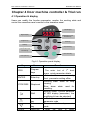
4.1 Operation & display
Users can modify the function parameter, monitor the working state and
control the operation panel running by the operation panel.
Indicate light
Digital display
Data/function code
decrease key
Program key
Enter key
Shift key
Stop-reset key
Data/function code
increase key
Door close key
Door open key
Fig 4-1 Operation panel display
Key
Name
PRG
Program
keys
ENTER
Enter key
STOP/RES
Stop/reset
Shift
OPEN
Incremental
key
Decrease
key
Open key
Function
The enter /out of 1st level
menu ,quick parameter delete
Enter
the
menu
by
level ,parameter setting affirm
Running state :used for stop
running
Error alarm state: used for
resetting.
stop/run state: Cyclical selection
of LED display parameter.( the
modifying bit can be selected)
The increase of data and
parameter code
Decrease of data and parameter
code
Open the door in panel
NICE900 User Manual
Door machine controller & Trial run
Key
Name
CLOSE
Close key
Function
operation mode.
Close the door in the panel
operation mode.
4.2 The basic operation of controller.
4.2.1 Operation flow of 3-level menu.
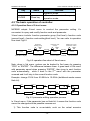
NICE900 adopts 3-level menu to conduct the parameter setting. It’s
convenient to query and modify function code and parameter.
3-level menu include: function parameter group (first level)→function code
(second level)→function code setting(third level). You can refer to operation
flow chart Fig4-2.
Parameter
modify group
PRG
Function code
change
ENTER
35.00
ENTER
F0
PRG
F003
PRG
1st level menu
STOP/RUN display
Modify the value
of function codes
2st level menu
50.00
PRG/
ENTER
3st level menu
Fig 4-2 operation flow chart of 3level menu
Note: when in 3rd menu, system can be backed to 2nd menu by pressing
“PRG” or “ENTER”. The difference between them: it goes back to 2th menu
with parameter saved when pressing “ENTER”, then jump to next function
code automatically; while it back to the 2nd menu with the parameter
unsaved and it will stay in the current function code.
Example: change F0-04 from 00.00Hz to 15.00Hz (boldfaced words means
flash bit)
35.00
PRG
PRG
F0
F0
ENTER
PRG
F000
F005
F004
ENTER
15.00
ENTER
00.00
00.00
10.00
10.00
Fig 4-3 parameter editing operation process
In 3-level menu, if the parameter has no flash bit, it means the function code
cannot be changed and the possible reasons are:
1) This function code is un-revisable, such as the actual examine
- 19 -
Door machine controller & Trial run
NICE900 User Manual
parameter and running record parameter..
2) This function code cannot be changed in operating state and can only be
changed when the controller is stopped.
4.2.2 Error information reading
When error occurs, the error code will be displayed on panel. It is convenient
to find reason of error and get rid of the error as soon as possible.
NICE2000 controller can save the previous 4 error codes and record the last
error frequency, current, bus voltage, digit input terminal state and digit output
terminal state. The relative sketch map is listed below:
35.00
PRG
F0
FA
ENTER
FA02
FA00
ENTER
0
Display in stop/run
Fig 4-4 error information reading
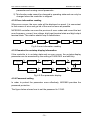
4.2.3 Examine the run/stop display information
If the controller is in run/stop state and no error occurs, the run/stop display
parameter can be examined by the setting of FA00/FA01 and shift key.
Set frequency
Run frequency
Bus volt
Output current
Output current
Door-width
position
Output state
Input state
Output torque
Fig 4-5 Run parameter display
4.2.4 Password setting
In order to protect the parameter more effectively, NICE900 provides the
password protection.
The figure below shows how to set the password to 12345.
- 20 -
NICE900 User Manual
35.00
PRG
1230
1234
ENTE
R
Door machine controller & Trial run
F0
FP
1230
1200
FP01
PRG
FP
ENTE
R
FP00
ENTE
R
1200
PRG
0000
0000
1000
1000
35.00
Fig 4-6 process of password setting
After setting the function password (parameter FP.00 is not zero), if the user
presses “PRG”, the controller will enter into password validate state first and
display“-----”. User can only enter the menu after inputting the user password.
For factory setting parameters editing, the user still need to input the factory
password. (Warning: do not change the factory setting parameter; if the
parameter values are wrong, the controller will work abnormally, even be
damaged.)
When the password protection is unlocked, user can change the password
freely, and the last input will be the user password.
If the user wants to cancel the password protection function, enter after
inputting the password and setting FP.00 as 0; if FP.00 is not zero, the
parameter is password protected.
- 21 -
Door machine controller & Trial run
NICE900 User Manual
- 22 -
Door machine controller & Trial run
Manual
NICE900 User
Function Parameter Table
Function parameter Table
NICE900 User Manual
Chapter 5 Function parameter table
5.1 function parameter table
Function parameters are classified into 13 groups. Each group has several
function codes. The function code uses 3-level menu with the format “F
X-XX”, which means “No. XX function code in group X”. For example, F
3-02 means the No.2 function code in group F3.
In order to make functional code setting convenient, the function group
number corresponds to first level menu, the function code number
corresponds to second level menu, and function code parameters
correspond to third level menu.
The contents of function codes:
Column 1“function code”, means the serial number for function parameter
group and parameter;
Column 2“name”, means the complete name of the function parameter;
Column 3“setting range”, means the parameter setting range;
Column 4“minimum unit”, means the minimum unit of the parameter
setting;
Column 5“factory setting”, means the original default;
Column 6“operation”, means the modification attributes of the parameters
(whether to enable the modification and the modification requirements).
Instructions are listed below:
☆: the parameter can be modified while the controller is running or
stopping;
★: the parameter can not be modified while the controller is running;
●: the parameter cannot be modified for it is actually measured and
recorded.
“Factory Default” means the numeric value after the function code
parameter is refreshed when recovering the default parameter, but the
actually measured value or recorded value will not be refreshed.
The controller provides password protection of function code to protect the
parameters effectively (detailed in Chapter 4).
- 24 -
NICE900 User Manual
Function parameter Table
5.2 function table
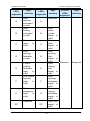
Press PRG buttons and then UP/DOWN button, all of the displays are first
level menu, which are group of function. Details as follows:
F0- Basic function parameter
F1- Motor parameter
F2- Performance control parameter
F3- Open door run parameter
F4- Close door run parameter
F5- Open/Close door auxiliary parameter
F6- Distance control parameter
F7- Demonstrating function parameter
F8- Auxiliary parameter
F9- I/O terminal function parameter
FA- Display & Error parameter
FF- Factory parameter
FP- User parameter
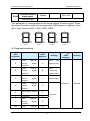
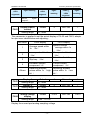
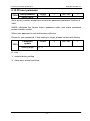
5.2.2 Function specification
Notice: The default parameter of some sync motor may different from the
table listed below, please so details in the end of chapter 5.
Function
code
Name
Setting range
Min.
unit
Change
default
properti
es
F0- basic function parameter
0 : Magnetic flux
F000
Control mode
vector control
1:close-loop vector
1
0
★
1
0
★
1
0
★
control
F001
F002
Open/close door
0:speed control
mode selection
1:distance control
Command
0:operation panel
- 25 -
Function parameter Table
Function
code
Name
source selection
NICE900 User Manual
Setting range
Min.
unit
Change
default
properti
es
control mode
1 : door machine
terminal
control
mode
2 : door machine
manual
adjusting
mode
3 : door machine
auto demonstrating
mode
F003
F004
Max. freq
Panel setting
freq.
20.00Hz~99.00Hz
0.01Hz
50.00Hz
★
0.00Hz~F003
0.01Hz
5.00Hz
☆
1
0
★
0.00~20.00Hz
0.01Hz
4.00Hz
★
2.0kHz~16.0kHz
0.1kHz
8.0kHz
★
1
0
★
1W
determin
0 : same as set
F005
Operation
direction setting
direction
1:opposite to set
direction
F006
F007
Slow walking
speed setting
Carrier wave
freq. setting
F1- motor parameter
F100
F101
F102
F103
F104
Motor type
selection
Motor rated
power
Motor rated
voltage
Motor rated
current
Motor rated freq.
0 : asynchronous
motor
1:sync motor
Model
0~750W
★
ed
Model
0~250V
1V
determin
★
ed
0.10A~99.00A
0.01A
1.00Hz~99.00Hz
0.01Hz
- 26 -
★
Model
determin
★
NICE900 User Manual
Function
code
Function parameter Table
Name
Setting range
Min.
unit
Change
default
properti
es
ed
F105
F106
Motor rated
rotation speed
Stator phase
resistance
Model
1~9999rpm
1rpm
motor rotor
Model
00.00~99.99Ω
0.01
0.01
0~99.99mH
inductance
F110
motor mutual
0.01m
H
0~999.9mH
0.1mH
ed
0.00~99.99A
0.01A
0.1mH
0.1mH
F115
F116
zero position
Actual angle of
sync motor
Motor
determin
★
ed
Model
0~250
1
coefficient
sync motor coder
★
Model
0~999.9mH
Sync motor
F114
determin
ed
inductance
inverse-EMF
★
Model
0~999.9mH
Sync motor
Q-axis
determin
★
ed
inductance
F113
determin
Model
D-axis
★
ed
inductance
Sync motor
F112
Model
determin
Asynchronous
motor non-load
★
Model
excitation current
F111
determin
ed
Asynchronous
F109
★
Model
00.00~99.99Ω
Asynchronous
motor leakage
determin
ed
phase resistance
F108
★
ed
Asynchronous
F107
determin
determin
★
ed
Model
0~359.9
0.1
determin
★
ed
Model
0~359.9
0.1
determin
●
ed
0~5
1
- 27 -
0
★
Function parameter Table
Function
code
NICE900 User Manual
Name
Setting range
Min.
unit
Change
default
properti
es
auto-tuning
F2- performance control parameter
Speed loop
F200
proportional gain
0~100
1
30
☆
0.01s
0.50s
☆
0.01Hz
5.00Hz
☆
1
20
☆
0.01~10.00s
0.01s
1.00s
☆
F202~F003
0.01Hz
10.00Hz
☆
10~500
1
60
☆
10~500
1
30
☆
1%
100%
☆
0.1%
1.0%
☆
0~200
1
64
☆
0~2
1
1
★
0~20
1
0
☆
1~9999
1
2048
★
1
0
★
1
F201
Speed loop
integration time 1
F202
Switching freq.1
F203
proportional gain
0.01~10.00s
0.00~F205
Speed loop
0~100
2
F204
F205
F206
F207
Speed loop
integration time 2
Switching freq.2
Current loop
proportional gain
Current loop
integral gain
Slip
F208
compensation
50%~200%
coefficient
F209
F210
Torque hoist
Over-excitation
gain
0~30.0%
Sync machine
F211
initial position
interference
mode
F212
F213
Speed feedback
filtering level
Pulse encoder
pulse setting
Pulse encoder
F214
direction
selection
0:forward
1:reversal
- 28 -
NICE900 User Manual
Function
code
Function parameter Table
Name
Setting range
Min.
unit
Change
default
properti
es
F3- open-door run parameter
Open door
F300
startup low
0.00~F303
0.01Hz
6.00Hz
☆
0.1~999.9s
0.1s
1.0s
☆
0.1~999.9s
0.1s
1.0s
☆
0.01Hz
25.00Hz
☆
0.1~999.9s
0.1s
2.0s
☆
0.00~F303
0.01Hz
3.00Hz
☆
0.1~999.9s
0.1s
2.0s
☆
0.1%
50.0%
★
0.1%
50.0%
★
speed setting
Open door
F301
startup
acceleration time
Speed control
F302
open door
startup
low
speed run time
F303
F304
F305
F306
Open door freq.
setting
Open door
acceleration time
Open door end
low speed setting
Open door
deceleration time
0.00Hz~F003
Open door
locked-rotor to
F307
0.0%
torque holding
~
150.0%
motor rated torque
switch point
setting
F308
Open door arrival
torque holding
0.0%~F307
F4-close-door run parameter
Close-door
F400
startup low
0.00~F403
0.01Hz
5.00Hz
☆
0.1~999.9s
0.1s
1.0s
☆
0.1~999.9s
0.1s
1.0s
☆
speed setting
Close-door
F401
startup
acceleration time
F402
Speed control
close door
- 29 -
Function parameter Table
Function
code
NICE900 User Manual
Name
startup
Setting range
Min.
unit
Change
default
properti
es
low
speed run time
F403
F404
F405
F406
close-door freq.
setting
Close-door
acceleration time
close-door end
low speed setting
Close-door
deceleration time
0.00~F003
0.01Hz
20.00Hz
☆
0.1~999.9s
0.1s
2.0s
☆
0.00~F403
0.01Hz
2.00Hz
☆
0.1~999.9s
0.1s
2.0s
☆
0.0%~F409
0.1%
50.0%
★
0.0%~F407
0.1%
50.0%
★
0.1%
100.0%
★
0.1%
100.0%
★
1
0
★
0.01Hz
10.00Hz
★
Close door
locked-rotor to
F407
torque holding
switch point
setting
Close door
F408
arrival torque
holding
F409
F410
F411
Up limit of close
door torque
closed blocked
torque setting
closed blocked
working mode
0.0%
150.0%
~
motor rated torque
0.0%~F409
0~1
0:immediate stop
1:re-open
Fire emergency
F412
closing high
5.00~F003
speed setting
F5-open/close door auxiliary parameter
F500
F501
F502
Abnormal
deceleration time
Door open time
limit
Door closing time
limit
0.1~5.0s
0.1
0.3s
☆
0~999.9s
0.1s
0.0s
☆
0~999.9s
0.1s
0.0s
☆
- 30 -
NICE900 User Manual
Function
code
F503
Function parameter Table
Name
Slow speed run
time limit
Setting range
Min.
unit
Change
default
properti
es
0~999.9s
0.1s
0.0s
☆
0~999.9s
0.1s
0.0s
☆
0~999.9s
0.1s
0.0s
☆
1
1
★
0.1%
20.0%
★
0.1%
60.0%
★
0.1%
20.0%
★
0.1%
60.0%
★
External open
F504
command delay
time
External close
F505
command delay
time
0~1
0 : straight
F506
Door-open curve
selection
line
acceleration/decele
ration
1
S
:
curve
acceleration/decele
ration
10.0 % ~ 50.0 %
Open-door
F507
acceleration S
curve initial time
( acceleration/dec
eleration
( initial
time )
stage +
ascend
stage≤90%)
10.0 % ~ 80.0 %
Open-door
F508
acceleration S
curve hoist time
( acceleration/dec
eleration
( initial
time )
stage +
ascend
stage≤90.0%)
10.0 % ~ 50.0 %
Open-door
F509
( acceleration/dec
deceleration S
eleration
curve initial stage
( initial
time
ascend
time )
stage +
stage≤90%)
F510
Open-door
10.0 % ~ 80.0 %
deceleration S
( acceleration/dec
curve descend
eleration
time )
- 31 -
Function parameter Table
Function
code
NICE900 User Manual
Name
Min.
Setting range
( initial
stage time
unit
Change
default
properti
es
stage +
descend
stage≤90%)
0~1
F511
Close door curve
selection
0:straight line
1
S
:
curve
1
1
★
0.1%
20.0%
★
0.1%
60.0%
★
0.1%
20.0%
★
0.1%
60.0%
★
0
★
acceleration/decele
ration
10.0%
Close door
F512
acceleration S
curve initial stage
time
/deceleration time)
initial
stage
+
ascend stage 90%
10.0%
close door
F513
~
50.0%(acceleration
80.0%
~
( acceleration/dec
acceleration S
eleration
curve ascend
initial
stage time
time )
stage
+
ascend stage 90%
10.0%
close door
F514
~
50.0%(acceleration
deceleration S
curve initial stage
time
/deceleration
time)initial stage +
descend
stage
90%
10.0%
close door
F515
~
80.0%(acceleration
deceleration S
/deceleration
curve descend
time)initial stage +
stage time
descend
stage
90%
F6-distance control parameter
0~1
F600
Door width
0:invalid
auto-tuning
1 : door
width
function selection
measuring,,
valid
only
in
manual
- 32 -
1
NICE900 User Manual
Function
code
Name
Function parameter Table
Setting range
Min.
unit
Change
default
properti
es
adjusting mode
Door width
F601
auto-tuning
0~20.00Hz
0.01Hz
3.00Hz
★
0~9999
1
0
★
0~9999
1
0
★
0.0%
15.0%
☆
0.1%
70.0%
☆
1
600
☆
0.1
15.0%
☆
0.1%
70.0%
☆
1
600
☆
1
0
★
speed
F602
F603
Door width pulse
amount low bit
Door width pulse
amount high bit
Distance control
F604
open startup low
speed run
0 ~ 30.0%
door
width
Distance control
F605
open-door
deceleration
60.0%
~
90.0%
(door width)
point setting
distance control
F606
open-door limit
point setting
0 ~ 9999 ( pulse
amount)
Distance control
close-door
F607
startup low
0.0%~30.0%
speed run
distance
Distance control
F608
close-door
deceleration
60.0%
~
90.0%
door width
point setting
Distance control
F609
close-door limit
0~9999(pulse)
point setting
0~1
F610
Initial run pulse
check mode
0:reset door width
after
first
locked-rotor
1:Reset only when
- 33 -
Function parameter Table
Function
code
NICE900 User Manual
Name
Setting range
pulse
Min.
unit
Change
default
properti
es
within
tolerance
after
locked-rotor
0~1
Single/dual
F611
motor(under
research)
0:asynchronous/sy
nc single motor
1:asynchronous
machine
0
0
★
dual
motor
F7-Demostrating function parameter
Demonstrate
F700
open arrival
1.0~999.9s
0.1s
2.0s
☆
1.0~999.9s
0.1s
2.0s
☆
0~9999
1
0
★
0~9999
1
0
★
0.00~99.00
0.01
1.00
●
0~100℃
1℃
0
●
1
0
★
0~100%
1
100
☆
0~9999 hours
1
0
★
holding time
Demonstrate
F701
close arrival
holding time
Demonstrate
F702
close/open times
record.
Demonstrate
F703
open/close
specify run times
F8-auxiliary parameter
F800
F801
Software version
number
Module
temperature
0~100
F802
Error auto reset
times
0 no auto reset
function ( gap is
2s)
,circulation is 1
hour
F803
F804
Brake utilization
ratio
Accumulative
- 34 -
NICE900 User Manual
Function
code
Function parameter Table
Name
Setting range
Min.
unit
Change
default
properti
es
working time
F805
F806
F807
F808
F809
F810
reserved
(minute)
Accumulative run
time
Reserved
(minute )
Accumulative run
time setting
Accumulative run
time setting
Error function
selection
0
1
0
★
0~9999 hours
1
0
★
0
1
0
★
0~9999 hours
1
0
★
0~9999 hours
1
0
★
0~9999
1
0
☆
1ms
20ms
☆
1
0
★
1
0
★
1
0
★
1
0
★
1
0
★
1
0
★
1
0
★
1
0
★
F9-I/O function parameter
F900
F901
F902
F903
F904
F905
F906
F907
terminal filtering
time
0~100ms
Switch input
0 no function can
terminal DI1
be re-selected
Switch input
1 open command
terminal DI2
2 close command
Switch input
3 external RESET
terminal DI3
input
Switch input
4 open forbidden
terminal DI4
terminal input
Switch input
5
terminal DI5
forbid
Switch input
input
terminal DI6
6
Switch input
open/close enable
terminal DI7
input
torque
holding
terminal
low
speed
7 fire input
8~9 reserved
F908
Switch input
10 light curtain N.O
terminal DI8
input
11 touch-pad signal
N.O input
- 35 -
Function parameter Table
Function
code
NICE900 User Manual
Name
Setting range
Min.
unit
Change
default
properti
es
12 open limit signal
N.O. input
13 close limit signal
N.O. input
14
open-door
deceleration
point
N.O input
15
close-door
deceleration
point
N.O input
16 door lock signal
N.O input
17~109 reserved
110
light
curtain
N.C input
111
touch
pad
signal N.C input
112
open
limit
signal N.C input
113
close
limit
signal N.C input
114
open-door
deceleration
point
N.C input
115
close-door
deceleration
N.C
input
116
door
lock
signal N.C input
Programmable
F909
relay output
TA1/TB1/TC1
0 no function
1
2
F910
Programmable
open
arrival
1
4
★
1
0
★
signal output 0
close
arrival
signal output 0
relay output
- 36 -
NICE900 User Manual
Function
code
Function parameter Table
Name
Setting range
TA2/TB2/TC2
3
open
Min.
unit
Change
default
properti
es
arrival
signal output 1
4
close
arrival
signal output 1
5 error relay signal
output1
6 reserved
7
Programmable
F911
open
arrival
signal output 2
relay output
8
TA3/TB3/TC3
close
arrival
1
3
★
1
319
☆
signal output 2
9 door lock signal
output
10
re-open
door
signal output
11 blocked signal
output
FA-display & error parameter
Adopt binary code
=1 select
BIT0 freq. setting
Hz
BIT1 run freq. Hz
BIT2
Dc
bus
voltage V
LED run display
FA00
parameter
selection
BIT3 output voltage
V
BIT4 output current
A
BIT5 output torque
%
BIT6 switch input
terminal state
BIT7 switch output
terminal state
BIT8
door
- 37 -
width
Function parameter Table
Function
code
NICE900 User Manual
Name
Min.
Setting range
unit
Change
default
properti
es
pulse percentage
Remark:
every
monitor
that
amount
selected
FA00
by
can
be
displayed
during
operation
and
switched by SHIFT
key.
1~511
0 open-door setting
freq. Hz
1 close-door setting
freq. Hz
2 DC bus voltage V
3
switch
input
terminal state
4
LED
machine-stop
FA01
switch
4
door
display
width
pulse
parameter
selection
output
terminal state
1
39
☆
1
0
●
1
0
●
1
0
●
percentage
Remark:
every
monitor
that
amount
selected
FA01
by
can
be
displayed
during
operation
and
switched by SHIFT
key.
1~63
FA02
FA03
FA04
First error type
no
abnormal
First error
record
clear
reminding
abnormal record
Second error
type
0
1 reserved
2
acceleration
- 38 -
NICE900 User Manual
Function
Name
code
FA05
FA06
FA07
FA08
Function parameter Table
Second error
reminding
Third error type
FA10
running
over-current Er02
3
deceleration
Third error
running
reminding
over-current Er03
th
4 constant speed
4 error type
th
FA09
Setting range
4 error
reminding
Last error type
running
over-current Er04
5
acceleration
Min.
unit
Change
default
properti
es
1
0
●
1
0
●
1
0
●
1
0
●
1
0
●
1
0
●
1
0
●
running
over-voltage Er05
6
deceleration
running
over-voltage Er06
7 constant speed
running
over-voltage Er07
8~9 reserved
10
controller
overload Er10
11~12 reserved
FA11
5th error
reminding
13
output
phase-failure Er13
14
radiator
overheated Er14
15 reserved
16
EEPROM
read-write
errorsEr16
17 reserved
18 current check
circuit error Er18
19 tuning overtime
error Er19
20 speed feedback
error Er20
- 39 -
Function parameter Table
Function
code
NICE900 User Manual
Name
Setting range
Min.
unit
Change
default
properti
es
21 initial position
check error Er21
22~24 reserved
25
over-speed
error Er25
26
parameter
setting
error
reminding Er26
27
door
width
auto-tuning
error
Er27
28 open overtime
Er28
29 close overtime
Er29
30
low
speed
open/close
overtime error Er30
FA12
FA13
FA14
FA15
Last error bus
voltage
Last error output
current
Last error run
freq.
Last error output
torque
0~999.9V
0.1V
0.0V
●
0.00~99.99A
0.01A
0.00A
●
0.00Hz~99.00Hz
0.01Hz
0.00Hz
●
0.1%
0.0%
●
1
0
●
1
0
●
*
*
*
●
*
*
*
●
0.0~180.0%
0~1023
FA16
Last error input
terminal state
0:OFF
1:ON
DI8/DI7/DI6/DI5/DI
4/DI3/DI2/DI1
FA17
FA18
FA19
Last error output
terminal state
Terminal state
query
Function input
0~15 0:OFF 1:
ON
T1/T2/T3
- 40 -
NICE900 User Manual
Function
Function parameter Table
Name
code
Setting range
Change
Min.
default
unit
properti
es
state query
FA20
FA21
Function output
*
*
●
0~9999
1
0
☆
Display 1
0~9999
1
0
●
Display 2
0~9999
1
0
●
0.01V
0.00V
●
1
0
●
1
0
☆
1
0
★
Display switch
control
FA22
FA23
FA24
*
state query
Analog voltage
display
0.00~10.10V
FF-factory parameter (reserved)
FF-00
reserved
0
FP- user parameter
FP-00
User password
0~9999(0 means
no password)
0:non
Parameter
FP-01
update
1 : to restore the
factory parameter
2 : delete memory
information
Remark : The different parameter are listed below:
Chan
Functio
n code
Name
Setting range
Min.
unit
default
ge
prope
rties
F0- basic parameter
F000
F001
F003
Control mode
0:magnetic flux vector control
1:close-loop vector control
Open/close
0:speed control mode
mode selection
1:distance control mode
Max. freq.
20.00Hz~99.00Hz
1
1
★
1
1
★
24.00Hz
★
5.00Hz
☆
0.01H
z
F3-open-door run parameter
F300
open-door
startup
low
0.01H
0.00~F303
z
- 41 -
Function parameter Table
NICE900 User Manual
Chan
Functio
n code
Name
Setting range
Min.
unit
default
ge
prope
rties
speed setting
F303
open door freq.
setting
0.01H
0.00~F003
z
15.00Hz
☆
4.00Hz
☆
12.00Hz
☆
F4-close-door run parameter
Door-close
F400
startup
low
0.01H
0.00~F403
z
speed setting
F403
Door-close freq.
setting
0.01H
0.00~F003
z
- 42 -
Door machine controller & Trial run
Manual
NICE900 User
Function parameter specification
Function parameter specification
NICE900 User Manual
Chapter 6 Function parameter specification
6.1 F0 Basic function parameter
F000
Control mode
Setting range
default
0~1
0
Min. unit
1
0: optimizing V/F control
It is suitable for the general application case, in which the motor do not need
to be connected to the rotating coder. The control effect will be a little bit
worse than vector control. The magnetic flux vector control can never be
applied to the case of permanent magnetism sync motor drive.
1: close-loop vector control
Feedback the motor speed signal by the encoder, the controller will run with
vector mode. The encoder and motor must be connected with the same axis
and the encoder wire amount must be correctly set.
F001
Close/open mode
selection
Setting range
Default
0
Min. unit
1
0~1
0:Speed control mode
This mode need to install 4 switches on the door, and slowdown by the
deceleration point, disposal the arrival by the limit switch signal.
1: Distance control mode
In this mode, the door width pulse auto-tuning must be correct. By setting the
open/close curve parameter to slowdown or reach arrival ( if the limit signal
has been set at the F9 input terminal function selection part, then it will
dispose the arrival by the limit signal.)
F002
Command source
selection
Setting range
Default
0
Min. unit
1
0~3
0: Operation panel control mode
Control running /stop by the operation panel, co-rotation by pressing the
OPEN key, inversion by pressing the CLOSE key, and stop by pressing the
STOP/RESET keys. In this mode, the controller will not operate
door-machine special logic flow.
NICE900 User Manual
Function parameter specification
1: Door-machine terminal control mode
The controller manages the door open/close by the system signal. The
operation logic is listed below:
Open
Close
Operation
command
command
state
0
0
Stop
0
1
Close
1
0
Open
1
1
Open
Table 6-1The logic table
2: Door machine manual adjusting mode
Control running /stop by the operation panel, door open by pressing the
OPEN key, door closed by pressing the CLOSE key, and stop by pressing the
STOP/RESET keys
3: Door machine auto-demonstrating mode
This mode is applied to door-machine demonstrating or factory trial run which
need no control system’s participation. The mode can be set after adjusting
the door machine running curve. The demonstrating of open/close can be
repeat by pressing OPEN or CLOSE key. The time gap can be modified by
F7 parameters, the machine stop by pressing STOP/RESET key.
Remark:
1) Door width auto-tuning only valid in the door machine manual adjusting
mode.
2) Motor tuning only valid in the panel control mode.
F003
Max. freq.
Setting range
Default
50.00Hz
20.00~99.00Hz
Min. unit
0.01Hz
Default
0.00Hz
Min. unit
0.00~max. freq. (F002)
0.01Hz
Used to set the controller Max. freq.
F004
Panel run freq.
Setting range
Speed setting mode adopts the running target freq. in the panel control mode.
F005
Run direction
setting
Default
- 45 -
0
Min. unit
1
Function parameter specification
Setting range
NICE900 User Manual
0~1
By changing this function code, the tractor running direction can be altered
without the change of wiring.
P.S.: parameter initialization will make the motor run direction w back to the
original state .user must cautious about this parameter.
Slow walking
speed setting
setting
F006
Default
4.00Hz
Min. unit
0.01Hz
0~1
Door-open mode selection(F001)is the first run freq. of the distance control
and door walking speed when the slow open/close signal enable is valid.
F007
Carrier wave freq.
Setting range
Default
8.0kHz
2.0~16.0kHz
Min. unit
0.1kHz
This function adjusts inverter carrier wave freq. to reduce the motor noise, the
current leakage and inverter interference.
When the carrier frequency is low, the output current higher-harmonic
component increases, the consumption and temperature rise of the motor
increase as well.
When the carrier frequency is high, the motor consumption declines and the
motor temperature rise reduces, but the consumption, temperature rise and
interference of the system increase.
low
~
high
Carrier wave freq.
big
~
small
Motor noise
Bad
~
good
Output current wave
high
~
low
Motor temperature rise
low
~
high
Inverter temperature rise
Small ~
big
Leakage current
External radiation
Small ~
big
interference
Table 6-2 Relevant parameter of carrier wave freq.
6.2 F1- motor parameter
Function
code
F100
Name
Default
Min. unit
Setting range
Motor type
0
1
0~2
- 46 -
NICE900 User Manual
Function
code
Function parameter specification
Name
Default
Min. unit
Setting range
1W
0~750W
1V
0~250V
selection
F101
Rated power
F102
Rated voltage
F103
Rated current
F104
Rated freq.
Rated rotation
rate
F105
Models to
determine
220V
Models to
determine
50.00Hz
0.01A
0.10~9.90A
0.01Hz
1.00~99.00Hz
1460rpm
1rpm
0~9999rpm
Please set the parameter according to the motor nameplate
Function
code
F106
F107
F108
F109
F110
F111
F112
F113
F114
F115
Name
Default
Stator
resistance
Rotor
resistance
Leakage
inductance
Mutual
inductance
Non-load
current
D-axis
inductance
Q-axis
inductance
Opposing
electromotive
force
Encoder zero
position
Actual angle of
sync motor
Models to
determine
Models to
determine
Models to
determine
Models to
determine
Models to
determine
Models to
determine
Models to
determine
Models to
determine
Models to
determine
Models to
determine
Min. unit
Setting range
0.01Ω
0.00~99.99Ω
0.01Ω
0.00~99.99Ω
0.01mH
0.0~99.99mH
0.1mH
0~999.9mH
0.01A
0.01~99.99A
0.1mH
0.0~999.9mH
0.1mH
0.0~999.9mH
1V
0~250V
0.1
0.0~359.9
0.1
0.0~359.9
F106~ F110 will update automatically after the motor auto-tuning.
- 47 -
Function parameter specification
NICE900 User Manual
About asynchronous machine; the NICE 900 controller can obtain the above
parameters through the complete tuning or static tuning. If the spot tuning can
not be done, users can manually input it (refers to the same nameplate
parameter). The system will resume the standard motor parameter of
F106-F110, every time after modification of rated power F101.
Applied to permanent-magnet sync motor: The system can obtain parameter
of F106, F111, F112, F113, F114. The corresponding parameter will not be
updated after the modification of rated power F101.
Motor tuning
F116
Setting range
Default
0
Min. unit
1
0~5(asynchronous :1、2、5
sync :3、
4、5)
The motor tuning must in the panel control mode (F002 = 0).Before the
tuning ,motor rated parameter ( F100 – F105) and encoder wiring parameter
F6-00.
0:Non
1:Asynchronous motor static tuning
Applied when the complete tuning can not be down to tune the stator
resistance, rotor resistance and leakage inductance parameter (non-load
current and mutual inductance should be calculated)
2: Asynchronous machine complete tuning
in order to assure the controller dynamic control performance, please select
the complete tuning. The motor must be in non-load state in complete tuning.
After select complete tuning , controller do the static tuning first, then the
motor will accelerate to the 80% of the rated freq with the default time 2s.
then hold on for a period , then decelerate to zero with the rated slowdown
time 2s. to over the complete tuning process.
3: permanent magnet sync motor non-load tuning.
Including:
encoder
zero
compensation
angle
(F114),
stator
resistance(F106),dq –axis inductance (F110.F111) e.g. The motor must in
non-load state to assure the control performance.
4: permanent magnet sync motor loaded tuning
Including:
encoder
zero
compensation
angle
(F114),
stator
resistance(F106),dq –axis inductance (F110.F111) e.g.. please manage to
- 48 -
NICE900 User Manual
Function parameter specification
use non-load tuning to assure the accuracy
5:Inertia tuning (under research)
Tuning operation:
Pressing ENTER key after setting F116, then the “TUNE” displayed and flash,
pressing “CLOSE” or “OPEN” to start parameter tuning ,the “TUNE” will stop
flash. The tuning can also be stopped by pressing STOP key.
The F116 will resume to 0 when the tuning is over.
Remark: please do the motor tuning before the 1st run of the permanent
magnet sync motor, pay attentions to the blocked-rotor to assure the success
of the tuning.
Please refer to chapter 7 for the use of permanent magnet sync motor.
6.3 F3 Performance control parameter
F200
F201
F202
F203
F204
F205
Speed-loop
proportional
gain 1
Setting range
Speed-loop
integral time 1
Setting range
Switch freq. 1
Setting range
Speed-loop
proportional
gain 2
Setting range
Speed-loop
integral time 2
Setting range
Switch freq. 2
Setting range
Default
30
Min. unit
1
0~100
Default
Default
0.50s
Min. unit
0.01s
0.01~10.00s
5.00Hz
Min. unit
0.01Hz
0.00~F205(switch freq. 2)
Default
20
Min. unit
1
0~100
Default
1.00s
Min. unit
0.01s
0.01~10.00s
Default
30
Min. unit
1
F202(switch freq. 1)~F003(max. freq )
F200 and F201 are PI adjusting parameter when the running freq. is smaller
than switch freq.;F203 and F204 are PI adjusting parameter when the
running freq. is bigger than switch freq. The PI adjusting parameter between
switch freq. 1 and 2 is the weighted average of F200, F201 and F203, F204.
- 49 -
Function parameter specification
NICE900 User Manual
See the fig below for details.
PI
Parameter
F200
F201
F203
F204
Switch
frequency 1
Switch
frequency 2
Frequency
command
Fig 6-1 PI parameter
The vector control speed dynamic response characteristic can be adjusted by
the means of adjusting proportional coefficient and integral time of speed
adjustor. Increase of proportional gain and decrease of integral time both can
quicken speed-loop dynamic response. The over-increase of proportional
gain or over-small of integral time may cause surge of system.
Recommended adjusting method:
fine tune the default parameter if it is not suitable for the application: increase
the proportional gain to avoid system surge then decrease the integral time to
insure the quick response of system.
If both the switch freq. 1 and 2 are zero, only the F203 and F204 are valid.
Remark: The inappropriate setting of PI parameter may cause
overshoot of speed, even over-voltage error.
F206
F207
Current-loop
proportional gain
Setting range
Current-loop
integral gain
Setting range
Default
60
Min. unit
1
30
Min. unit
1
10~500
Default
10~500
F206 F207 are current-loop adjusting parameter in the vector control
arithmetic, generally need no adjusting. Please refer to the speed-loop
- 50 -
NICE900 User Manual
Function parameter specification
adjustor if adjusting is needed.
F208
slip compensation
coefficient
Setting range
Default
100%
Min. unit
1%
50~200%
This parameter influence the dynamic performance and load current of motor
and it only be used when there is speed sensor vector control. Generally, it
need no adjusting.
F209
Torque
magnification
Setting range
Default
1.0%
Min. unit
0.1%
0.0~30.0%
In order to compensate the V/F control low frequency torque characteristic,
some lifting compensation of the inverter output current are added.
If torque hoist is set too large, it may cause over-heated motor and
over-current. Normally, do not set torque lifting over 8%
To adjust this parameter effectively can avoid over-current at startup of motor.
As to the situation of over-load, it is recommended to increase this parameter;
vice versa.
When the torque hoist is set to 0, controller become automatic torque rising
F210
over-excitation
gain
Setting range
Default
64
Min. unit
1
0~200
The function of over-excitation gain is to restrain the bus voltage rising in the
process of inverter deceleration. The bigger the over-excitation is the strong
restrain effect will be.
1) set as zero in small inertia condition, and set it bigger when inertia
becomes bigger.
2) Remember to set it as zero in the case of brake resistance.
F211
Initial position
inference method
Setting range
Default
1
Min. unit
1
0~2
1:Magnetic pole initial position inference method of permanent magnet sync
motor which adopts pulse mode
- 51 -
Function parameter specification
NICE900 User Manual
2:Magnetic pole initial position inference method of permanent magnet sync
motor which adopts other mode (under research)
F212
Feedback
speed filtering
level
Setting range
Default
0
Min. unit
1
0~20
This parameter set the encoder feedback speed filtering level. Generally, it
needs no adjusting.
In the case of serious interference or very little encoder lines, if adopt
close-loop vector control mode, the feedback speed filtering level should be
added to insure the smooth run of motor.
Remark: in the case of small load, too big parameter setting may cause
serious motor overshoot or surge.
F213
Encoder pulse
setting
Setting range
Default
2048
Min. unit
1
1~9999
If the NICE 900 controller need to close-loop vector run, the encoder
parameter must be correctly set. In the door machine distance control mode,
the encoder parameters are also need to be correctly set to insure the good
effect of distance control.
F314
Encoder
direction
selection
Setting range
Default
0
Min. unit
1
0~1
This parameter will back to zero when restore factory setting, please cautious
about this function.
6.4 F3 – open-door run parameter.
In the speed-control mode, door machine signal contacts (travel switch)
install position show below:
- 52 -
NICE900 User Manual
Door-open
limit signal
Function parameter specification
Door-open
slowdown signal
Door-close
Door-close
limit signal
slowdown signal
Door-open
arrival
Door-close arrival
OPEN
CLOSE
Fig 6-2 speed control switch install sketch
Correctly set the parameter in F3 group which related to speed control,
precisely set slowdown signal switch and limit signal switch, open-door run
speed curve can be detailed as fig 6-3.
Dot-line:The run curve of F506 in
straight line deceleration/acceleration
F303
F302
F301
F304
F306
F300
F305
Door-open
command
Door-open
slowdown
command
Door-open limit
command
Time
OFF
ON
OFF
ON
OFF
ON
Fig 6-3 Speed control open-door curve sketch
Speed control door opening process:
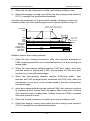
1) When the door opening command is valid, door machine accelerate to
F300 creeping speed then run at constant speed in the door open low
speed stage.
2) Time from door open starting, when the time reaches low speed run time
(F302), then door machine switch to high speed (F303), and speedup at
F304 time, then constant run in the high speed stage.
3) When the door open signal is valid, door machine set F305 as target
speed, slowdown with F306 time, when the deceleration is over then run
at constant speed in the door open finish low speed stage.
4) When the door open limit signal is valid, door machine continue to
- 53 -
Function parameter specification
NICE900 User Manual
creeping at door open finish low speed, after locked-rotor, entering door
opening torque holding state, holding torque as F308,a complete door
open process is over.
5) When the open command is invalid, open torque holding is over.
6) Dotted line display: running curve When the door opening curve
selection (F506) is straight line acceleration/slowdown.
Correctly set parameter in F3 group which related to distance control, set
relevant pulses, the door opening speed curve can be detailed as fig 6-4.
Dot-line:The run curve of F506 in
straight line deceleration/acceleration
Frequency
F303
F307
F301
F304
F306
F308
F300
F305
Door-open
command
Door-open
slowdown pulse
Door-open
limit pulse
Time
OFF
ON
F604*door width
OFF
ON
F605*door width
OFF
ON
F606*door width
Fig 6-4 Distance control open-door curve sketch
Distance control door opening process:
1) When the door opening command is valid, door machine accelerate to
F300 creeping speed then run at constant speed in the door open low
speed stage.
2) When the door-opening distance reaches F604*door width,then door
machine switch to high speed (F303), and speedup at F304 time, then
constant run in the high speed stage.
3) When the door-opening distance reaches F605*door width , door
machine set F305 as target speed, slowdown with F306 time, when the
deceleration is over then run at constant speed in the door open finish
low speed stage.
4) when door opening distance pulse reaches (door width-F606),door
machine continue to creeping at door open finish low speed, after
locked-rotor, entering door opening torque holding state, holding torque
- 54 -
NICE900 User Manual
Function parameter specification
as F308,a complete door open process is over.
5) When the open command is invalid, open torque holding is over.
6) Dotted line display: running curve When the door opening curve
selection (F506) is straight line acceleration/slowdown.
6.5 F4- Door closing run curve
Correctly set the parameter in F4 group which related to speed control,
precisely set slowdown signal switch and limit signal switch, open-door run
speed curve can be detailed as fig6-5.
Dot-line: The run curve of F511 in
straight line deceleration/acceleration
Frequency
F403
F408
F402
F409
F400
F405
F407
Door-close
command
Door-close
owdown pulse
Door-close limit
pulse
F401
F404
F410
F406
F411? F412
Torque arrival
and holding
Time
OFF
ON
OFF
ON
OFF
ON
Speed control door closing process:
1) When the door closing command is valid, door machine accelerate to
F401 speed then run at constant speed in the door closing low speed
stage.
2) Time from door closing starting, when the time reaches low speed run
time (F402), then door machine switch to high speed (F403), and
speedup at F404 time, then constant run in the high speed stage.
3) When the door closing signal is valid, door machine set F405 as target
speed, slowdown with F406 time, when the deceleration is over then run
at constant speed in the door closing finish low speed stage.
4) When the door closing limit signal is valid, door machine continue to
creeping at door open finish low speed, after locked-rotor, entering door
closing torque holding state, holding torque as F408,a complete door
closing process is over.
- 55 -
Function parameter specification
NICE900 User Manual
5) When the closing command is invalid, open torque holding is over.
6) Dotted line display: running curve When the door closing curve selection
(F511) is straight line acceleration/slowdown.
Correctly set parameter in F4 group which related to distance control, set
relevant pulses, the door opening speed curve can be detailed as fig 6-6.
Dot-line:The run curve of F511 in
straight line deceleration/acceleration
Frequency
F403
F408 F410
F409
F400
F405
F407
Door-close
command
Door-close
slowdown pulse
Door-close
limit pulse
F401
F404
F406
F411、F412
Torque arrival
and holding
Time
OFF
ON
F607*door width
OFF
ON
F608*door width
OFF
ON
F609*door width
Distance control door closing process:
1) When the door closing command is valid, door machine accelerate to
F400 creeping speed then run at constant speed in the door closing low
speed stage.
2) When the door-closing distance reaches F607*door width,then door
machine switch to high speed (F403), and speedup at F404 time, then
constant run in the high speed stage.
3) When the door-opening distance reaches F608*door width , door
machine set F405 as target speed, slowdown with F406 time, when the
deceleration is over then run at constant speed in the door closing finish
low speed stage.
4) when door opening distance pulse reaches F609,door machine continue
to creeping at door closing finish low speed, after locked-rotor, entering
door opening torque holding state, holding torque as F408,a complete
door open process is over.
5) When the closing command is invalid, open torque holding is over.
6) Dotted line display: running curve when the door closing curve selection
(F511) is straight line acceleration/slowdown.
- 56 -
NICE900 User Manual
F409
Door closing
torque up limit
Setting range
Function parameter specification
Default
100.0%
Min. unit
0.1%
0.0~150.0%
The motor output torque will not exceeds the product of this parameter and
rated torque.
F410
Door closing
blocked torque
setting
Setting range
Default
100.0%
Min. unit
0.1%
0.0~F409
Check the actual motor output torque, when the torque bigger than the
product of F410 and the rated torque means door closing blocked. Set it as
zero, the check will not be down.
F411
Door closing
block working
mode
Setting range
Default
0
Min. unit
1
0~1
0:Immediate stop when closing blocked, if there is open command within 10s
then close the door; if the run command withdraw then immediately close
door.
1:Re-open when closing blocked, during the re-open process, the out
open/close command is invalid.
Door closing blocked including the following states:
a) During door closing run process, light curtain/contact board signal is
valid.
b) During the door closing run process, the output torque is bigger than
the door closing block torque.
F412
Fire emergency
closing door
high speed
setting
Setting range
Default
10.00Hz
Min. unit
0.01Hz
5.00~30.00Hz
When the fire emergency input function is valid, door closing high speed
running.
- 57 -
Function parameter specification
NICE900 User Manual
6.6 F5-Door auxiliary parameter
F500
Abnormal
deceleration
time
Setting range
Default
0.3s
Min. unit
0.1s
0.1~5.0s
When the door closing was blocked, slowdown from current closing speed to
zero, the parameter should be set as small as possible in the condition of no
over-current when slowdown.
F501
Door open time
limit
Setting range
Default
0s
Min. unit
1s
0~9999s
The max. door opening time, users can set this parameter bases on the
actual condition. The set value should not be smaller than the totality of all
the door opening time(door opening run curve parameter group), otherwise
parameter setting error (Er26) will occurs. Correctly set this parameter can
realize the door machine abnormal protection. If the door opening limit lose
effect, and running time exceeds the setting range will give rise to door
opening error protection (Er28). Set as zero, this function is invalid.
F502
Door closing
time limit
Setting range
Default
0s
Min. unit
1s
0~9999s
The max. door closing time, users can set this parameter bases on the actual
condition. The set value should not be smaller than the totality of all the door
closing time(door closing run curve parameter group), otherwise parameter
setting error (Er26) will occurs. Correctly set this parameter can realize the
door machine abnormal protection. If the door closing limit lose effect, and
running time exceeds the setting range will give rise to door closing error
protection (Er29). Set as zero, this function is invalid.
F503
low speed run
time limit
Setting range
Default
0s
Min. unit
1s
0~9999s
The max. low speed run time when the low speed run signal is valid, users
can set this parameter bases on the actual condition. The set value should
not be smaller than the totality of all the door open/ closing time(door
open/closing curve parameter group), otherwise parameter setting error
- 58 -
NICE900 User Manual
Function parameter specification
(Er26) will occurs. Correctly set this parameter can realize the door machine
low speed run abnormal protection. If the door open/ closing limit lose effect,
and running time exceeds the setting range will give rise to low speed door
open/closing error protection (Er30). Set as zero, this function is invalid.
F504
External door
opening
command
delayed time
Setting range
Default
0s
Min. unit
1s
0~9999s
Within the door open arrival holding time, when the run command of door
open terminal is invalid, the holding time should not be smaller than the
function parameter, the controller stop. Before door open arrival, if the open
command was cancelled, the controller will immediately stop, and the
time-delay function will be invalid.
F505
External door
closing
command
delayed time
Setting range
Factory
default
0s
Min. unit
1s
0~9999s
Within the door closing arriving holding time, when the run command of door
closing terminal is invalid, the holding time should not be smaller than the
function parameter, the controller stop. Before door closing arrival, if the
closing command was cancelled, the controller will immediately stop, and the
time-delay function will be invalid.
6.7 F6-Distance control parameter
F600
Door width
auto-tuning
function
selection
Setting range
Default
0
Min. unit
1
0~1
When this function parameter change from 0 to 1, pressing OPEN or CLOSE
key to start door width auto-tuning, run with the logic of CLOSE-> OPEN->
CLOSE, when door opening arrival locked-rotor occurs, store door width, the
door width auto-tuning is only valid in door machine manual adjusting mode ,
please refers to CHAPTER 7 for details.
- 59 -
Function parameter specification
F601
F602
F603
Door width
auto-tuning
speed
Setting range
Door- width
pulse low bit
Setting range
Door-width
pulse high bit
Setting range
NICE900 User Manual
Factory
default
4.00Hz
Min. unit
0.01Hz
0
Min. unit
1
0
Min. unit
1
0~F002(Max. freq.)
Default
0~9999
Default
0~9999
Door width measure method:door width=F603×10000+F602。 Door width
pulse number which obtained by auto-tuning can be modified by keyboard.
F601
Initial run pulse
check mode
Setting range
Factory
default
0~1
0
Min. unit
1
When the NICE 900 controller select distance control mode, the machine will
run at low speed after re-powered, and verify the door width pulse, there is 2
kinds of methods:
0: When the locked-rotor occurs, door width pulse will be restored; if F9
group input terminal function select limit signal, the door width will only be
restored in the case of valid limit signal.
1:When the locked-rotor occurs, and the obtained pulses are within the
tolerance of 2 times setting (F313 or F413),the door width could be restored.
That means:(pulse number < F314 * 2) or (pulse number> total pulse
number of door width– F313 * 2)。
Pulse restored:when door closing arrival,restored as 0;when door opening
arrival,restored to door width total pulses.
F605
Single/double
motor setting
Setting range
Default
0
0~1
0:Asynchronous or sync machine single motor control
1:Asynchronous machine double motor control
- 60 -
Min. unit
1
NICE900 User Manual
Function parameter specification
When F605=0, controller work in single motor mode, the sync machine must
work in this mode; when F605=1, the controller work in asynchronous double
motor control mode, the controller can drive 2 asynchronous motors that
have same parameter variable, but the tuning must be down in the single
motor mode..
6.8 F7-Demonstrating function parameter
F700
Demonstrate
door opening
arrival holding
time
Setting range
Factory
default
2.0s
Min. unit
0.1s
0.5~999.9s
Demonstrate door opening arrival holding time means in the demonstrating
mode, the time gap between opening arrival stop and opposite door closing,
set it according to actual condition.
F701
Demonstrate
door closing
arrival holding
time
Setting range
Factory
default
2.0s
Min. unit
0.1s
0.5~999.9s
Demonstrate door closing arrival holding time means in the demonstrating
mode, the time gap between closing arrival stop and forward direction door
opening, set it according to actual condition.
F702
Demonstrate
door operation
times record
Setting range
Factory
default
0
Min. unit
1
0~9999
Record parameter for demonstrate run times, auto saved when power
removal, the value of this parameter will be added after re-powered. Add 1
each times after door opening, and closing. The demonstrating mode is an
auto cycle run process, pressing OPEN or CLOSE key to start demonstration
run, after starting, the machine close the door with low speed, and operate
the door-opening run after closing arrival, timing from opening arrival, operate
auto door-closing run when the time reaches F700’s setting value. When the
closing time reaches F701’s setting value, the machine open the door again,
vice versa. Until pressing the STOP/RESET key to stop the machine. The
- 61 -
Function parameter specification
NICE900 User Manual
demonstration run can be distance control or speed control. The
demonstration mode can be applied to demonstrating and aging test.
F703
Demonstrate
door operation
times setting
Setting range
Default
0
Min. unit
1
0~9999
It used for setting demonstrating operation times, when the actual
demonstrating operation door times are more than this function parameter,
demonstrating operation automatically over.
6.9 F8-Auxilary parameter
F800
Software
version
Setting range
Default
1.00
Min. unit
0.01
0.00~99.99
Display the current software version of controller, for factory maintence.
F801
Module
temperutute
Setting range
Default
0℃
Min. unit
1℃
0~100℃
Update the bottom module temperature of controller at anytime.
The number of
automatic error
Default
0
Min. unit
1
F802
reset
0~100
Setting range
When the error occurs during running, controller stops and reset
automatically to continue the running. No auto reset function ( only manual
reset) when set error reset times as 0. If no error during 1 hour or manual
resetting occurs, the machine will reset the finished reset times as zero.
Remark: errors that can not be reset automatically:Er19- motor tuning error
Er28-parameter setting error indicator, Er 27- door width auto tuning error.
F803
Brake
utilization ratio
Setting range
Default
100%
Min. unit
1%
0~100%
It is valid to inverter of inside brake unit, can adjust the braking effect of brake
unit.
- 62 -
NICE900 User Manual
accumulative
working time
Setting range
F804
Function parameter specification
Default
0
Min. unit
1
0~9999
Controller accumulative power applied working time (hour). The max. value is
9999 hours, re-accumulate when over 9999 hours.
F806
Accumulative
running time
Setting range
Default
0
Min. unit
1
0~9999
Controller accumulates power applied working time (hour). The max. value is
9999 hours, re-accumulate when over 9999 hours.
6.10 F9-I/O function parameter
F900
Filitering time
Setting range
Default
0~100ms
20ms
Min. unit
1ms
Setting the sensitivity of input terminal, if the digital input terminal is likely to
be interfered, please set this parameter bigger to avoid interferce,but the
sensitivity will be reduced.
F901
F908
digital quantity
input terminal
Setting range
Default
0
Min. unit
1
0~116(no repeat selection )
0: Non;
1: Door opening command, door opening command signal;
2: Door closing command, door closing signal;
3: External RESET input, external error reset terminal signal;
4: Door opening forbidden terminal input, controller give no response to
external door-opening command;
5: Torque holding forbid terminal input, during the door opening/closing
arrival torque holding, holding the torque as zero when the signal is valid.;
6: Low speed door enable input, the system run with low speed freq. (F006)
when the signal is valid.;
7: Fire emergency input, close the door with fire emergency high speed
freq.(F 419) when the signal is valid.;
- 63 -
Function parameter specification
NICE900 User Manual
8~109:reserved。
10/110:Light beam curtain signal N.O/N.C. input, during door closing process,
if the signal terminal is valid, the door-closing blocked protection will be
operated. No response to door-closing will be given during re-opening
process, if the door closing limit position was reached, the protect signal will
ne invalid.
11/111:Touch plate signal N.O/N.C. input, during door closing process, if the
signal terminal is valid, the door-closing blocked protection will be operated.
No response to door-closing will be given during re-opening process, if the
door closing limit position was reached, the protect signal will ne invalid.
12/112: Door opening limit signal N.O/N.C. input.
13/113:Door opening limit signal N.O/N.C. input。
14/114 Door opening slowdown signal N.O/N.C. input. In the speed control
door opening process, when the signal is valid, switch to low speed running.
15/115:Door closing slowdown signal N.O/N.C. input. In the speed control
door closing process, when the signal is valid, switch to low speed running.
16/116:Door lock signal N.O/N.C input, receiving the relevant information of
door lock.
F909
F910
F911
relay output
selection
TA1/TB1/TC1
setting range
Relay output
selection
TA2/TB2/TC2
Setting range
relay output
selection
TA3/TB3/TC3
setting range
Default
4
Min. unit
1
0
Min. unit
1
3
Min. unit
1
0~11
Default
0~11
Default
0~11
0:non;
1: Door opening arrival signal output 0, in the opening process, when the
controller receive door opening limit signal or the pulses reaches the set
value, then output door opening arrival signal 0.
- 64 -
NICE900 User Manual
Function parameter specification
2:Door closing arrival signal output 0, in the closing process, when the
controller receive door closing limit signal or the pulses reaches the set value,
then output door closing arrival signal 0.
3:Door opening arrival signal output 1, in the opening process, when the
controller receive door opening limit signal or the pulses reaches the set
value, and locked-rotor torque reaches F316 set value, then output door
opening arrival signal 1.
4: Door closing arrival signal output 1, in the closing process, when the
controller receive door closing limit signal or the pulses reaches the set value,
and the ratio of locked-rotor torque and rated torque reaches F417 set
value, then output door closing arrival signal 1.
5:error signal output 1(Er26 is just reminding information, not error)。
6:reserved。
7:Door opening arrival signal output 2, in the opening process, when the
controller receive door opening limit signal or the pulses reaches the set
value, door lock signal is invalid and the ratio of locked-rotor torque and rated
torque reaches F316 set value, then output door opening arrival signal 2.
8:Door closing arrival signal output 2, in the closing process, when the
controller receive door closing limit signal or the pulses reaches the set value,
and the ratio of locked-rotor torque and rated torque reaches F417 set
value, then output door closing arrival signal 2.
9:Door lock signal output, the synchronously I/O door lock signal.
10:Re-opening signal output, output re-opening state signal.
11:Blocked signal output, in the closing process, when blocked then output
signal.
6.11 FA-Display & Error parameter
LED run
parameter
FA00
display selection
Setting range
Default
319
Min. unit
1
1~511
This group controls 9 state parameter display, every parameter was
controlled by a binary code, “1” means display the parameter, “2” means do
not display the parameter. In the control system run state, change the
- 65 -
Function parameter specification
NICE900 User Manual
parameter display state by the SHIFT key.
LED off
parameter
FA01
display selection
Setting range
Default
39
Min. unit
1
1~63
This group controls 6 state parameter display, every parameter was
controlled by a binary code, “1” means display the parameter, “2” means do
not display the parameter. In the control system run state, change the
parameter display state by the SHIFT key.
FA02
FA03
FA04
FA05
FA06
FA07
FA08
FA09
FA10
FA11
FA12
1st error
category
Setting range
1st error remark
Setting range
2nd error
category
Setting range
2nd error remark
Setting range
3rd error
category
Setting range
3rd error remark
Setting range
4th error
category
Setting range
4th error remark
Setting range
5th error
category
Setting range
5th error remark
Setting range
Bus voltage in
the latest error
Default
0
Min. unit
1
0~30
Default
0~9
0
Min. unit
1
Default
0
Min. unit
1
0~30
Default
0~9
0
Min. unit
1
Default
0
Min. unit
1
0~30
Default
0~9
0
Min. unit
1
Default
0
Min. unit
1
0~30
Default
0~9
0
Min. unit
1
Default
0
Min. unit
1
0~30
Default
0~9
0
Min. unit
1
0V
Min. unit
0.1V
Default
- 66 -
NICE900 User Manual
Function parameter specification
0~999.9V
Setting range
Output current
in the latest
FA13
error
Setting range
Run freq. in the
latest error
FA14
Setting range
Output torque in
the latest error
FA15
Setting range
Default
0.00A
Min. unit
0.01A
0.00Hz
Min. unit
0.01Hz
0.0%
Min. unit
0.1%
0~99.99A
Default
0~99.00Hz
Default
0.0~180.0%(the percentage between output
torque and rated torque )
Input terminal
state in the
FA16
latest error
Setting range
Output terminal
state in the
FA17
latest error
Setting range
Default
0
Min. unit
1
0
Min. unit
1
0~1023
Default
0~15
This group of parameter record the controller last 5 errors and the latest error
details, please refer to chapter 8 for details.
Remark: Er26 is just the reminding information of parameter setting error, do
not saved in error record.
FA18
Terminal state
query
Setting range
Default
*
Min. unit
*
*
This parameter is corresponding to the input/ output display of terminal side.
When the input/ output function is valid, the corresponding LED segment is
lighting. From left to right, there is LED1, LED2, LED3, LED4.
A
F
A
B
G
E
.
C
D
LED1
DP
F
A
B
G
E
F
.
C
D
B
G
E
DP
LED2
.
C
D
LED3
- 67 -
A
DP
F
B
G
E
.
C
D
LED4
DP
Function parameter specification
NICE900 User Manual
LED segment meaning as the following:
LED1
segments
A
B
C
D
E
F
G
DP
FA19
“light”
LED2~LED3
“light”
LED4
segments
meaning
segment
meaning
DI1
input
input
DI3
input
DI4
input
Reserved
input
input
Reserved
F
input
G
valid
DI8
C3
、
connected
E
valid
DI7
A3
Reserved
valid
DI6
C2
、
connected
D
valid
DI5
A2
C
valid
C1
、
connected
B
valid
meaning
A1
A
valid
DI2
“light”
input
DP
valid
Fuction input
state query
Setting range
Default
*
Min. unit
*
*
This parameter is corresponding to the input display of function part. When
the input function is valid, the corresponding LED segment is lighting. From
left to right, there is LED1, LED2, LED3, LED4.
A
F
A
B
G
E
.
C
D
LE D1
DP
F
A
B
G
E
F
.
C
D
G
E
DP
L ED2
- 68 -
.
C
D
L ED3
LED segments meaning as the following:
A
B
DP
F
B
G
E
.
C
D
LE D4
DP
NICE900 User Manual
LED1
segments
A
B
C
D
E
F
G
“light”
meaning
Door
opening
command
is valid
Door
closing
command
is valid
External
reset
is
valid
Door
opening
forbidden
is valid
Torque
holding
forbidden
input
is
valid
Low speed
opening
input
is
valid
Fire
emergency
input
is
valid
Function parameter specification
LED2
segments
LED3~
LED4
segments
“light”
meaning
Reserved
Reserved
Reserved
A
B
C
D
E
F
G
Reserved
DP
“light”
meaning
DP
Light
beam
curtain
signal is
valid
Touch
plate
signal is
valid
Door
opening
limit
signal is
valid
Door
closing
limit
signal is
valid
Door
opening
slowdown
signal is
valid
Door
closing
slowdown
signal is
valid
Door lock
signal is
valid
- 69 -
Function parameter specification
FA20
NICE900 User Manual
Function output
state query
Setting range
Default
*
Min. unit
*
*
This parameter is corresponding to the output display of function part. When
the output function is valid, the corresponding LED segment is lighting. From
left to right, there is LED1, LED2, LED3, LED4.
A
F
A
B
G
E
F
.
B
E
DP
LED1
F
.
G
C
D
A
C
B
G
E
.
C
DP
D
A
D
LED2
DP
LED3
F
B
G
E
.
C
D
DP
LED4
LED segments meaning :
“light”meaning
LED1
segments
segment
Door
A
LED2
arrival
opening
signal
“light”
LED3~
“light”
meaning
LED4
meaning
segment
Door
A
lock
signal output
output 0
B
Door
closing
arrival
signal
Door
B
output 0
Door
C
arrival
re-opening
signal output
opening
signal
blocked
C
signal output
output 1
D
Door
closing
arrival
signal
Reserved
D
output 1
E
F
Error signal output
1
Reserved
door
G
arrival
E
F
Reserved
opening
signal
G
closing
DP
output 2
DP
Door
- 70 -
Reserved
NICE900 User Manual
Function parameter specification
“light”meaning
LED1
segments
LED2
segment
arrival
“light”
LED3~
“light”
meaning
LED4
meaning
segment
signal
output 2
FA21
Display switch
control
Setting range
Default
0
Min. unit
1
0~9999
This parameter is applied to set the actual display of FA 22 and FA23, adopts
for spot error identification and adjusting.:
Set value
1
Average speed within
1s (Hz)
2
max. speed within 1s
(Hz)
3
Slip freq. (Hz)
4
Others
FA22
FA23
FA24
FA22 display
Excitation current
component(A)
Receicing encoder
pulses within 1s (high
bit )
Display 1
Setting range
Display 2
Setting range
analog voltage
display
Setting range
Default
0~9999
Default
0~9999
Default
FA23 display
speed fluctuate
average within 1s
(Hz)
Min. speed within 1s
(Hz)
Actual feedback freq.
(Hz)
Torque current
compenent (A)
Receiving encoder
pulse within 1s (low
bit )
0
Min. unit
1
0
Min. unit
1
0.00V
Min. unit
0.01V
0.00~10.10V
Display the current part analog sampling voltage
- 71 -
Function parameter specification
NICE900 User Manual
6.12 FP-user parameter
FP00
User password
setting range
Default
0~9999
0
Min. unit
1
Set it as any number except zero so that the password protection function is
valid.
00000: eliminate the former user’s password value and make password
protect function invalid.
When user password is set and become effective,
Please fix your password. If mis-setting or forget, please contact with factory.
FP01
Parameter
update
Setting range
Default
0~2
0:non;
1:restore factory setting;
2:clean error record and time.;
- 72 -
0
Min. unit
1
NICE900 User Manual
Function parameter specification
Application and adjustment
- 73 -
Application and adjustment
NICE900 User Manual
Chapter 7 Application and adjustment
This chapter introduces in details the basic procedures of system design
and function parameter setting method when NICE900 controller is used to
form door machine application system. The following is the respective
application of speed control and distance control.
7.1 Door machine controller adjustment
7.1.1Adjustment flow
To make door machine controller adjustment convenient, this chapter lists
common setting order of the parameters of the controller. When external
circuit and mechanical installation are ready, basic adjustment of door
machine controller can be completed. Adjustment flow refers to Fig7-1:
External circuit inspection
Rotary encoder inspection
Motor parameter setting/
each rotation pulse of
encoder
Limit switch setting
F004 panel running
frequency setting, motor
runs normally
Motor parameter tuning
Manual adjustment mode
F002=2
Door width self-learning
Deceleration point setting
F002=1, terminal control
Open/ close the door by
smooth deceleration
Over
Fig 7-1 Basic adjustment flow of Door machine
7.1.2 Wiring inspection
Before power-on external wiring should be inspected to ensure the security
of parts and people.
1) Wire correctly according to the drawing provided by manufacturer;
2) Every switch works normally, action is reliable;
3) Inspect inter phase resistance of the main circuit, check if there’s short
to ground;
4) Make sure mechanical installation is OK, it will not bring equipment
NICE900 User Manual
Application and adjustment
damage or personal injury;
7.1.3 Encoder inspection
Pulse signal given out by encoder is the quarantee for the system to realize
precise control, it must be checked before adjustment.
1) The encoder should be mounted steady, and grounded well.
2) Signal wire of the encoder and heavy current circuit should be placed
in different slots to avoid interference.
3) It’s better to introduce the wire of encoder to controller directly. If the
wire is not long enough, the added part should be shielded wire, and
it’s better to connect it with original wire by welding with soldering iron.
4) Sheiled layer of encoder should be grounded at the side of the
controller.
7.1.4 Grounding inspection
Check if the resistance between the following terminals and grounding
terminal PE is boundless, inspect at once if it’s not big enough.
a)L、N and PE;
b)U、V、W and PE;
c)Encoder 24V、PGA、PGB、PGZ、COM and PE;
7.1.5 Application of synchronous motor
Before the first use of permenant-magnet motor, magnetic pole position
must be identified, otherwise, it cannot be normally used. When motor
wiring, encoder or encoder wiring is changed, encoder position must be
identified again. As a result, it must be ensured that the wiring of magnetic
position identification and that of motor normal running are completely the
same. In the process of identification motor may rotate, so please check
it’s safe before tuning. Tuning flow refers to Fig 7-2:
- 75 -
Application and adjustment
NICE900 User Manual
F100=1
Choose synchronous
motor
Recover terminal
condition setting,
Recover motor load
connection
Set according to the motor nameplate :
F101、F102、F103、F104、F105,
Each rotation pulse of encoder F600
Please check if the motor runs normally, and if the
current is normal; if it’s abnormal, please exchange
the signal direction of the pulse wheel encoder, and
conduct tuning again.
Load :tuning with load
or without load
Tuning is over, set F004=10.00Hz, press “OPEN” or
“CLOSE” to run
F002=0 Operation panel control, F116=3 no-load tuning /F116=4 Tuning with load (Running with load
will affect the accuracy of motor tuning. If permitted, it’s better to choose no-load tuning; in the time
of with-load tuning, please make sure there will not be locked-rotor because of not enough door width,
otherwise tuning will not succeed). Phenomenon: “TUNE” will be displayed on the operation panel
when “ENTER” is pressed, motor tuning will start when “OPEN” or “CLOSE” is pressed.
Fig 7-2 Tuning flow of sync motor
Before identification F1 Group motor nameplate parameters should be
input correctly, including rated power, rated voltage, rated frequency, rated
speed, rated current, and pulse of the encoder(F600) should be set
correctly(F600). And then set F116 to 3 or 4, press “ENTER”, inverter will
display “TUNE”. The controller start to identify the parameters when
“OPEN” or “CLOSE” is pressed. During the process of identification the
inverter will display “TUNE” all the time, the identification finishes when
“TUNE” disappears.
The result of identification is the mount position angle of the encoder, it will
be put in F114, and it can be checked and changed, but after position
identification it cannot be changed again, or the controller may fail to work
normally.
If Er19 appears in the process of encoder position identification, please
check if the wiring is right.the inverter is under with-sensor vector control
mode(make sure control mode F000 is set to 1).
7.1.6 Door width self-learning
In the process of door width self-learning, action direction of the door
- 76 -
NICE900 User Manual
Application and adjustment
can changed automatically, so it should be done in the condition that
personal safety is ensured.
It must be made sure that there’s no obstacle in the way of door
action before door width evaluation. If there’s obstacle, it should be judged
as arrival, in this condition door width cannot be evaluated correctly. Time
order of door width evaluation refers to Fig7-3:
F002=2
Door machine manual
tuning mode
Set door open limit and close limit according
to the system (Not set if there’s no)
Set F604=1
Door width evaluation is
effective.
Press “OPEN” or “CLOSE”, door width evaluation start to
close the door with the frequency of F603, when it’s closed to
locked-rotor, door open begins, and when to locked-rotor, the door
close again, door width evaluation finish when another locked-rotor
arrives. Store it in F606 and F607(Door width=F606 + F607
*10000)
7.1.6 Test run
After encoder position identification, please do test run before the elevator
is loaded. It is suggested that test run applies inverter panel control mode.
The following two points should be paid attention to in test run:
1) Whether the motor running direction is in accordance with the actual
situation(door open, door close). If not, the wiring of controller output
side to motor should be adjusted, and encoder position identification
should be done once again.
2) Whether forward and reverse running of the motor are stable, without
- 77 -
Application and adjustment
NICE900 User Manual
noise. As there’s no load, the current in controller is very small.
When the above two points are made sure, door machine controller has
recorded accurate position of the motor and the encoder in F114(Users
can take them down for later use), at this time normal control of the motor
can be conducted. As asynchronous motor and synchronous motor are
different, users can reduce the gain of F2 Group speed loop PI Properly.
7.2 Typical application
7.2.1 Speed control mode
The speed control slowdown through the deceleration point. The limit
signal will realize the arrival judgment and treatment. System wiring of
speed control refers to Fig 7-1:
COM
TA2
TB2
TC2
TA3
TB3
TC3
Common terminal of
control system input
Close to place output
Reserved -relay
output
Common terminal of
control system input
Elevator control system
Single- phase
power
DI1
DI2
DI3
DI4
DI5
DI6
DI7
DI8
Door machine
NICE900 controller
Door open command
Door close command
Door open limit signal
Door close limit signal
pen deceleration signal
ose deceleration signal
Spare signal
Spare signal
TA1
TB1
TC1
Open to place output
U
L
V
N
M
W
PE
PE
Fig 7-3 Wiring of typical application of speed control system
Effective curve of door open command in the process door close refers to
Fig 7-2:
- 78 -
NICE900 User Manual
Application and adjustment
Strange
decelerationtime
F505
Frequency
F305
F405
F302
F402
F314
0
Door close
command
Door open
command
Door open
deceleration
signal
Door open limit
signal
Time
OFF
ON/OFF
ON
OFF
ON
OFF
Door close
OFF deceleration
ON
OFF
ON
Fig 7-2 Effective curve of door open command in the process door close
In the process of door close, the elevator decelerates to stall when it is
blocked, deceleration time is F505(strange deceleration time). When
reopening the door, the elevator start up and run at a low speed during
low-speed running time (F303) and then run at a high speed. After door
open deceleration signal is effective, it start to run at a low speed until door
open to place, outputting door open to place signal.
7.2.2 Distance control mode
A、Wiring of Pulse + limit switch mode
- 79 -
Application and adjustment
NICE900 User Manual
COM
DI1
DI2
DI3
DI4
Door
machine
controller
Rotary
encoder
TB3
TC3
Open limit output
U
L
Singlephase power
Close to place output
TA2
Reserved-relay
TB2
output
TC2 Common terminal of
control system
TA3
NICE900
24V
PGA
PGB
PGZ
COM
Common terminal of
control system
Elevator control system
Door open command
Door close command
Open limit signal
Close limit dignal
TA1
TB1
TC1
V
N
M
W
PE
PE
Fig 7-3 Distance control mode(Pulse+limit switch) wiring
B、Full pulse mode
COM
24V
PGA
PGB
PGZ
COM
L
TA2
TB2
TC2
TA3
TB3
TC3
Door machine
controller
Single-phase
power
DI1
DI2
NICE900
Rotary
encoder
TA1
TB1
TC1
Common terminal of
control system
Close to place output
Reserved-relay output
Common terminal of
control system
Open to place output
U
V
N
M
W
PE
PE
Fig 7-4 Distance control mode(Full pulse) wiring
- 80 -
Elevator control system
Door open
command
Door close
command
NICE900 User Manual
Application and adjustment
Strange
Deceleration time
F505
Frequency
F305
F405
F314
F402
Time
0
Door open
command
Door close
command
Open
deceleration
pulse
Open limit
pulse
ON/OFF
ON
OFF
Door
close
blocked
OFF
OFF
OFF
ON
ON
OFF
ON
Fig 7-5
- 81 -
Application and adjustment
NICE900 User Manual
- 82 -
NICE900 User Manual
Application and adjustment
Fault Diagnosis and Countermeasures
- 83 -
Fault Diagnosis and Countermeasures
NICE900 User Manual
Chapter 8 Fault Diagnosis and
Countermeasures
Door machine controller has almost 30 pieces of alarm information and
protection functions. The controller monitor s all kinds of input signals,
running conditions, external feedback and so on. As soon as there’s
abnormality appears, corresponding protection function will act and display
error code at the same time.
If door machine controller displays fault alarm information, it can be handled
according to different fault type. At this time, users can analyse the fault,
identify the cause and find remedies taking the content of this chapter as a
reference.
Fault
display
Description
Possible causes
1.Main
Er02
Accelerated
over-current
circuit
output
Remedy
is
grounded or short wired;
2.If the motor has done
parameter tuning;
circuit
output
Deceleration
over-current
problems
2.Tune motor parameters;
is
grounded or short wired;
Er03
exterior
such as connection;
3,Lighten suddenly added load;
3.Load is too heavy;
1.Main
1.Obviate
1.Obviate
exterior
problems
2.If the motor has done
such as connection;
parameter tuning;
2.Tune motor parameters;
3.Load is too heavy;
3,Lighten suddenly added load;
4. Deceleration curve is too
4.Adjust curve parameters;
steep;
1.Main
circuit
output
is
grounded or short wired;
Er04
Constant
2.If the motor has done
speed
parameter tuning;
over-current
3.Load is too heavy;
4.Rotary
encoder
interference is too strong;
1.Input voltage is too high;
Er05
Acceleration
over-voltage
2 Brake resistance is too
large,
3. Acceleration curve is too
steep;
1.Obviate
exterior
problems
such as connection;
2.Tune motor parameters;
3,Lighten suddenly added load;
4.Select proper rotary encoder,
and adopt shielded cable;
1.Adjust input voltage;
2.
Select
proper
resistance;
3.Adjust curve parameter;
brake
NICE900 User Manual
Fault
display
Fault Diagnosis and Countermeasures
Description
Possible causes
Remedy
1.Input voltage is too high;
Er06
Deceleration
Over-voltage
2.Brake resistance is too
large;
3.Deceleration curve is too
steep;
Constant
Er07
speed
over-voltage
Er10
System
overload
1.Input voltage is too high;
2.Brake resistance is too
large,
or
brake
unit
is
abnormal;
1.
no
blocking
in
the
1.Adjust input voltage;
2.Select
proper
brake
resistance;
3.Adjust curve parameter;
1.Adjust input voltage;
2.Select
proper
brake
resistance;
1. Check the track to the
elevator door guild rail.
elevator door
2.Load is too heavy;
2. reduce the load;
1.The connections of main
Er13
Output
circuit
phase-failure
loose;
output
become
1.Inspect connection;
2.Obviate motor fault;
2.Motor is broken;
1.Environmental
Er14
Module
over-heated
1.Reduce
temperature is too high;
2.The fan is broken;
3.The
wind
channel
is
read-write
is
blocked;
Er16
EEPROM
EEPROM
Fault
abnormal
Current
Er18
inspection
fault
Drive
control
panel
is
abnormal;
overtime
2.Parameter
tuning
is
overtime;
3.Rotary
synchronous
encoder
motor
of
is
abnormal;
1. If the model of rotary
Er20
2.Clear the wind channel;
3.Change the fan;
Please contact with agent or
Please contact with agent or
factory;
is incorrect;
Motor tuning
environmental
factory;
1.Motor parameter setting
Er19
the
temperature;
Rotary
encoder matches;
encoder fault
2. Wiring of rotary encoder
is not right;
- 85 -
1.Input
the
right
motor
parameter;
2.Detect motor lead wire;
3.Detect the wiring of rotary
encoder,
make
surpulse
of
each rotation is set right;
1. Choose ABZ-phase rotary
encoder of open collector type.;
2. Obviate wiring problem;
Fault Diagnosis and Countermeasures
Fault
display
Er21
Description
NICE900 User Manual
Possible causes
Remedy
Initial position
detection fault
1 、 The speed of fast
Er25
Over-speed
fault
running during door open
and close is bigger than
1、Detect the wiring of encoder.
20% of the setting speed
for 50ms.
1、 Door open time(F500)
is less than the total door
to ensure F500 is bigger than
the sum of all the door open time
open time;
2、Door close time (F501)
is less than total door close
time;
parameters;
2、Set door open time bigger to
ensure F500 is bigger than the
sum of all the door open time
3、Command source
Er26
1、Set door open time limit bigger
Parameter
(F002) is not in manual
setting
adjustment mode during
warning
door width self-learning, or
door open and close mode
selection(F001) is not in
distance control mode;
4、when driving sync motor
control mode(F000)
parameters;
3、Command source (F002) is
in manual adjustment mode or
door open and close (F001)
choose distance control mode at
the time of door width
self-learning;
4、When controlling synchronous
motor (F100), control mode
choose magnetic flux
should be ( F000 )
vector control mode;
vector
control;
1 、 Inspect the wiring of the
1 、 Door
Door
Er27
width
self-learning
fault
width
got
in
self-learning should be less
encoder
and
relative
the
mechanical
parameters;
than 50;
2 、 Inspect
2、Before self-learning, the
system of door machine;
running
3 、 Conduct door width pulse
should
be
in
distance control mode;
self-learning before distance
control running;
1、Motor running direction is
Er28
Door
overtime
open
opposite with that set in
1、Exchange phases of motor
wiring or set F004=1;
door open;
2、Inspect door open limit signal;
2、Signal fault or wrong
3、Inspect the wiring of encoder;
- 86 -
NICE900 User Manual
Fault
display
Fault Diagnosis and Countermeasures
Description
Possible causes
Remedy
setting door open limit;
3 、 Pulse
encoder
is
disconnected;
1、Motor running direction is
opposite with that set in
Er29
Door
close
overtime
1、Exchange phases of motor
door open;
wiring or set F004=1;
2、Signal fault or wrong
2、Inspect door close limit signal;
setting door close limit;
3 、 Pulse
encoder
is
3、Inspect the wiring of encoder;
disconnected;
Low-speed
Er30
1、Signal fault or wrong
door
open
setting door open limit;
and
close
2 、 Pulse
overtime
encoder
disconnected;
- 87 -
1、Inspect door close limit signal;
is
2、Inspect the wiring of encoder;