1
Operating Instructions
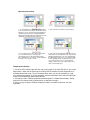
1. To start logging, press and hold the orange button
for 4 seconds. The two led lights will flash three times,
indicating a successful start. If the two LED lights do
not flash in turn the unit is not functioning properly.
Please return the label directly to Elitech or one of our
distributors and we will send you a new one.
2. Tear off the bar code label for record keeping.
3.To stop logging, press and hold the orange button
for 4 seconds (If memory is full, logger will
automatically stop).The two lights will flash three
times, indicating a successful stop. The blue light will
then flash once every two seconds.
4. Tear off the transparent plastic bag, exposing the
USB interface. Insert USB interface to computer. Two
LED lights will light at the same time, indicating that
the PDF report is in the process of generation. When
the blue LED light flashes the PDF report has been
successfully generated. Your computer will now
display a U disk icon in its file system. Open the U
disk to view the PDF report.
Temperature Indication
1. One of the LED indicator lights will flash every 30 seconds. If the blue LED flashes, the current
temperature is within the desired range. A flashing red LED indicates that the temperature has
exceeded the desired range. The current temperature status may also be queried by a single
press of the orange button. 2. Do not attempt to read the temperature label under the bright light
as the LED flashing will be difficult to be observe.
3. The battery used in ITRACK temperature monitoring label is CR2032 lithium battery. Do not
expose the unit to direct heat, microwave oven, or attempt to charge it
4. Please recycle or dispose ITRACK temperature label in accordance with local laws and
regulations.