1
SurveyMonkey User Manual
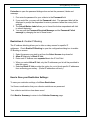
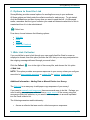
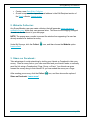
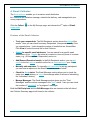
Table of Contents & Summary
I. Getting Started …..………………………………………………………………. pg. 3
1. Creating accounts and upgrading
2. Pricing and payment options
3. Features of Basic and Professional accounts
pg. 3
pg. 4
pg. 5
II. Survey Design …………………………………………………………………... pg. 7
A. A new survey
4. Where to begin
5. How to add questions and pages (or pull from our Question Bank)
6. Types of questions available and Features
a) Types of questions
b) Features
i.
Adding a comment field
ii.
Required to answer
iii.
Text validation
iv.
Change of question size and placement
7. Copying a survey
8. Editing the survey theme
9. Survey Options
i.
Page and question numbering
ii.
Add logo to survey
iii.
Progress bar settings
iv.
Survey page/titles
v.
Navigation button
10. Skip Logic & Advanced Logic
B. Edit an existing survey
11. Copy or move a page/question
12. Add a page or insert a page break
13. Delete a page/questions
14. Restore deleted questions
15. Edit a question with responses collected
C. Print a survey or responses
pg. 7
pg. 7
pg. 8
pg. 9
pg. 9
pg. 9
pg. 13
pg. 15
pg. 16
pg. 19
pg. 21
pg. 21
pg. 21
pg. 22
pg. 22
pg. 23
pg. 24
III. Collecting Responses …………………………………………………………. pg. 27
A. Collectors
pg. 27
B. Collector Settings and Restrictions
pg. 28
i.
ii.
Collector Settings
Collector Restrictions
C. Sending out the link
pg. 35
Page 1