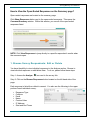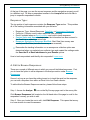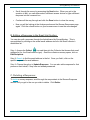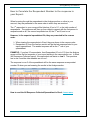
1
SurveyMonkey User Manual Accessible and 508 compliant and certified surveys (*U.S. only) Limit of 3 collectors per survey b. Paid Plans: SurveyMonkey offers the following paid plans: SELECT Monthly or Annual plan features GOLD plan features PLATINUM plan features GOLD and PLATINUM plans provide additional Advanced Logic features such as: Random Assignment Question Piping Question Randomization With the PLATINUM plan, you can take advantage of our white label feature. With this feature, you can remove SurveyMonkey branding and use a “research.net” URL to distribute the survey. Here are examples of some other things you can do with a paid plan: 1. 2. 3. 4. No limits - Create surveys with an unlimited number of questions and pages. Create surveys from templates. Use questions from our Question Bank. Create skip logic (Conditional Logic) - Customize the path a respondent takes through your survey. 5. Add a logo - Branding your survey gives it a professional feel. 6. Create custom themes - Every element of your survey can be customized: fonts, sizes, and colors. 7. Embed survey/popup surveys -Embed the survey on your site or have it appear as a popup. 8. Custom redirect - Once your survey is complete, respondents will be redirected to the page of your choice. (Available to GOLD and PLATINUM plans only.) 9. Filter results - Find patterns in your results. Ask questions such as: "Show me only those respondents who answered choice X in question Y." The entire results section will reflect your filter choices. 10. Cross tabulate results - Cross tabulated data is useful for showing a side by side comparison of how respondents answered two or more survey questions. 11. Share results - Let others view your results without giving them access to your account. 12. Download results & charts - All data can be downloaded to your local computer for further analysis. Create custom charts for presentations. 13. Create PDF - Create a printable PDF version of your survey or the results. Page 6