1
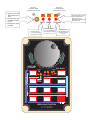
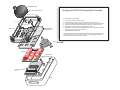
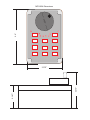
SPINNER KNOB
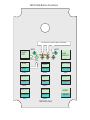
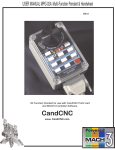
Changing the MPG-02 Replaceable Faceplate
Allen Head Setscrews (2)
Case Cover Screws (4)
To Change out the Faceplate:
Encoder Mounting Screws(2)
Keypad Screws (4)
Clear Cover
REPLACEABLE
FACEPLATE
1.
2.
3.
4.
5.
6.
Loosen Set Screws on Spinner Knob
Remove Spinner Knob by carefully prying from both sides at once.
Loosen 4 screws holding Clear Cover and remove Clear Cover from Base.
Remove 2 Flat head screws holding Rotary Encoder onto Clear Cover.
Remove the 4 Screws holding the Keypad to the front.
Separate the Front Panel and replace with new one. Make sure the LED’s
all line up properly and are in the holes.
7. Reassemble in reverse order.
There is no need to remove the lower Connector Interface card or disconnect
the Encoder wires. If you do make sure the encoder is plugged back in the
same way since the connector is not “keyed”.
ROTARY ENCODER
Keypad
Sub-Plate
Connector Interface
Card
Base