1
Chapter 2 Install & Uninstall
2.1 Install the Software
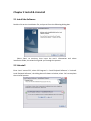
Double-click on the installation file, and you will see the following dialog box.
Select ‘Next’ to continue, then input the user’s information and select
installation folder, the wizard will guide you through the process.
2.2 Uninstall
Enter ‘start’ menu of PC, select ‘All Programs’-> ‘Local Playback Software’-> ‘Uninstall
Local Playback Software’, the dialog box will shown as below, select ‘Yes’ to complete
the uninstall process.