1
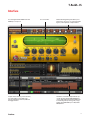
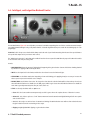
T-RackS CS ® • OUTPUT CEILING: sets the top level the audio will never be allowed to exceed. Typically set to -0.1 or 0.2 dB. If “D/A Distortion Protection” is selected in the Preferences this can be left to 0 dB. • OUTPUT: peak indication of the limiter output audio level. • BYPASS: completely bypasses the Brickwall limiter. • RESET: brings the limiter back to its default state. Clicking on this button again will bring your settings back, in case you hit reset by mistake. • L=R: click on the L or R icons if you want to tweak the limiter’s L or R channels independently. 4 - T-RackS CS module processors 45