1
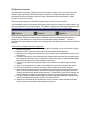
TES Software Overview Thermal Evaluation Software (TES) gives the user the ability to capture, open, save, and manipulate thermal images. Spec i f i c al l y ,Wi nTES2c ons i s t sofac ol l ec t i onof“ s t andar dmodul es ”whi c hmaybe selected and combined accor di ngt ot heus er ’ sneeds .Sophi st i cat eduser smaypr oduce“ cust om modul es”t omeetuni queneeds. Refer to the help messages in WinTES2 for specific help on each function or module. The fundamental concept of the modules is that each module may receive input from another module, and may pass information to a successor module. This relation is shown by the left-to-right arrangement of the selected modules in the status bar at the bottom of the main WinTES2 window illustrated below. In this illustration, Module-A will send its data to Module-B. Whenever Module-B receives data from Module-A, it will do whatever it is configured to do and then pass its data to Module-C. The icons associated with each module are solely to aid in identifying them and neither imply nor serve any functional purpose. General Rules for Modules and their arrangement. A particular module from the list of standard modules may appear zero or more times in the active analysis configuration. Data and control is moved from left to right in the order depicted in the status bar. Modules may be configured to appear in any order, however some ordering patterns may be of no useful value. A module requiring user action will stop the flow of data and will remain the active module until the user response requirement is met. Predecessor modules may continue to generate data and add data sets to the input que of a module waiting for user action. There is no mechanism for sending the output of one module to more than a single successor module. There is no mechanism for a module to receive data from more than one predecessor module. There is no mechanism for sending the output of the last module back to the first module. Modules will finish processing their current data before beginning the processing of the next set of dat a.I ft he“ Di s c ar dDat a”opt i oni ss el ec t ed,t hemodul ewi l l begi npr oc es s i ngt hemos tr ec ent ( newes t )dat as etandwi l l di s c ar dal l ol derdat as et s .I f“ Di s c ar dDat a”opt i oni sNOTs el ec t ed,t he module will begin processing the oldest data set, and will keep newer data sets in its input que. Receipt of data by a module acts as a trigger to activate the process implemented by that module ev eni ft hatmodul edoes n’ tac t ual l yus eanyoft hedat ai tr ec ei v es . Modules do not necessarily alter the data they receive, and many of them pass their input data directly to their successor after performing their own process.