1
1
2
3
4
5
6
7
8
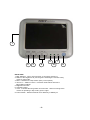
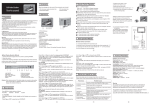
Front view
1. Mini Switches - Turns mirror function on and off for Camera 1
2. Reduces the brightness to prevent glare. Switching the monitor to day
mode or night mode.
3. Menu - Switches to setup mode. (See p.8 for options)
4. Volume +/- & Menu Control - Increases & Decreases Volume &
Adjust Menu settings
5. Brightness Control
6. Contrast Control
7. Color - Indicates dimming status & Tint Control - LED is lit orange if the
monitor is operating in day mode, green if night
8. Power Switch - Switches Monitor from Stand-by to Steady-on
-3-