1
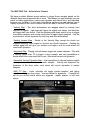
The MAPPING Tab - Articulations Presets
We have provided different preset options to trigger these samples based on the
different ways most composers like to work. This means you can intuitively use one
patch for many applications, create more dynamic and natural lines, and ultimately
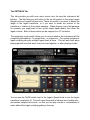
improve your workflow. In the main Articulations patches you can choose from a
variety of presets in the form of buttons on the left side of the MAPPING interface:
•Velocity Map - The short articulations are mapped based on velocity from
shortest to longest. Light taps will trigger the eighth note shorts, and hard hits
will trigger half note shorts. Hold the sustain pedal down and hit a key to trigger
the sustain samples, and overlap midi notes to trigger legato samples. Use the
mod wheel to control dynamics for both long and short articulations.
•Velocity Inverse Map - Similar to the Velocity Map, except the shorts are
mapped inversely; from longest to shortest as velocity increases. Holding the
sustain pedal will still give you sustains and legato, and the mod wheel still
controls all dynamics.
•Keyswitch Map - Playing soft will always trigger the sustain samples. Play with
a velocity higher than 70 to trigger a short sample, and use keyswitches to
decide which short you would like to use. Mod wheel controls all dynamics.
•Keyswitch Velocity Dynamics Map - Use keyswitches to choose between eighth
note, quarter note, half note, or sustain samples. Velocity will determine the
dynamics of the short notes, mod wheel will control dynamics of sustain
samples.
•MIDI CC Map - Lower velocities will trigger sustain samples, and higher
velocities will trigger short notes. Use mod wheel for dynamics. Controller #3
will let you choose which shorts are triggered - eighth, quarter, or half note
shorts.