1
Rorke Data
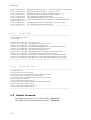
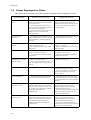
The following are common errors that may be encountered when running the Client:
Error Message
Reason/s For The Error
Things You Can Do
Input Read Stream Error
• Communication between the Client and
the other module is suddenly broken.
• This is a network-related error. Just try
to refresh and see if the operation is carried
out. Just repeat again the command.
[hostname] is a Daemon
Server not a RAID
Subsystem
• An attempt to connect to an Galaxy HDi
is made when hostname and port number
specified is not an Galaxy HDi AVC-L
• Verify that you are connecting to the
correct hostname and port number.
Connections to the Monitor Daemon and
Galaxy HDi’s are different.
[hostname] is not a Monitor
Daemon
• An attempt to connect to a Monitor
Daemon is made when hostname and port
number specified is that of a Monitor
Daemon.
• Verify that you are connecting to the
correct hostname and port number.
Connections to the Monitor Daemon and
Galaxy HDi’s are different.
•
•
7.4
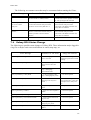
Galaxy HDi Status Change
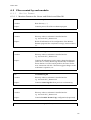
The following are possible status changes of Galaxy HDi. These information maybe logged in
a log file or maybe send out as notifications in email, snmp trap, etc.
Error Message
Reason/s For The Error
Things You Can Do
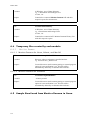
Instant Copy Status Changed: Failed
• Instant Copy operation
wasn’t successful
Confirm if instant copy source
and target logical units exist and
running.
Array #: [old status] => Degraded Mode
• Array became degraded
maybe because a drive has
failed.
• Replace failed drive.
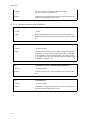
Array #: [old status] => Reconstruction Mode
• A drive belonging to this
array is undergoing
reconstruction mode.
• No action required.
Array #: [old status] => Retry Mode
• A drive belonging to this
array is undergoing retry mode.
• No action required.
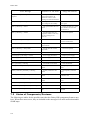
Array #: [old status] => System Halt
• When 2 or more drives
belonging to the array have
failed.
• Confirm if wrong drives
were replaced. If so, power off
and replace drives then power
on.
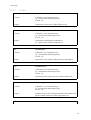
Spare #: [old status] => Failed
• Specified Spare drive has
failed.
• Replace failed drives.
Spare #: [old status] => Offline
• Spare drive was assigned as
Offline.
• No action required
Spare #: [old status] => Missing
• Spare drive was removed.
• No action required.
Spare #: [old status] => Reconstruction Mode.
• Data reconstruction started
on spare drive.
• No action required.
Spare #: [old status] => Retry Mode
• The specified spare drive is
undergoing retry mode.
• No action required.
Spare #: [old status] => Blank
• Spare drive was assigned as
offfline.
• No action required.
157